Build a Cleaning AI Receptionist for Move-Out Quote Enquiries
Capture a cleaning enquiry's revised service, inclusions, property state, access window and completion deadline so staff can prepare a useful reviewed quote.
Table of Contents▼
A caller asks about a regular clean, then explains that they are moving out and need the property ready before handing back the keys. The office needs a different brief now. “Two-bedroom clean, Friday” leaves out the requested extras, the property's current state, when cleaners can get in and when the caller needs the work finished.
An AI receptionist for cleaning companies can prepare a useful scope enquiry before staff review a quote. This guide builds that conversation in Burki: clarify the actual service, ask the questions that change the scope, and keep access time separate from the completion deadline. It does not calculate an unsupported price, promise a crew or guarantee a deposit return.
Download the free cleaning enquiry starter. It contains an approved-services sheet, an adaptable prompt, a worked brief and a review worksheet. The resource is free. Production platform, model, speech and telephone usage can incur costs. The example is fictional; it uses no customer address, live booking system or paid call.
What adoption and industry context support
Valory's vendor case study identifies CleanMade, an Australian cleaning-services business, using its AI receptionist to answer inbound calls, gather service, property, area and quote context, and pass structured information into post-call triage. The page attributes its operating summary to the vendor's production records. This is a qualitative example of cleaning-front-office AI use, not an independent outcome study, a Burki integration or proof of the precise move-out workflow below. No visible publication date is given. CleanMade case study.
For historical UK context, the British Cleaning Council's 2026 report records 26,315 cleaning-activities enterprises in 2025, covering SIC 81.21, 81.22 and 81.29. This includes general building, other building/industrial and other cleaning activities, so it is broader than domestic or move-out cleaning. The report's Table 31 attributes its counts to ONS/Nomis. That dataset represents VAT and/or PAYE-based enterprises from the 14 March 2025 business-register snapshot, not every unregistered cleaner or individual site. It is a historical count, not a 2026 forecast, revenue figure or voice AI addressable market. The UK count and Australian adoption example describe different geographies. BCC report, section 5.1 and Table 31, Nomis 2025 definitions.
These sources do not establish a cleaning voice AI market size or savings for your company. A more useful first measure is whether staff receive enough accurate scope information to take the next step without asking the caller to start over.
Define which questions change the scope
The receptionist should not use one long questionnaire for every cleaning call. A recurring home clean, a move-out clean and a commercial site enquiry may need different information. Ask the service question early, then follow the approved questions for that service.
For a move-out enquiry, the company might approve this scope sheet:
| Information | Why staff need it | How to keep it useful |
|---|---|---|
| Requested service | A recurring clean and a move-out clean are different requests | Replace the old service when the caller corrects it |
| Property type and approximate size | Staff need context for reviewing the work | Preserve caller-supplied room counts; do not turn them into an automatic price |
| Current property state | Furniture, boxes or ongoing moving activity can affect access and scope | Record the caller's description without assuming the property is empty |
| Requested inclusions and extras | Oven, carpet or other requests may need separate review | Use the company's actual service list and distinguish included work from requested additions |
| Service area | The office needs to assess whether the location is covered | Ask only for the location detail the company actually needs at this stage |
| Earliest access | When the caller says the team could enter | Keep it separate from a confirmed crew arrival |
| Requested completion deadline | When the caller needs the work finished | Record the date, local time and reason if volunteered; do not promise feasibility |
| Follow-up process | Staff need to review the scope and respond | Explain the actual approved process without inventing a sent message or ticket |
Approve the service list before adding it to the assistant. If oven cleaning is an extra, say that according to the company's facts. If carpet cleaning needs a specialist or an inspection, record the request for staff rather than assume it is included. If staff have not approved an inclusion or a price, the assistant should not manufacture one.
Avoid a promise that the clean will satisfy a landlord, agent or bond/deposit decision. That is different from explaining the company's actual service. Do not give chemical, stain-treatment or product-safety advice as part of this administrative starter.
Keep access, arrival and completion in different fields
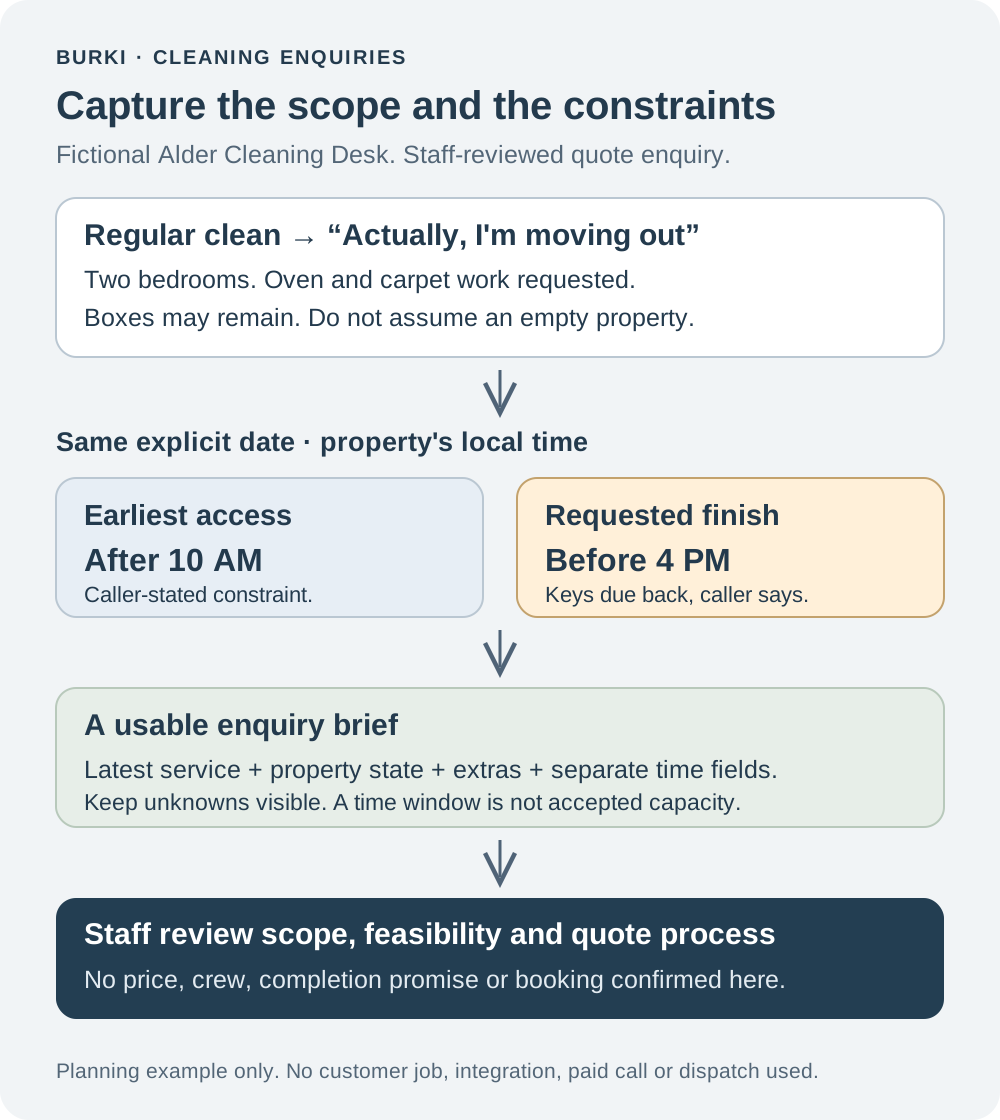
“I can let you in after ten” is an access constraint. “The keys are due back at four” is a requested completion deadline. Neither means the business has accepted a six-hour slot or assigned a crew.
Record both with an explicit date and local time. If the caller only says “Friday,” clarify which date they mean. If the property and caller are in different timezones, use the company's approved method for resolving the property's local time rather than silently applying the caller's location.
Do not subtract the two times and announce that the job will fit. Travel, staffing, property state, service scope and any inspection remain for the company to assess. A usable brief makes the constraint visible so the office can give a truthful answer.
This starter should not collect alarm codes, key-safe combinations or passwords. The company can arrange any necessary access details through its approved process after the appropriate staff review.
Set up the receptionist in Burki
For an authorized new setup, open Assistants → New assistant → Set up manually → Receptionist. Complete Assistant name, then Business setup with Assistant job, Business name, Business facts and Desired outcome. Select Receptionist for the job; put the precise enquiry task in the facts and desired outcome.
For the fictional Alder Cleaning Desk, use Business facts to describe the actual supported services, service area, which questions affect scope, approved inclusions/extras and the real staff review process. Use Desired outcome for a concise brief that preserves the caller's latest service choice, property context, requested work and separate access/deadline fields.
Select Apply business details to instructions, then read Instructions and First greeting before proceeding. Applying the business details replaces those fields. A suitable greeting is: “I can take a few details for the cleaning team to review. Is this a regular clean, a move-out clean or another service?” With GPT Live, the first greeting is guidance that may be paraphrased; it does not prove exact wording or first-turn playback.
Adapt the following instructions with the company's approved facts:
You prepare cleaning-scope enquiries for staff review.
Ask which supported service the caller wants. If they correct it,
use the latest service and the questions appropriate to that service.
Ask one relevant question at a time. Preserve unknown answers.
Clarify property type/size, current state and requested inclusions
or extras using only the approved service list.
Keep earliest access and requested completion deadline separate.
Clarify the date and property's local time when needed.
Read back the scope and constraints so the caller can correct them.
Explain the real staff review process. Do not quote an unsupported
price, accept a crew/time, promise a deposit return or claim a
message, ticket or booking was created. No such action is configured.
Do not collect alarm codes, key-safe combinations or payment data.
For a new assistant, Create assistant persists the setup. On an existing assistant, inspect the current saved and published state before making a change. Where versioned publication is in use, Publish distinguishes saved changes from the published telephone version; legacy live settings can affect connected calls differently. Follow the actual release process rather than assuming every save is a rehearsal.
Review the chosen Voice configuration and current funding/provider prerequisites before any later authorized evaluation. A configured prompt does not verify a telephone route or staff handoff. No assistant was created, saved, published or called for this fictional example.
Worked enquiry: the service changes
This planning exchange is illustrative, not a transcript of a performed call:
Caller: “Could I get a regular two-bedroom clean on Friday?”
Assistant: “Is that an ongoing regular clean, or a one-off service?”
Caller: “Actually, I'm moving out. I need the oven and carpets included too. There will still be boxes while we move.”
Assistant: “You need a move-out cleaning enquiry for a two-bedroom property, with oven and carpet work requested. The property may still have boxes. I will keep those as requests for the team to review. Which date is Friday for this job?”
The caller supplies an explicit date, says access is possible after 10 AM and that the keys must be handed back at 4 PM, in the property's local time. The assistant reads those as separate constraints, then explains the company's actual staff review process.
A useful planning brief is:
Service: move-out clean, replacing earlier regular-clean enquiry.
Property: caller describes two bedrooms; other size details unknown.
Current state: caller says boxes may remain during the move.
Requested work: oven and carpet work; inclusion/feasibility pending review.
Earliest access: caller-stated date, after 10 AM property local time.
Requested finish: same explicit date, before 4 PM key handover.
Staff task: review scope, access constraints, feasibility and quote process.
Not confirmed: price, crew, arrival slot, completion promise or booking.
This is a staff-readable brief, not a saved system record produced by the guide. Do not say “I have booked you” because the details are written in a worksheet. If staff need more information or cannot meet the requested deadline, their actual process should establish the next step.
Review the scope rather than just the greeting
The starter includes planning cases that catch different kinds of missing information:
- A caller changes recurring cleaning to a move-out clean. The final brief must replace the old service.
- A requested extra is absent from the approved service list. The assistant should preserve the request for review rather than say it is included.
- Access is after 10 AM and keys are due at 4 PM. Both constraints should remain visible, without an invented accepted slot.
- The property is still occupied or has moving boxes. The brief should retain that state instead of silently assuming an empty property.
- A caller asks for a guaranteed deposit return or an immediate price unsupported by the facts. The assistant should explain the actual staff process.
For any later authorized evaluation, write expected behavior first and record the actual response separately. A shorter call is not automatically better if the office must repeat every scope question. No outcome rate, booking improvement or cost saving is claimed from these proposed cases.
Make the review process real
Decide who checks enquiries, where they are reviewed and how staff respond when they need more detail. This starter does not install job-management software, dispatch a contractor or create a quote. If a supported integration is added later, verify its exact permissions and returned outcome separately from the spoken conversation.
Keep approved inclusions, service areas and follow-up instructions current. Review total costs using Burki pricing, the selected speech/model providers, telephone usage and actual staff follow-up. The useful starting point for a cleaning AI receptionist is a clear brief that helps the office assess the real job, with the caller's constraints preserved.
Ready to try Burki?
Create an assistant and check your available browser practice allowance.
Create your assistantTrial eligibility and available practice are shown in your workspace.