For the calls that keep your business moving.
An AI receptionist that knows your business.
Answer questions, understand service requests, and give callers a helpful first conversation using your business’s facts.
- Your services, hours and instructions
- A conversation you can test before going live
- Clear call history and usage costs
Start in your browser. No card needed.
Try a live conversation.
Free · 3 minReceptionist demo
Harbor Home Services
Try saying “My kitchen tap is leaking. Can you help?”
Uses your microphone. Voice goes to the AI service. No audio recording; transcripts are saved for review.
Prefer a telephone call?
Try Burki on your phone
Get a free call from Burki, up to 3 minutes. Choose your country below.
The voice behind businesses building with AI.
Onyx by Marc Ellis and BiteBuddy AI run on Burki.
Know what was said.
See what happened next.
A helpful conversation is the beginning. Burki keeps the transcript, connected action results and usage together so your team can review the next step.
Keep the details.
Read the conversation, including corrections and requests that still need an answer.
Check the outcome.
Review what connected actions returned, and which requests need your attention.
Understand the cost.
See each call’s usage and charges alongside its history.
Harbor Home Services
The caller changes their request. The assistant follows.
Do you fix leaking kitchen taps?
Actually, it is the bathroom sink.
Oh, okay. For the bathroom sink, are you looking for a repair or just an estimate?
From your business facts
to your first conversation.
Start with a browser test. Connect a business line when your setup is ready.
- 1. Make it yours
Give it the details.
Choose a starting role. Add your services, hours, common questions and how you want callers helped.
- 2. Try it yourself
Be your first caller.
Ask a question, interrupt, or change your mind. Review the transcript and adjust your draft before publishing.
- 3. Connect when ready
Plan your phone setup.
Add prepaid funds, connect an eligible number and review its readiness. We can help check your carrier and routing before you switch.
Give a good conversation
somewhere to go.
Book the appointment, update your CRM and start the follow-up.
Cal.com
Check availability and book a confirmed appointment during the call.
HubSpot
Find contacts, save confirmed details and add a call note.
Open Dental
Connect your practice to find existing patients and book general appointments.
Square
Look up menu items and estimate a total for your connected restaurant.
Zapier Invite-only
Send call outcomes to your workflows. Allow outbound calls when you choose.
Make it fit the way
your business works.
Start with your facts. Add the connections you need when you’re ready.
See the assistant editor
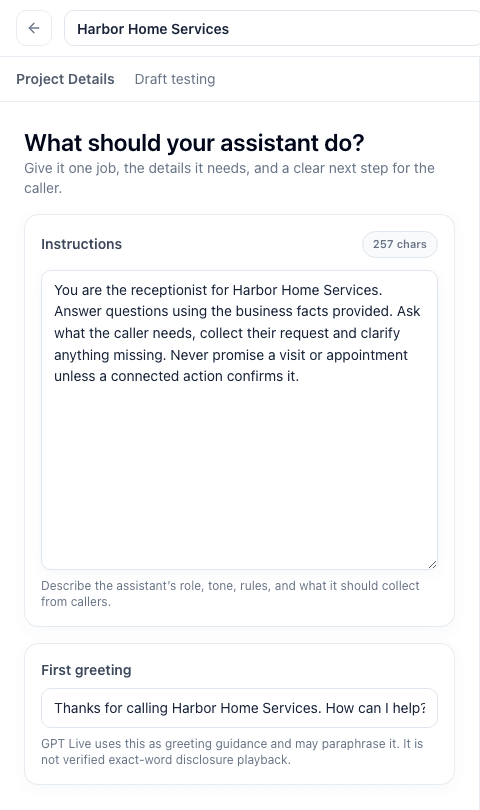
Your business knowledge
Add services, policies and common questions. Set clear instructions for what to ask and when to leave a request for your team.
Your calendar, with Cal.com
Connect an eligible appointment type. Practice with simulated actions first; funded calls can make a booking after the caller confirms.
Your phone setup
Number availability and routing depend on your carrier and account. We’ll help you check the path for an existing line, a new number or after-hours forwarding.
Check my phone setupA clear place to start.
Pay as you use it.
No mandatory subscription. Try the public demo for up to 3 minutes, then create your own assistant. Eligible new workspaces get up to three minutes of browser practice.
No card to start. Add prepaid funds when you choose.
Estimate my monthly usageOne example, before phone charges
$24.50USD / month
100 calls × 3 minutes · About 8¢ / minute
Includes AI voice, an illustrative model allowance and Burki’s platform charge. Provider usage is charged at cost.
How this example is calculated
GPT Live 1 + GPT-5.4 mini, assuming 1,000 input and 200 output tokens per minute and equal voice-session and conversation time. Rates verified September 25, 2026. Actual usage and per-call rounding vary.
Phone carrier charges, number rental and management, optional actions and taxes are additional.
See the full breakdownBefore your
first customer call.
Practical answers to help you choose your next step.
Ask us a questionCan I keep my existing business number?
Forwarding from your existing carrier to an eligible Burki-connected number may let you keep your public number. Carrier support, destination availability and charges vary. Email us with your carrier and country so we can check the setup before you make changes.
Can I use it after hours or for overflow?
If your carrier supports scheduled or conditional forwarding, you can use that routing to send selected calls to your assistant. Ask us to check compatibility; the browser demo does not change your phone routing.
What if the assistant cannot resolve a request?
Give it instructions to explain what it can help with and collect the details your team needs. Review unresolved requests in the transcript and action results. Live transfers depend on the voice setup and phone route; contact us to confirm availability before relying on a handoff.
Can it book appointments?
Connect a supported Cal.com event type and add the booking action. Free practice simulates actions. Funded calls can create real bookings after the caller confirms their details and chosen time.
What can I try without a card?
All three public scenarios—receptionist, appointments and customer support—offer up to 3 minutes when capacity is available. They use fictional details and cannot book, call or message anyone. Eligible new workspaces get up to three minutes of browser practice, with up to two minutes per call.
When does paid usage begin?
Only when you choose to add prepaid funds and use them. Trial exhaustion does not charge you automatically. Voice usage, number rental and telephone charges are explained on the pricing page and in your workspace.
Are calls recorded?
The public demo does not record audio. Your voice is sent to the AI service and transcripts are saved for review. Recording in your own workspace requires supported storage, consent and eligible funded usage. Read our privacy policy.
You can talk to a person, too.
Tell Meeran what your business needs. Get help with setup, pricing or choosing your first use case.
Your business.
Your next receptionist.
Start with a role. Add your details. Try your first conversation.