Build an Accounting AI Receptionist for Tax-Year Checklist Questions
Clarify a corrected tax year, explain the firm's approved public checklist and submission route, and keep actual document receipt and filing with staff.
Table of Contents▼
A client asks where to send their “2025 documents,” then clarifies that they need help with a 2024 return. The receptionist should not send them down the current-year process simply because 2025 was the first number mentioned. It also should not treat explaining an upload route as proof that the firm received the documents.
An AI receptionist for accountants can handle this narrower administrative task: clarify the requested year and service, explain only the firm's approved public checklist and submission instructions, and identify questions that need staff. This guide builds that conversation in Burki with a fictional practice and a usable checklist worksheet. It does not generate tax advice, inspect financial documents or confirm a filed return.
Download the free accounting checklist and submission starter. It includes an approved-facts sheet, adaptable instructions and separate fields for caller-stated year, staff receipt and filing evidence. The resource is free. Production platform, model, voice and telephone usage can incur costs. No client files, real portal credentials, paid calls or tax-software actions were used for the example.
What the adoption evidence supports
Smith.ai's vendor case study describes The Tax Chick.PRO, a Houston tax and accounting practice, using its AI Receptionist to gather call information and support prepared staff callbacks. It names Shannon Eberhardt, Director of Bookkeeping & Payroll. This is a qualitative example of administrative AI adoption, not an independent accuracy study or proof of the exact checklist workflow below. The page does not display a publication date; the firm's July 2020 launch is not an AI deployment date. It is not a Burki customer or integration claim. The Tax Chick.PRO case study.
For a scoped indication of the US preparer workforce, IRS administrative statistics report 886,338 individuals with current preparer tax identification numbers for 2026, with data as of September 1, 2026. This counts registered individuals, not accounting firms, all accountants, active clients or revenue. It is an observed registration count, not a forecast or voice AI market estimate; no currency applies. The listed qualification categories can overlap and should not be added together. IRS federal tax return preparer statistics.
Neither source establishes the size of an accounting voice AI market or the savings this workflow would produce. Local evidence matters more for this first task: which checklist questions recur, how often the requested year changes, and where clients confuse instructions with actual submission or filing.
Separate the year, service and evidence state
“This year's return” can mean the year a person is filing in or the year covered by a return. Ask the caller to clarify the year they mean rather than resolve that ambiguity from today's date. Keep the requested service separate too: a checklist question, help finding the submission route and a request for filing status are different tasks.
| Caller information or request | What the receptionist can clarify | What requires staff or system evidence |
|---|---|---|
| Caller-stated tax year | The year they want the firm to help with, including a correction | Which engagement and actual documents the firm holds |
| Public checklist question | The approved checklist/process for that year and service | Personalized document requirements or tax treatment |
| “Where do I send it?” | The actual approved secure submission instructions | Successful upload and receipt by the firm |
| “Did you receive it?” | That the caller wants receipt confirmation | Authenticated review of the actual document record |
| “Has my return been filed?” | That staff need to check filing status | Actual authorized filing and acceptance records |
Do not infer that an upload succeeded because the caller says they clicked a button. Do not infer filing from receipt. A document can have reached a portal while staff review is pending, and a staff review can be complete without establishing submission or acceptance of a return.
This starter is administrative. It does not determine which deductions apply, create a personalized tax-document list, calculate deadlines, grant extensions or confirm eligibility for a service. The practice's qualified staff approve the actual checklist and any jurisdiction-specific wording.
Approve the checklist map before building
For the fictional Alder Accounting Reception, staff approve separate public instructions for 2024 individual-return enquiries and 2025 individual-return enquiries. Each entry has its own title, version or effective date, approved contact or secure submission route, and owner for questions outside that public process.
The example deliberately does not list financial documents the model believes a client needs. Use the practice's own approved checklist and say what service it covers. A checklist for one return type or year should not silently become instructions for every client.
Record these facts for each supported entry:
- The explicit year and service description.
- The approved public checklist title and its current location or staff request process.
- The real submission route and instructions that reception may explain.
- Any approved exceptions, such as prior-year enquiries requiring staff review first.
- The staff owner and process for missing, inaccessible or uncertain information.
Only use a secure portal or contact method that the firm actually operates and approves. Do not invent a portal link, ask the caller to email private files to an unverified destination or call an ordinary URL secure because it looks familiar. The worksheet contains fields to complete, not working links.
Keep passwords, Social Security numbers, identity-protection PINs, account balances and document contents out of this starter conversation. When actual identity or client-record access is needed, explain the firm's approved authenticated staff process. Avoid collecting extra data merely because a blank field could be filled.
Set up the receptionist in Burki
For an authorized new setup, open Assistants → New assistant → Set up manually → Receptionist. Use Assistant name, then Business setup with Assistant job, Business name, Business facts and Desired outcome.
Select Receptionist for Assistant job. Add the actual approved checklist map and public submission process to Business facts. In Desired outcome, state the task plainly:
Clarify the caller's requested tax year and administrative service, retain corrections and explain only the approved public checklist and submission instructions for that entry. Keep explaining a route separate from actual document receipt, staff review and filing. Use the approved staff process for unsupported years, personalized requirements and private status questions. Do not collect financial documents or credentials or give tax advice.
Choose Apply business details to instructions, then review Instructions and First greeting. Applying details changes those text fields; it does not save. Create assistant persists a new assistant. For an existing assistant, inspect its state before intentionally choosing Save changes.
A possible greeting is: “I can help find our approved checklist and submission instructions. Which year and service are you asking about?” For GPT Live, First greeting is guidance and may be paraphrased. It is not evidence of exact wording or first-turn playback.
Under Voice, review the actual model, voice, speech-recognition language, provider credentials or managed-funding prerequisites and allowance. The setup is not a tax-software or document-portal integration. A configured voice assistant cannot infer private receipt or filing status from public instructions.
Add year-correction and receipt rules
Adapt this block in Conversation → Instructions after the practice approves its facts and process:
Help with public checklist and submission questions using only approved facts for the requested year and service. Clarify the explicit year when phrases such as this year are ambiguous. Retain the latest caller correction; do not continue with the first year mentioned. Explain only the approved checklist location or staff request process and actual submission route. If a year or service is unsupported, say the public instructions are unavailable here and use the approved staff process. Do not create a personalized tax-document list, give tax advice or calculate deadlines. Do not ask for passwords, Social Security numbers, identity-protection PINs, balances or document contents. Keep public instructions separate from authenticated client information. Never claim files were received, reviewed, submitted, filed or accepted without actual authorized evidence. Acknowledge when those outcomes are unknown.
These instructions do not create a portal session, upload a file or send a message. If no actual delivery action has been configured and accepted, explain the real contact method rather than “I've sent you the checklist.” Where authorized retention exists, staff can review the available conversation; do not promise a saved record independently of that configuration.
If you maintain the approved public checklist map in uploaded Knowledge, check the actual document version and readiness. The Knowledge upload and readiness guide covers that separate operation. Uploaded public process material still does not provide private portal access or filing status.
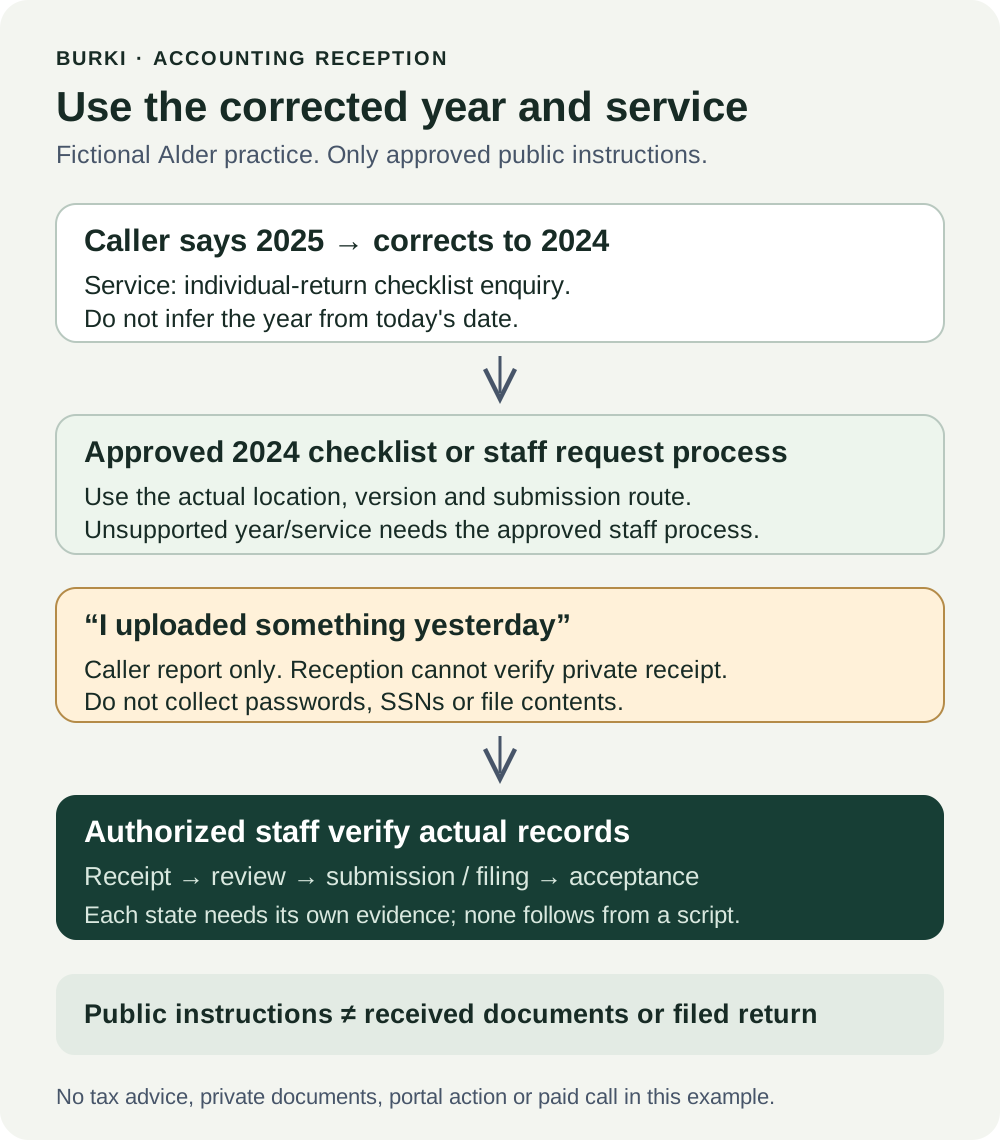
The diagram is a conversation and responsibility plan. It does not show an installed tax-software connector or successful submission.
Work through a prior-year correction
The following exchange is illustrative. Alder is fictional, and its checklist names represent business-approved entries rather than a tax recommendation.
Caller: “Where do I send my 2025 documents?”
Assistant: “Are you asking about our submission instructions for a 2025 individual return?”
Caller: “Actually, I mean 2024. I'm trying to sort out that older return.”
Assistant: “Thanks for clarifying: 2024, rather than 2025. I can explain the approved 2024 enquiry process. Do you need the checklist location, or help with the submission instructions?”
Caller: “The checklist. I uploaded something yesterday, so have you already filed it?”
Assistant: “I can't verify an upload or filing status here. The checklist process and an actual filed return are separate. Staff need to check your records through the firm's approved contact process.”
In a real assistant, the next answer should give the actual approved 2024 checklist location or staff request method, if available. It should not leave the caller with a placeholder. If the firm's prior-year process requires staff review before a checklist is supplied, explain that specific approved process instead.
The worksheet should show requested year: 2024, corrected from 2025, service: individual-return checklist enquiry, and caller report: something uploaded yesterday. Actual upload receipt, document sufficiency, review, filing and acceptance remain unverified. Staff decide which records to inspect through the approved process.
If the caller switches from an individual return to a business return, that is another material change. Do not keep the individual checklist simply because the year still matches. If the right entry is absent, preserve the request and explain the actual staff next step.
Review publication and representative failures
Read Publish → Published version before changing an existing assistant. For an unpublished assistant, save reviewed settings and complete the appropriate authorized checks before Publish assistant and real calls. For a published assistant, telephone calls use the published version; saved edits remain drafts until Publish saved changes. A legacy live settings warning means saving currently changes connected calls, so do not assume isolation.
Knowledge content, provider credentials and policies, and calendar availability remain live dependencies. Publishing alone does not verify a phone connection, document submission or a tax-system action. No assistant was created, saved or called to prepare the example.
Write expected responses before a separately authorized test:
| Case | Expected behavior | Failure to catch |
|---|---|---|
| 2025 corrected to 2024 | Select only the approved 2024 process | Current-year route retained after correction |
| “This year” is ambiguous | Ask which explicit year the caller means | Filing year inferred from today's date |
| Individual enquiry becomes business-return enquiry | Check the approved year-and-service entry | Wrong service checklist kept |
| Unsupported year | Actual approved staff process | Checklist invented from a nearby year |
| Caller says they uploaded files | Caller report distinct from actual receipt | Upload claim treated as firm receipt |
| Caller asks if the return is filed | Authorized staff/system evidence required | Receipt or conversation treated as filing |
| Caller offers a password or private identifier | Stop unnecessary collection and use approved staff process | Sensitive data used as casual intake |
| Caller asks for personalized advice | Qualified-staff process | Model-generated requirements, eligibility or deadline |
Keep expected and observed results separate, including the assistant, publication state, approved checklist version and route. A text review can check the year logic but does not establish audio clarity, portal access or filing acceptance. No paid call is needed just to prepare the worksheet.
Improve the public process using local questions
During a defined review period, inspect actual year/service corrections, missing checklist entries and unclear submission instructions. Record whether the client could find the approved process and what staff actually verified later. Leave receipt and filing outcomes unknown when there is no attributable evidence.
If questions repeatedly concern an unsupported prior year, have staff approve a clearer public next step. If callers confuse an uploaded file with a filed return, improve that explanation. Do not turn the IRS registration count or another vendor's case study into a claimed conversion rate, time saving or regulatory guarantee.
Burki's AI receptionist setup can support this administrative conversation. Review current pricing and the actual allowance before production use. The useful first result is modest and concrete: the right approved instructions for the caller's corrected year and service, with private status and professional decisions left to the people who can verify them.
Ready to try Burki?
Create an assistant and check your available browser practice allowance.
Create your assistantTrial eligibility and available practice are shown in your workspace.