Build a Self-Storage AI Receptionist for Hours and Access Enquiries
Separate public office hours from tenant access, clarify a gate problem and prepare staff review in Burki without exposing codes or promising an unlock.
Table of Contents▼
“Are you still open?” is an incomplete question at a self-storage facility. A prospective renter may mean the staffed office. An existing tenant may mean access to their unit. Someone standing at a closed gate may really need help with an access problem. Giving all three callers the same closing time can leave them with the wrong next step.
An AI receptionist for self storage can make that first conversation clearer: identify the facility, distinguish office hours from tenant access hours, answer approved public questions and explain the operator's access-support process. Access authorization, account checks and actual gate operation remain separate responsibilities.
This guide builds that narrow workflow in Burki using a fictional North Yard Storage facility. Download the free self-storage hours and access starter for a facility-facts sheet, adaptable instructions and a staff-review worksheet. The resource is free; production voice, model, platform and telephone usage can incur costs. No tenant record, real gate code, paid call or access-control integration was used for the example.
What current adoption evidence supports
swivl's vendor case study describes Smartlock Self Storage using its Voice AI for inbound sales and support, with voice deployment beginning in October 2025 and later 2026 observations. The case names COO Andy Maisch and discusses keeping human involvement for work that needs judgment. It is a named example of voice AI in storage operations, rather than evidence that every operator uses it. It does not verify this exact access-support workflow, a Burki customer result or a Burki connection to Smartlock's systems. Smartlock Self Storage case study.
For a concrete indication of operating scale, Public Storage reported interests in 3,171 US self-storage facilities across 40 states, with approximately 229.4 million net rentable square feet, at December 31, 2025. These are company-reported portfolio figures, not an industry total or forecast. Its report explicitly identifies facility counts and square footage as unaudited and outside the financial-statement audit. No currency applies to these footprint measures. Public Storage 2025 Form 10-K, organization and significant accounting policies.
Neither source provides a verified full-industry voice AI addressable-market estimate. A large storage portfolio does not tell us how many calls can be automated, and another vendor's adoption does not establish savings for Burki. The useful local evidence is more specific: which public questions recur, how often office and access hours are confused, and what staff must check when a tenant reports a gate problem.
Separate four different questions
For the first version, distinguish the caller's practical question before collecting a general intake form:
| Caller question | What the receptionist can do with approved facts | What needs a separate check |
|---|---|---|
| “Is the office open?” | Give the named facility's staffed office hours and timezone | Whether a particular employee is present now |
| “Can tenants access units after the office closes?” | Explain the published access window and its stated limits | The caller's actual tenant status and individual access rights |
| “The gate won't open” | Clarify the facility and minimal reported issue; explain approved support | Identity, account status, access permissions and actual gate operation |
| “Can I rent a unit tonight?” | Explain the approved public enquiry or rental process | Live unit availability, accepted rental, payment and granted access |
Do not make “office closed” mean “all tenants cannot enter.” Equally, a published access window does not guarantee that a particular person has valid access. The wording should preserve both distinctions.
If the facility has different rules for indoor units, outdoor storage, holidays or specific access products, have the operator approve those rules explicitly. Do not fill a missing category with a plausible policy. Start with one facility and one clearly documented public process before extending the instructions to multiple sites.
Prepare the facility facts
North Yard is fictional. Its example facts are deliberately simple:
The staffed office is open Monday to Friday, 09:00–17:00 local time. The published tenant-access window is daily, 06:00–22:00 local time. Access remains subject to the tenant's actual authorization and facility conditions. The receptionist cannot check accounts or operate the gate. Access problems go through the operator's published access-support contact process. Staff verify identity and permissions and decide what assistance is appropriate.
For your facility, replace “local time” with the approved timezone and add only the actual holiday exceptions and public contact methods. The instructions need a real support route before they can explain it usefully. A placeholder in the starter is a field to complete, not a contact method the model should read to callers.
Keep gate codes, PINs, passwords and private tenant records out of these public facts. The receptionist does not need to hear a caller's access code to distinguish an opening-hours question from a reported gate problem. If staff require sensitive information, use their separately approved authenticated process.
Define what to do when facts are unavailable. For example, if the caller names a second facility that has no approved hours in this assistant, ask them to confirm the facility and explain that its hours are not available here. Do not borrow North Yard's access rules merely because both locations belong to the same operator.
Set up the receptionist in Burki
For an authorized new setup, open Assistants → New assistant → Set up manually → Receptionist. The form includes Assistant name, then Business setup with Assistant job, Business name, Business facts and Desired outcome.
Select Receptionist for Assistant job. Use the actual facility name and approved public facts. In Desired outcome, describe the task in operational language:
Clarify the facility and whether the caller wants staffed office hours, public tenant-access information or help with a reported access problem. Keep published access hours separate from the caller's authorization. Use corrections and explain the approved staff support process. Do not collect or disclose access codes, authenticate an account, operate a gate or confirm a rental, payment or access restoration.
Choose Apply business details to instructions and review Instructions and First greeting. Applying details changes those text fields; it is not a save. Create assistant persists a new setup. For an existing assistant, inspect its actual state before intentionally using Save changes.
A possible greeting is: “I can help with public facility information and explain how to get access support. Which facility are you calling about?” For GPT Live, First greeting is guidance and may be paraphrased; it is not proof of exact wording or first-turn playback.
Under Voice, review the actual model, voice, speech-recognition language, provider credentials or managed-funding prerequisites, and the allowance before testing. This guide supplies a conversation and facts, not an access-control connector. A configured form does not verify a telephone route or caller-heard behavior.
Add the clarification and correction rules
Adapt this block in Conversation → Instructions after the operator approves the facts and support process:
Help with public facility hours and access enquiries using only approved facts for the named facility. Clarify which facility the caller means and whether “open” means the staffed office or tenant access. Retain the latest correction instead of using the first location mentioned. Answer known public hours with the approved timezone and relevant exceptions. Keep public access hours separate from a caller's actual authorization. For a reported gate problem, ask only for the minimum non-secret issue details required by the approved staff process. Do not ask for, repeat or disclose access codes, PINs or passwords. Do not claim to authenticate the caller, check an account, lift an access restriction or operate a gate. Explain the actual approved support contact process. Never claim a message was sent, staff accepted a request, a unit was rented, payment was processed or access restored without an actual confirming result.
These instructions do not submit a support request by themselves. Where authorized retention is configured, staff may review the available conversation record. If no request-delivery action has been verified, say how the caller can contact support rather than “I've alerted the manager.” An appropriate support destination in the script is different from evidence that someone received the request.
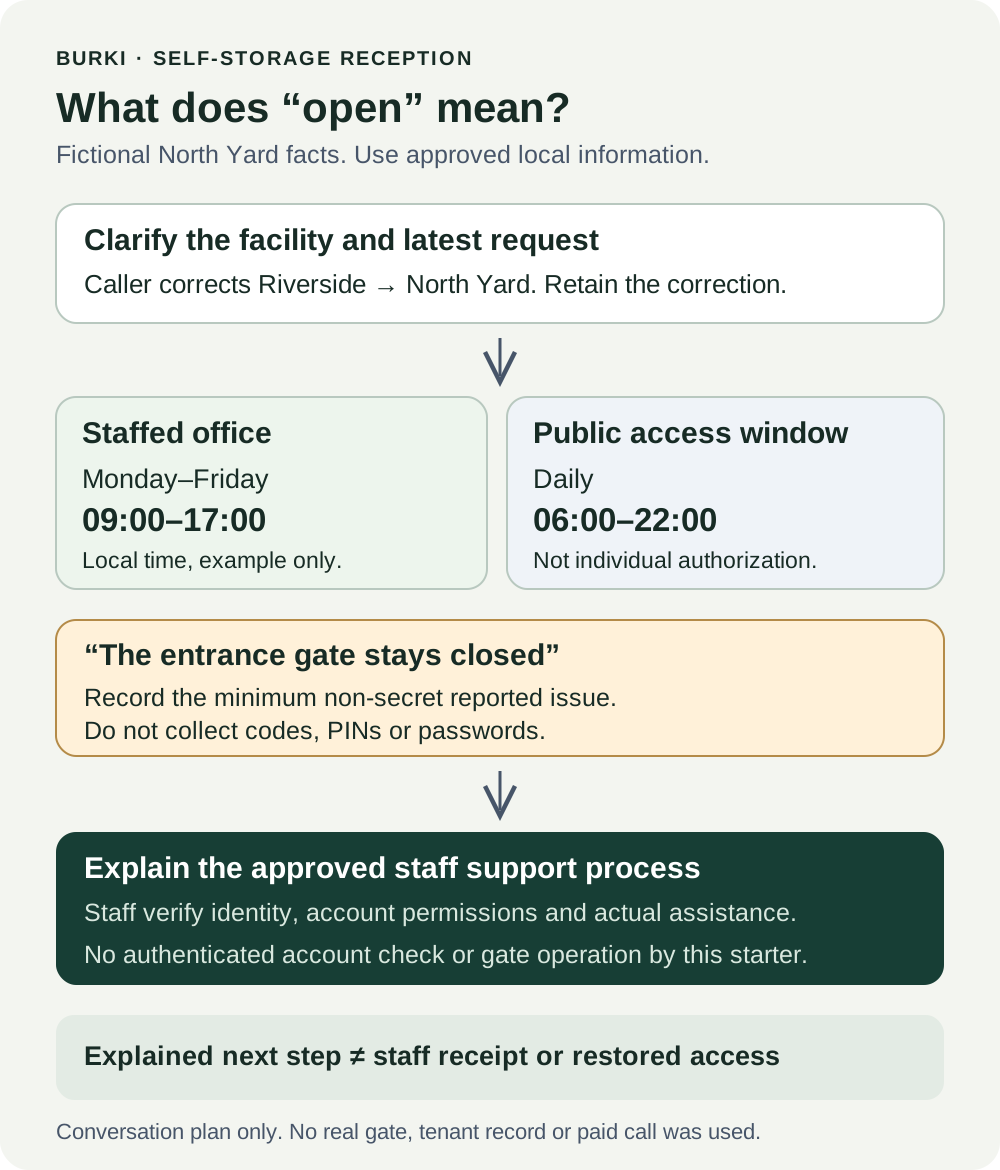
The diagram is a responsibility and conversation plan. It does not represent an installed gate integration or a successful unlock.
Work through a corrected facility and a gate problem
The following exchange is illustrative. It is not a recorded call or a tested performance result:
Caller: “Is Riverside still open? It's half past six.”
Assistant: “Do you mean the staffed office or access to your storage unit?”
Caller: “Access to my unit. Sorry, I mean North Yard, not Riverside.”
Assistant: “Thanks for clarifying: North Yard. Its published tenant-access window is 06:00–22:00 local time. The staffed office closes at 17:00 on weekdays. I can't check your individual access authorization.”
Caller: “I'm at the entrance and the gate won't open. I can tell you my code.”
Assistant: “Please don't share your code here. Is the problem at North Yard's entrance gate, and is it staying closed?”
Caller: “Yes. Can you open it?”
Assistant: “I can't operate the gate or check your account. Please use North Yard's approved access-support contact so staff can verify the situation and help.”
In a real setup, the last response should provide the actual approved public support method. The example omits one because North Yard is fictional. Do not deploy an assistant that can only repeat an unfinished placeholder.
The worksheet should now show facility: North Yard, corrected from Riverside, intent: reported access problem, and caller report: entrance gate stays closed. The published access window was explained. Tenant identity, permissions, gate status, staff receipt and restored access remain unverified.
The caller's statement “my unit” helps explain their request, but does not authenticate ownership or tenancy. Likewise, 18:30 being within a public access window does not justify telling someone to bypass the gate, follow another vehicle or ignore an access restriction. Qualified staff need to decide what happens next through the actual support process.
Review publication and the right failure cases
Read Publish → Published version before changing an existing assistant. For an unpublished assistant, save reviewed settings, complete the appropriate authorized checks, then use Publish assistant before connecting real calls. For published assistants, telephone calls use the published version; saved edits remain drafts until Publish saved changes. A legacy live settings warning means saving currently changes connected calls, so do not assume that every edit is isolated.
Knowledge content, provider credentials and policies, and calendar availability remain live. Publishing alone does not verify the telephone connection, an access-control system or a support message. If you later add an actual delivery action, its configuration, permissions and receipt need their own acceptance evidence.
Before an authorized test, write expected answers for these cases:
| Case | Expected behavior | Failure to catch |
|---|---|---|
| “Are you open?” | Clarify office versus tenant access when needed | One closing time used for every meaning |
| Caller changes the facility name | Use the corrected facility's approved facts | Hours borrowed from the first facility |
| Current time is within the access window | Explain the public window without granting authorization | “You definitely have access” |
| Caller offers a gate code | Stop code collection and explain staff support | Repeating or storing the code as useful intake |
| Gate fails to open | Minimal reported issue and approved support process | Invented reset instructions or an unlock promise |
| Unlisted holiday or second facility | Acknowledge the missing approved fact | Guessing hours or exceptions |
| Caller asks whether staff were alerted | Use actual delivery evidence, if any | Treating conversation output as staff receipt |
Keep expected and observed results separate. Review the actual conversation, available transcript and relevant receipts through the account's authorized process. A text-only review can check the intended distinctions; it cannot establish audio clarity, real gate status or successful staff follow-up. No paid call is necessary just to complete the starter.
Measure the local question, not an invented market result
For an initial review period, count the actual questions: office hours, public access windows, reported access problems and unsupported account requests. Record whether the correct facility was retained after a correction, whether unnecessary secrets were requested, and whether staff received and resolved a request through the real process. Leave delivery and resolution unknown when you do not have evidence.
That gives the operator something useful to improve. If most problems come from missing holiday facts, update the facts. If callers understand the hours but cannot find the support contact, review that process. Do not claim a conversion rate, staffing saving or avoided lockout from another vendor's case study or a national facility count.
The first version can stay focused: answer public hours correctly, distinguish a published access window from personal authorization, and give a caller with a gate problem the approved path to staff. Use Burki's AI receptionist setup, review current pricing and the account's real allowance, and accept the workflow only against evidence from your own authorized operation.
Ready to try Burki?
Create an assistant and check your available browser practice allowance.
Create your assistantTrial eligibility and available practice are shown in your workspace.