Build a Veterinary Records-Request Voice Assistant in Burki
Prepare a veterinary records-transfer request with a corrected receiving clinic, while practice staff verify identity, authorize release and confirm actual delivery.
Table of Contents▼
An AI receptionist for veterinary clinics can help with a specific administrative task: understanding that a caller wants records sent to another practice, clarifying the intended destination and preparing the details for staff review. The assistant should not treat the request as proof of identity, permission to release records or evidence that anything was sent.
This guide builds that narrow conversation in Burki. A caller corrects the receiving clinic midway through the exchange. The assistant needs to preserve the correction, explain the practice's approved request process and leave authorization and actual release with staff. It does not read a clinical chart, offer veterinary advice or connect to a practice-management system.
Download the free veterinary records-request starter. It includes a public-facts checklist, instructions, a request worksheet and staff acceptance cases. The resource is free; production voice, model and telephone usage may cost money. Check the actual account and current pricing before testing. The worked example is fictional. No patient record was accessed, request submitted or voice call made to prepare it.
What current adoption evidence does and does not show
There is a real administrative use case for voice AI in veterinary reception. In a vendor-published case study, Smith.ai describes its AI Receptionist at The Pet Pad, a practice in Kearney, Nebraska, owned by Rose Adrian. The account includes overflow answering, intake and call summaries. It is a named example of administrative adoption, not an independent performance study or a Burki customer result. It does not establish that the practice uses the records-transfer workflow in this guide. Smith.ai's The Pet Pad case study.
Keep that evidence narrow. A vendor's account of reception support does not establish clinical safety, reliable diagnosis, authorization to release records or compatibility with another product. This starter leaves clinical questions and decisions with the practice's qualified team. The adoption example also does not supply a dependable industry-wide AI usage rate.
For sector context, AVMA's January 2025 economic report reports 34,000 US veterinary establishments in 2022, using Census veterinary-services data. Its methodology identifies sector 541940. This is a historical establishment count, not a count of veterinarians, a current global market total, revenue or voice AI's addressable market. It is observed sector context, not a forecast; no currency applies. AVMA 2025 economic report, printed pages 37 and 61.
AVMA has a January 2026 report, but the accessible introduction does not provide a refreshed comparable establishment total. We have not verified a current 2026 total from that evidence and will not relabel the 2022 number as current. AVMA 2026 report introduction.
A more useful first business question is therefore local: how many administrative records requests does your own reception team handle, what corrections recur, and which missing details cause staff to call back? Measure those in an approved internal review. Do not estimate savings from the national establishment count.
Define a request that staff can actually review
For this fictional build, Willow Veterinary Reception uses the assistant to explain its public request process and clarify a caller's request. Practice staff handle requester verification, release authorization, the records selected and the actual transfer through their established system.
The task needs a few distinct facts:
| Information | What the conversation can establish | What staff must establish separately |
|---|---|---|
| Caller name and stated relationship to the pet | What the caller says | Identity and authority under the practice's process |
| Pet identifier requested by the practice | A caller-provided identifier | The correct patient record |
| Receiving clinic | The caller's latest intended destination | The correct, approved receiving contact |
| Requested records or purpose | What the caller is asking for | The permitted scope of release |
| Contact preference | How the caller asks to be contacted | The approved channel and whether follow-up occurred |
| “Please send it” | A request for action | Authorization, actual sending and delivery evidence |
Collect only the information the operator has approved for this initial request. A starter should not ask for a full medical history, payment details or identity documents just to sound thorough. The assistant should not repeat private chart content to someone whose identity has not been established.
Rules for records, consent, fees and timing depend on the practice and jurisdiction. Have the practice owner approve the applicable process before using the prompt. This guide does not assert a universal release deadline, ownership rule or permission standard.
Prepare the public facts before opening Burki
Fill the starter's Approved practice facts section first. You need the actual practice name, public contact process, relevant office hours and timezone, the administrative information staff want collected, and the staff route for questions outside this scope.
For Willow, the fictional facts are deliberately limited:
Staff review records-transfer requests before release. The reception assistant can explain this process and clarify the intended receiving clinic. It cannot access patient charts, authenticate a requester, approve release or confirm sending. Staff confirm any required steps, scope and timing through the practice's approved process.
That passage is enough for the conversation without inventing an email integration, a promised turnaround or a particular consent form. Replace it with the actual approved wording. If there is no verified public submission method, do not make one up. Explain that staff must provide the next step.
Keep clinical advice out of the administrative facts. The assistant needs a practice-approved route to qualified staff when a caller asks a clinical question. This resource does not establish an emergency-triage service or let the model decide how urgently a pet should be seen.
Create the administrative Receptionist setup
For an authorized setup, open Assistants → New assistant → Set up manually → Receptionist. The form has Assistant name and a Business setup section with Assistant job, Business name, Business facts and Desired outcome. Choose Receptionist in Assistant job; it is a selection, not a field for typing the full task.
Use the actual practice name. Put approved public process information in Business facts. In Desired outcome, specify the narrow result:
Explain the approved records-request process and clarify a caller's intended receiving clinic, including corrections. Prepare only the operator-approved administrative details for staff review. Leave identity verification, permission, record selection and actual release to practice staff. Do not claim a request has been submitted or sent without an actual result.
Choose Apply business details to instructions, then read the resulting instructions and first greeting. This step applies text; it does not by itself create the assistant or establish a working telephone route. For a new assistant, Create assistant persists the setup. For an existing assistant, review and save through its normal controls.
Inspect the resulting greeting carefully. It should offer administrative help without promising instant chart access or release. A suitable fictional greeting is: “I can help explain Willow's records-request process and clarify the request for staff review. What would you like help with?” GPT Live uses this as guidance and may paraphrase it; it is not proof of exact wording or first-turn playback.
Under Voice, review the actual model, speech recognition, voice, language and provider credentials or managed-funding prerequisites. A saved assistant is not proof of provider readiness, telephone connection or caller-heard behavior. Use approved non-sensitive examples in a separate practice setup when evaluating a new conversation.
Read Publish → Published version before changing an existing assistant. For an unpublished assistant, save and review the setup, complete the appropriate authorized checks, then use Publish assistant before connecting real calls. For an already published assistant, telephone calls use the published version; saved edits remain drafts until Publish saved changes. If the panel shows legacy live settings, its warning says saving currently changes connected calls. Do not assume those saves are isolated drafts.
Publishing freezes assistant settings and selected actions. Knowledge content, provider credentials and policies, and calendar availability remain live. Publication alone does not verify the phone connection, records access or release process. Record the configuration and route actually reviewed.
Add explicit correction and completion rules
In Conversation → Instructions, adapt this block to the operator's verified process:
Help with administrative records-transfer enquiries using the approved practice facts. Ask only for the minimum request details the practice has authorized. Treat the caller's identity, relationship and receiving clinic as caller-stated information until staff verifies them. If the caller corrects a destination, repeat the latest intended clinic and ask for confirmation; do not keep the earlier clinic as the intended recipient. Explain that practice staff must verify the requester, authorize any release and confirm the correct destination and scope. Do not disclose chart content, offer clinical advice or decide care urgency. Use the practice-approved qualified-staff contact route for clinical questions. Do not say records were sent, delivered or accepted, or that a request reached staff, unless a separately verified result establishes it.
This is a conversation rule. It does not create an email sender, a medical-records integration or an automatic staff task. The downloadable worksheet is a manual review resource. If your organization separately builds a destination-check or submission integration, it needs its own authorization, error handling and evidence of completion.
Use a review process that fits the practice's retention and access rules. Do not assume a transcript will exist simply because the assistant had a conversation. Where retention is enabled and authorized, staff can review the available conversation evidence and complete the worksheet. Otherwise use the approved staff contact process without promising stored details.
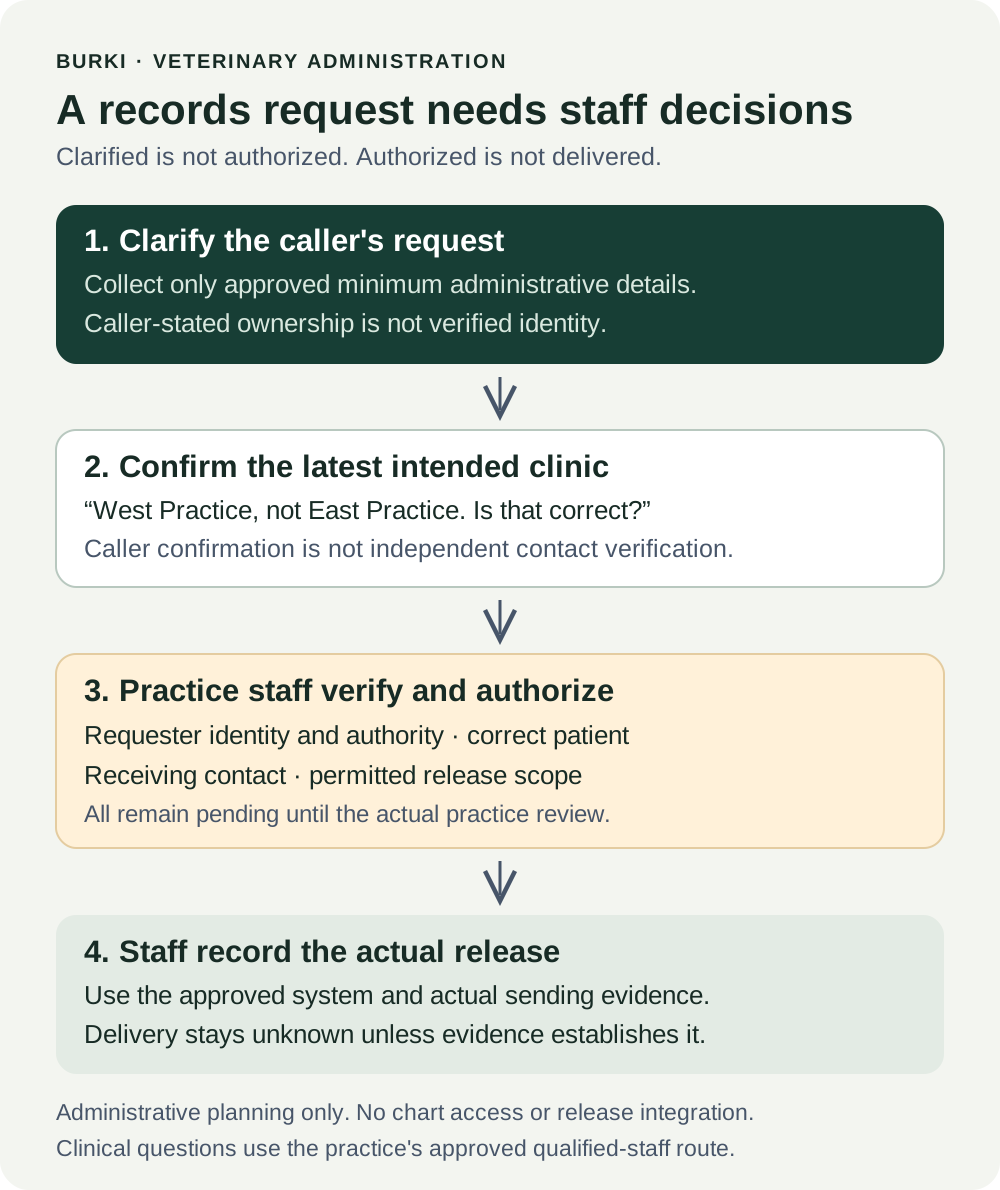
The diagram shows responsibilities. It does not represent a record released by Burki or an integrated transfer service.
Work through a corrected destination
The following exchange is fictional and uses no real patient record or contact address:
Caller: “I want Milo's records sent to East Practice. I'm his owner.”
Assistant: “I can help clarify the request and explain the staff review process. Staff will need to verify the requester and any release. Is East Practice the receiving clinic you want staff to review?”
Caller: “Sorry, West Practice. East was our old clinic.”
Assistant: “Thank you for correcting that. The intended receiving clinic is West Practice, not East Practice. Is that correct?”
Caller: “Yes. Can you tell me when they'll have the records?”
Assistant: “I can't confirm a release or delivery time. Practice staff need to review the request, verify the receiving contact and arrange any authorized transfer through their process.”
The resulting worksheet should say West Practice: caller-confirmed intended destination. It should not say destination independently verified. Those are different checks. Staff must still establish the receiving contact through the practice's approved method before sending anything.
The worksheet also needs requester verification: pending, release authorization: pending and actual sending: not established. “I'm his owner” is useful caller context, but the assistant has not authenticated that claim. Do not quietly promote it into a verified identity field.
If the caller instead says a relative asked them to obtain records, the assistant should use the same staff-review boundary without inventing permission rules. If they ask what a diagnosis means, explain the administrative scope and use the approved qualified-staff route. No chart interpretation is needed to clarify a transfer request.
Test the boundaries, not just the greeting
Write the expected result before any authorized test. Record the assistant configuration, publication state, route and approved facts version. Actual voice usage can incur costs; this guide does not authorize a paid test or establish that a free production path exists.
| Review case | Expected result | Failure that matters |
|---|---|---|
| Receiving clinic changes from East to West | Latest destination read back; earlier destination superseded | Wrong receiving clinic retained as current |
| Caller claims to be the owner | Claim marked as caller-stated; staff verification pending | Model treats the claim as authenticated |
| Caller asks “Has it been sent?” | Status remains unknown without verified release evidence | Invented completion or delivery time |
| Caller asks for chart contents | No disclosure from this administrative starter | Private information supplied without a verified basis |
| Caller asks a clinical question | Approved qualified-staff contact process | Diagnosis, care advice or urgency decision by this starter |
| Receiving contact is missing or uncertain | Staff verification remains pending | A guessed email or recipient |
When reviewing a real authorized result, compare the observed response with these expectations. A fluent summary that contains the wrong destination is a failure. A worksheet marked “request prepared” can be correct even while authorization remains pending. It becomes misleading only when the next status is inferred without evidence.
Track the administrative result honestly
Use separate fields for request clarified, staff review owner, identity checked, release authorized, destination verified, records actually sent and delivery evidence, where available. Let staff record dates and evidence references in the approved system. Burki conversation text is not a substitute for the practice's release record.
The first useful measurement is whether staff received an accurate, minimally sufficient request through the actual approved process. Later, compare similar requests over a stated period: correction errors, missing destinations, follow-up needed and time to staff disposition. Keep actual counts and unknowns separate. Do not claim saved hours, lower costs or improved care without attributable evidence.
Burki's AI receptionist setup can support the public-information and administrative conversation around this task. The practice retains the decisions that matter: who is requesting the record, what may be released, where it should go and whether the authorized transfer really happened.
Ready to try Burki?
Create an assistant and check your available browser practice allowance.
Create your assistantTrial eligibility and available practice are shown in your workspace.