Build an AI Receptionist for Gym Guest and Class Enquiries
Build a Burki gym receptionist that handles branch, guest and class questions while staff verify membership access, prerequisites and actual capacity.
Table of Contents▼
An AI receptionist for gyms needs to distinguish a simple class question from an access decision. “I belong to your North branch. Can I bring a friend to Pilates at South on Saturday?” involves at least three checks: whether the member can use that branch, whether the guest qualifies, and whether the class has space.
A public timetable answers none of those checks on its own. A useful first version explains approved branch information, clarifies the requested visit and preserves the questions staff need to resolve. It does not turn a caller's membership claim into verified access or a requested class into a confirmed place.
This guide builds that branch-and-guest workflow in Burki. Download the free gym guest and class starter for a public-facts worksheet, adaptable instructions, a worked conversation and a staff review record. The guide and resource are free. Production voice, model providers, telephone numbers, carrier usage and later integrations can cost money. The example is fictional; no live class booking, membership check or paid call was performed to create it.
Where gym voice AI is being used today
ABC Fitness's September 8, 2026 Dynamic Fitness case study describes an AI receptionist handling inbound enquiries across three Houston clubs, with questions logged for staff follow-up. It also describes an operator reviewing conversations and updating the knowledge base. This is a named vendor account of adoption, not an independent effectiveness study. It does not establish Burki support for ABC software, nor does it mean Dynamic Fitness uses Burki. ABC Fitness customer story.
There is substantial participation in the underlying fitness sector. HFA's 2026 U.S. Health & Fitness Consumer Report: Headline Trends, released April 9, estimates that 81 million Americans held a fitness-facility membership in 2025. Its national tracking study surveys approximately 18,000 U.S. residents aged six and older annually, with Sports Marketing Surveys USA as part of the Physical Activity Council. HFA report summary and methodology.
That is an observed survey estimate of U.S. membership participation. It is not a count of facilities, a global revenue figure or a forecast of spending on voice AI. Neither source provides a defensible voice AI addressable-market total for gyms. The useful local question is which enquiries your front desk can answer from public facts and which still require access to membership or class systems.
Pick a task that respects the gym's operating rules
For this starter, cover first visits involving another branch, a guest and a class request. This is more specific than general appointment intake. The assistant needs to keep several independent states visible:
| Question | What the caller can tell the assistant | What staff must establish |
|---|---|---|
| Membership | Claimed member/prospect/guest status and home branch | Actual account identity, plan and access entitlement |
| Location | Requested branch and visit preference | Whether that plan allows entry at that branch |
| Guest | Whether the caller wants to bring someone | Eligibility, operator-approved prerequisites and any actual charge |
| Class | Class name, requested date/time and number of people | Current availability, instructor requirements and accepted places |
| First visit | Questions about arrival, reception and orientation | The accepted orientation or visit arrangement |
Do not combine these into a single “eligible” field. A member might be allowed into the building while the class is full. The guest might need staff review even when the member's place is accepted. If only one of two requested places is available, the assistant should not silently confirm the other person.
This starter answers public logistical questions and prepares a staff-review conversation. It does not authenticate membership, activate passes, take payment, accept waivers or connect to a gym management platform. Those are separate workflows that need verified authorization, integration behavior and actual results.
Prepare branch facts without inventing availability
Ask the operator to approve a compact information sheet for each branch:
- Exact name, address, timezone and staffed reception hours.
- Public class names and the effective date of any timetable used.
- The process for cross-branch and guest enquiries, including who checks eligibility.
- First-visit arrival instructions that are safe to give publicly.
- How staff actually receive and review requests, and the contact route callers may use.
Leave unknown rules unknown. Do not add a universal free trial, guest age, waiver rule or access promise. If a real operator has approved a published guest policy, the assistant may explain it within its scope. That still does not prove a specific caller meets it.
Our fictional Harbor Fitness has North and South branches. Its approved public information says a Saturday Pilates session is advertised at South at 09:00 local time. Staff check cross-branch access, guest eligibility and class availability. The public timetable is an example, not current availability at a real gym.
Do not put member numbers, payment details, medical history or private access codes in this public starter. An assistant can ask what administrative help the caller wants without deciding whether an exercise class is suitable for their health. Questions about medical clearance or exercise suitability go to the gym's approved qualified-staff route; the receptionist should not recommend an activity or reassure the caller about safety.
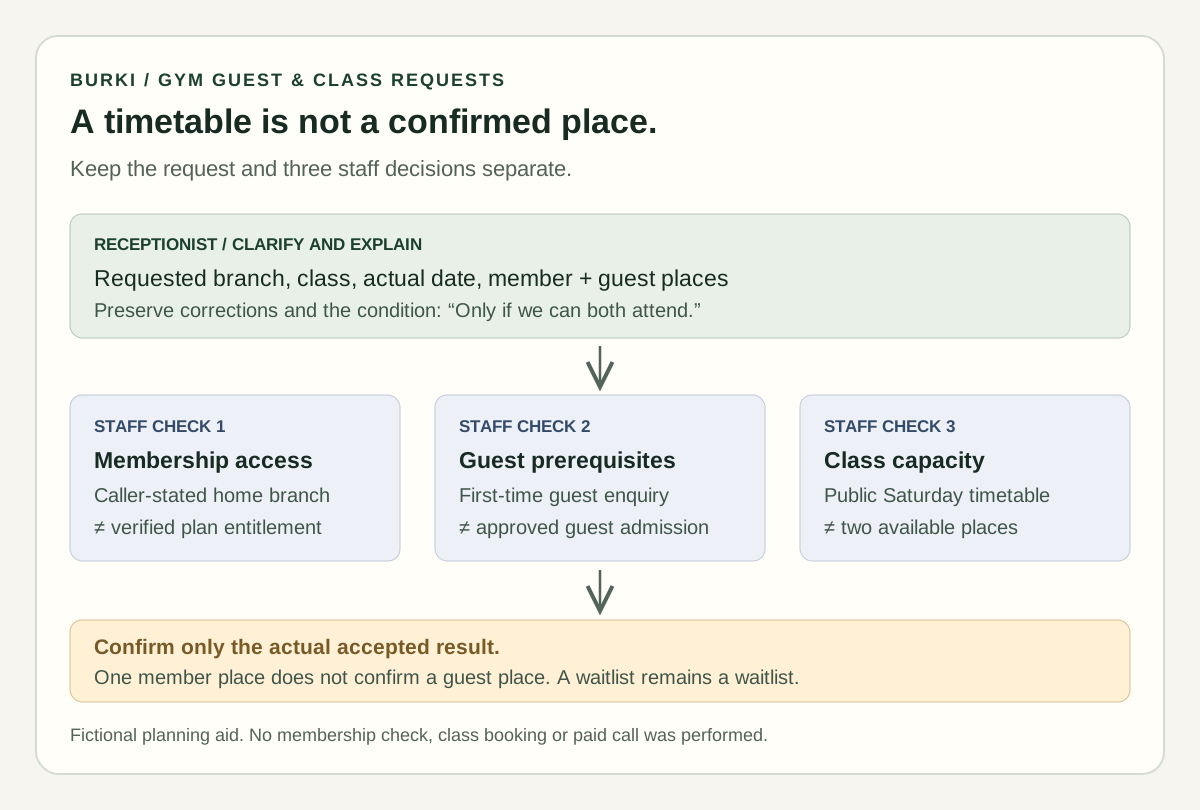
A class on the timetable is a class to ask about. It is not evidence that a seat, guest pass or cross-branch entry has been accepted.
Create the receptionist with the exact request boundary
In Burki, open Assistants → New assistant → Set up manually and choose Receptionist. The Conversation business setup includes Assistant job, Business name, Business facts and Desired outcome.
Select Receptionist in Assistant job, then enter the actual approved business name and branch facts. Put the specific task in Desired outcome:
Clarify a caller's requested branch, first visit, guest and class preferences. Explain approved public facts. Keep caller-stated membership separate from staff-verified entitlement, guest eligibility and available class places. Prepare the request for the operator's actual staff-review process without confirming access or a booking.
Choose Apply business details to instructions. Inspect the resulting Instructions and First greeting before Create assistant. Applying business details replaces those fields; it does not save or verify the setup. For an existing assistant, review changes before Save changes and check the current published or legacy-live status.
Use an honest greeting such as:
Thanks for calling Harbor Fitness. I can help with public branch information and visit enquiries. Which branch are you asking about?
The starter's instruction block adds operational rules:
Ask the requested branch before using branch-specific facts. Record member, prospect or guest status as caller-stated. Separate requested member places from guest places. Confirm corrections in branch, class and date before summarizing. A timetable is not current capacity. Do not authenticate an account, approve guest access, accept a waiver or confirm a place without an actual authorized result. If the facts do not establish an answer, preserve the question for staff and explain the approved contact route.
Under Voice, review the actual conversation model, speech recognition, voice, language and provider or managed-funding requirements. This guide does not establish that any particular voice provider, telephone number or regional route is ready for your gym. Review Burki pricing and the account's actual setup before an authorized test.
Work through a cross-branch correction
The fictional example starts with a member requesting a class for themselves and a friend. The useful result is a precise request, including a correction, rather than a confident booking.
Caller: I'm a North member. Can I bring my friend to Pilates at South on Saturday?
Assistant: South's public timetable lists Pilates on Saturday at 09:00. Staff still need to check your cross-branch access, your friend's guest eligibility and places for both of you. Is that the session you want to ask about?
Caller: Yes. Actually, I'm a South member now, not North. My friend has never visited.
Assistant: Thanks. I'll use South as your stated home branch. You're asking about two places in Saturday's 09:00 Pilates class, including a first-time guest. That still needs staff confirmation. Do you also want to ask about first-visit arrival instructions for your friend?
Caller: Yes. If only I can get in, don't book it.
Assistant: Understood. Your preference is to attend together, and you do not want a member-only place accepted. The request still needs staff review; no class place or guest access has been confirmed.
These are illustrative expected lines, not a recorded call or a promise that the assistant automatically wrote to a CRM. In the starter, an operator reviews the actual conversation and completes the worksheet manually. Do not have the assistant say “I sent this to reception” unless a real configured action returned a verified result.
For a real request, clarify the actual calendar date and local timezone. “Saturday” becomes ambiguous around midnight, travel or a recurring timetable. Repeat the caller's final preference, and keep the original requested branch separate from a corrected one if that correction matters for staff review.
Give staff a request they can actually resolve
The worksheet captures the final stated home branch, requested location, class/date/time, member and guest places, together-or-separate preference and approved callback route. It also has separate staff-owned columns for entitlement, guest prerequisites, capacity and actual acceptance.
That separation matters when the answer is mixed. Staff may confirm access but have no class places. They may offer another session without the caller accepting it. A waitlist entry is not a confirmed place, and a pending guest check is not an approved pass.
If you later add a supported action, verify precisely what it does. Reading a timetable is not reading live capacity; creating a request is not reserving a seat; a successful API response is not necessarily the gym's accepted booking state. Do not claim support for ABC, Mindbody or another gym system merely because one appears in an industry example.
Test the decisions before connecting real calls
Use the starter's review cases and write the expected outcome first:
- A prospect asks for opening hours at one branch. The answer uses that branch's approved facts.
- A member asks about another branch with a guest. Entitlement and guest eligibility remain unresolved until verified.
- A caller changes branch or class mid-conversation. The final summary reflects the correction.
- A timetable lists a class but capacity is unavailable. No seat is promised.
- Two places are requested only if both can attend. The assistant preserves that condition.
- A caller asks whether an activity is safe for a health condition. The assistant uses the approved qualified-staff route without exercise advice.
Record actual answers and failures. A prompt that looks correct is not an executed conversation. A text evaluation does not establish speech recognition, caller-heard delivery or a telephone route. An authorized voice test can incur costs, and should be scoped to the real prerequisites rather than run just to fill the worksheet.
Under Publish → Published version, review whether the assistant is unpublished, published or using legacy live settings. Published telephone calls use the published version; saved edits remain drafts until published again. Legacy live settings carry a different warning about saves affecting connected calls. Publishing alone does not verify a phone connection, and Knowledge content remains live.
Begin with a reviewed public-information and request workflow, then add one verified capability at a time. Burki's AI receptionist gives the product context. The practical goal is a caller who understands what is known, and a staff member who can clearly see what still needs a decision.
Ready to try Burki?
Create an assistant and check your available browser practice allowance.
Create your assistantTrial eligibility and available practice are shown in your workspace.