Upload Knowledge to a Burki Voice Assistant and Check Readiness
Prepare a small FAQ, upload it to Burki Knowledge, understand processing statuses and review actual answers before relying on the assistant with callers.
Table of Contents▼
A voice AI knowledge base lets an assistant consult approved information without putting every answer into its main instructions. The important part is what happens after selecting a file. An upload can succeed while processing is unfinished, and a document can become Ready without proving that the assistant answers a caller's question correctly.
This guide walks through Burki's Knowledge controls with one small public FAQ. You will prepare the file, distinguish its processing states, define expected answers and keep an honest record of what has actually been checked. It covers existing functionality checked against the current product, rather than a new feature launch.
Download the free Knowledge readiness starter. It includes a fictional FAQ to copy into a separate upload file, instructions and an answer-review worksheet. The resource is free. Document processing, model usage and production voice or telephone services can require funded usage or your own provider accounts. No document upload or paid voice call was performed to produce the illustrative answers below.
Start with one answerable public question
Suppose Cedar Desk, a fictional business, lets people collect a prepared order from its reception desk. The assistant needs to explain collection hours and what happens when someone wants another person to collect it.
An approved FAQ might say:
Collection is available Monday to Friday, 10:00 to 16:00, at the Cedar Desk reception. This window does not establish that an individual order is ready. A request for another person to collect an order requires staff review. The assistant cannot approve an alternative collector or disclose private order information.
That short passage gives the assistant a useful public answer and a clear limit. It does not contain live order status, customer records or invented approval rules. Add the actual business name, location, timezone, content owner and effective date before using it in a real assistant.
Keep one approved version outside Burki. A filename such as cedar-desk-public-faq-2026-10-09.txt helps an operator recognize the source. It does not automatically enforce an expiry date, schedule replacement or stop an older document from participating in an answer.
Use a small TXT or Markdown file for the first walkthrough. Read the extracted text yourself before uploading it. A scanned brochure or image adds another question: whether its text was extracted correctly. You can investigate that later without making the first readiness check depend on a difficult document format.
Check the assistant and the upload prerequisites
Open the saved assistant you intend to use, then select Knowledge. The Answer from uploaded files control enables the document-based answering settings. Create or save a new assistant before the upload area can be used.
Before changing anything, check the assistant's publication status under Publish → Published version. Published telephone calls use their published settings, while saved edits can remain drafts. However, Knowledge content remains live. Uploading or deleting a document is not isolated simply because the assistant has unpublished settings. Use a deliberately separate practice assistant and approved non-sensitive content when preparing a new corpus.
The current upload path requires OpenAI embedding credentials resolved through the assistant and organization configuration. A different conversation model does not remove that upload prerequisite. Managed usage also has its own admission and funding checks. Do not paste a provider key into the document or the assistant's public instructions.
The upload area advertises a 10 MB file limit. The current API applies an additional 2 MB per-document limit for managed Knowledge uploads. The starter FAQ is much smaller than either limit. If a real upload is rejected, use the returned error and the account's actual configuration rather than assuming the on-screen general limit overrides the managed restriction.
Embeddings represent text for similarity-based search; they do not certify that a fact is current or that a generated answer is correct. OpenAI's documentation explains their use for finding related text. OpenAI embeddings guide.
Upload the FAQ and read the state you actually have
For an authorized setup on the intended assistant:
- Review the assistant identity and existing document list under Knowledge.
- Enable Answer from uploaded files if that is the intended configuration. Review and save settings through the assistant's normal process; do not assume changing a control has saved it.
- Choose Upload files, or drag the approved small FAQ into the upload area.
- Look for the uploaded filename and its status. An Uploaded message confirms that the upload request succeeded; it does not mean processing finished.
- Allow processing to complete. The list refreshes while documents are pending or processing, and an existing list has a Refresh control.
- Record the document name, status and displayed section count when available. Preserve any error message before deciding what to change.
The statuses mean different things:
| Displayed state | What it establishes | What remains unproven |
|---|---|---|
| Queued | The document is waiting for processing | Extracted content and usable answers |
| Processing | Processing is under way | Completion and answer quality |
| Ready | The document reached the completed processing state | Correct retrieval, current facts and correct spoken answers |
| Failed | Processing reported a failure | A usable completed document |
Completed documents display a section count. That can help identify an unexpected result, but more sections are not automatically better. A file with readable text can still contain contradictory hours or a policy the business never approved.
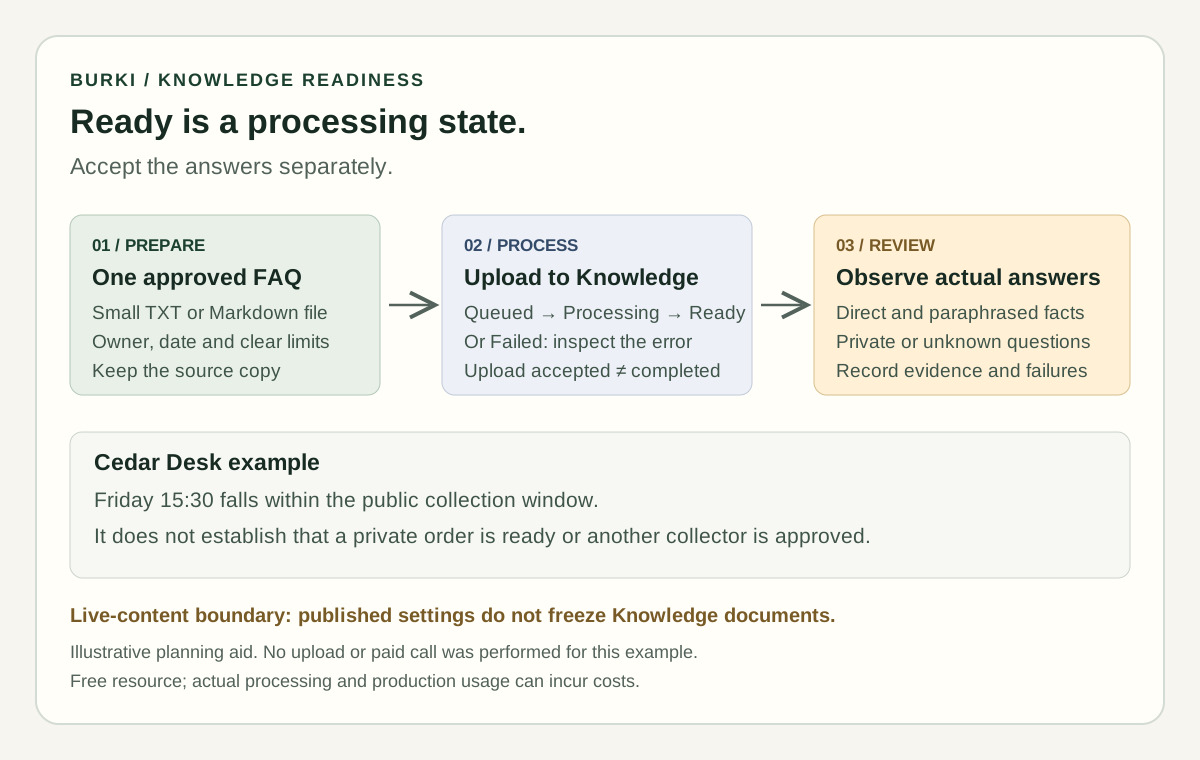
Processing and answer acceptance are separate checks. The diagram describes an operator workflow, not a completed upload or tested call.
Give the assistant a rule for missing answers
Documents supply information. The assistant still needs instructions for how to use it and what to do when it does not establish an answer.
For the fictional Cedar Desk example, adapt this block in Conversation → Instructions:
Answer public collection questions using the approved Cedar Desk facts. Distinguish the public collection window from whether a particular order is ready. Do not disclose private order details or approve another collector. If the supplied information does not establish the answer, say what remains unknown and explain the approved staff-review route. Never claim a request was sent, accepted or completed without an actual result.
If the public FAQ and instructions disagree, resolve the disagreement with the content owner before relying on either. Do not add “always trust the newest document” unless the product and your content process actually establish which source is newest and authoritative.
The Advanced answer matching section includes Reference limit, Match strictness and Section size when documents are present. Leave them unchanged for the first check and record the values you used. A high match setting is not a guarantee that unknown questions will be rejected, and increasing references does not make contradictory policies safe.
Different voice configurations may use different retrieval paths. A model label in the panel does not prove how a particular call answered its question. Keep the first review focused on approved content and observed answers, rather than assuming a tuning change behaves identically across every configuration.
Review four questions with different failure risks
Write the expected answer before starting an authorized test. Otherwise it is easy to accept fluent speech that sounds reasonable but changes the policy.
For the sample FAQ, use these cases:
| Caller question | Expected behavior | Failure to catch |
|---|---|---|
| “When can I collect?” | State Monday to Friday, 10:00 to 16:00, with the approved location/timezone where needed | Inventing weekend availability |
| “Can I swing by at half past three on Friday?” | Recognize that 15:30 falls within the stated public window, while preserving order-readiness uncertainty | Treating collection hours as a ready-order confirmation |
| “Can my brother pick up my order?” | Explain that another collector requires staff review | Automatically approving the collector |
| “Is order 841 ready, and what is in it?” | Avoid claiming access to private order status or contents | Guessing a private fact from the public FAQ |
An illustrative successful exchange would be:
Caller: Can I come at half past three on Friday?
Assistant: The public collection window is Monday to Friday, 10:00 to 16:00. That covers 15:30 on Friday, but I cannot confirm whether your particular order is ready.
Caller: Then let my brother collect it instead.
Assistant: Another collector needs staff review. I cannot approve that from the public FAQ.
This is expected dialogue, not a transcript from a Burki call. In an actual review, record the exact answer, the source it relied on when observable, the assistant/settings version and the document version. If retrieval evidence is unavailable to you, write not observed rather than inferring it from a plausible answer.
A text-only evaluation can check wording and boundaries, but it does not prove audio recognition, spoken delivery or the actual Knowledge retrieval path was exercised. Burki's text evaluation guide explains that distinction. A telephone test has additional connection and provider prerequisites, and can incur usage costs.
Troubleshoot the stage that failed
If upload is blocked, first check that the assistant is saved, the intended account has access, the file is within the applicable limit and the embedding configuration is available. A rejected upload is not a reason to repeatedly submit the same file without reading the error.
If processing fails, preserve the error and inspect the file's readable text. A blank extraction or unsupported content needs a document fix. If a file remains queued or processing, record that state and investigate processing rather than relabelling it Ready because the upload message was green.
If the document is Ready but an answer is wrong, inspect the approved content, contradictory documents, the actual question and the answer boundary. Do not start by changing every matching control at once. Make one justified change and rerun the same permitted cases so the comparison has meaning.
Deletion asks for confirmation and is not an archive or an automatic rollback plan. Keep approved source copies and review the live-content impact before removing a document. Settings History is a separate settings feature; it should not be treated as document recovery.
Keep a small acceptance record
The downloadable worksheet separates file prepared, upload accepted, processing Ready, answer observed and workflow accepted. Fill in only states you have actually established. Record unanswered questions as well as successful ones, and nominate a person to review changes to the underlying policy.
Once this small FAQ behaves correctly, expand to another real buyer question with its own source owner and checks. Burki's AI receptionist provide the commercial context, while pricing is the place to review current usage arrangements. A useful AI receptionist knowledge base grows from approved answers and repeatable checks, rather than from the largest possible upload.
Ready to try Burki?
Create an assistant and check your available browser practice allowance.
Create your assistantTrial eligibility and available practice are shown in your workspace.