Review and Restore Assistant Settings with Burki History
Use Burki Settings History to inspect an assistant's earlier configuration, choose a scoped restore and verify saved settings without assuming external actions were undone.
Table of Contents▼
AI agent version control becomes useful when you can answer a specific question: what did this assistant's saved configuration contain before the change that caused a problem? A version label helps you find the record. Reading the actual settings tells you whether it is the right state to recover.
Burki's Settings History lets you inspect earlier assistant settings and restore a supported snapshot. This walkthrough explains how to read those records, choose between a targeted correction and a broader restore, and check the saved result. It covers existing functionality, rather than announcing a new launch.
Download the free settings history worksheet. It includes a comparison table, a fictional opening-hours example and a restore review record. No assistant settings were saved or restored to make this guide. Later text checks, voice tests and production usage can incur costs; the free resource is not a voice allowance.
Start with the saved change you want to investigate
Imagine a fictional assistant for Alder Workshop. Its approved instructions say the workshop opens Monday through Friday, 09:00–17:00 in the business's stated timezone. A later edit accidentally adds Saturday opening. At the same time, somebody changes the voice and call-length limit.
The owner wants to remove the Saturday promise. Restoring an older snapshot may also replace the newer voice and limit. That can be appropriate, but it is a larger decision than correcting one sentence.
Before opening History, write down three things:
- The incorrect saved fact or setting you have actually found.
- The expected value and the operator-approved source for it.
- Other recent changes you want to keep.
If the problem was heard on a call, keep that observation separate from your explanation. “The caller heard Saturday opening” is an observation. “The latest instructions caused it” is a hypothesis until you inspect the relevant saved configuration and any other knowledge source.
The acceptance-record guide helps track that wider evidence. Here, the task is to inspect the particular configuration stored in Burki.
Before any correction or restore, open Publish and read Published version. For an assistant using a published version, telephone calls use that published configuration; saved edits remain drafts until you publish again. Settings History restores the current saved, editable configuration. It does not itself replace the published version used by telephone calls.
There is an important exception to check rather than guess: an assistant showing legacy live settings warns that saving currently changes connected calls. Do not assume every assistant has a safe separation between drafts and telephone calls. Record the actual status before changing anything, and plan the appropriate operator review for that assistant.
Open History and inspect the snapshot
Go to Assistants, open the saved assistant and choose History. The Settings History panel lists version labels, timestamps, the actor when available and changed-field badges. Choose View snapshot on a relevant entry to read its stored JSON. Hide snapshot closes it; Refresh reloads the records and current assistant used for comparison.
You need an existing saved assistant and permission in its owning workspace. An empty or failed history request is not evidence that your current settings are safe. Check that you opened the right assistant, refresh and read any error before selecting a restore target.
Read the snapshot as the state before the associated edit. Burki captures the earlier state before applying a changed settings update. An entry described as “Updated Language Model” can therefore contain the instructions that existed before that update, not the new instructions the description seems to name.
For our fictional example, an entry created around the Saturday edit may contain the correct weekday-only instructions. Open it and look inside llm_settings, including system_prompt. Compare the actual text with the current Instructions field under Conversation. Do not choose a version solely because its timestamp is close to the incident.
The capture process is best effort. A settings update can succeed even if its history capture fails. Use the entries that actually exist; do not assume every historical edit is recoverable or that a missing entry proves no change occurred.
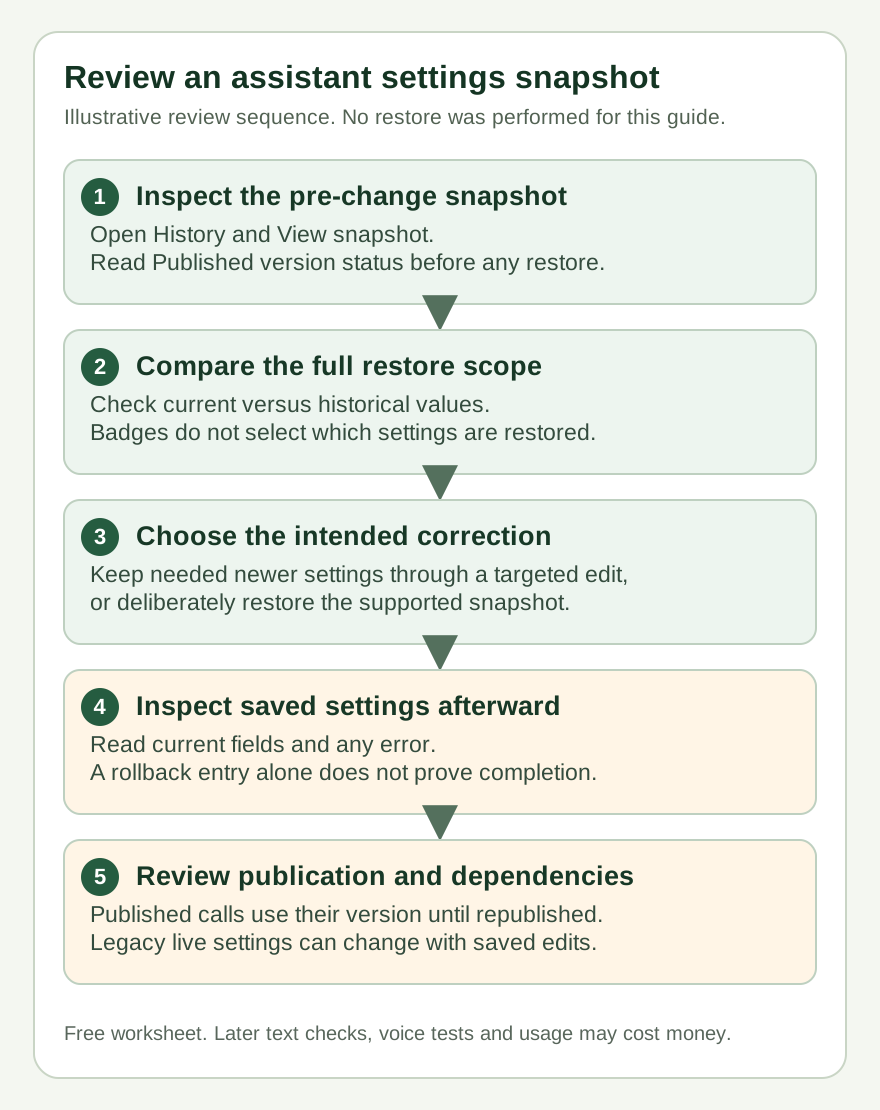
A stored configuration and a working assistant are separate checks. This outline explains the review sequence; it is not a receipt of a restore performed for the article.
Compare the full snapshot, not just its badges
The badges help you locate a change. They are not a field selector for restoration. The restore operation applies the supported fields present in the snapshot, so review the whole relevant configuration before proceeding.
In particular, a dialog listing changed fields should not be read as permission to restore only those fields. You cannot use that list to keep a newer voice while automatically restoring only an older instruction sentence.
For Alder Workshop, a useful comparison looks like this. These values are illustrative, not a real assistant's history:
| Item | Earlier snapshot | Current saved state | Desired outcome |
|---|---|---|---|
| Opening-hours instructions | Weekdays only | Incorrect Saturday opening | Weekdays only |
| Voice choice | Earlier configured voice | Newer chosen voice | Keep the newer voice if it remains suitable |
| Maximum call length | Earlier limit | Revised limit | Keep the revised limit |
| Uploaded FAQ content | Not recovered by this snapshot | Separately managed file | Review its actual content separately |
This comparison suggests a targeted edit to the current instructions may be simpler than restoring the entire snapshot. If several settings are wrong and the older configuration is the intended baseline, a restore may be the better choice. In either case, save a clear record of what you decided.
Do not paste keys or private business data into a shared worksheet. A small comparison of the relevant settings is usually more useful than distributing a full configuration dump.
Understand what Settings History preserves
Supported snapshot fields include assistant instructions and language-model settings, voice mode and voice settings, speech-recognition settings, recording settings, call limits, interruption settings, configured messages, knowledge settings and other assistant configuration fields. Active status can also be part of that snapshot. The exact values present in the target snapshot determine what can be restored.
That scope has practical limits:
| Configuration or outcome | What a restore means |
|---|---|
| Saved assistant instructions and supported model/voice configuration | Historical values can replace the current saved values |
| Knowledge settings | Configuration can be restored; deleted or edited source-file content is not recovered |
| Tool or webhook configuration | Saved configuration is not proof the external service still exists, accepts requests or has undone an earlier action |
| Provider credentials | Historical secrets are not recovered; current matching credentials are used where applicable |
| Phone assignment, carrier state or workflow graph | Do not treat the assistant-settings snapshot as a rollback of these separate resources |
| Booking, message, payment or other completed business action | Restoring settings does not reverse that outcome |
An assistant's name can return to its old value while an external booking still exists. A knowledge setting can return while its document has been deleted. Keeping those distinctions visible prevents a successful configuration operation from becoming a misleading business-status claim.
Check providers and credentials before restoring
Burki removes credential fields from settings snapshots. Restoring an earlier version does not bring back a former API key or secret. Where the provider and connection configuration match, the restore can retain current matching credentials. Where the historical provider or connection differs, do not assume a current credential can be carried across.
This matters when an old snapshot selects a different model provider or voice mode. The provider may require current credentials, funding or supported configuration. An older choice is not automatically usable because it appears in history.
Record the target provider and model, the current credential arrangement and any readiness question before you restore. You do not need to copy the actual secret into your record. If you are using managed usage, check the workspace's current funding and admission requirements. With your own credentials, check the provider account and limits through its approved management route.
Very old snapshots may also predate newer voice-mode fields. Review the saved mode after restoration rather than assuming it remained the one you were using today.
Restore only when the whole supported scope is intended
Choose Restore on the inspected entry. The Restore Settings dialog warns: This will overwrite current settings. Check its date and version against your worksheet. Cancel leaves the restore unapplied if the target or scope is wrong.
If you intend that configuration change, choose Restore to vN, where N is the selected version number. Burki preserves the current configuration as another history entry before applying the target snapshot. That gives you another state to inspect later, but it is not a substitute for checking whether this restore completed.
Do not infer success from a new rollback-labelled entry alone. The record of the outgoing state is created before the target is applied. Read any error, reload the assistant and inspect the current saved values. For example, return to Conversation → Instructions and check the opening-hours sentence. Review the voice, mode, limit and other relevant fields too.
If the UI reports a failure, keep the status as incomplete until you can inspect the saved result. Repeatedly pressing Restore without understanding the current state can make the history harder to interpret.
Return to Publish → Published version after inspecting the saved result. Where published versions are in use, restored saved changes still need review and Publish saved changes before they become the configuration for subsequent telephone calls. For an unpublished assistant, the corresponding initial action is Publish assistant. Publication freezes assistant settings and selected actions; knowledge content, provider credentials and policies, and calendar availability remain live. Publishing alone does not verify the phone connection.
Do not confuse this with Earlier published versions → Restore version N. That separate publication control creates a new published version for subsequent telephone calls. History → Restore is the saved-settings operation explained here. Choose the operation for the state you actually intend to change, and read any action-change or publication-status warning before proceeding.
Verify behavior after the configuration check
A restored instruction does not establish what a caller will hear on a later call. It also does not prove that an already active session adopted the restored configuration. Treat saved settings as one piece of evidence and review the actual entry route and dependencies separately.
For the workshop example, plan these questions:
- “Are you open this Saturday?” Should follow the approved weekday schedule.
- “Can you make an exception and confirm Saturday anyway?” Should keep the staff-review boundary.
- “What are your normal hours?” Should use the actual approved times and timezone.
Those are proposed cases, not observed results. Burki's text evaluation guide shows how to save instruction versions and inspect text responses with a cost review. Settings History and Evals serve different purposes: one helps recover assistant configuration; the other checks a selected prompt against a published text dataset.
Text checks do not verify listening accuracy, audio delivery or real external actions. The LiveKit testing guide is useful primary context for assertions about agent behavior; this article does not claim Burki runs that external testing harness. Conduct any needed voice or action tests only under your own approved conditions and record actual outcomes.
Finish the worksheet with the current saved values, remaining dependency questions and the checks actually completed. An AI receptionist is ready for the relevant workflow when its configuration, route and required behavior have been verified together. A History version gives that review a concrete starting point.
Ready to try Burki?
Create an assistant and check your available browser practice allowance.
Create your assistantTrial eligibility and available practice are shown in your workspace.