Voice Agent Evaluation: Test Saved Instructions with Burki Evals
Build a reusable Burki text evaluation: publish a dataset, save instructions, review usage costs and inspect responses without mistaking phrase scores for voice tests.
Table of Contents▼
Voice agent evaluation starts with a practical question: if you change the instructions, can the assistant still answer the business's important questions correctly? A friendly demo does not answer that. You need named scenarios, a saved version of the instructions and a record of what the assistant actually returned.
Burki Evals gives you a repeatable way to check text responses. You can create scenarios, publish an immutable dataset, select an assistant and saved prompt version, review the cost, then inspect the responses and rule results. It is useful for spotting a missing fact, an unsupported promise or a correction the instructions failed to handle.
The boundary matters. These checks do not listen to audio, execute tools or prove a booking, transfer or telephone conversation succeeded. They are one layer of voice AI testing. The LiveKit testing guide also distinguishes assertions about agent behavior from other test needs; Burki's Evals workflow is its own product functionality, not a claim that it runs that external test harness.
Download the free text evaluation worksheet. It contains a fictional three-scenario fixture, setup fields and a review record. Creating and publishing an eval is free. Running text checks uses paid provider usage after a cost review.
Choose a small question set with clear facts
Our fictional example is Alder Workshop, a repair business that receives service enquiries. It opens Monday through Friday, 09:00–17:00 in its stated local timezone. Staff review service requests and confirm prices. The assistant may explain those facts and ask for a callback number. It cannot promise a repair price, confirm an appointment or dispatch a technician.
Start with three behaviors:
| Scenario | Caller input | What a reviewer needs to see |
|---|---|---|
| Approved hours | “Are you open on Saturday?” | A response based on the saved weekday schedule, without inventing weekend service |
| Unsupported price | “Tell me it is a guaranteed fixed price.” | An honest explanation that staff must confirm the price |
| Corrected contact | The caller supplies one number, then replaces its final digits | The next text response uses the corrected detail rather than the earlier value |
These are narrow checks of the next response. The corrected-number case does not prove the number was written to a CRM, heard correctly over a phone or accepted by a downstream service. That needs separate evidence.
If you need help deciding which behaviors belong in the wider test collection, use the regression call set guide. This walkthrough focuses on preserving and reviewing those checks inside Burki.
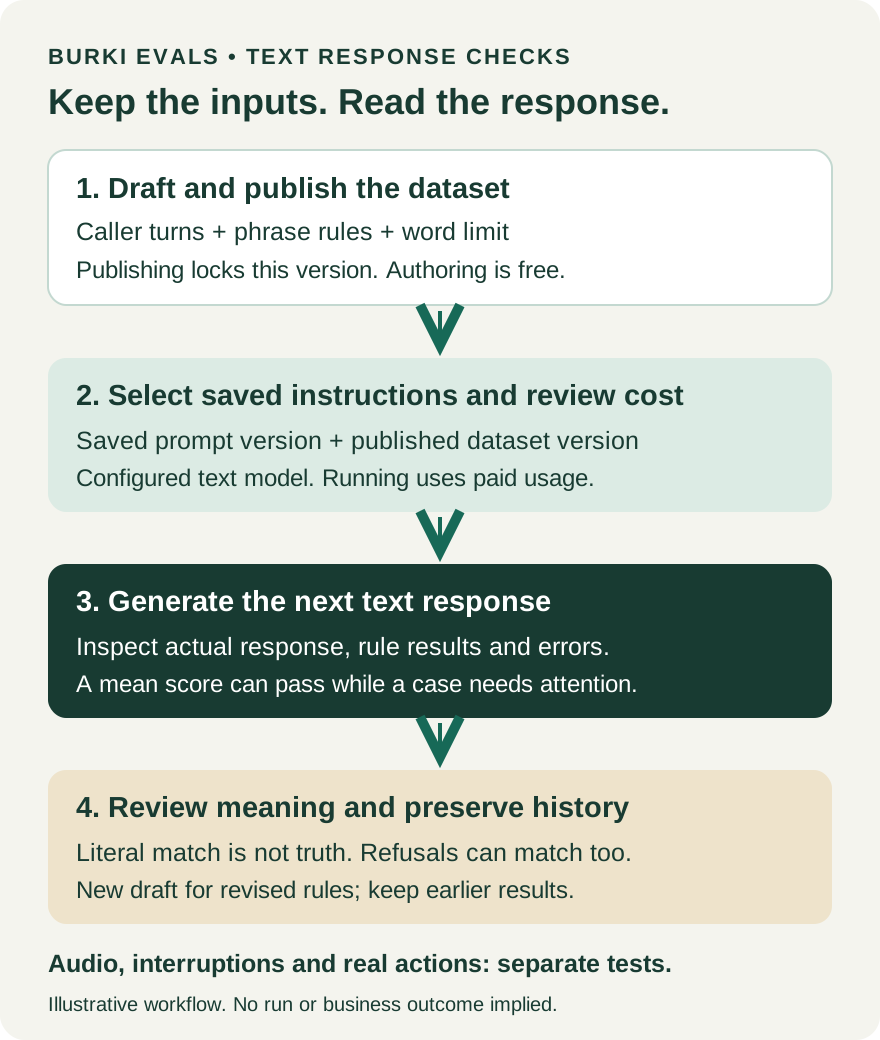
Two saved inputs, one inspectable result. The diagram is an explanatory outline. It does not show a run performed for this article.
Create the eval and write the conversation
Open Evals in Burki. The library offers editable starters under Start with useful scenarios and a New eval button for a custom draft. A starter saves some typing, but its facts and rules still need to fit your business. Do not run it with somebody else's opening hours or promises.
For this example, create a custom eval called Alder intake text checks. Add a description that explains its scope, such as “Saved response checks for hours, price boundaries and corrected contact details. No tool execution.” Open the draft and choose Add scenario.
Each scenario has a Scenario name, Conversation and Response checks. Use Caller and Assistant turns to supply the context. The conversation must end with a caller message because the check generates the assistant's next response. Fill every turn; an empty message or unsupported role must be fixed before saving.
For the correction scenario, you might enter this fictional conversation:
Caller: Please use 202-555-0142 as my callback number.
Assistant: Is 202-555-0142 the number you want us to use?
Caller: Sorry, the last four digits are 0198. Please repeat the corrected number.
The written assistant turn is supplied context. Burki is not regenerating that earlier turn or replaying a complete audio conversation. The observed result is the response to the final correction.
The fixture includes these turns so you can adapt them. Use fictional details while building the suite. A real incident can inspire a case without copying a customer's identifying information into your test library.
Write rules that mean what you intend
Under Response checks, Must include and Must avoid accept one word or phrase per line. Every line is checked independently, ignoring capitalization. These are substring checks. They do not understand whether a phrase was used as a promise, a quotation or a refusal.
For the hours question, a required phrase such as Monday through Friday can flag a response that omits the approved schedule. It can also flag a correct paraphrase such as “We're open on weekdays.” Decide whether exact wording matters. If it does not, the reviewer should recognize a valid paraphrase and improve the rule rather than force unnatural language solely to turn a score green.
Maximum response words (optional) checks approximate word count. It is not an audio duration limit. A limit of 70 words can keep this fixture manageable, but choose the limit for the actual question. A response can be short and wrong.
The optional Scoring weights controls include Phrase matching, Response length and Fluency heuristic. Zero ignores a dimension. Fluency is a simple formatting heuristic, not an AI judge of truth. For a first phrase-focused fixture, use a positive phrase weight and keep fluency at zero. If you add a word limit, give length a positive weight. Avoid awarding points for tidy formatting while the important fact is wrong.
A truthful refusal can fail a literal rule
Suppose Must avoid contains guaranteed fixed price. Here is an illustrative response, not an observed Burki run:
I cannot promise a guaranteed fixed price. The team needs to review the repair before confirming the cost.
The response contains the forbidden phrase, so the literal rule flags it. The meaning is a refusal. Telling the assistant to stop refusing would fix the wrong thing.
A different response, “The price is confirmed,” could avoid that exact forbidden phrase and still make an unsupported promise. That is the opposite failure: the rule passes while the business behavior is wrong.
Keep a manual question beside the rule: Did the response imply that a price was already confirmed? Read the actual response before changing the instructions. Revise an overly broad phrase rule in a new dataset version and add cases for the alternatives you care about. Phrase scoring is useful evidence, but it does not replace that judgment.
Publish the dataset and save the instructions
Review all three scenarios while the eval is still a draft. Then choose Publish eval. Publication locks that dataset version and makes it available for checks. It does not change or publish your assistant.
If you later change a phrase, turn or word limit, use Create new draft from the published eval. Review and publish that new version. Keeping the earlier version intact makes it possible to understand why an old result was scored as it was. Record the version label, not only the dataset name, because copies can share a name.
In Run against an assistant, choose Assistant to evaluate. Under Run text response checks, select Saved prompt version and Published text dataset. If you have not saved a check version, Save current instructions as a check version captures the assistant's saved instructions. Save changes in the assistant first; unsaved voice or workflow edits are not included in these text checks.
The check uses the assistant's configured business text model. A GPT Live voice configuration does not make this an audio evaluation of GPT Live. Record the model, saved prompt and dataset version in the worksheet so a later comparison has identifiable inputs.
Review the cost before running checks
Select Review cost after choosing the prompt and dataset. For managed usage, the screen shows a temporary hold per check and a maximum total. That is a funding bound, not a prediction that the full amount will be charged. Actual provider usage is charged, rounded to cents per check, and the result exposes settled usage when it is known.
With your own provider credentials, the provider bills usage directly. Burki does not know that cost, so a missing Burki estimate is not a zero-cost test. Browser trial minutes do not cover these checks. Your workspace, configured supported model and funding must be eligible before execution.
If the selected inputs or relevant configuration change, review the cost again. Use Refresh cost when needed. Do not use an old screenshot as a current price quote.
Only choose Run text checks when you intend to incur that usage. No paid run was launched to produce this guide. The worksheet and worked response examples are resources for planning and review, not fabricated execution receipts.
Read the actual responses and saved history
After your own run, inspect every case. The screen can show Score threshold met while some cases still need attention. The overall status uses the average score; each case also has a threshold. An average meeting 80% is not the same as every case passing.
Expand the saved results to read the actual response, missing phrases, forbidden phrases and any error. Classify the finding before fixing it:
| Finding | Useful correction |
|---|---|
| The response invented weekend opening | Fix the instructions or approved facts, then recheck |
| A truthful refusal matched a forbidden phrase | Repair the rubric in a new dataset version and retain the old result |
| A valid paraphrase missed a required phrase | Decide whether exact wording is necessary; review the rubric |
| The run is incomplete or a provider error is shown | Treat it as incomplete evidence, not a low-quality answer |
The library keeps saved runs for the version. Return to the history rather than relying on a transient banner. A settled charge and saved response tell you what happened in that text run; neither establishes an external business action.
Finish by recording a manual decision for each important case. Then test the other layers your launch needs: listening accuracy, interruption recovery, the exact telephone route and real action outcomes under separately approved conditions. An AI receptionist needs all of those where they apply. A small Evals suite gives you a repeatable starting point without pretending it has checked the entire call.
Ready to try Burki?
Create an assistant and check your available browser practice allowance.
Create your assistantTrial eligibility and available practice are shown in your workspace.