Export a Burki Voice Workflow and Check What the File Preserves
Download a Burki workflow's saved draft, published graph and version history. Check omitted unsaved edits, private content and dependencies with a free worksheet.
Table of Contents▼
When you export a voice AI workflow, the useful question is not simply whether a JSON file downloaded. You need to know which configuration it contains. An unsaved change on the canvas, the server-saved draft and the published conversation can all be different.
Burki's Export operation downloads the saved workflow bundle, including its draft graph, published graph when present and version history. It does not download unsaved canvas edits or create a complete backup of the assistant's providers, Knowledge documents and telephone setup.
This guide walks through that existing operation and a fictional hours-change example. Download the free workflow export review worksheet to record what was saved, what was published, what was omitted and what needs review before sharing. The worksheet is a manual planning resource, not an import tool or a tested recovery procedure. No production workflow was created, saved, restored or voice-tested to produce the example.
Decide why you need the export
An export can give an operator a local record of workflow instructions and version history. That is useful when reviewing a change with a colleague or preserving the workflow before another authorized revision. It is less useful if nobody can tell whether the file contains the behavior that was actually reviewed.
Write the purpose before downloading. For example: “Preserve the saved hours-change draft and identify how it differs from published version 2.” That is specific enough to check. “Back up everything” is not a promise this operation can fulfill.
Use the intended account and workflow. Keep the local file in a place approved for its contents. The export is available through an authenticated workflow request scoped to the account's organization; that does not mean the downloaded file is automatically suitable for public sharing.
This walkthrough concerns Guided workflow behavior. Assistant Settings History is a different feature, and a workflow export is not a snapshot of every setting that may affect a call. For the wider business context, see Burki's AI receptionist workflows.
Understand the three configuration states
Consider a fictional reception workflow for Alder Desk. Its published version 2 says the public desk closes at 17:00. The operator has saved a draft changing that to 16:00. There is also an unsaved canvas edit proposing 15:00.
These are intentionally different values so the operator can spot a mistaken assumption:
| State before export | Fictional closing time | Where to look |
|---|---|---|
| Unsaved canvas edit | 15:00 | Current editor, before saving or discarding |
| Server-saved draft | 16:00 | Exported graph |
| Published version 2 | 17:00 | Exported published_graph and the relevant version entry |
Choosing Export fetches the server's bundle. The local unsaved 15:00 proposal is not added to that file just because it is visible in the editor. If you actually want to preserve it as the workflow's saved draft, saving is a separate, authorized decision. Do not save a production change merely to make an export match a proposed value.
The opposite mistake matters too. The exported graph may contain the newer saved 16:00 draft while the published graph still contains 17:00. Reading only graph would not establish the published workflow's instructions.
None of these times are real business facts. Replace the example with your own approved change, and do not assume an exported published graph proves which assistant settings, external services or telephone route a particular call used.
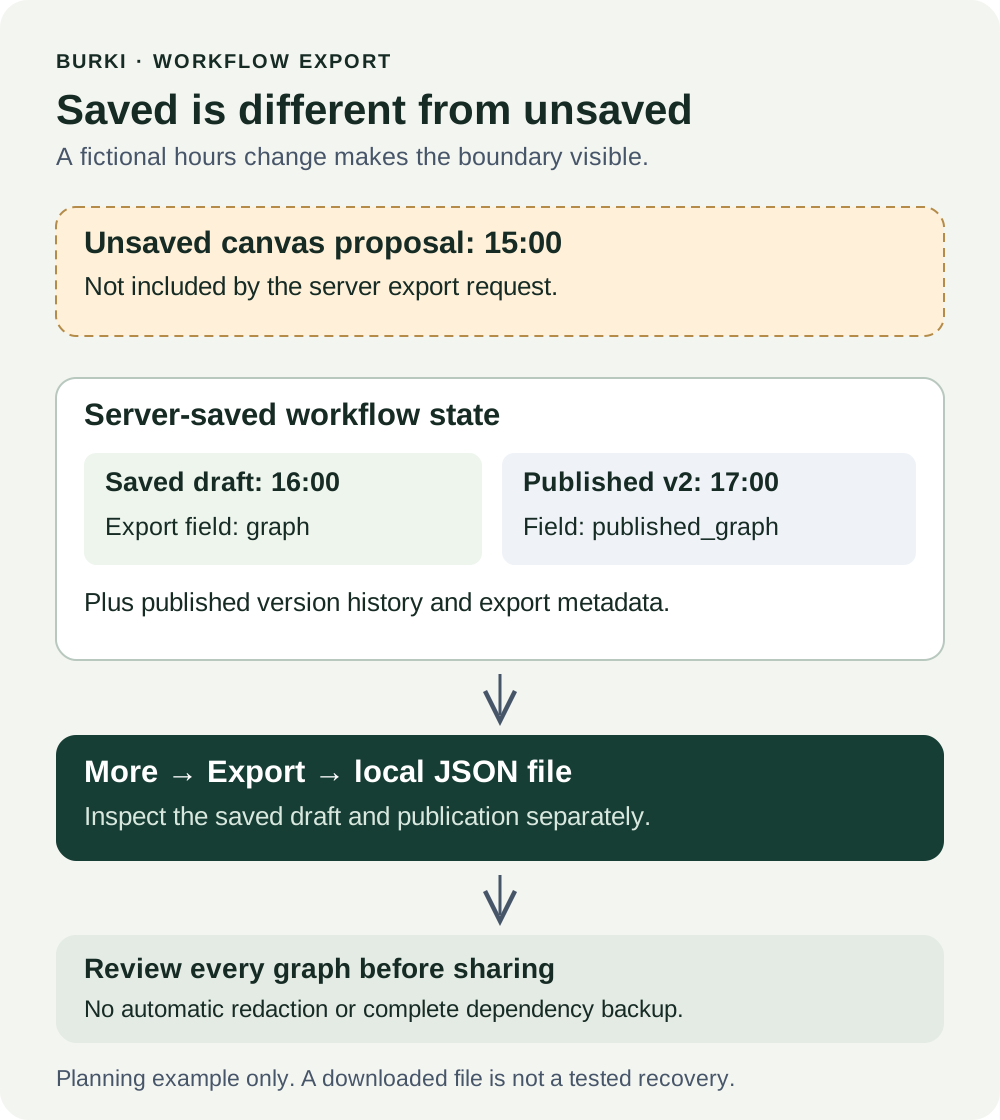
The diagram describes the export's configuration boundary. It is not a completed download, a restored environment or an accepted voice call.
Open the workflow and download the file
Use Assistants → an existing Guided assistant → Open. In the workflow editor, open More, then choose Export.
Before choosing the download:
- Check the workflow name and the account you are using.
- Note whether the editor displays Unsaved draft.
- Record the displayed publication state, such as Published v2 or Unpublished.
- Decide whether you need the already saved server state or whether a separate review must resolve unsaved edits first.
- Choose More → Export, then check the browser's download result and open the file locally.
The current implementation formats the server bundle as JSON and derives the download filename from the workflow name, followed by -export.json. For example, the fictional Alder Desk name would produce alder-desk-export.json. The operation does not put a timestamp into that filename. Your browser may handle repeated downloads differently, so record the actual file and keep an unambiguous local copy rather than identifying an export only by its name.
If the page reports an export error, preserve the message and check the workflow and account before retrying. Do not substitute a partial copy of the visible prompt and label it a successful bundle export.
The export operation fetches configuration and creates a local download. It does not start a voice session or a provider action. That is separate from the costs and eligibility of later voice tests, production calls or other operations. The free worksheet does not establish a free production plan; review current pricing and your actual account when those activities are relevant.
Inspect the fields that distinguish draft and publication
Open the downloaded JSON in a local text editor. Do not edit the only preserved copy while reviewing it. The current bundle uses these fields:
| Field | What it records | What it does not prove |
|---|---|---|
format | The bundle type, burki.conversation_flow | That all external dependencies are included |
format_version | The bundle format revision, currently 1 | A published workflow version |
name | The workflow name | Its account permissions or voice readiness |
graph | The server-saved editable draft | The local unsaved canvas or necessarily the published behavior |
published_graph | The published graph when present | A passed call or working phone connection |
published_version | The selected published workflow version, when present | That it is always the highest version number |
latest_version | The latest version number in the workflow's release state | That this version is the selected publication |
versions | Preserved published version entries and their graphs | Recordings, call transcripts or proof each version passed testing |
exported_at | The server-generated export time in UTC | When the instructions were last changed or tested |
An unpublished workflow can have no published graph or published version. Record that absence instead of inventing a version. A workflow with history can also have an earlier version selected, so do not treat latest_version as a synonym for published_version.
Version entries can include a label, publication timestamp and actor identifier. These help interpret history, but a publication timestamp is not an acceptance-test timestamp. Keep your actual review evidence alongside the export receipt.
For Alder Desk, the review succeeds if the saved draft shows 16:00 and the published version 2 shows 17:00, while the unsaved 15:00 proposal is absent from the bundle's saved state. “The file opens” is only the first check.
Review the complete bundle before sharing
The checked export helper validates the graph format. It does not provide a general automatic-redaction guarantee. Instructions and business details can be present in the current draft, published graph and older version graphs. Tool configuration or references can also be part of graph content.
Review every included version, not just the current draft. Removing a private detail from today's prompt does not demonstrate that the same detail is absent from older exported instructions. Check for internal contact routes, private examples, identifiers, sensitive tool configuration and material that the receiving person is not authorized to see.
Do not paste credentials into workflow instructions in the first place. Also do not assume an export is safe to share because it lacks a top-level field called “password.” Review the actual contents. Keep the original internal receipt separate from any deliberately prepared sharing copy, and do not present an altered sharing copy as a complete recovery bundle without validating that separate purpose.
The download itself does not revoke access, rotate credentials or remove information from the saved workflow. If the review finds a problem, the relevant owner must handle it through the organization's normal process. Exporting is a way to inspect configuration, not an automatic remediation.
Record the dependencies outside the file
The bundle is a workflow record, not a complete assistant or account backup. It does not separately package the base assistant's settings or provider credentials, Knowledge document contents, call recordings, conversation history, organization membership or telephone routing. That is not a guarantee that sensitive values are absent from inline graph content; the complete-file review still applies.
A graph can reference something without containing a usable copy of it. A Knowledge reference does not export the document corpus. A tool name does not prove the receiving environment has a valid connection. A published graph does not prove a carrier or provider will accept a new session.
Use the worksheet to list dependencies and their responsible owner:
- The base assistant's voice mode, model, voice and other settings that matter to this workflow.
- Approved Knowledge sources and the process for verifying their current contents.
- Any assigned or graph-referenced tools, their configuration and their actual connection status.
- Account permissions, funding and provider prerequisites.
- The intended browser or telephone route and its separate acceptance evidence.
This walkthrough does not teach or perform import. Do not assume importing a bundle is a harmless unpublished preview or that it restores all those dependencies. Any later import, restoration or rollout needs its own explicit scope, environment review and verification.
Finish with a receipt that states the actual result
Record the actual filename, export time, workflow name, save state, published version and the observations from the file. Add the review owner, storage location and unresolved differences. If someone else changed the workflow around the same time, treat mismatched values as something to reconcile rather than silently editing the receipt to match your expectation.
Useful acceptance checks include an absent publication, differing draft and published instructions, an unsaved edit excluded from the file, private content preserved in an older version, and a referenced dependency that has not been checked. Leave unknowns visible.
A successful result for this guide is a downloaded, inspected workflow bundle with an honest description of its contents and limits. That gives a future reviewer something concrete to work from. A tested restored assistant or a verified telephone conversation would be a different result requiring additional evidence.
Ready to try Burki?
Create an assistant and check your available browser practice allowance.
Create your assistantTrial eligibility and available practice are shown in your workspace.