Deepgram Nova-3 Configure: Wait for the Ack
Handle Deepgram Nova-3 Configure acknowledgments, pending updates and uncertain outcomes with a worked vocabulary-change trace and free state worksheet.
Table of Contents▼
A caller asks about a specialist part. Your application sends a smaller recognition vocabulary for that department, then immediately marks it active. The socket write succeeds, but the provider rejects the change. The next transcript is now being judged against a vocabulary the recognizer never accepted.
Deepgram Nova-3 Configure handling needs an explicit receipt before the application promotes a proposed list to its active state. This guide develops that application design with a fictional parts desk. It is useful for developers connecting directly to recognition, rather than someone simply editing an assistant's initial vocabulary.
On October 19, 2026, Deepgram added explicit ConfigureSuccess/ConfigureFailure responses and expanded midstream configuration to its global, EU, Australia and India endpoints. These are subsequent changes to the October 2 launch, not an October 26 release. October 19 update.
Download the free configuration-state worksheet. It includes original proposed-state records and failure fixtures. The examples below are designed traces, not captured provider responses; no paid recognition test was run.
Prepare the direct-provider connection
Have an authorized Deepgram account, a funded usage arrangement, an eligible Nova-3 streaming connection and an application owner for its lifecycle. Keep credentials on the server. Do not paste production secrets into the worksheet or use customer audio just to try the example.
Deepgram added explicit Configure helpers to its Python, JavaScript and Java SDKs on October 12. Use a supported current SDK and check its installed interface before copying a helper from a dated example. The wire contract below is the review target; this is not an assertion that the October 12 SDK versions remain the newest. SDK support announcement.
Before any live use, write down why a change is needed. A department transition is a plausible reason. Replacing vocabulary after every partial transcript is harder to explain and audit. The application should be able to answer which list it wanted, why, and whether it has evidence that the provider accepted it.
Keep the provider contract compact
For Nova-3 streaming /v1/listen, the relevant rules are:
keytermsreplaces the complete list;[]clears it. Omitted fields retain their values.- A rejected update changes nothing, including accompanying
features; the stream remains open. - Allow one pending update. Replies carry the stream's
request_id, with nosequence_id. - Settings affect audio not yet transcribed, possibly audio already sent. Returned transcripts are not rewritten.
A minimal proposed replacement looks like this:
{"type":"Configure","keyterms":["CalderaFlow","PXR42","seal cartridge"]}Those are protocol rules, not evidence that this example was accepted. Configure reference.
Each list must stay within 500 tokens. Count tokens according to the provider's rule rather than treating 500 words or characters as interchangeable. Keyterm limits.
Work through one department transition
The fictional Northline Parts receptionist starts with a general list covering its company and departments. The caller then asks about a CalderaFlow seal. Staff will decide compatibility and stock; recognition hints must not turn a tentative request into a confirmed order.
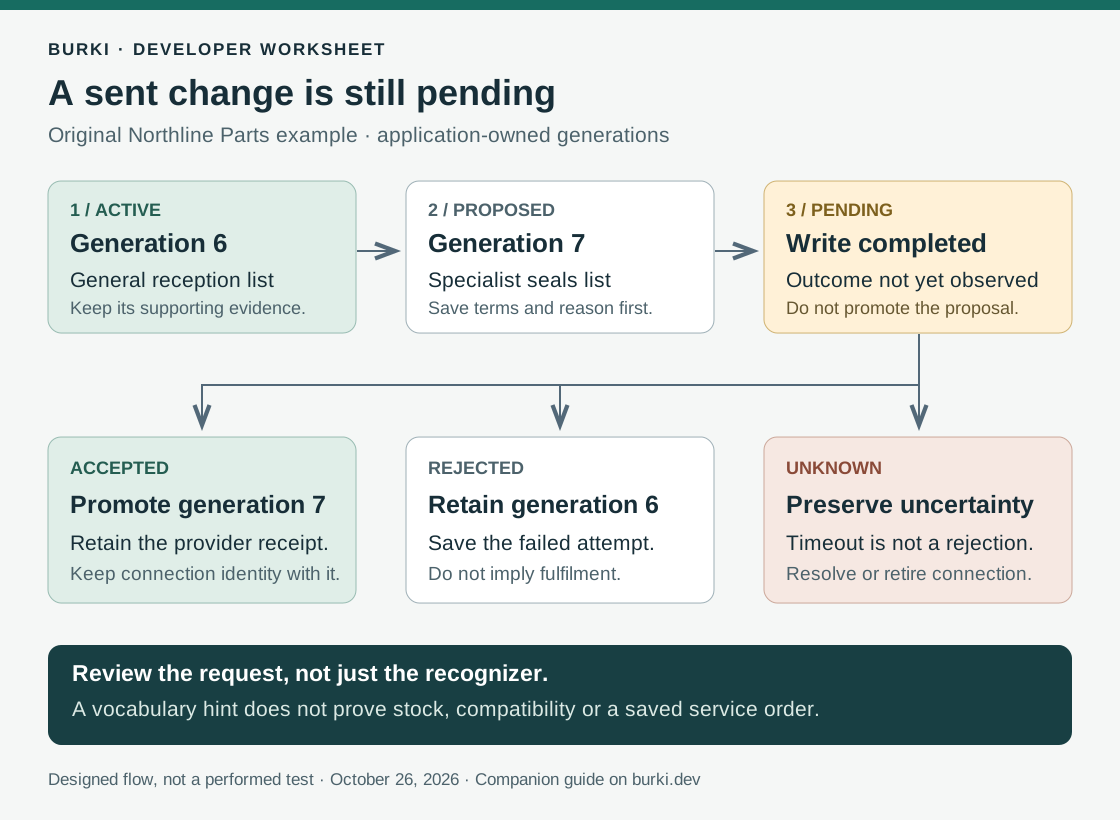
Give the application two separate records. Active contains the last accepted list for this connection. Proposed contains the department list waiting for an outcome. The number beside each record is an application-owned generation number, not a Deepgram field.
| Designed event | Application record | What staff-facing history may say |
|---|---|---|
| Connection has its initial list | Active generation 6 | Initial vocabulary configured |
| Department decision proposes a replacement | Proposed generation 7 | Department vocabulary requested |
| Socket write completes | Generation 7 remains pending | Waiting for provider outcome |
| Success reply is observed for this pending operation | Promote generation 7; retain its receipt | Department vocabulary accepted |
| Next request needs a different department | Prepare generation 8 after reconciliation | Another change is being considered |
The middle row matters. A transport library can accept bytes while the business workflow is still waiting. Avoid using a green “saved” label for both events.
Store a local connection instance identifier with every transition. If a user opens another browser session or the recognizer reconnects, it should not inherit a pending operation merely because the business conversation has the same customer reference. Associate receipts with the actual connection that produced them.
For the worked example, save the proposed terms exactly, plus a digest if your application uses one. Comparing a returned active list with the intended list can reveal an application bug before someone blames recognition accuracy. A stream identifier is useful supporting evidence, but it should not be mistaken for a unique identifier generated for each replacement.
Design the failure and timeout branches
Suppose generation 7 fails. Keep generation 6 in the active record and attach the error evidence to the attempted change. The receptionist can still ask the caller to repeat the part code, spell it or leave a note for staff. A failed vocabulary optimization should not silently become a fulfilled service request.
Suppose instead that the socket closes after the write and before your application observes an outcome. Record unknown. Neither success nor failure has been established locally. A timer expiring is an application observation, not a provider rejection.
Do not let a timeout automatically release the pending slot and fire the next change. That can make late replies impossible to interpret. A conservative design blocks further mutations on that connection while it resolves the uncertainty or retires the connection through its normal lifecycle. A replacement connection can be initialized with the desired list, but that does not tell you what happened to the earlier audio. Preserve the boundary in the record.
These are application design choices. They deliberately favor explainable state over guessing which vocabulary was active when evidence is incomplete. Choose a timeout appropriate to your own connection handling; this guide does not invent a provider timeout guarantee.
Test the state machine before testing recognition
Use the worksheet as an offline review first. A developer can feed synthetic events into the application's own state handler without sending audio or making a provider request.
Start with four cases:
- Success: proposed generation 7 becomes active only after the expected outcome is processed. Its receipt is retained.
- Rejection: active generation 6 survives; the rejected proposal is visible as an attempt.
- Lost connection: the attempt stays unknown. A new connection receives a new local identity.
- Late or duplicate event: it cannot promote a proposal from a different connection or overwrite a newer reconciled state.
Then add two rapid department decisions. The application may keep a latest desired list locally, but it should not confuse that desired list with one already sent or accepted. Review how the code behaves when a caller corrects the department before the first change finishes.
Finally, inspect the transcript boundary. If an existing transcript says PXR24, changing the vocabulary does not justify rewriting it to PXR42. Keep the original recognition record and the caller's later clarification separate. The service note should say the caller clarified the code, not that a configuration change proved the original words.
Budget recognition separately from the application work
On October 26, Deepgram's page lists current PAYG Nova-3 streaming rates of USD 0.0048/minute monolingual and USD 0.0058/minute multilingual, alongside higher regular rates. Keyterm prompting is listed at USD 0.0013/minute. Check the applicable offer, tier and billing conditions before estimating production costs. Current pricing.
For an illustrative 100 eligible monolingual minutes, the displayed current recognition rate plus that add-on gives USD 0.61: 100 × (0.0048 + 0.0013). That arithmetic is not a full voice-agent quote. It excludes speech generation, conversation models, telephone transport and application operating costs. No separate per-Configure charge is inferred here.
The free worksheet helps plan and review the implementation. It does not make production audio or test calls free.
Connect this to the right Burki workflow
For an initial vocabulary list, use the existing Burki keyterm setup guide. It covers the assistant editor's initial Key terms configuration. This developer walkthrough does not establish a Burki control that replaces vocabulary during an active call, or a verified deployed worker that performs the state machine above.
When building an AI receptionist, first decide whether a compact initial list and clear staff handoff solve the actual task. Use dynamic provider configuration only when the application can explain and preserve each transition. Review Burki pricing separately from direct-provider rates, and judge the finished workflow by the request staff can safely act on.
Ready to try Burki?
Create an assistant and check your available browser practice allowance.
Create your assistantTrial eligibility and available practice are shown in your workspace.