Deepgram Keyterm Prompting: Set Up Business Vocabulary in Burki
Set up Deepgram keyterm prompting in Burki with a business vocabulary worksheet, recognition checks and the limits of Nova-3's October update.
Table of Contents▼
An assistant can understand an entire enquiry and still miss the product name that staff need to act on it. Deepgram keyterm prompting gives speech recognition a short list of important words and phrases before it listens. For a business assistant, the useful task is to choose those terms carefully, check what callers actually said and keep uncertain requests open for clarification.
On October 2, 2026, Deepgram added midstream keyterm updates to Nova-3. Developers can now replace the vocabulary list during a streaming session. Burki currently exposes an initial Key terms list in its assistant editor. This guide explains the provider update and walks through that existing Burki setup, with a fictional parts supplier as the worked example. October 2 release note.
Download the free business vocabulary worksheet. The resource is free; recognition, voice-agent usage and any test calls can cost money. No paid provider test was run for this article.
What changed in Nova-3
The new provider protocol accepts a Configure message containing keyterms on the global Nova-3 streaming endpoint. Each update replaces the complete list, and an empty list clears it. Updates have a 500-token limit. An oversized update reports an error and retains the previous list. The new midstream capability is unavailable on the EU, Australia and India regional endpoints. Update behavior and endpoint limits.
A custom application could use this to narrow vocabulary after learning which department a caller needs. For example, a general reception stream might start with company names, then receive a smaller product list when the caller asks about a specific line. That is an implementation possibility, not a workflow this guide claims Burki performs automatically.
In Burki, enter the initial vocabulary for the assistant. There is no verified editor control here for replacing that list while a call is in progress. Changing a saved assistant configuration should not be described as changing an already active provider stream. Choose a compact list that fits the assistant's actual remit.
Build a vocabulary list from the request staff must understand
Suppose the fictional Northline Parts desk handles enquiries for a product line named CalderaFlow. Staff need the product family, the requested part and a confirmed callback number. They will review compatibility and stock themselves; the assistant must not invent either answer.
Start with six proposed terms:
Northline Parts, CalderaFlow, PXR42, seal cartridge, flange adapter, returns deskThese are proposed recognition hints, not a product catalog or proof that any model transcribed them correctly. Put them in the worksheet with the reason each matters. For PXR42, write down how a caller might speak it: “P, X, R, forty-two” or “P, X, R, four, two.” Keep the expected identifier separate from the spoken test sentence.
Choose terms from reviewed business vocabulary and recurring transcription problems. Deepgram documents plain keyterms for Nova-3 and Flux, with the older weighted keywords syntax reserved for other models. Keyterms use no intensifier. The provider advises focused lists rather than filling the token limit, and it can weigh audio context against the requested spelling. Keyterm syntax and selection guidance.
Do not add your entire inventory because the field accepts several terms. A reception assistant that hears sales, returns and support calls needs a different list from a specialist product desk. Give every term an owner and a review date. Remove discontinued names when the business stops handling them.
Also include words that must remain different. If the catalog contains both a flange adapter and a flange gasket, the assistant needs to preserve that distinction. A useful vocabulary list improves the chance of hearing the request; it does not authorize silently rewriting one item into another.
Configure the initial list in Burki
Use a draft assistant and record its current configuration before changing recognition settings. You need access to the organization, an available Deepgram credential or managed arrangement, and sufficient funding for any eventual voice usage. Check Usage & billing and the assistant's readiness messages before scheduling a test.
- Open the assistant in Assistants, then Voice. Expand Model and provider choices and choose Standard pipeline · advanced provider choices under Conversation engine.
- Within that panel, open Advanced speech recognition. Choose Deepgram under Recognition provider.
- Choose the Nova-3 general option whose model ID is
nova-3-general. Keep the intended recognition language fixed for this first review. Do not switch to Medical or Flux while also evaluating the term list. - Expand Keywords & key terms. Enter the six example terms in Key terms, separated by commas. Replace these fictional terms with the vocabulary your organization has approved.
- Check the list for empty entries, duplicates and accidental punctuation. Record the model, language and term list in the worksheet. Review readiness before saving the intended draft.
- When the organization approves the usage and test budget, compare the same cases with and without the list. Keep the assistant's business instructions, other providers and recording conditions unchanged.
Burki's input uses commas to build a stored list. That is different from writing a provider URL yourself: Deepgram's query syntax repeats keyterm for each term and treats a comma-filled parameter as one literal term. Do not paste a Burki input string unchanged into a direct API query. Direct API parameter syntax.
The configuration path, Deepgram model choices and Key terms input were inspected in the live editor without saving or making a call. The initial-list mapping was checked against current product source. These checks do not prove a provider accepted a request. Verify the actual session and transcript when you run your own test.
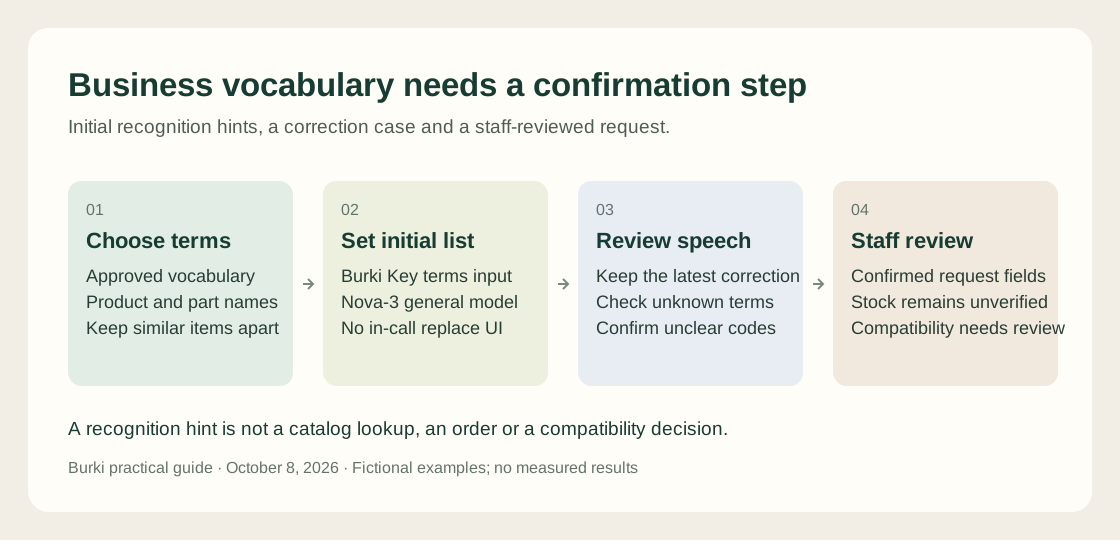
Vocabulary hints help recognition. The assistant still needs to preserve corrections and confirm important details before staff use the request.
Walk through a correction, not just a clean product name
Use this fictional caller case:
“I'm calling about a CalderaFlow seal cartridge. The code is P, X, R, forty-two. Actually, it is forty-three. Can someone check whether it fits my unit?”
The important outcome is a request for PXR43, subject to confirmation, with compatibility left for staff. Merely finding CalderaFlow in the transcript is insufficient. The assistant should acknowledge the correction and read back the code slowly: “To confirm, P, X, R, four, three. Is that correct?”
An example instruction for the request workflow is:
Collect the product family, requested item, identifier and callback details.
When the caller corrects an identifier, confirm the latest value aloud.
If any character remains unclear, ask the caller to repeat or spell it.
Do not confirm stock, compatibility, a price or an order from vocabulary hints.
Explain that staff must review the request before confirming those details.
This instruction is a starting template, not a connected inventory action. The vocabulary list cannot answer whether the part exists or fits. Any stock lookup or external write needs its own verified connection, permission and successful result.
Add a negative case: “I need a flange gasket, not the adapter.” Add an unknown brand that is absent from the list. Add a caller who pauses halfway through the identifier. Check whether the assistant asks a useful question rather than confidently selecting the nearest known product. The worksheet leaves outcomes blank so your team records observed results.
Measure useful errors and the cost of the hints
For a small review set, count exact important-term matches, wrongly inserted listed terms, missed corrections and unconfirmed identifiers. Include cases where the caller never says a listed product. A higher match count is not an improvement if unrelated speech is repeatedly turned into the favored brand.
Listen to the source audio when permission and retention rules allow it. A transcript alone cannot establish what was spoken. Note unclear recordings separately, keep unsuccessful sessions in the review and have another staff member check disputed labels. Report the number of attempts and the configuration used instead of presenting a few selected successes as an accuracy percentage for all callers.
Deepgram's October 8 pricing page lists promotional streaming Nova-3 monolingual Pay As You Go recognition at USD0.0048 per minute and Keyterm Prompting at an additional USD0.0013 per minute. Using both listed rates gives an illustrative provider subtotal of USD0.0061 per minute, or USD0.366 for one hour. Rates and account terms can change. Current Deepgram pricing.
That arithmetic covers the named provider services only. It excludes reasoning, synthesis, telephone service, platform charges, other add-ons and any applicable account charges. Review Burki pricing for the platform arrangement. A free worksheet and a provider promotion do not make production calls free.
For an AI receptionist, the practical next step is a small reviewed vocabulary list attached to a clear enquiry process. Keep the cases that exposed a correction or unknown term, then rerun them when the list, model or business catalog changes. Publish the observed outcome only after the relevant session has actually been checked.
Ready to try Burki?
Create an assistant and check your available browser practice allowance.
Create your assistantTrial eligibility and available practice are shown in your workspace.