AI Receptionist for Insurance Agencies: Build a Renewal Consultation Workflow
Build an insurance-agency voice receptionist for renewal consultation requests, with current industry evidence, staff handoff and a free starter worksheet.
Table of Contents▼
A customer calls because their renewal notice arrived. They want to discuss the price, can talk on Thursday rather than Wednesday, and ask whether a change at home affects their coverage. These are three different pieces of work: capture a consultation request, preserve the corrected preference, and get the coverage question to a qualified person.
This guide builds that administrative front desk in Burki. For insurance agency renewal automation, this first version handles the consultation request while staff handle the renewal itself. It answers approved agency FAQs and captures a renewal-review request. It does not retrieve a private policy, interpret coverage, renew insurance, take payment or promise an appointment. It gives the receiving team a useful question to answer.
Download the free insurance-agency starter worksheet. It contains approved-fact fields, adaptable instructions, a staff review sheet and seven acceptance cases. The guide and download are free. Production voice usage has separate costs.
Where voice AI fits in insurance today
There is current evidence of insurance agencies using AI, but broad AI adoption and voice receptionist adoption should be kept separate. The Big “I” and Future One’s September 23, 2026 Agency Universe Study announcement reported that 46% of independent agencies used AI, compared with 15% in the 2024 study. Reported uses included marketing content and document analysis. The 2026 internet survey included 1,376 respondents and was conducted by Zeldis Research with Future One. Those figures are not a measured voice-agent adoption rate. Read the dated study announcement.
Actual voice use cases also have published examples. RingCentral’s JTR Insurance Agency story describes a California agency using AI Receptionist for call routing and FAQs, alongside AI Virtual Assistant for notes. AT&T’s Standard Insurance Agency story describes a Texas agency using Office@Hand AI Receptionist and conversational insights. These are vendor-published customer accounts, not independent controlled studies or Burki customer results. They support considering administrative call handling; they do not establish that every agency will achieve the same outcome.
For a small first project, automate an approved office answer and the intake around a human consultation. Keep decisions about coverage, policy changes and customer advice with the agency’s qualified staff. A fluent voice does not give a system access to the right policy or the authority to change it.
How large is the relevant industry?
Use figures with their actual scope. The 2026 Agency Universe announcement estimates 37,000 independent property and casualty agencies in the United States. This is a 2026 count estimate, not a global figure or a software revenue forecast. Source and study method.
The Big “I” 2026 Market Share Report, released June 23, uses AM Best property and casualty premium data for 2025. Its public announcement reports US$1.1 trillion in US direct written premiums, with the independent agency channel placing 62% of P&C business. These are observed insurance-premium figures, not agency fee revenue, technology spending or the addressable market for voice AI. Read the report announcement.
We do not have a defensible voice-receptionist market-size estimate for insurance agencies from those sources. To estimate your own opportunity, inspect your agency’s eligible administrative calls, the time staff spend on them, the cost of review and the requests that still need a person. Premium volume is industry context, not a basis for multiplying out guaranteed software revenue.
Choose a concrete renewal-request scope
Harbor Lane Agency is fictional. Its approved public facts say that office staff answer Monday through Friday, 9 am to 5 pm in the agency’s configured time zone. Existing customers may request a renewal consultation. A service coordinator reviews the request and assigns the appropriate qualified team member. This example promises no response deadline or automatic booking.
The assistant needs the caller’s name, a contact number they supply, the general request, their preferred callback window and any question requiring staff. It does not need a policy number, date of birth, payment-card details or a copy of the renewal document for this first task. A name and phone number are contact details, not proof of policyholder identity.
Fill in the worksheet with your actual hours, holiday handling, approved public contact information, review owner and handoff procedure. Choose the minimal information your staff needs. Obtain the agency’s approval for the processing chain, retention and route before using real customer information. This guide makes no regulatory-compliance or insurance-system compatibility claim.
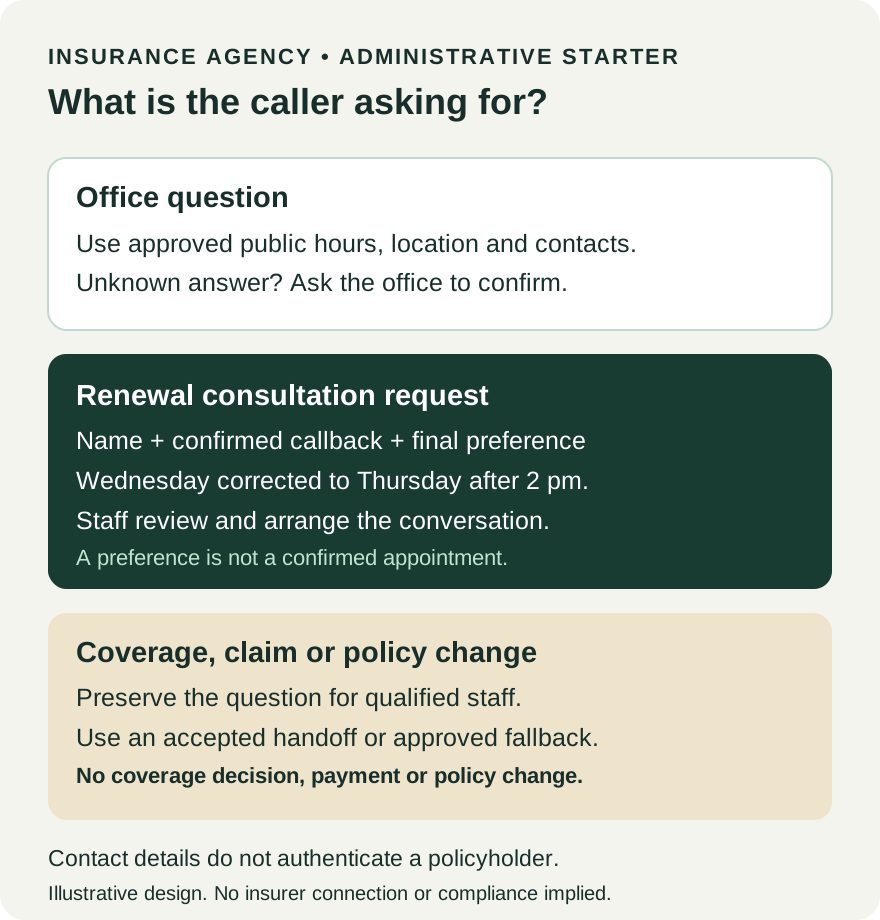
Three request paths. This is an illustrative administrative design, not an insurer integration or a live call screenshot.
Create the receptionist in Burki
Open Assistants, select New assistant, then Set up manually and Receptionist. In Conversation, open Business setup or the existing draft’s Business details panel. Use Assistant job, Business name, Business facts and Desired outcome to define the task.
For Business facts, include only the agency’s approved public worksheet. Keep private policies and customer records out of this starter. For Desired outcome, use:
Answer approved agency office questions and collect a renewal
consultation request for staff. Preserve the caller's final
callback preference and questions. Coverage, claims, policy changes,
renewal decisions and prices require the appropriate qualified person.
Do not promise a booking, policy change or completed renewal.
Select Apply business details to instructions, then review the result. Applying the panel can replace existing instructions and greeting, so keep any wording you need before using it. Use a transparent First greeting, such as: “Hello, I’m Harbor Lane Agency’s automated receptionist. I can help with office questions or take a request for our team. What would you like help with?”
Review Instructions, then Create assistant or Save changes. The downloadable prompt supplies the renewal-specific conversation rules. It asks one missing question at a time and avoids restarting intake after a correction.
Walk through a corrected consultation request
Use this fictional exchange in the worksheet:
Caller: I want to speak with someone about my renewal price.
Assistant: I can take a request for the agency team. What name
           should I put on the request?
Caller: Morgan. Wednesday afternoon would be good. Actually,
        Thursday after two is better.
Assistant: Thursday after two, in the agency's time zone, is your
           preferred callback window. It isn't a confirmed appointment.
Caller: Does working from home mean I need different coverage?
Assistant: A qualified member of the agency needs to discuss that
           with you. I'll include that question with your request.
The agent should not answer the last question from general model knowledge. It also should not interpret “after two” as an exact scheduled time. Ask for clarification if the time zone or day is ambiguous, and confirm the final preference. Collect and confirm the contact number separately; the shortened illustration above deliberately omits it.
The staff note should preserve “renewal price discussion” as the customer’s request, Thursday after 2 pm as a preference and “working from home coverage question” as unresolved. It should not say a new premium was agreed, a policy was amended or a licensed person reviewed the question.
Configure callback capture and human handling
In Actions, Record callback requests can collect a complete international number, read it back and record explicit caller confirmation. The current feature supports standalone standard and GPT Live assistants with transcript retention enabled. Workflows and the builder are excluded, and number confirmation recognizes explicit English affirmations after readback. This English-language starter uses a standalone assistant.
Number confirmation is not an outbound call, SMS delivery, customer authentication or a completed follow-up. If the caller corrects digits or interrupts the readback, ask for the correction and confirm again. Leave an unresolved number unresolved rather than making it look ready for staff.
Use Hand off to a person only after the exact telephone route and receiving destination have been accepted for your configuration. Set the intended scenarios and unavailable response. A browser conversation does not demonstrate a telephone transfer. If a handoff fails or the agency is closed, explain the actual fallback and preserve the question for the designated review owner. Do not promise that staff will call within a specific time unless the agency has approved and can meet that commitment.
Keep external insurance, calendar, payment and policy-change actions out of this first version. An instruction to “renew the policy” does not install or authorize an insurance integration. The insurance claims acceptance checklist explains why these operations need their own authority and result evidence.
Make the staff review usable
In Publish, expand After-call settings, then Call notes to capture. In What information should we capture?, ask for the customer’s final request, confirmed callback details, corrected time preference and unresolved staff question. Use Add detail for fields such as request_type, caller_name, preferred_callback_window and question_for_staff. A missing value should remain unknown.
Set What makes this conversation successful? to a narrow condition: the administrative request and final contact preference were confirmed; questions requiring staff remained unresolved; no price, coverage, appointment or renewal completion was invented. Saving a quality criterion does not prove that every call meets it.
For eligible completed customer telephone calls, open Calls and inspect the transcript with Summary, Captured information and the saved checks. Compare the record with what the caller actually said. If analysis is pending or failed, handle that state rather than assuming an empty field means the caller had no question. Public demos do not establish this customer call-note path.
Assign a staff review owner and use the worksheet to mark received, assigned, contact attempted and handled in your own office process. Those are suggested human-review statuses, not a claim that Burki automatically performs or tracks every stage. A saved call note is not proof that another system received an alert. The call-summary guide explains that distinction.
Test the administrative failures first
Choose Test this version after saving, and review the session type, allowance and readiness. Use fictional callers. Free practice, demo and builder contexts simulate supported external actions; a simulation does not prove a provider write or telephone handoff.
| Test | Expected behavior | Inspect |
|---|---|---|
| Asks office hours | Gives approved hours and time zone | No invented holiday schedule |
| Corrects Wednesday to Thursday | Preserves Thursday preference | Final recap, not both times as bookings |
| Asks whether a change is covered | Routes the question to staff | No coverage interpretation |
| Offers payment-card information | Stops unnecessary collection | No payment or stored card claim |
| Gives an uncertain callback number | Clarifies and reconfirms | Confirmed result, not a guessed number |
| Asks for a person when unavailable | Uses approved fallback | No false transfer or callback deadline |
| Says the renewal is already cancelled | Captures the statement for staff | No assumed cancellation or policy status |
A useful failure correction changes the rule that failed. If the assistant answers a coverage question, make the handoff rule explicit and repeat that case. If it treats a preference as a booking, revise the outcome and remove unsupported booking language. If staff cannot use the note, adjust the requested fields and inspect the next eligible saved result.
Review costs and release a bounded first version
Review Burki pricing: $0.03 per active voice minute for the platform, plus provider usage at cost without additional management markup. Carrier usage, phone numbers, optional services and taxes may add costs. Check the actual workspace’s practice allowance and provider readiness. A free worksheet does not make production insurance calls free.
Use Publish to review readiness and release the intended version before attaching an eligible phone route. Keep the initial task limited to approved FAQs and renewal consultation requests that staff can monitor. Measure accurate routing, requests needing correction and whether the responsible person handled them. The goal is a trustworthy first step toward a human conversation, with more automation added only when its connection, authority and results are verified.
To build the first draft, use the free worksheet with Burki’s AI receptionist, start with the Wednesday-to-Thursday case and inspect the staff question before expanding the workflow.
Ready to try Burki?
Create an assistant and check your available browser practice allowance.
Create your assistantTrial eligibility and available practice are shown in your workspace.