Soniox vs AssemblyAI for Bilingual Transcription
Compare Soniox v5 and Universal-3.6 Pro for mixed-language calls, with scoped benchmarks, language controls, costs and a free evaluation worksheet.
Table of Contents▼
A caller asks in English, clarifies one phrase in Spanish and then corrects a name in English. A useful transcript should preserve that sequence. Converting everything to English may read smoothly while hiding what the caller actually said.
This Soniox vs AssemblyAI multilingual transcription comparison focuses on that recognition task. It checks current Soniox `stt-rt-v5` and AssemblyAI `universal-3-6-pro`, explains their language controls, and separates published STT benchmarks from the mixed-language evaluation a business still needs.
Soniox lists v5 as active after its June 16, 2026 release. AssemblyAI released Universal-3.6 Pro Realtime on September 29 and currently recommends that model for streaming. Those dates describe the models' availability; neither is a new October 20 launch. Soniox model history, AssemblyAI current model selection.
Download the free bilingual recognition worksheet. It contains an original fictional script, separate review questions for language switches and blank results. No audio, API call or paid benchmark was generated or run for this guide.
Compare the task before the language count
For this guide, recognition means writing the spoken words in their original languages. Translation means producing a different-language rendering. A bilingual reply adds another task: deciding what to say and speaking it appropriately. A recognizer's language list cannot prove that complete experience.
Take this fictional enquiry:
I need una visita por la tarde, but not on Friday. The name is Nila, not Mila.
An evaluation should check the Spanish span, the negation about Friday and the corrected name independently. A model could handle the switch while still losing the negation. A translated note could preserve the request's meaning while failing the requirement to retain original wording. Decide which artifact your workflow promises before scoring either result.
Recruit reviewers who understand both languages and the caller task. Ask them to approve the reference from the recording, rather than treating the sample sentence printed here as proof of what an actual speaker would produce. Accents, pauses and corrections belong in the recording specification, not in assumptions about a language label.
Understand each provider's steering contract
Soniox documents automatic recognition across more than 60 languages, including mixed-language speech. language_hints biases it toward expected languages while allowing others. That is useful when English and Spanish are likely but an occasional third language remains possible. Soniox language hints.
Its separate language_hints_strict option strengthens the preference for the specified languages. Soniox calls restriction best effort, warns that multiple-language restrictions can reduce robustness, and does not guarantee a hard filter. Do not enable it merely to make a bilingual configuration look more definite. Language restrictions.
AssemblyAI documents native mid-sentence code-switching across 32 languages on Universal-3.6 Pro. With no language parameter it remains multilingual. language_codes steers toward expected languages; language_detection reports language information and does not change recognition. A detected language label is therefore a different output from correctly recognizing the switch itself. Multilingual transcription contract.
| Decision | Soniox v5 | Universal-3.6 Pro |
|---|---|---|
| Expected English and Spanish | Provider language hints | Provider language codes |
| Original wording across a switch | Inspect the recognized words | Inspect the recognized words |
| A language label is needed | Verify the relevant reporting option | Verify the relevant reporting option |
| A translated staff note is needed | Review translation separately | Review translation separately |
The following fragments illustrate direct-provider configuration, not complete authentication/audio clients and not interchangeable Burki settings:
{
  "model": "stt-rt-v5",
  "language_hints": ["en", "es"]
}
{
"speech_model": "universal-3-6-pro",
"language_codes": ["en", "es"],
"sample_rate": 16000
}Both examples are unexecuted. Match the real audio format and API contract before any authorized run. A configuration snippet cannot establish acceptable recognition on a telephone recording.
Read the shared benchmark within its limits
Pipecat's published benchmark, pinned to October 1 commit `94f5672` and checked October 20, includes both exact models on 1,000 smart-turn-data-v3.1 samples. References are Gemini-generated and human-reviewed; the current semantic judge is Claude Sonnet 5.5. It reports:
| Model | Mean semantic WER | Median time to final segment | P95 time to final segment |
|---|---|---|---|
| Universal-3.6 Pro | 0.89% | 307 ms | 401 ms |
| Soniox stt-rt-v5 | 1.11% | 260 ms | 305 ms |
Lower is better. Transcript coverage is 99.9% and 99.8%, respectively; missing transcripts are excluded from WER. The repository warns that gaps below roughly 0.25 percentage points among the most accurate systems fall within its bootstrap 95% uncertainty interval. The 0.22-point mean-WER gap does not establish a reliable accuracy ranking. Final-segment latency ends at received text, not an audible reply. The published results do not establish performance on this bilingual task. Pinned benchmark, scoring and timing methodology.
AssemblyAI separately reports 7.20% WER across twenty public code-switching sets covering five English-to-European language pairs. This is vendor-reported evidence, and the exposed table does not include Soniox v5. It cannot supply a head-to-head bilingual winner or an Arabic-English result. AssemblyAI release benchmark.
The pinned benchmark configuration steers both providers toward English and forces VAD turn endpointing. Its latency rows therefore describe that harness, not an untouched native endpointing default. Pinned service settings.
No shared current mixed-language benchmark for this pair was verified for this article. Use the published context to ask better questions, then keep the business-specific result unknown until a suitable evaluation exists.
Preserve source speech before creating a translation
Soniox's streaming transcript distinguishes provisional tokens from final tokens; provisional text may change. Its translation is configured separately. A display or downstream consumer should not confuse a temporary guess with the completed recognition artifact. Real-time transcription and output handling.
AssemblyAI's optional streaming translation sends a final turn to LLM Gateway and returns a separate LLMGatewayResponse. The original Turn remains in the spoken language. That is an additional configured text-processing path, not what code-switching alone promises. AssemblyAI real-time translation.
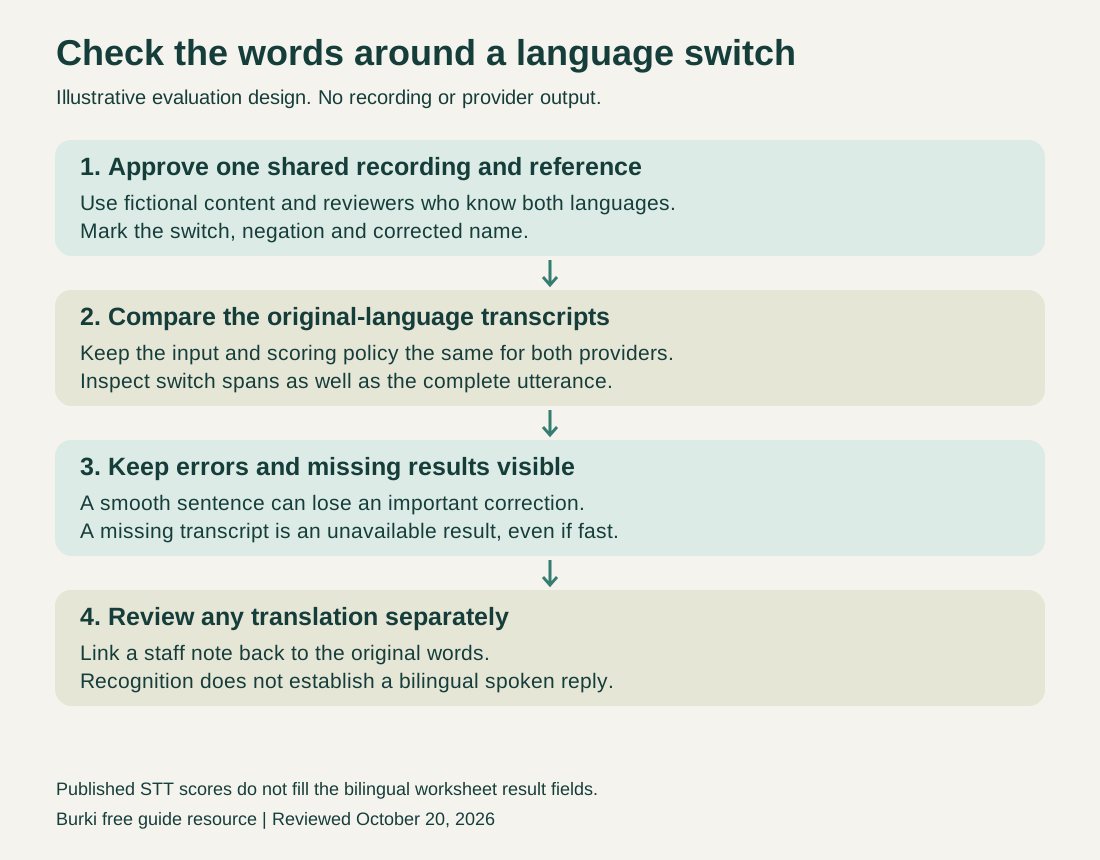
An evaluation design, not observed provider output. Review original words and optional translated notes as separate artifacts.
For the fictional visit request, a staff summary might say “Afternoon visit requested; Friday excluded; name corrected to Nila.” That is an illustrative summary a human might prepare, not either model's measured output. Retain the source wording so a reviewer can resolve ambiguity later.
Avoid silently adding a translation requirement halfway through a comparison. It changes both the product task and the cost basis. If staff need only the caller's original words, a translated note should not overwrite them.
Build a bilingual evaluation you can actually interpret
Use a small, deliberately varied recording set before expanding to a production cohort. Keep the same recordings, chunking, channel format and approved language assumptions for both providers. Record which settings are available through the application you actually use.
The worksheet proposes four specimen types: a switch inside one clause, a corrected proper name, a negative instruction and a caller who stays in one language throughout. Each serves a different acceptance question. A monolingual control helps reveal whether an apparent code-switch problem is actually a general audio or vocabulary problem.
Approve a normalization policy before seeing model results. Decide how punctuation, number formatting and equivalent contractions will be scored. Preserve negations and corrected names as explicit task checks even if an aggregate word metric looks good. For languages where word segmentation is unsuitable, agree on an appropriate character or span method with qualified reviewers rather than mechanically reusing an English word count.
Mark the switch boundaries in the reference and inspect those spans separately. An otherwise accurate long utterance can dilute a short but consequential error. Save the recognized span, reviewer rationale and proposed correction alongside any aggregate score.
For latency, define the same endpoint on both sides: final transcript received after the reference speaker stops. Record failed or missing transcripts separately. Do not remove them from your acceptance report simply because a benchmark's WER excludes them. A fast missing answer is still an unavailable result.
Compare billing on the same workload
Soniox currently lists streaming token rates of USD 2 per million audio-input tokens, USD 4 per million input-text tokens, and USD 4 per million output-text tokens. Its approximately USD 0.12 per hour illustration is a workload estimate; context and returned text belong in the token accounting. Soniox pricing and usage reference.
AssemblyAI lists Universal-3.6 Pro at USD 0.45 per hour. Optional prompting, diarization and Voice Focus have separately listed charges. The release describes streaming billing by session duration. Compare the enabled configuration and connected duration, not a lower-priced prerecorded model. Current AssemblyAI pricing, streaming release and billing basis.
A short recording and a long connected session with pauses can have different usage implications. Record actual units, options and applicable account rates in the worksheet before estimating a monthly total. Recognition is one component of a voice application; language-model, synthesis, carrier and platform charges remain separate where applicable. The free worksheet does not provide free production transcription.
Make a practical Burki configuration decision
Current Burki source includes a Soniox stt-rt-v5 runtime adapter and AssemblyAI universal-3-6-pro. Soniox was not offered in the recognition-provider menu inspected on October 20. An adapter in source does not establish an available editor choice or a supported user setup path. The inspected menu offered AssemblyAI, Azure Speech and Deepgram. The source-level options are also narrower than the raw provider APIs. The Soniox adapter forwards one hint derived from the configured language. It does not establish a native two-hint, strict-restriction or translation control. AssemblyAI accepts model-specific language codes, while extra options such as language_detection are rejected by its current validation. Do not assume the JSON fragments above can be pasted into the assistant editor.
The API/source release and an accepted provider run are separate evidence. The exact source of the dedicated manually uploaded voice worker is not verified here, and no bilingual execution was performed for this guide. Treat the described settings as current configuration contracts, with caller-channel acceptance still required.
For a Burki AI receptionist, first list the languages the business can actually serve and the task it will support. Inspect the recognition providers actually offered in the editor, retain the original-language instruction requirements, and use the worksheet to plan a matched evaluation. Keep the voice and reply-language decisions separate from recognition.
The Soniox vs Deepgram recognition guide addresses a different provider pair. The voice and model evaluation guide supplies broader review principles. This comparison's decision remains specific: preserve the caller's mixed-language meaning, choose settings your application supports, and collect pair-specific evidence before claiming one model handles your callers better.
Ready to try Burki?
Create an assistant and check your available browser practice allowance.
Create your assistantTrial eligibility and available practice are shown in your workspace.