Soniox vs Deepgram: Compare v5 and Nova-3 for Voice Agents
Compare Soniox v5 and Deepgram Nova-3 with independent benchmark methods, streaming costs, language limits and a practical voice-agent decision worksheet.
Table of Contents▼
A useful Soniox vs Deepgram comparison starts with the recognition model and the request it must preserve. A legible transcript can still send staff the wrong product identifier. A fast final segment can still arrive after the assistant has interrupted a caller. Compare accuracy, finalization behavior, costs and the product path you can actually configure.
This October 8, 2026 guide compares Soniox stt-rt-v5 with Deepgram nova-3-general. It uses an independent public benchmark and current provider documentation, then works through a support-intake decision. Burki did not run paid API benchmarks or provider calls for this article. The current Burki editor exposes Deepgram; it does not expose a Soniox recognition selector.
Download the free comparison worksheet. It includes a benchmark evidence record, workload examples, timing boundaries and a cost template. Running an evaluation can involve paid usage.
Match the exact model to the job
Soniox's current real-time model is stt-rt-v5, released June 16, 2026. The registry now maps stt-rt-v4 to v5, so an old-looking alias is not proof that a request used the older model. Use the explicit ID in a comparison record. The asynchronous model is a different workload and should not be substituted into a streaming table. Current Soniox model registry.
Soniox documents v5 capabilities including recognition across more than 60 languages, speaker identification, context, translation and semantic endpointing. These are provider capabilities, not evidence that a particular application enables every option or that callers achieve a given accuracy. Its June release is current background for this comparison, not a launch today. V5 release details.
Deepgram describes Nova-3 as general-purpose recognition for prerecorded and streaming audio. Its separate Flux family supplies model-native conversational turn detection. The Nova-3 row below cannot be used as a Flux score. Nova-3's multi mode covers ten listed code-switching languages; availability of another language in single-language mode is a separate capability. Deepgram model and language table.
| Workload question | Soniox v5 | Deepgram Nova-3 general |
|---|---|---|
| Streaming model in this article | stt-rt-v5 | nova-3-general |
| Provider-documented native semantic endpointing | Available when enabled | Nova-3 does not supply Flux's model-native turn detection |
| Vocabulary mechanism to examine | Provider context | Provider keyterms |
| Language decision | Verify intended language and enabled features | Verify single-language versus the listed multi set |
| Current Burki recognition menu | Soniox is not shown | Deepgram is shown |
For an application built directly on a provider API, Soniox's endpoint detection returns a final <end> token. Its controls change how readily or quickly segments finalize; aggressive settings can split speech or reduce recognition accuracy. Those settings are not a Burki menu walkthrough. Soniox endpoint documentation.
Read the common benchmark without inventing a winner
Pipecat reports 1,000 samples from pipecat-ai/smart-turn-data-v3.1-train. October 8 is our access date, not the models' run date. Original benchmark results.
| Exact model | Mean semantic WER | Pooled semantic WER | TTFS median | TTFS P95 | TTFS P99 |
|---|---|---|---|---|---|
Soniox stt-rt-v5 | 1.11% | 1.09% | 260 ms | 305 ms | 313 ms |
Deepgram nova-3-general | 1.32% | 1.37% | 247 ms | 298 ms | 326 ms |
Both rows returned transcripts for 99.8% of samples; accuracy excludes missing transcripts. Mean WER averages samples; pooled WER weights words. TTFS spans speech end to final segment. Metric definitions.
The project's bootstrapped 95% uncertainty covers top-service gaps below roughly 0.25 percentage points. This pair's mean gap is 0.21. September rescoring used Claude Sonnet 5.5, changing stutter and word-split treatment. Separately contributed rows lack exact per-row dates, geography and complete settings in this summary. Uncertainty and scoring history.
The downloader filters for English, non-synthetic audio, shuffles with a seed and converts audio to 16 kHz, 16-bit PCM. The underlying dataset contains other languages, but these results do not establish Arabic or multilingual accuracy. A seeded subset is a useful common starting point, not a reproduction of your telephone callers. Dataset preparation code.
These results do not establish a reliable accuracy winner. Preserve the scoring revision when recording a result and keep older table copies separate.
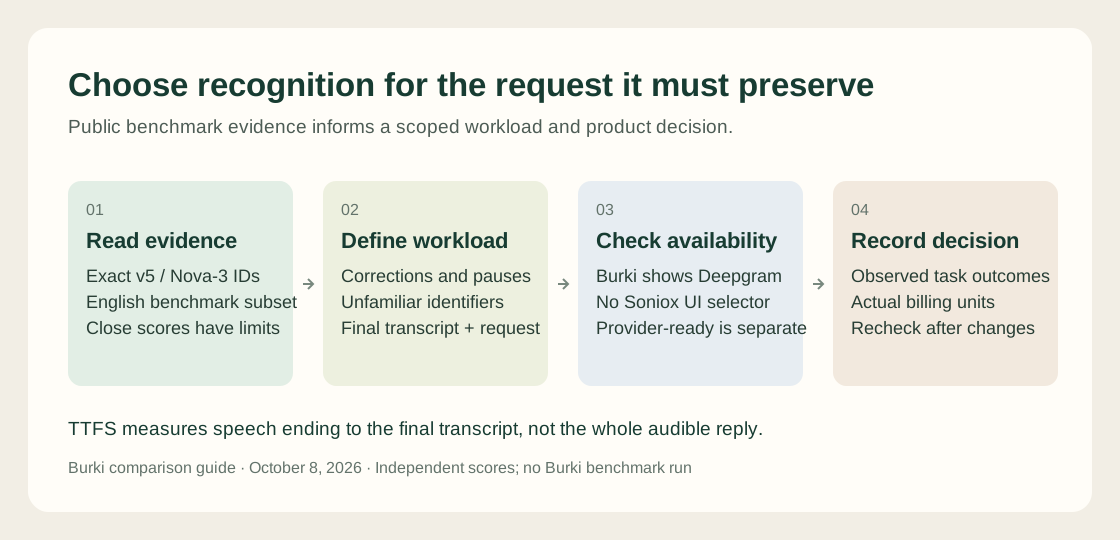
The published table supplies one evidence set. Caller tasks, product availability and observed session outcomes still determine the deployment decision.
Compare the invoice units before comparing the headline price
As checked October 8, Soniox lists streaming input audio at USD2 per million tokens and input/output text at USD4 per million tokens. Its approximately USD0.12 per hour example depends on assumed token usage. Speech density, context and translation can change the invoice; the hourly example is not a flat tariff. Soniox pricing.
For illustration, 30,000 audio tokens and 15,000 output text tokens cost USD0.06 each at those rates, totaling USD0.12 before extra text usage. Use actual billed token counts when comparing a real workload. An hour of silence and an hour of dense speech should not be assumed to have identical text output.
Deepgram lists promotional streaming Nova-3 monolingual Pay As You Go at USD0.0048 per minute and multilingual at USD0.0058. Keyterm Prompting adds USD0.0013 per minute. The corresponding arithmetic is USD0.288 per monolingual hour, or USD0.366 with keyterms, at the displayed rates. Promotions and account terms can change. Deepgram pricing checked October 8.
These figures cover recognition provider services, not a complete voice agent. Include synthesis, reasoning, telephony, platform charges and other selected features in the worksheet. An API price is not a Burki quote, and dividing unlike billing units does not produce a defensible savings percentage. Review Burki pricing for the platform arrangement.
Work through a support-intake choice
Consider a fictional equipment support desk. The assistant collects a product family, serial identifier, symptom and callback preference. Staff decide the remedy. The caller may pause halfway through a code, correct one character or ask for a person. The valuable outcome is an accurate, clearly qualified request, rather than a smooth but incorrect transcript.
Write acceptance criteria before listening to samples:
- The corrected identifier survives into the final request.
- A pause inside an identifier does not cause the assistant to act on the incomplete value.
- An unfamiliar name remains uncertain until the caller confirms or spells it.
- A request for staff produces the configured handoff or an honest explanation of its availability.
- Failed sessions and missing transcripts remain in the record.
Use the worksheet's fictional utterance: “The serial is Q, L, seven ... sorry, Q, L, nine, two. It stops after a minute.” The intended identifier is QL92, subject to spoken confirmation. Record the exact transcript and the assistant's later request separately. A recognition model can capture the correction while the reasoning step still uses the obsolete value.
For a direct provider evaluation, hold audio, language and downstream instructions constant. Compare a minimal configuration first, then record any context, keyterms or endpoint controls as another configuration. Do not silently give one model specialized vocabulary while calling the result a model-only test. Use authorized recordings or fictional recordings with the necessary permissions, and an approved usage budget.
Define the timing interval before measuring. Record speech end, final transcript, response generation and audible output separately. A finalization measurement cannot explain all downstream delays. Review callers who hesitate and callers who finish quickly, because a responsive setting that cuts off a serial number fails this task.
Apply the comparison to the current Burki path
A read-only live editor inspection confirmed Deepgram, AssemblyAI(BYO) and Azure(BYO) recognition options, with no Soniox option. Current Burki source contains a Soniox adapter and a v5 default, but the source alone does not establish an exposed account workflow or a successful Soniox invocation. No assistant was saved or called for this check. Do not expect to reproduce a two-provider switch from this editor.
To inspect the available Nova-3 configuration:
- Open a draft assistant under Assistants → Voice. Expand Model and provider choices and choose Standard pipeline · advanced provider choices under Conversation engine.
- Within that panel, open Advanced speech recognition and select Deepgram under Recognition provider.
- Choose the general Nova-3 option with ID
nova-3-general. Record the recognition language and leave other model choices unchanged for the first evaluation. - If the task needs a short vocabulary list, use Keywords & key terms → Key terms. Treat this as a separately recorded configuration. The keyterm setup guide includes a worked vocabulary example.
- Review account readiness, credentials and Usage & billing before saving and running any budgeted session. Record an accepted provider request and actual transcript after testing; a selector choice is not execution evidence.
For an AI receptionist using the current Burki editor, Nova-3 is an available configuration to assess. For a team integrating recognition directly, Soniox v5 is another candidate with documented endpoint and language features. Choose against the support task's recorded outcomes and the deployment path available to that team. The common public benchmark supports investigation; it does not settle the choice for your callers.
Ready to try Burki?
Create an assistant and check your available browser practice allowance.
Create your assistantTrial eligibility and available practice are shown in your workspace.