GPT Live vs Gemini Live: Compare Background Tool Work in Voice Agents
Compare GPT-Live 1 and Gemini 3.8 Live for background tools, caller corrections, cancellation and costs, with a reproducible evaluation worksheet.
Table of Contents▼
A caller asks a voice agent to look up a request, then corrects the reference number before the lookup finishes. The agent needs to keep listening, associate the result with the right request and avoid presenting the old result as current. A quick spoken acknowledgment is useful, but it does not prove the business task was handled correctly.
This comparison covers gpt-live-1 and gemini-3.8-live, checked against current official documentation on October 9, 2026. Google announced general availability of Gemini 3.8 Live on September 15. That release date is separate from today's review date. Google release history.
We found no verified common benchmark for these exact current models under matched background-tool conditions. This is a capability comparison with a reproducible evaluation design, not a measured winner. Download the free background-work worksheet. No paid provider calls or benchmark runs were performed for this article.
Compare the architecture that handles pending work
GPT-Live separates the spoken conversation from a backend agent. OpenAI offers Responses delegation, where a configured backend model receives delegated work, and client delegation, where your application operates the backend workflow. In either case, the application owns permissions and business state. Backend work can continue independently while the caller speaks. GPT-Live architecture.
Gemini 3.8 Live supports asynchronous function calling inside the live session. Its current model documentation specifies non-blocking execution as the default and an explicit blocking option for backward compatibility. This differs from older Gemini Live versions, so applying a legacy sequential example to the new model can produce the wrong design. Gemini 3.8 Live model contract.
| Decision | GPT-Live 1 | Gemini 3.8 Live |
|---|---|---|
| Pending work | Delegated to a selected backend model or your client-operated workflow | Non-blocking function calls in the live-session contract |
| Conversation input | Audio and text; direct image/video input is unsupported | Text, image, audio and video input |
| Result control | Client mode lets your application review results before sending them to the voice model | Application handles function results and associates them with call IDs |
| Configuration boundary | Delegation mode is selected when the session starts | Model-specific tool behavior and result scheduling must match the selected version |
| Burki editor today | GPT Live is available | No Gemini Live selector is verified |
Sources for the table: GPT-Live model modalities, delegation modes, Gemini model capabilities, tool-result handling. Burki availability was checked separately against current product source and the editor.
If the task includes looking at a photo or screen, that is a meaningful architectural difference. OpenAI documents routing visual context through a vision-capable backend rather than directly into GPT-Live. Keep that additional processing in the latency and cost record. Gemini's supported visual input does not itself establish that either application interpreted a particular image correctly. GPT-Live visual context.
Work through a delayed lookup and a correction
Use a fictional delivery-support case, with no real customer information:
Caller: Please check delivery request R204.
Assistant: I'll check that request.
Caller, while lookup is pending: Sorry, it is R240.
Later tool result: R204 is awaiting collection.
The acceptance condition is not that the agent can speak during the wait. It must recognize that the old result belongs to R204, preserve the correction to R240 and avoid saying that R240 is awaiting collection based on the old response.
An application design for either provider can record a task ID, input revision, tool-call ID, status and result provenance. When a correction arrives, mark which revision the pending operation used. A read result for a superseded revision can be retained for the audit while being excluded from the current answer. This is a proposed engineering pattern, not a feature claim about an exposed Burki control.
Make the first experiment a read-only lookup. Have a local stub return deterministic fictional results with a fixed delay. Keep the delay, caller script, network conditions, language and business policy consistent across candidates. Later, if your team authorizes paid voice sessions, record the actual accepted model/version and backend configuration. A stub checks application logic; it does not measure either voice model.
For GPT-Live, decide whether the application needs to validate or discard a result before the voice layer sees it. OpenAI's client mode offers that ownership. Its delegation guide also warns that appending conversational instructions does not cancel backend work. A finished backend response is distinct from the spoken answer reaching the caller. Result review and execution boundaries.
For Gemini 3.8 Live, explicitly record the function's behavior and result scheduling. Its model page documents scheduling controls, but current documentation uses inconsistent spellings for the interrupt option. Verify the accepted value against your current SDK before implementing it. The Extended Thinking sibling has a different contract and is outside this comparison. A client-content update can interrupt generation; that does not prove an external operation was reversed. Exact model controls, version comparison.
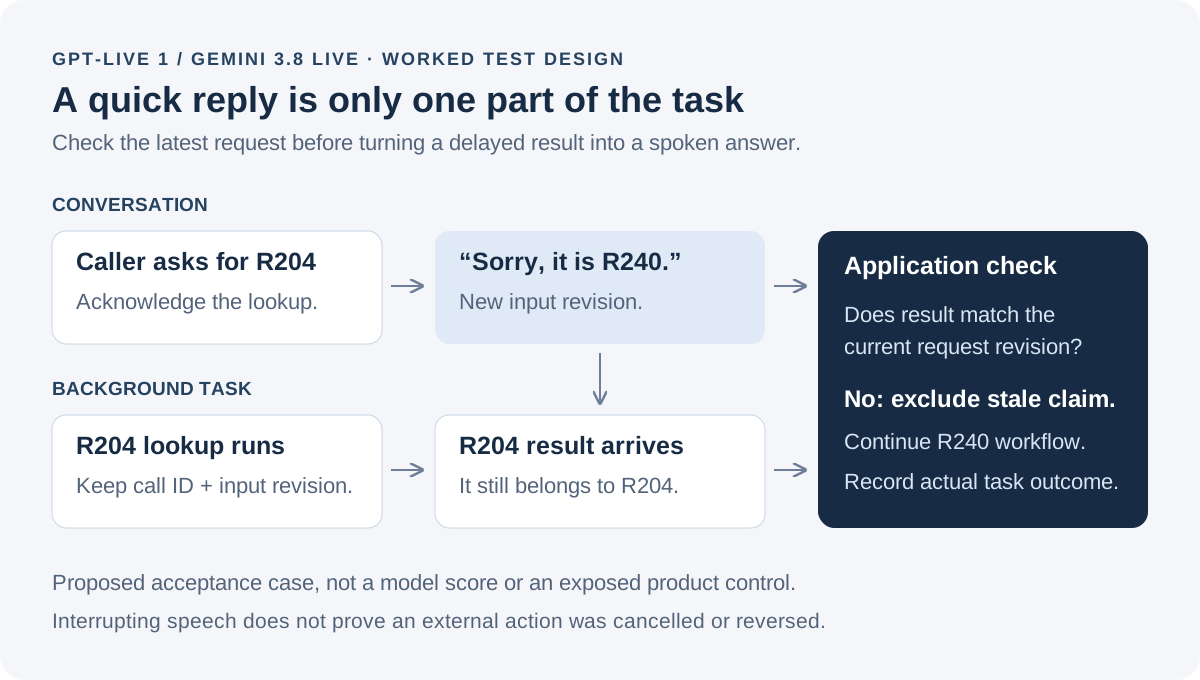
Conversation progress and business-task progress need separate records. A result must still match the current request before it is used.
Test cancellation separately from interruption
A caller saying “stop” can mean stop speaking, stop looking up information or cancel a business action. Define what the assistant asks when the meaning is unclear. Do not silently equate those three events.
Add these cases to the worksheet:
| Case | Proposed pass condition |
|---|---|
| Caller corrects the reference during a read | Old result is not attributed to the corrected reference |
| Caller cancels before an action starts | Application prevents the action from starting |
| Caller cancels after an external action completes | Assistant states the actual recorded outcome and offers the available next step |
| Tool returns twice after a reconnect | Duplicate result does not create a second business action |
| Tool times out | Assistant explains that the outcome is unconfirmed and follows the agreed fallback |
| Caller interrupts result playback | Audio stops as intended; task state remains accurate |
For an external write, compare the operation's state with the cancellation request time. A cancellation signal cannot by itself prove an already committed order was undone. The application needs a supported cancellation or remedy process and a receipt of what actually happened. This distinction matters more than which model produced the smoother acknowledgment.
Google's tool guide describes manual function-response handling, including the original function ID and name. Its generic examples retain legacy blocking defaults, and its interrupt scheduling label differs from the model card. Use the current 3.8 model contract for behavior and verify the actual SDK before submitting a configuration. Record the exact SDK and API version in a direct integration. Function responses, 3.8 behavior.
Build a fair benchmark instead of borrowing unrelated scores
A speech-recognition word-error score does not measure whether an agent discarded a stale tool result. A TTS preference score does not measure duplicate writes. For this decision, define business-task correctness before assigning weights to latency or voice preference.
Use the same cases and label expected outcomes before testing. Record language, accent, microphone or telephone path, exact model, backend model, tool implementation, delay distribution, prompts, session transport and test date. Keep failed connections and timeouts in the denominator. If different integrations require different backends, disclose that difference rather than presenting the test as a voice-model-only experiment.
The worked script here is English only. Verify each exact model's current language contract and assess the accents and languages your callers use in separate labeled sets. Supported input modalities do not establish a language-accuracy or latency winner.
Measure acknowledgment delay, time to a correct useful answer, correction retention, stale-result exposure, duplicate actions and cancellation outcome. Report attempted cases and raw counts alongside any rates. For enough repeated trials, publish median and tail latency with the sample size and uncertainty method; do not infer a stable percentile from a few calls. Have a reviewer listen to the audio and compare it with task receipts. The worksheet leaves measurements blank because none were collected here.
Compare the bill using its actual units
OpenAI's current listed GPT-Live rate is USD0.05 per session minute, billed per second. Backend model and tool usage are separate. For an illustrative six-minute session, the voice-session component is USD0.30 before backend and other costs. This calculation is not an observed bill. GPT-Live pricing.
Google lists paid Gemini 3.8 Live at USD3 per million audio-input tokens and USD12 per million audio-output tokens. Its pricing page also gives audio-minute equivalents of USD0.005 input and USD0.018 output. Text input is USD0.75 and text output, including thinking, USD4.50 per million tokens. Search grounding can add charges. Gemini pricing, checked October 9.
Session duration and input/output audio are different quantities. A six-minute conversation does not imply six minutes of output speech, and transmitted silence or context handling may affect the actual usage record. Estimate each provider from its recorded billable units, then add backend work, tools, platform, transport and telephone costs. Do not turn two different published units into an unsupported savings percentage. A free worksheet or evaluation allowance is not a promise of free production voice service.
Apply this decision to Burki today
The current Burki source supports gpt-live-1 and uses client delegation. The editor exposes GPT Live, with no Gemini Live option verified. That allows you to inspect a GPT Live configuration; it does not reproduce a matched two-model experiment inside Burki.
- Open a draft assistant under Assistants → Voice. Expand Model and provider choices if the engine control is collapsed.
- Under Conversation engine, choose the GPT Live option. Record the live model and the separately selected reasoning configuration shown for the assistant.
- Review the assistant's business instructions and connected actions. Use the corrected-reference and timeout cases above as acceptance criteria, not as evidence they already pass.
- Check readiness messages, credentials and Usage & billing before saving or scheduling an authorized test. Inspect the actual session, spoken result and business receipt afterward.
For an AI receptionist, start with the task that must remain correct when the conversation changes. GPT-Live's delegated backend and Gemini's async functions are both relevant designs to investigate. Choose using the integration you can operate, the recorded outcomes and the full bill. The documentation establishes capabilities; your own matched workload establishes which configuration serves your callers.
Ready to try Burki?
Create an assistant and check your available browser practice allowance.
Create your assistantTrial eligibility and available practice are shown in your workspace.