ElevenLabs Transcript Editing: Keep the Original and Review the Changes
Set up Scribe v2 transcript editing with separate original, edited and confirmed records. Includes realtime failure checks, costs and a free review worksheet.
Table of Contents▼
ElevenLabs transcript editing can turn spoken dates, times and abbreviations into a consistent written format. The important implementation decision is where that edited text goes. Keep the recognized transcript, the edited proposal and the confirmed business value as separate records. A cleaner date is useful; a cleaner date that silently changes a caller's request is a problem.
ElevenLabs introduced the feature in its September 28, 2026 Speech to Text update. Its October 5 SDK release added client support for edited-transcript callbacks. This is a guide to that recent functionality, checked on October 10, rather than a claim that it launched today. ElevenLabs changelog.
The provider labels transcript editing experimental, so validate the current request contract and failure handling before relying on it. Batch feature status, realtime feature status.
Burki does not currently expose a Scribe recognition selector or transcript-editing toggle. The provider setup below is for an application integrating ElevenLabs directly. The Burki section explains how the same record-review discipline applies to a business voice assistant without claiming a native Scribe integration.
Download the free transcript-editing worksheet. The resource is free; transcription, editing and application operation can cost money. No audio was uploaded and no provider request was executed for this guide.
Decide what an edit is allowed to change
Start with a narrow purpose: a date display, a time format or an approved abbreviation. Avoid a broad instruction to “fix the transcript.” That phrase gives a reviewer little basis for judging whether a changed sentence still represents the caller.
Use three columns in your application or review process:
| Record | What it represents | Example responsibility |
|---|---|---|
| Original recognized text | What the recognizer produced from the audio | Retain the correction and its source |
| Edited text | A derived presentation of that text | Normalize a fully specified date |
| Confirmed business field | The value accepted for the business task | Store a requested date with its confirmation status |
The original is still a recognition result, not infallible evidence of every sound spoken. When a detail matters and audio is available under your retention policy, review that evidence too. Preserving the original prevents a later formatting step from obscuring the recognizer's actual output.
A business field also needs a meaning. requested_date and booked_date should not share a slot simply because both contain a calendar date. Editing cannot establish that a booking tool completed or that a member of staff accepted a request.
A worked example with a correction and an unknown year
Consider a fictional equipment-hire enquiry:
“Could I collect it on the fourteenth of November twenty twenty-six? Sorry, the fifteenth. The return would be December the second.”
A useful review keeps the first date and the correction visible. The proposed collection date is November 15, 2026. The return date has a day and month, but the caller did not explicitly state its year in that sentence. Your business may be able to resolve it in conversation; the edit instruction should not quietly make that decision.
An instruction starter could be:
Normalize fully specified dates to YYYY-MM-DD.
Preserve corrections, negations and uncertainty in the text.
When a year is not stated or is ambiguous, leave that date in words.
Do not add a reservation, approval or promise that the speaker did not make.
This is an instruction to evaluate, not a guarantee of model behavior. For the example, the acceptance criteria are that the corrected collection date remains identifiable, the initial date is not presented as final, and the uncertain return year remains unresolved. The assistant should ask a follow-up question before a downstream system requires a complete return date.
If the edited output loses “Sorry” and leaves only the initial date, reject that edit for the business record. If it supplies a plausible year, mark that field as needing clarification. The point of the review is to catch semantic changes even when the output looks neatly formatted.
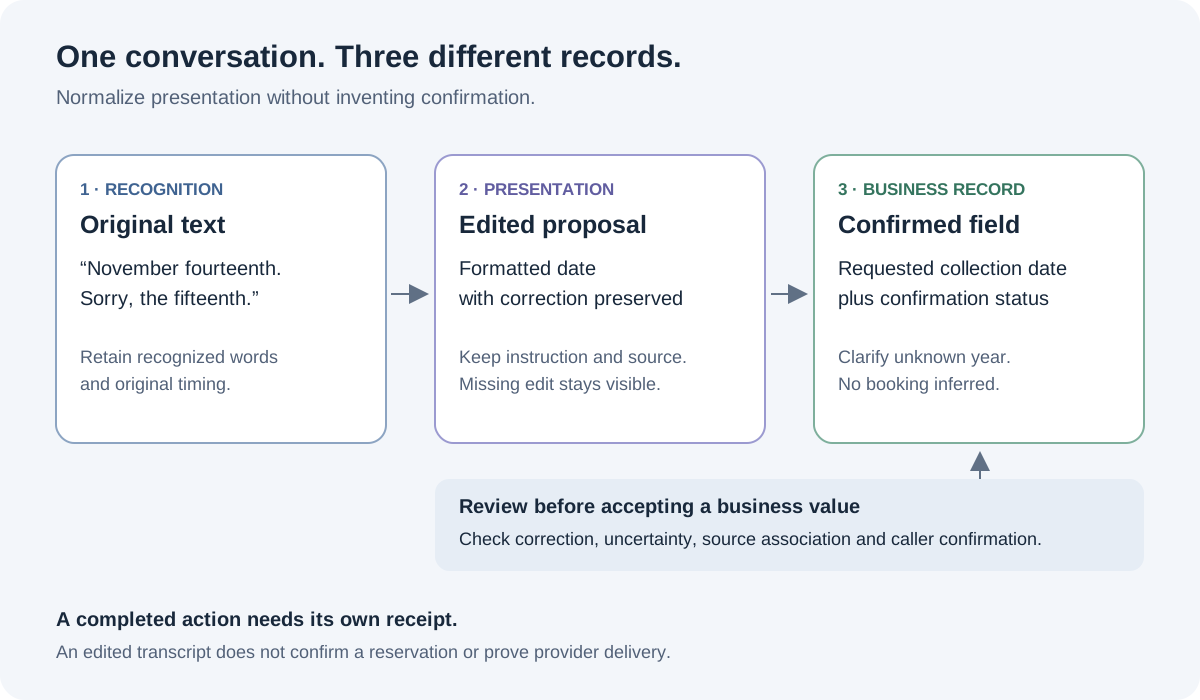
An edit is a proposal about presentation. Confirmation and business actions remain separate decisions.
Set up batch editing in a direct ElevenLabs application
Before implementation, choose an account with the required Speech to Text access, keep its API key on your server and use audio you have permission to process. Check the selected account's pricing and retention requirements. Use a permitted local sample during your own review, rather than sending production customer recordings just to try the feature.
For a completed recording, the documented setup is:
- Use the Speech to Text
convertmethod with modelscribe_v2and the audio file. - Add your reviewed instruction in
transcript_edit, at most 2,000 characters. - Save the original
textandwords, then inspect the separateedited_transcriptobject. - Branch on its
kind. Atranscriptcontains the edited text; anerrorwithedit_failedmeans editing failed even though the original transcription succeeded.
The same feature supports synchronous and webhook responses. In webhook delivery, the edit is inside the payload's transcription object. Word timing, speaker labels and other original formats do not become an alignment for rewritten words. Batch transcript-editing guide.
In your own storage, retain a reference to the source recording or permitted source record, the exact instruction, the model name, processing time and review status. Those are application record-design suggestions, not a promise that ElevenLabs supplies your preferred audit fields automatically.
Treat “transcription succeeded, edit failed” as a usable partial result. Show the original and an explicit pending or failed edit state. Do not replace the original with an empty value, and do not mark the entire conversation as absent. A later retry should create another derived attempt associated with the same source, rather than silently rewriting the first attempt's history.
Check options before sending the request. The current conversion reference rejects transcript editing combined with entity_detection, entity_redaction or use_multi_channel. If your workflow requires one of those, choose the appropriate separate processing design instead of assuming every add-on can run together. Speech to Text conversion reference.
Handle realtime edits as asynchronous events
For realtime, the model is scribe_v2_realtime. Set transcriptEdit in the client connection options, or transcript_edit in the documented server/WebSocket configuration. Subscribe to RealtimeEvents.EDITED_TRANSCRIPT as well as the committed transcript event. Use a server-issued single-use token for browser access rather than exposing a permanent API key. Client-side streaming setup.
An edit contains text and edited_text. Partials are not edited; committed text remains unchanged. Edits may arrive after a later partial or out of order. The provider recommends matching the original text; an edit failure can produce no edit event for that segment. Original word timestamps remain attached to the original words. Realtime editing cannot be combined with entity detection. Realtime transcript-editing guide.
That event contract needs an application rule for repeated text. Two consecutive caller turns can both say “November fifteenth.” Matching only on text may be ambiguous. Maintain your own connection and committed-segment sequence, keep pending candidates, and refuse to attach an edit when the available evidence does not identify a unique source. Do not invent a provider segment ID that the documented event does not contain.
A practical local event-handling review can use this sequence without contacting a provider:
- Commit A: “November fourteenth.”
- Commit B: “Sorry, November fifteenth.”
- Edit B arrives, then edit A arrives.
- A later segment has no edit event.
The expected application behavior is to preserve both commits, associate only unambiguous edits and leave the missing edit visible. This is a suggested simulation for your own application. It is not a Burki test or proof of provider delivery timing.
Budget for the editing minimum, not just the recording length
As checked on October 10, ElevenLabs documents a 30% editing premium over base transcription cost. Batch editing has a 10-second minimum per request. Realtime editing has a 10-second minimum per committed transcript. Check the current account and plan for the base rate and any other minimums. Batch costs, realtime costs, ElevenLabs pricing.
For a hypothetical sequence of twenty two-second committed segments, the editing minimum covers 200 seconds even though those segments contain only 40 seconds of audio. That arithmetic illustrates the minimum; it is not a customer bill or a claim about the base transcription charge. Connection behavior, actual committed duration, plan terms, retries and other services still affect the invoice.
Do not stretch commits merely to optimize this line item without checking what that does to caller responsiveness and your application's evidence boundaries. First ask whether you need editing during the call at all. Staff reviewing a completed enquiry may have different timing requirements from an application displaying normalized live captions.
Apply the review discipline to Burki's current workflow
For a Burki AI receptionist, define the fields staff need and the questions the assistant must clarify. Keep the requested date, the final confirmed value and the completed action separate in the instructions and review worksheet.
Open Test Calls → Call history, select the relevant conversation and review the available transcript and post-call results. Compare a captured value with its supporting conversation and any actual action receipt. If a result is missing or processing is incomplete, preserve that uncertainty. For a fuller explanation of the existing review outputs, use the AI call-summary template.
This review does not enable ElevenLabs transcript editing in Burki, upload a recording to ElevenLabs or establish a new automatic normalization pipeline. Current recognition provider choices should be inspected in Voice → Model and provider choices → Advanced speech recognition, using an available provider for the intended language. Verify credentials, readiness and Usage & billing before separately authorizing funded tests.
Use the worksheet to review one ordinary date, one correction, one ambiguous value, an edit failure and repeated identical segments. Record what actually happened rather than only the best output. A useful edited transcript makes the original easier to use while leaving staff able to see what changed and what still needs confirmation.
Ready to try Burki?
Create an assistant and check your available browser practice allowance.
Create your assistantTrial eligibility and available practice are shown in your workspace.