Streaming Speech-to-Text Speaker Diarization: Handle Final Label Revisions
Build a revision-safe streaming speaker transcript with AssemblyAI: preserve original turns, apply final labels and keep identity and business actions separate.
Table of Contents▼
Streaming speaker diarization can make a live transcript easier to follow. It also creates a practical problem: the label attached to an early sentence can change after the system hears more of the conversation. Your final review record needs to accept that correction without rewriting the spoken words or repeating an action.
AssemblyAI's roadmap dates generally available streaming speaker diarization to September 22, 2026. Its original SpeakerRevision announcement was June 9. This is a current implementation guide checked October 11, not an October launch announcement. The streaming docs still retain beta wording in their limitations section, so confirm the current contract before production use. AssemblyAI roadmap, SpeakerRevision announcement, current diarization docs.
AssemblyAI speaker diarization is not currently enabled in Burki's native AssemblyAI configuration. The current adapter rejects its speaker-label options. The provider setup below is for a separate integration you control. Burki's recognition selector and call review remain useful, but they do not establish this particular capability.
Download the free streaming speaker review worksheet. It includes a fictional conversation, expected review behavior and failure cases. No provider call or transcription benchmark was run for this article. The guide and worksheet are free; production transcription is metered.
Decide what a speaker label is allowed to mean
Use labels such as A and B to organize a conversation. Do not translate them directly into a person's identity, account ownership or permission to change a request. Those are separate business decisions.
Imagine a community venue receiving an enquiry about room availability. One caller begins, then a colleague joins from the same speakerphone. An early sentence asks for a large room. A later sentence asks staff to call a different number. A label helps a reviewer inspect who appeared to say each sentence. It cannot establish whether either person represents the organization or can authorize a booking.
The useful outcome is a reviewable request with uncertainty visible. A booking, payment or change to an existing reservation still follows the venue's own confirmation process. Keep that distinction even if the final transcript looks tidy.
Design three separate records:
| Record | Purpose | Changes allowed |
|---|---|---|
| Received events | Show what the integration actually received | Append new events; retain prior evidence under your retention policy |
| Speaker review view | Present the latest attribution for each turn | Revise labels with an explicit processing version |
| Business request | Capture information independently confirmed for staff | Change through the business workflow, with its own audit trail |
This separation is our application-design recommendation. It is not a claim that AssemblyAI or Burki automatically stores these three records for you. Decide what data is appropriate to retain and who can access it before recording real conversations.
Set up a direct AssemblyAI integration
Use a server-held AssemblyAI credential, authorized audio and a controlled budget. Check your installed SDK against the current API before copying example parameters. Set the model explicitly: the current model-selection page lists universal-3-6-pro as the default streaming model, while universal-3-5-pro remains supported. An explicit identifier makes later review less dependent on a changing default. AssemblyAI model selection.
For the first implementation, choose one documented audio format and one session. Record the actual encoding and sample rate; changing the label logic should not also change the audio source. The provider's message-sequence guide describes the binary audio frames, session Begin message and configuration echo. Check that echoed model against the one requested before treating the session as ready. Streaming message sequence.
Enable speaker_labels: true. The optional max_speakers is a hard cap, not an estimated count. Leave speaker_labels_revision_interval_ms unset or zero for final-only revisions. That keeps this first exercise focused on a single finalization path. The current page conflicts about values above 300000, so this guide does not promise a mid-session interval. Diarization configuration.
Do not paste these options into Burki's AssemblyAI fields. A direct provider parameter and a product-supported setting are different contracts.
Build a review view that can accept corrections
AssemblyAI's revision announcement describes a delta: only changed turns are included, and turn_order associates each correction with the original turn. A missing turn in that delta does not mean delete it. SpeakerRevision message design.
Use a composite key containing your session identifier and the turn order. A turn numbered three in one call must never update turn three in another call. Keep the original received event separate from the latest view.
A practical processing sequence is:
- Receive a turn and save its session key, order, text, word timings and current labels.
- Update the live view as that turn develops. Do not create a new business request for every transcript update.
- Receive a revision and locate the existing turn in the same session.
- Verify that the turn and expected words match before updating attribution. If they do not, flag the item for investigation instead of silently pairing unrelated words.
- Save the new speaker view and the revision event that produced it. Rebuild a summary only as an explicit new version.
The validation in step four is a defensive application choice. It helps catch truncated local records or an integration bug. It should not turn a provider correction into permission to invent missing words.
Only speaker assignments change in SpeakerRevision; text and word timestamps do not. Revisions carry no speaker confidence, so an old confidence must not be attached to a replacement label. Revision fields and confidence limits.
Work through one correction before adding automation
Here is an invented received-event sequence for the venue enquiry. These are teaching values, not provider output or a promised diarization result.
| Turn | Words received | Initial label | Later revision |
|---|---|---|---|
| 0 | We need a room for a community meeting. | A | Unchanged |
| 1 | I am joining the enquiry. Please ask staff about the smaller room too. | A | B |
| 2 | Keep my original callback details for the enquiry. | A | Unchanged |
After a revision to turn one, the review view shows B for that sentence. The original words remain intact. The request continues to say that room requirements need staff clarification; the software does not decide that B owns the enquiry or that the smaller room has been booked.
If a draft summary previously grouped turns zero and one under one speaker, produce a corrected summary version with a visible reason. Do not quietly replace a message already sent to a customer. If any external action was already taken, investigate it through the action's own record.
Most importantly, receiving the same correction twice must not send two callbacks, create two requests or change a booking twice. Treat transcript maintenance as its own operation. Use a stable action identifier and explicit confirmation in any separate business workflow.
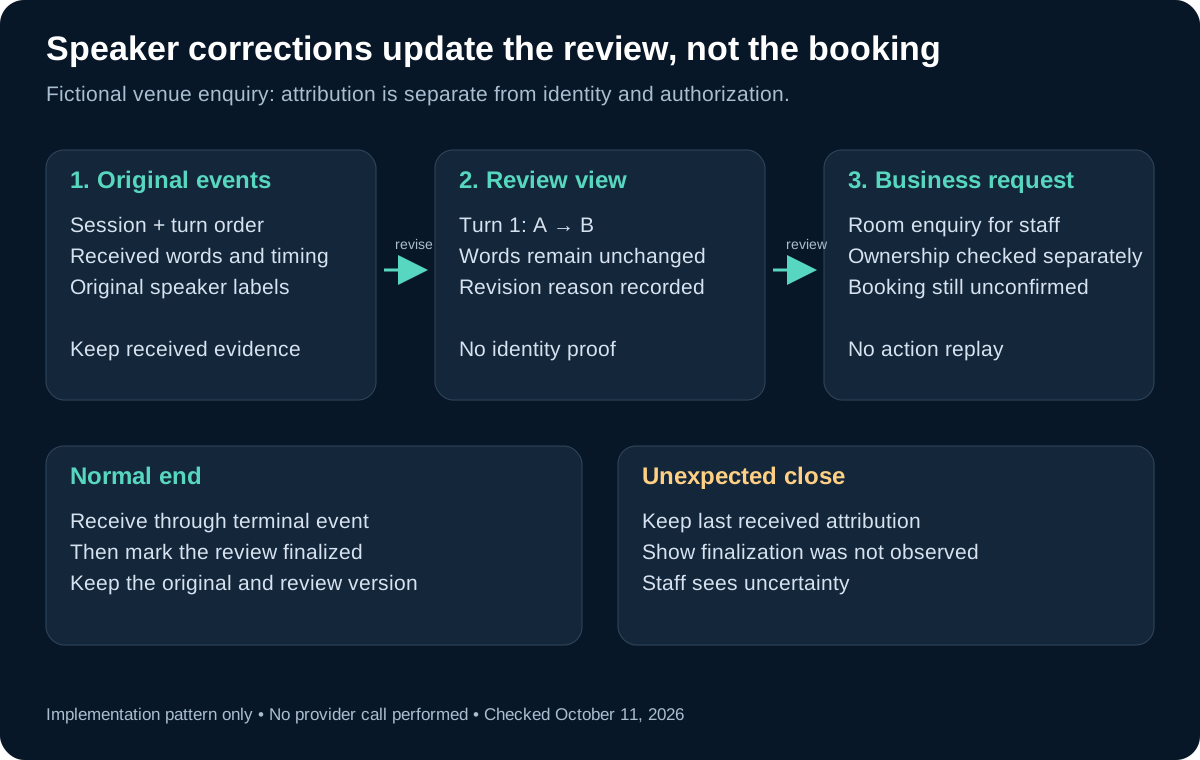
The diagram shows an implementation pattern. Revised labels update attribution; a separate confirmation step governs the business request.
Finish the session without pretending every close is complete
On a normal shutdown, send Terminate and keep receiving messages through Termination. The provider places final speaker revision before that terminal message. A dropped connection can lose the final revision. Streaming message sequence, revision delivery limits.
Represent those outcomes separately in your application. A complete shutdown can produce a finalized review version. An unexpected close should preserve the last received labels and show that finalization was not observed. A timeout chosen by your application is not proof that the server completed its work.
For a practical review screen, display the session outcome beside the transcript rather than hiding it in a log. Staff should be able to distinguish a finalized attribution view from a partial one before trusting a speaker-based summary.
Include these cases in the worksheet exercise: an empty revision, two revisions for one turn, a correction to an unknown turn, an interrupted connection, and a repeated event. Each should have an explicit expected result. You can rehearse the processing logic with invented event fixtures before authorizing any paid audio test.
Review uncertainty and costs
The provider documents unresolved labels for very short speech, degraded attribution with cross-talk and noisy audio, and experimental confidence values that are not calibrated probabilities. Do not make a rule such as “0.9 means verified person.” Diarization limitations.
Review ambiguous turns in context. If someone says a short “yes,” do not assume a speaker label establishes what they approved. A useful fallback is to ask a clear follow-up or leave the detail for staff, rather than attaching certainty to the transcript's visual formatting.
On October 11, AssemblyAI's PAYG pricing lists Universal-3.6 Pro Realtime at USD 0.45 per hour and speaker diarization at USD 0.12 per hour. One billable hour with those two components would therefore be USD 0.57. Additional features, infrastructure and voice-agent components are separate. This is not a Burki call price. AssemblyAI pricing.
Budget using the provider's actual usage and billing receipts, including unsuccessful attempts. A successful connection or a locally built transcript does not establish the amount billed, model accuracy or a completed customer outcome.
Apply the review discipline in Burki today
To inspect current Burki recognition choices, open Voice → Model and provider choices, select Standard pipeline · advanced provider choices under Conversation engine, then review Advanced speech recognition. Burki offers AssemblyAI BYO model configuration, but the current adapter rejects speaker_labels, max_speakers and diarization options. A Deepgram-specific diarization control is not an AssemblyAI control and does not promise AssemblyAI revisions.
For an existing conversation, use Test Calls → Call history and select the relevant record. Review recognized details and recorded actions separately. Do not infer person identity from a transcript's labels, and do not infer that a request was fulfilled merely because the assistant discussed it.
For a business AI receptionist, that discipline is useful with any supported recognition provider: preserve uncertainty, ask for clarification and let the appropriate staff confirm the business outcome. Use a factual review rubric to check the request itself. Speaker attribution can help organize that review, but it cannot perform the confirmation on its own.
Ready to try Burki?
Create an assistant and check your available browser practice allowance.
Create your assistantTrial eligibility and available practice are shown in your workspace.