Gemini Flash TTS vs Flash-Lite TTS: Compare Production Workflows and Costs
Compare Gemini 3.8 Flash TTS and Flash-Lite TTS for short scripts and longer dialogue, with current prices, setup checks and a free evaluation worksheet.
Table of Contents▼
Gemini 3.8 Flash TTS and Flash-Lite TTS address different production priorities. Google positions Flash for demanding voice performance and longer dialogue, and Lite for high-volume everyday speech. Those recommendations are a starting point. Choose using the script, delivery requirements and costs of the actual job.
The exact models are gemini-3.8-flash-tts and gemini-3.8-flash-lite-tts. Both became generally available on September 22, 2026. This comparison was checked on October 10, including model pages updated October 9. These TTS models are separate from Gemini Live. Google release notes.
Neither Gemini TTS model is currently exposed as a voice-provider choice in Burki. This is a provider comparison and direct implementation guide, followed by an honest explanation of Burki's available configuration path. It is not an announcement of a Burki Gemini TTS integration.
Download the free Gemini TTS production worksheet. It contains two scripts and an evaluation record you can adapt. No paid generation or listening benchmark was run for this article; the worksheet is an unperformed protocol, not a results report.
Compare the production task before the model name
Use the provider's recommendations as hypotheses about which model to evaluate first:
| Decision | Flash TTS | Flash-Lite TTS |
|---|---|---|
| Exact identifier | gemini-3.8-flash-tts | gemini-3.8-flash-lite-tts |
| Provider's emphasis | Expressive performance and longer voice continuity | Throughput and economical everyday speech |
| Example evaluation task | A narrated explanation or changing speakers | A short repeated announcement |
| Published language table | 130 languages | 101 languages |
| Shared request limits | 8,192 input tokens; 16,384 output tokens | 8,192 input tokens; 16,384 output tokens |
The positioning and limits above come from Google's Flash model page and Flash-Lite model page. Google's claims about quality, speed and dialect strength are vendor descriptions, not independent measurements by Burki. Neither model is the bidirectional Live API or a tool-calling agent.
A common mistake is to evaluate a voice assistant with one warm greeting, then apply the result to every type of speech. A brief acknowledgement, a long explanation and a sequence containing corrected numbers stress different things. Split those jobs before deciding whether one model should serve all of them.
For example, an equipment-support business might have a short waiting message and a longer public explanation of what information staff need. The first needs clear, consistent wording. The second needs listeners to retain several steps without the voice becoming distracting. Neither requires theatrical emotion simply because a model can produce it.
Use separate speech text and delivery metadata
The current model pages document both Interactions and GenerateContent paths. Sustained direction belongs in speech_metadata: an annotation on an Interactions text block, or metadata on a GenerateContent part. Put only the words the listener should hear in the text. For multi-speaker requests, identify each turn's speaker in that metadata. Current Flash migration instructions.
That separation matters when migrating an old prompt. If the input says “Read this reassuringly: Your request is waiting for review,” you may be giving the new model extra words to recite. Instead, make the spoken text “Your request is waiting for review,” and put the delivery instruction in the structured style field. This is an application-design example, not a recorded output from either model.
For the first comparison, avoid voice cloning and a long persona prompt. Choose one permitted prebuilt voice and a short, constant delivery instruction. That reduces the number of changing decisions. If a custom voice is genuinely required, resolve permission and its provider-specific identifier before adding it to the evaluation; a model comparison does not establish permission to replicate a speaker.
A direct implementation sequence you can reproduce
Prepare a Gemini API project, appropriate access and a controlled budget before making requests. Keep credentials on the server. Choose the documented API path and check its current SDK syntax rather than combining fields from different APIs.
- Freeze the text. Save the two scripts below as versioned input. Put stage directions in a separate delivery field, not inside the spoken words.
- Freeze the voice and delivery. Use the same permitted prebuilt voice and neutral instruction for both models. Record the selected voice identifier.
- Choose one API path. Use the current Interactions example or the documented GenerateContent metadata path consistently. Change the exact model identifier for the paired request rather than changing voice, prompt and model together.
- Declare the audio contract. Record streaming versus unary, encoding, sample rate and the playback destination. Inspect the returned format before saving or joining audio.
- Keep every attempt. Save the request version, actual response metadata, duration, usage and failure status. If a request needs a retry, retain the first result and include the retry in costs.
- Review before connecting a caller. First inspect the generated asset and playback in the intended application. A saved file does not demonstrate that a telephone caller heard the complete message.
Google's generation guide currently specifies Python google-genai >= 2.25.0 or JavaScript @google/genai >= 2.24.0, or REST. Unary output defaults to complete WAV; streaming defaults to headerless PCM. Both defaults use 24kHz mono, signed 16-bit little-endian samples. Single-request multi-speaker generation supports up to two prebuilt speakers; custom voices require separate speaker turns. Speech-generation setup and limitations.
Do not add a second WAV header to an already complete WAV response. Conversely, do not rename raw streaming bytes to .wav and assume that created a valid file. When joining turns, use an audio-aware container or an explicitly matched raw format. Hold this constant across models so a playback-format mistake does not become an alleged model failure.
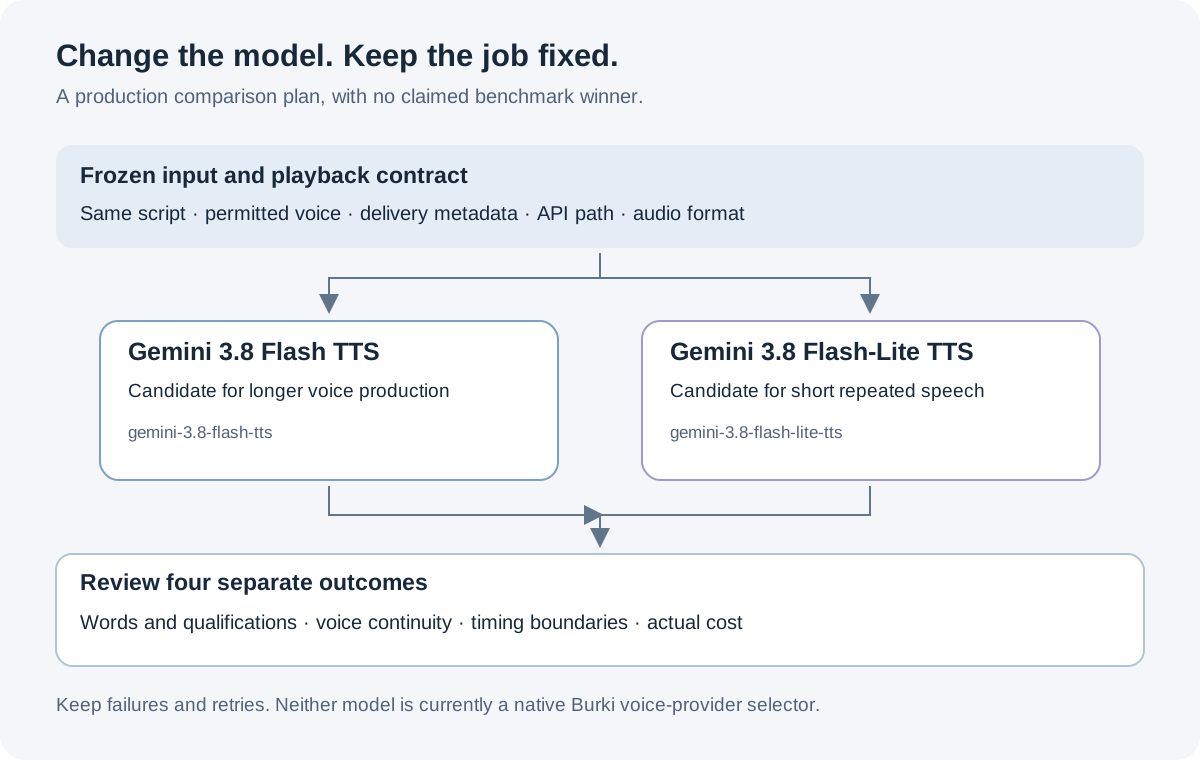
Change the model in the paired run. Keep the production task and playback contract fixed.
Work through two useful scripts
Use this short announcement for the first task:
Your support request is waiting for staff review.
Please keep the device identifier and a callback number ready.
This message does not confirm a repair visit.
The acceptance criteria are concrete: all three sentences are audible, “waiting for review” remains clear, and the final sentence does not disappear into a rushed ending. Ask reviewers to write down what they believe has been confirmed. If they infer a booked visit, inspect the wording and delivery rather than relying on a general pleasantness score.
For the second task, divide a longer explanation into three turns:
Turn 1:
Before you describe the fault, find the identifier printed on the device.
If a character is unclear, say that you are unsure rather than guessing.

Turn 2:
Next, explain what happened and when you first noticed it.
A short sequence of events is more useful than a proposed diagnosis.

Turn 3:
Finally, give the team a callback number and your preferred time.
Staff will review the information. A service visit has not been arranged.
This example tests continuity across a practical explanation. Keep one speaker for the baseline. Listen for unexpected voice changes, clipped transitions, omitted qualifications and uneven volume at turn boundaries. Only after that baseline should a two-speaker variant be added, with the speaker assignment explicitly recorded.
These scripts are fictional and have no integration behind them. They are useful because a reviewer can check whether the message stayed correct, not because they demonstrate a real business result. Adapt the language to approved information and the actual service your organization provides.
What the pricing difference does and does not mean
The following Standard Gemini Developer API rates were checked on October 10. Amounts are USD per million tokens; audio output and text input are different meters.
| Standard charge | Flash through Dec. 31, 2026 | Lite through Dec. 31, 2026 | Flash from Jan. 1, 2027 | Lite from Jan. 1, 2027 |
|---|---|---|---|---|
| Text input | $0.50 | $0.50 | $1.00 | $1.00 |
| Audio output | $9.00 | $6.00 | $18.00 | $12.00 |
Google specifies 25 audio tokens per second. Its pricing page also lists separate Batch, Flex, Priority and free-tier conditions; those are not the Standard prices in this table. Google Gemini API pricing.
As an illustrative calculation, one hour of output contains 90,000 audio tokens at that conversion. The current Standard output-only charge would be $0.81 for Flash or $0.54 for Lite. From January 1 it would be $1.62 or $1.08. This excludes input text, retries, application infrastructure, storage and telephone or platform charges. It is not a quote for one hour of a full voice-agent conversation.
At a small volume, the output-rate difference might matter less than a repeated omission or a message that staff must repair. At a large volume, retries and regenerations also matter. Use total accepted production output as the denominator: all costs incurred to obtain the messages you can actually use. Do not discard the failed attempts from the cost calculation and then describe the surviving audio as the normal price.
Benchmark evidence and an honest comparison record
This review did not establish a common, current quantitative benchmark for the exact two TTS identifiers. It therefore does not declare an accuracy, latency or naturalness winner. A provider's recommendation is not a matched listening study, and a score for a similarly named Gemini model should not be assigned to these TTS versions without a verified model mapping.
For your own planned comparison, use the worksheet to record the dataset version, exact model, access date, API path, voice, language, delivery metadata and output format. Blind the model labels during listening where practical. Keep text correctness, qualification retention, voice continuity and listener preference as separate observations. A preferred voice can still omit a crucial word.
Measure timing at defined boundaries. Request-to-first-audio-byte is different from request-to-complete-file, and both differ from the end of audible playback. Report the sample count and failures alongside any percentile. Do not compare one provider-side timing number with an end-to-end application measurement and call the difference model latency.
The worked scripts here are English only. For global deployment, check each model's actual language list and evaluate the target accent, names and local phrasing separately. A language count does not guarantee a particular accent or equal performance within every locale. If a required language is absent, treat that as an eligibility issue before discussing voice preference.
What you can configure in Burki today
Burki's current editor offers other voice-provider choices. To inspect a separate recognition and speaking configuration, open Voice → Model and provider choices and choose Standard pipeline · advanced provider choices under Conversation engine. Review the recognition provider in that panel. Then open Speech settings → Advanced voice stack for Voice provider, Voice model and Assistant voice.
Select only options actually available in your account. Gemini TTS credentials or model IDs do not create an integration by being pasted into another provider's custom voice field. Current catalog choices establish what can be configured; they do not prove a voice, language or funded session was accepted by a provider. Check readiness and Usage & billing before planning tests.
For a business AI receptionist, use the same task-first review with an available provider: short acknowledgements, corrected details, the longer explanation and a clear staff handoff. Compare actual outputs in the application that callers will use. Keep the provider choice, conversation-engine choice and completed business action as separate decisions; the conversation-engine guide covers that wider architecture choice.
Ready to try Burki?
Create an assistant and check your available browser practice allowance.
Create your assistantTrial eligibility and available practice are shown in your workspace.