Inworld TTS-2 vs TTS-2 Flash: Compare Steering, Latency and Cost
Compare Inworld TTS-2 and Flash by steering support, persistent instructions, dated prices and vendor latency claims, with a free evaluation worksheet.
Table of Contents▼
The first decision between Inworld TTS-2 and TTS-2 Flash is whether the application requires directed speech. Flash does not support the steering contract available on the flagship model. If a script depends on those instructions, a lower advertised latency does not make Flash an equivalent replacement.
The exact current identifiers are inworld-tts-2 and inworld-tts-2-flash. Inworld's API notes date TTS-2 to May 5, 2026, its persistent steering change to August 6 and Flash to August 9. This review checks their current contract on October 11; none is presented as today's launch. Inworld models, dated API release notes.
Neither compared model ID is currently exposed in Burki's verified Inworld selector. Burki's current catalog still lists earlier Inworld models. This comparison explains the direct provider decision and how to inspect Burki's available choices honestly. It does not announce native TTS-2 support or a provider-accepted Burki run.
Download the free Inworld steering evaluation worksheet. It contains controlled scripts, a decision record and empty result fields. No listening study, paid generation or application benchmark was performed for this article. Voice generation and production calls have separate costs.
Compare the capability you actually need
| Decision | TTS-2 | TTS-2 Flash |
|---|---|---|
| Exact model | inworld-tts-2 | inworld-tts-2-flash |
| Natural-language steering | Supported | Instruction tags and request instruction ignored |
| Recognized nonverbal tags | Supported | Supported |
| Provider's published language coverage | 200+ languages and locales | Same published coverage |
| Vendor server-side P90 first-byte claim | 100 ms | 20 ms |
| On-Demand price checked October 11 | USD 25 per million characters | USD 15 per million characters |
Capabilities and timing are from Inworld's model page and steering contract. Prices are the On-Demand rates. The timing figures exclude network latency and do not describe the full voice conversation.
Separate a requirement from a preference. “The address must be understandable” is an acceptance requirement. “I like a warmer greeting” is a preference. Steering may help you express a delivery intention; it does not prove the generated speech retains every important word.
For example, a public workshop organizer might want a deliberately slow sentence explaining how to find the entrance, followed by an ordinary invitation to ask a question. That is a concrete steering task. If all the application needs is a short, plainly spoken acknowledgement, start by testing it without any instruction tags. Avoid adding direction just because the model supports it.
Persistent steering changes how you write a script
In TTS-2, an instruction remains active until changed or cleared with [reset]. A pause does not clear it. Reset returns the voice to its own character; it does not promise a different neutral voice. In a WebSocket context, instructions can carry into later messages. Inworld steering rules.
This matters when your application assembles one reply from several text fragments. A delivery instruction at the start of the first fragment can affect a later sentence that was written by another part of the application. Treat the instruction's scope as an explicit part of the script, not as an assumption about punctuation.
Use this original worked passage:
[say slowly with clear articulation] The entrance is beside the library,
not the loading gate. [reset] What would you like the team to clarify?
The intended acceptance check has two parts. A listener should be able to repeat the entrance instruction correctly. The final question should no longer depend on the earlier slow-delivery instruction. These are intended checks, not observations from generated audio.
For a second input, remove [reset] while keeping all spoken words the same. This deliberately creates a comparison of scope. Record whether the difference matters to the listening task. Do not evaluate the reset variant with a different voice or a rewritten sentence, because then you cannot tell what caused the change.
The same words can still produce an unsuitable message if the business content is wrong. A calm delivery cannot turn an unconfirmed event time into a confirmed booking. Keep factual approval of the script separate from voice selection.
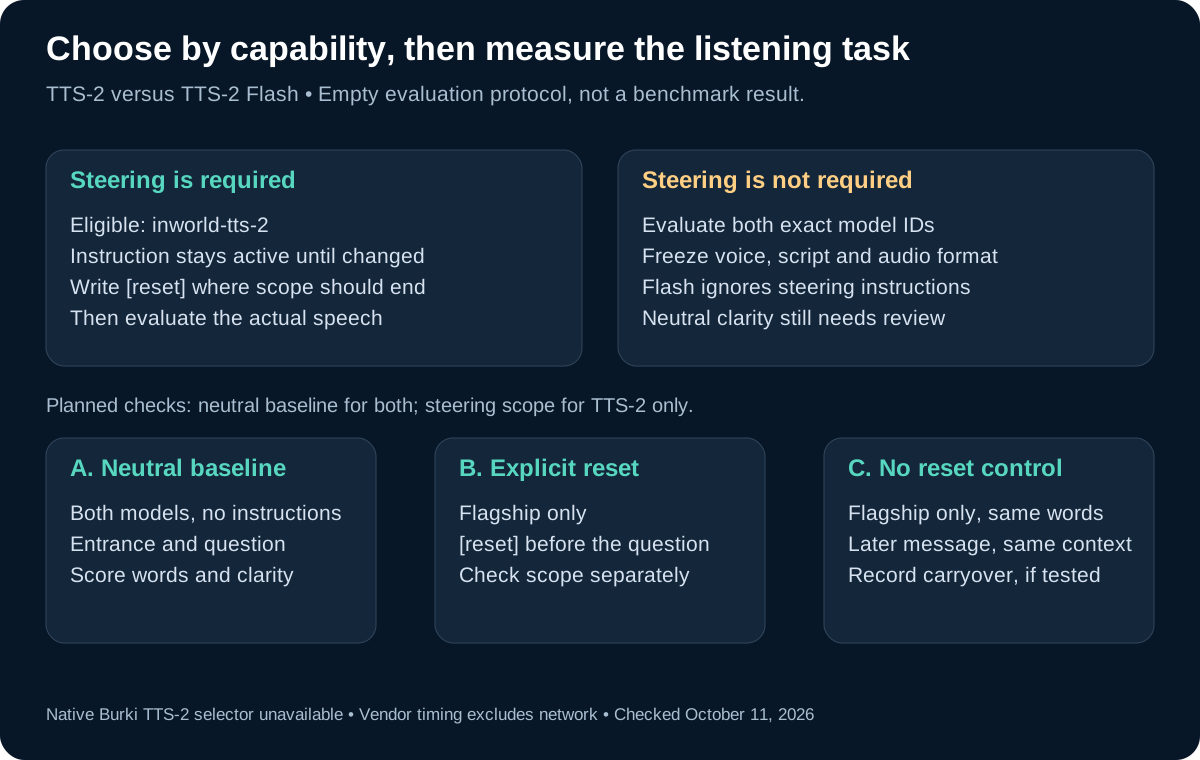
The diagram separates documented capability eligibility from an evaluation you still need to perform. It reports no generated-audio result.
Flash ignores steering, which is a different result from failing a listening test
An instruction tag and a recognized nonverbal tag do different jobs. The current docs say Flash ignores steering instructions while allowing recognized sounds such as [laugh]. Instructions must be in English even when the spoken text uses another language. Inworld steering support.
A model that does not implement a required field should fail the eligibility check before you calculate a preference score. Otherwise, a pleasant neutral recording might accidentally pass a test that was supposed to verify controlled delivery.
If the application requires the workshop entrance sentence to be deliberately paced through the documented steering feature, choose TTS-2 as the eligible candidate for that requirement. You can still evaluate Flash for a separate unsteered workflow. That is a capability decision, not a declaration that one model sounds better overall.
Do not use a laugh or sigh as a substitute for steering acceptance. Producing a sound at one point in a script does not show that a sustained instruction was interpreted. For many administrative conversations, omit nonverbal sounds entirely and keep the evaluation focused on clear information.
A direct provider setup sequence
Prepare a permitted provider voice, current API access and a budget before generating audio. Keep credentials on the server. A custom voice requires its own permission and provider preparation; neither is established by this comparison.
- Freeze the script and voice. Save the neutral passage, directed passage and reset variant under one version. Use the same voice where the provider permits it.
- Pin the exact model ID. Use TTS-2 for the steering check. Use both IDs for the neutral baseline. Record the actual request and any returned model metadata.
- Choose one instruction mechanism. For a single synthesize or streaming request, the provider documents a request-level
instructionfield. For WebSocket speech, use inline tags instead; that field has no equivalent there. Instruction transport. - Keep the audio contract constant. Record encoding, sample rate, API route, client region and playback path. Measure the same boundaries in both runs.
- Check context scope explicitly. If you use WebSocket, append the neutral question in a later message within the same context, once with an explicit reset and once without it. Do not describe the second message as independent merely because it is a new network frame.
- Retain failures and review the result. Record omitted words, unintelligible directions, unexpected style carryover and unusable audio. Do not discard those attempts from the final cost record.
This is an unperformed evaluation sequence, not runnable code or a claim about an installed SDK. The provider's current WebSocket guide documents creating a context, sending text, flushing or closing it and continuing to receive audio until contextClosed. It also specifies 2,000 characters per sendText message and UTF-16 counting. Do not cut a markup tag in a manual flush or close an unfinished tag. WebSocket request and completion contract.
If an LLM writes the spoken text, use a small approved set of directions and inspect its output before testing. Inworld publishes prompting examples for model-generated steering, but an application's policy still has to decide what is appropriate to say and how to handle unexpected bracketed text. TTS-2 prompting guidance.
Read vendor latency figures at their actual boundary
The published 100 ms and 20 ms figures are server-side P90 time to first audio byte, excluding network. The model page does not disclose a matched test script, sample count, language distribution or load profile for those figures. They are vendor claims, not a Burki benchmark. We did not establish an independent matched quality benchmark for this exact pair.
A first byte does not mean the browser has enough decodable audio to play, that the final word was emitted or that a caller heard it. Those outcomes need their own measurements. Do not subtract the provider's server-side number from a complete telephone response measurement and call the remainder a proven model difference.
Inworld's latency guidance discusses network distance, connection reuse and streaming strategy. Those are additional implementation variables, so hold them steady when comparing the models. Inworld latency guidance.
Use separate columns for request-to-first-byte, request-to-first-audible-speech and request-to-last-audible-word. Record sample count, errors and measurement location with every percentile. A faster first byte and a rushed, unclear instruction are different observations; neither should hide the other.
The worksheet's scripts are English only. Check the current language contract and evaluate the actual listener language, accent expectations, local names and pronunciation separately. A language count does not prove equal performance or a specific Dubai/UAE dialect outcome.
Calculate the price of accepted output
On October 11, Inworld lists On-Demand TTS-2 at USD 25 per million characters and Flash at USD 15 per million characters. Paid plans offer other rates and credits. The site's minute conversion assumes about 1,000 characters per minute, so use character counts rather than treating that conversion as a fixed per-minute tariff. Current Inworld pricing.
For an illustrative budget of 100,000 billable characters, the corresponding On-Demand usage would be USD 2.50 for TTS-2 or USD 1.50 for Flash. This is a calculation from the listed character rates, not a provider invoice or a full agent cost. Actual billable usage, retries, LLM work, storage, platform and telephone charges need their own records.
Compare accepted output rather than only successful responses. If several generations are unusable, their costs still belong to the task. Conversely, if both models meet an unsteered application's acceptance criteria, the lower listed rate becomes a relevant input to a deployment decision. It does not establish that the model is cheaper for every workload or every plan.
Inspect Burki's actual model choices
The verified Burki Inworld catalog contains inworld-tts-1.5-max, inworld-tts-1.5-mini, inworld-tts-1 and inworld-tts-1-max. It does not expose either TTS-2 identifier. The current Inworld documentation deprecates those earlier families and says requests to 1 and 1-max have been rerouted since their June 15 discontinuation. That provider policy is not evidence of which model a particular Burki call used. Inworld model lifecycle.
To inspect available choices, open Voice → Model and provider choices, then select Standard pipeline · advanced provider choices under Conversation engine. Open Speech settings → Advanced voice stack and inspect Voice provider, Voice model and Assistant voice. Use the options actually present. A custom voice identifier is not a model override, and pasting a new model ID into it does not add support. Review readiness and Usage & billing before planning a test.
For a business AI receptionist, choose an available stack using the actual caller task: intelligible directions, careful qualification, correction handling and staff handoff. The wider conversation-engine guide explains that architecture choice. Keep provider capability, product configuration and accepted caller experience as separate evidence when you decide what to deploy.
Ready to try Burki?
Create an assistant and check your available browser practice allowance.
Create your assistantTrial eligibility and available practice are shown in your workspace.