Hume API Shutdown: Plan a TTS or EVI Migration Before November 13
Plan a Hume TTS or EVI migration with a data inventory, voice-permission checks, a Burki setup example and a practical cutover worksheet.
Table of Contents▼
Hume's October 2, 2026 announcement sets a deadline for applications using its TTS and EVI APIs: access ends on November 13, 2026 at 12:01 a.m. EST. Hume says the APIs remain supported until that point and account data will be permanently deleted after November 13. This is a notice about those voice APIs, not evidence that every Hume business or product has closed. Official sunset notice.
If your business depends on one of these APIs, start by identifying what you need to replace. A website that generates spoken answers has a different migration from a live EVI assistant that listens, handles interruptions and invokes tools. Moving a prompt and choosing a pleasant voice will not reproduce the second application's behavior.
This guide gives you a practical inventory, a fictional support-desk example and a current Burki configuration path. Download the free Hume migration worksheet. The guide and worksheet are free; replacement services, voice usage, storage and tests can incur costs. No customer account was exported or migration tested for this article.
Separate the TTS dependency from the conversation dependency
For a TTS-only integration, inspect the boundary between your application and speech generation. Record the text sent, voice reference, delivery instructions, audio format, streaming behavior and how playback stops. Your application may already own recognition, reasoning and tools. Replacing speech output does not require silently replacing those other components.
For EVI, inventory the full conversation contract. Hume's configuration guide includes the EVI version, voice, system prompt, supplemental language model, tools, turn detection, interruption, event messages and timeouts. A saved configuration is only part of the inventory if your application overrides settings during sessions. EVI configuration reference.
Make a two-column mapping before choosing a replacement:
| Existing dependency | Replacement decision to record |
|---|---|
| TTS voice reference | New provider, permitted voice and identifier |
| Acting or style instructions | New supported control or rewritten speaking instruction |
| Recognition and turn behavior | Which component hears the caller and commits a turn |
| Function invocation | Tool schema, permission check, result and failure handling |
| Session resume | What approved context is retained and how it is restored |
| History and audio | Which records exist, who may retain them and where they will live |
Mark every unmapped behavior explicitly. A missing emotion-related field, for example, should remain an identified gap rather than being renamed to an unrelated setting. Decide whether the business actually needs that behavior before accepting a substitute.
Preserve permitted records without assuming everything is exportable
Assign one owner to the inventory and one reviewer to the retained data. Record what the application needs for continuity, its retention policy and the destination's access restrictions. A shutdown deadline does not make all historical customer data appropriate to copy into a new assistant prompt.
For saved voices, Hume documents My Voices in its platform and a read endpoint, GET /v0/tts/voices?provider=CUSTOM_VOICE, for listing custom voices. Use the documented listing to identify dependencies. It is a metadata inventory, not evidence of a portable voice model that another provider can load. Voice management.
Keep the original consent and usage restrictions with any source recordings your organization already has permission to retain. Review permission for the proposed new service before using a recording there. A Hume voice ID is a provider-specific reference, and this guide establishes no cross-provider import path or guarantee of an identical voice. If permission or the original asset is missing, choose a new permitted stock voice and review how the changed voice affects callers.
For EVI history, use the current documented chat, chat-group and event retrieval routes. Retain IDs, timestamps and configuration associations when they matter to the business record. Hume describes reconstructing transcripts from user and assistant message events. It also states that history and audio reconstruction are unavailable when data retention was disabled. An empty response is therefore not proof that an export tool simply needs another retry. Chat history and retention limits.
Check pagination and reconcile the records you expect against what you retrieved. Open a sample locally and verify its contents and permissions before marking an inventory row complete. The worksheet distinguishes identified, retrieved, reviewed and unavailable. It does not offer a general account export or promise that historic audio can always be recovered. Ask Hume support about records whose supported retrieval remains unclear.
Rebuild the business task before matching the old voice
Consider a fictional equipment-support desk. Its old EVI assistant asks for a device identifier, explains public troubleshooting information and sends unresolved requests to staff. A caller says:
“The unit is N, L, four, one. Sorry, four, seven. It started stopping yesterday. Please have someone call me back.”
Write the replacement contract in ordinary business terms: retain the corrected identifier, collect callback details, avoid unsupported repair advice and leave the request pending staff review. The useful result is a clear request for NL47. A voice that sounds similar but leaves NL41 in the request has failed the task.
Use this starter instruction after replacing the fictional details:
Help callers describe their equipment-support request.
Collect the device identifier, issue description and callback details.
When a caller corrects a value, confirm the latest value aloud.
Use only approved public support information.
Do not promise a repair, warranty decision, appointment or completed request.
Explain what staff must review and what happens next.
If a connection fails, say the request has not been confirmed.
This is an instruction template, not a connected service desk. If the old application wrote into an external system, separately map the tool inputs, authorization, duplicate prevention and success receipt. Keep secrets out of prompts and migration worksheets. A function name shared by two systems does not mean the inputs or permissions match.
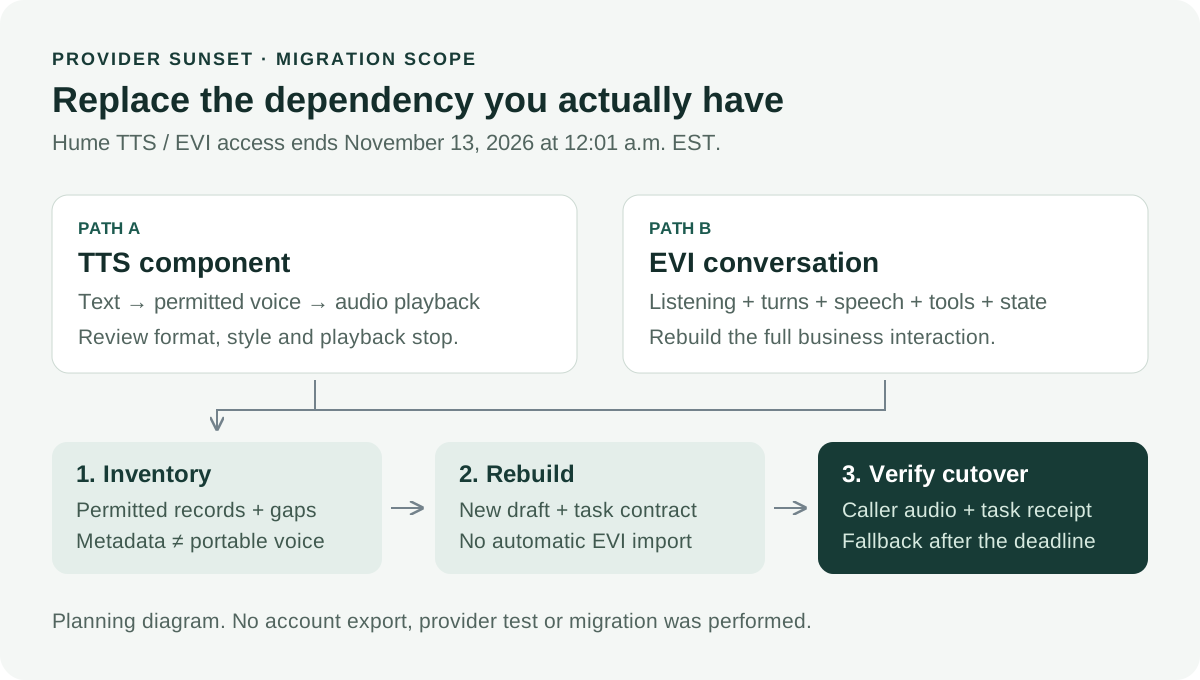
Choose the scope first. Voice metadata, business records and a tested conversation each need their own review.
Prepare the replacement assistant in Burki
Burki can be considered for the replacement business assistant. Its current editor does not provide a Hume account import, and this guide does not claim native Hume execution or automatic EVI conversion.
- Open a draft assistant in Assistants. Write down the support task, approved information and staff handoff requirements before changing voice choices.
- Open Voice → Model and provider choices. Under Conversation engine, choose Standard pipeline · advanced provider choices for a configuration with separate recognition and speaking providers.
- Within that panel, review Advanced speech recognition and select an available provider and model for the intended caller language. Record the exact choices. Do not treat an old EVI language setting as proof the replacement model supports the same calls.
- Open Speech settings and review Advanced voice stack. Select an available Voice provider, Voice model and Assistant voice. Choose a permitted voice from that provider; do not paste the old Hume voice ID into a new provider's custom-voice field.
- Enter the reviewed business instructions and inspect any required action connection separately. Check readiness messages, credentials and Usage & billing before saving or planning funded tests.
These steps describe preparing a configuration. The current source and editor choices establish what can be selected, not that a provider accepted a session or that the migrated task succeeded. For the architectural choice between a pipeline and GPT Live, use the existing conversation-engine guide.
Budget for overlap and define the cutover evidence
Allow for an overlap period while the original service remains available, subject to its terms. Your estimate should include both services during review, backend model work, speech, telephone charges, platform charges and storage. Keep the billing unit beside each rate. A character allowance, a session minute and an audio token are not interchangeable quantities. Check the selected account terms and Burki pricing before committing a test budget.
Set a decision date earlier than the provider deadline, with a named owner. Check the clean request, the corrected identifier, an unavailable connection, a caller interruption and an incomplete request. For each case, record the actual configuration, observed transcript, caller-heard response and resulting business record. Retain failed attempts in the review. A synthetic script or saved draft is not acceptance evidence.
Prepare an operational fallback such as a reviewed staff answering path for the period after the API deadline. A rollback that depends on the retired API cannot be your only plan beyond that date. Switch real traffic only after the responsible team accepts the replacement and can verify routing and follow-up.
For an AI receptionist, the migration is complete when callers can finish the intended business interaction and staff can trust the resulting request. The deadline gives you a reason to start now. The inventory and acceptance record tell you when it is safe to finish.
Ready to try Burki?
Create an assistant and check your available browser practice allowance.
Create your assistantTrial eligibility and available practice are shown in your workspace.