Eleven v4 vs v4 Turbo: Compare Models for a Voice Agent
Compare Eleven v4 and v4 Turbo using current model IDs, published latency methods, dated API prices and a practical Burki configuration worksheet.
Table of Contents▼
The useful Eleven v4 vs v4 Turbo comparison starts with the speech your application needs. A prepared narration can prioritize the final recording. A receptionist must also answer short requests, leave room for corrections and keep the conversation moving. Choose the exact model for that task, then evaluate the complete interaction.
ElevenLabs introduced both variants on September 28, 2026. This October 7 guide compares their documented capabilities, explains the available latency evidence and shows the corresponding choices in Burki. There is no verified common public benchmark here that establishes a quality winner between the pair, and Burki has not run a paid model benchmark for this article. Official launch announcement.
Download the free comparison worksheet. It contains reusable scripts, configuration fields and separate latency boundaries. Completing the worksheet can involve paid usage; downloading it does not.
Identify the models before comparing them
The current official IDs are eleven_v4 and eleven_v4_turbo. The provider positions v4 for produced speech and Turbo for real-time interaction. Both belong to a family supporting more than 90 languages. Language coverage is a capability list, not an intelligibility or task-accuracy score for your callers. Current model catalog.
| Decision | Eleven v4 | Eleven v4 Turbo |
|---|---|---|
| Exact model ID | eleven_v4 | eleven_v4_turbo |
| Documented emphasis | Produced speech and quality | Interactive speech and low latency |
| Family language coverage | 90+ languages | 90+ languages |
| Shared provider controls | Stability, Similarity and audio tags | Stability, Similarity and audio tags |
| Comparable public pair quality score verified here | Unavailable | Unavailable |
| Burki current standard-pipeline model selector | Available option | Available option |
ElevenLabs documents neither Style nor Speed sliders for the v4 family, and it does not support SSML. Audio tags can guide delivery but are fallible. Do not copy an older model's tuning recipe and expect equivalent behavior. V4 controls and limitations.
The provider's dialogue WebSocket supports both models. Turbo registers one voice, while v4 permits up to ten in that interface. That is an API capability; Burki's assistant editor configures a selected voice and does not become a multi-speaker production tool merely because the provider supports one. Dialogue streaming documentation.
Read the latency numbers at their actual boundaries
ElevenLabs reports approximately 100 milliseconds median inference latency for Turbo. Its launch page separately reports approximately 150 milliseconds median time to first speech. The latter is a vendor comparison using identical scripts and default settings in September 2026, with Turbo over WebSocket and network latency measured and removed. Script language and sample count are not disclosed there. Published latency claims and footnotes.
Those figures measure different intervals. They do not establish a 50-millisecond application overhead, a maximum delay or the time between a caller finishing and hearing a complete business answer. The source does not supply an equivalent v4 measurement for a controlled pair comparison. Keep that cell empty instead of assigning a guessed v4 score.
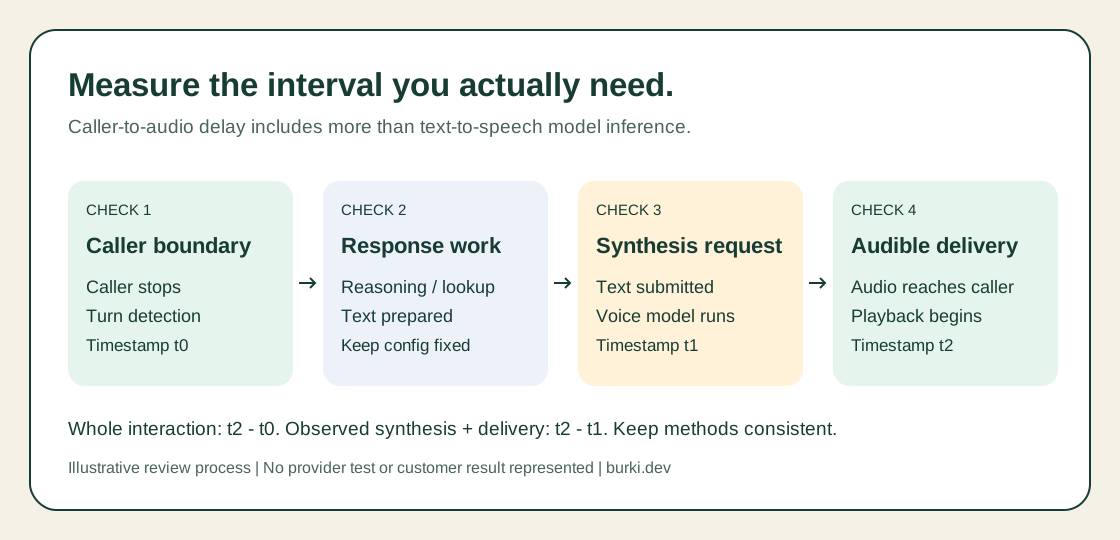
Published synthesis latency covers part of the interaction. A whole-call timing record needs a defined caller boundary, request boundary and audible output boundary.
For your own authorized evaluation, mark when the caller stops, when the application submits synthesis work and when audible output begins. Keep cold starts and reused connections separate. A model can improve synthesis while the overall answer remains slow because of recognition, response generation or an external lookup.
Do not compare TTS naturalness with speech-to-text word error rate. Recognition accuracy belongs to a different component. If a caller's name was transcribed incorrectly, changing the speaking model cannot recover information that never reached the answer.
Compare cost in characters, then budget the rest
As checked October 7, ElevenLabs' API pricing page advertises launch prices through October 12: USD0.022 per 1,000 characters for v4 and USD0.011 for Turbo. The page displays ordinary prices of USD0.08 and USD0.04 respectively, with taxes excluded. Account and plan terms should be checked before purchase. These are dated provider prices, not Burki quotes. API pricing.
For an illustrative workload of 100,000 billable characters, multiplication of those advertised unit rates gives:
| Pricing basis | V4 synthesis only | Turbo synthesis only |
|---|---|---|
| Advertised launch rate, through October 12 | USD2.20 | USD1.10 |
| Displayed ordinary unit rate | USD8.00 | USD4.00 |
These are arithmetic examples, not observed invoices. They exclude tax, subscriptions or included allowances, recognition, language-model usage, platform charges and telephone service. Do not convert characters into a guaranteed number of minutes: speaking pace, response length and actual billing rules matter.
Burki also needs the correct credentials or managed account arrangement, available funding and any required account review. Review Burki pricing and the current Usage & billing selection rather than applying a promotional provider rate to the whole stack. A model appearing in a selector does not prove the account can invoke it.
Set up a controlled comparison in Burki
Use a draft standard-pipeline assistant and a voice your organization is allowed to use. Keep the business facts, recognition model, reasoning model, voice ID and language the same while changing the synthesis model. If a voice is unavailable for one variant, record that mismatch; it prevents a simple attribution of the result to the model alone.
- Open the draft in Assistants, then Voice. Choose Standard pipeline · advanced provider choices under Conversation engine. If needed, expand Model and provider choices to reach the engine selector.
- Open Speech settings and Advanced voice stack. Under Voice provider, choose ElevenLabs.
- Set Voice model to Eleven v4 Turbo and record the exact ID
eleven_v4_turbo. Select the intended Assistant voice. For an accessible existing custom voice, choose Saved custom voice, expand Custom voice identifier and enter its Custom voice ID. - Expand Voice tuning. The current v4 form shows dialogue-delivery guidance and Language choices, including Automatic (multilingual). It hides the historical tuning sliders. This walkthrough does not instruct you to adjust absent Stability or Similarity sliders.
- Use English for the first comparison so language selection is held constant. Automatic language handling is a separate case to evaluate later, not another change to add during the model comparison.
- Review readiness, credentials and funding, then save the intended draft. With an approved test budget, run the same cases for Turbo and v4, changing only Voice model between saved configurations.
These options and their current source mapping were checked for this guide. No provider call was placed to produce a sample or benchmark result. Record an accepted request and actual playback separately when you conduct the evaluation.
In GPT Live, the separate provider selection controls the Announcement voice for configured disclosures and telephone handoffs. It does not replace GPT Live's conversation voice with v4. Evaluate announcements as their own workload.
Use short replies, corrections and an unavailable action
The worksheet uses fictional studio enquiries. Begin with an approved plain response: “We open at nine in the morning. I can explain the enquiry process.” Then include a time clarification, a staff-handoff request and an unavailable booking. The truthful unavailable-action response should remain clear: “I cannot confirm a booking from this enquiry. Staff need to review the request.”
Use ordinary speech first. Add a delivery tag only as a separate experiment, with the same tag and response text for both models. A dramatic performance can be attractive while obscuring an important limitation, so ask reviewers to repeat the meaning of the answer as well as rate how it sounds.
Hide model labels from reviewers when practical and rotate listening order. Record the voice, response text, model, date, language and settings with each clip. Use fictional data and an agreed recording policy. Do not publish a percentage preference from a handful of hand-picked successes.
For latency, repeat cases under the same connection conditions and report the number of attempts. If you calculate a median or a percentile, state the measured interval. Keep failed requests and interrupted replies visible instead of excluding them because they make a chart less tidy. The voice evaluation guide provides broader review guidance.
Choose against the business's acceptance criteria
Turbo is the provider's documented starting point for interactive speech. That makes it a sensible candidate for an AI receptionist, subject to actual voice access and acceptance testing. It does not prove that every caller will prefer it or that the remaining pipeline is fast enough.
Choose v4 when the workload and reviewed output justify prioritizing produced speech. For a live assistant, keep the exact cases that exposed missed words, confusing delivery or excessive delays, then recheck those cases after a model or configuration change. An updating model name and a good launch demo are reasons to evaluate, not a substitute for the resulting record.
Ready to try Burki?
Create an assistant and check your available browser practice allowance.
Create your assistantTrial eligibility and available practice are shown in your workspace.