Multilingual Text to Speech: Choose One Voice for Different Languages
Understand Cartesia's multilingual voice update, check each voice's language coverage and build a fixed-language Burki pilot with a free selection worksheet.
Table of Contents▼
Multilingual text to speech can help a business sound recognizable in different languages. The practical question is whether the particular voice you choose supports the languages your callers need. A model's long language list does not answer that question, and a translated script does not establish a working multilingual phone service.
Cartesia's September 23, 2026 Multilingual Voices release makes voice selection worth revisiting. This guide explains the development, shows how to build a voice-and-language inventory, and walks through the fixed-language configuration currently available in Burki. The provider's newest locale controls and Burki's existing language settings have different boundaries.
Download the free voice selection worksheet. It includes a worked inventory, approval checks and an empty test record. The worksheet is free; provider synthesis, platform use and telephone service have separate costs.
What Cartesia changed
Cartesia announced more than 50 library voices able to speak up to 25 languages natively, alongside options for making a custom voice multilingual. The development concerns the identity and language coverage of a voice, rather than a new language being added to every possible assistant. The announcement describes native-speaker review of accents and local readings. It does not establish that your chosen voice will pass your business's acceptance checks. Cartesia's September 23 announcement.
The distinction is useful for a company with an English help line and a planned Hindi service. Staff may want both lines to sound like the same business. Choosing a shared voice ID can be part of that plan, but each language still needs an approved script, an appropriate recognition configuration and staff who can handle the resulting enquiry.
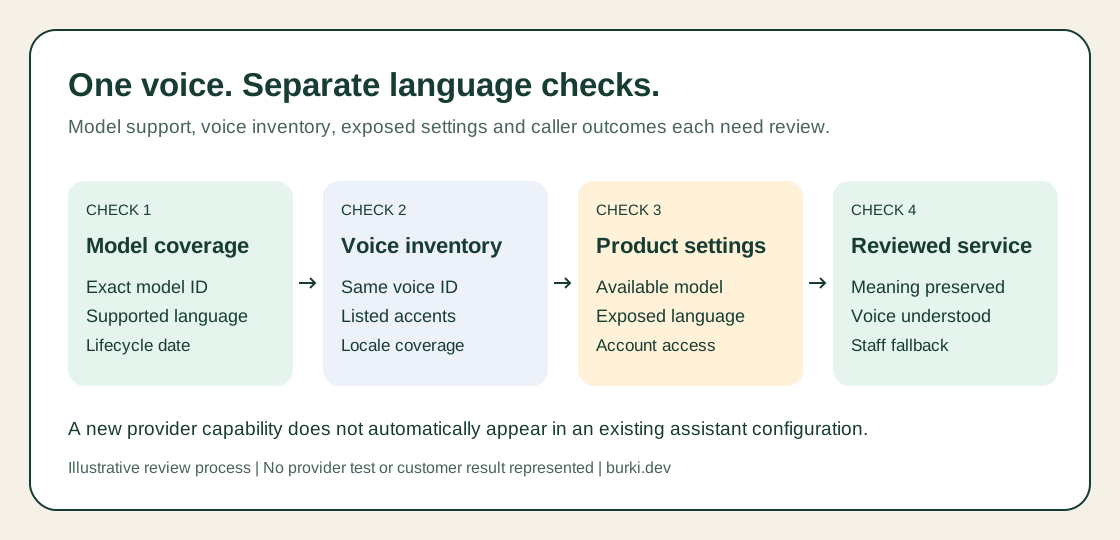
Treat model coverage, voice coverage, exposed product controls and caller outcomes as separate checks. This diagram describes a review process, not an automatic routing feature.
Build a voice inventory before changing the assistant
Record the exact model, voice ID, desired language and relevant locale. Cartesia's voice library shows a voice's languages and accents; its Get Voice response exposes an accents inventory. Check those records rather than guessing from a friendly voice name. A name such as Jacqueline is an identity label, not proof of British English, Hindi or Arabic coverage. Cartesia multilingual voice documentation.
Use one row per intended language path. This hypothetical studio enquiry service starts with English and prepares Hindi for later review:
| Inventory field | English path | Proposed Hindi path |
|---|---|---|
| Task | Explain approved opening hours | Explain the same approved opening hours |
| Voice | Existing approved voice ID | Same candidate ID, coverage not assumed |
| Script owner | English-speaking operations lead | Hindi-speaking reviewer |
| Model and language | Record actual selected model; English | Record actual selected model; Hindi |
| Status | Existing configuration to recheck | Candidate, not ready for callers |
| Unavailable service | Refer to the agreed staff route | Explain the available language options |
The table contains no test results. Filling in a voice ID is the start of the review. A missing reviewer, unknown provider entitlement or unsupported language path should remain visible in the record.
For an Arabic service, add the Arabic varieties and staff requirements relevant to the business. Do not infer UAE-specific accent support from the base code ar. Burki's UAE page can frame a regional discussion, while the Arabic receptionist evaluation guide covers the broader caller-to-record checks.
Understand locale selection and accent fallback
Cartesia documents locale for Sonic 3.6 and newer; earlier models use a base language code. The provider advises using one language per synthesis request. Mixed-language generation has specific cases such as Hinglish and Taglish, so a sentence containing several languages needs its own review. An unavailable locale can also fall back to the voice's original accent rather than fail. Language, locale and fallback rules.
These distinctions explain a common misleading result: the API returns audio, yet the voice is not appropriate for the intended listeners. Record intelligibility and language suitability separately from successful request acceptance. If reviewers reject the accent, adding more translations will not settle the selection problem.
Sonic 3.6's current model ID is sonic-3.6, with a dated August 27, 2026 snapshot. It is separately documented from older Sonic 3. Current Sonic documentation. A product label containing “latest” does not establish that it invokes the provider's latest model family.
Configure the fixed-language pilot in Burki
The October 7 walkthrough uses Burki's standard pipeline. Prepare approved business facts, a permitted voice ID and the speech provider account or managed funding arrangement your organization actually uses. Choose a small informational task before connecting actions. For this example, the assistant answers opening-hours questions and leaves exceptional requests for staff.
- Open Assistants, then create or edit the assistant you are authorized to configure. In Voice, choose Standard pipeline · advanced provider choices under Conversation engine. If the engine selector is collapsed, expand Model and provider choices.
- Open Speech settings, then Advanced voice stack. Set Voice provider to Cartesia and record the exact Voice model shown. The current choices are
sonic-3andsonic-3-2025-10-27; this walkthrough does not claim a Sonic 3.6 selector. - Choose the permitted voice in Assistant voice. For an existing custom voice, choose Saved custom voice, expand Custom voice identifier and enter its actual Custom voice ID. Enter an identifier you have access to, not a voice's display name or an invented example ID.
- Expand Voice tuning and set Language to English for the first path. The current Cartesia form exposes base-language choices; it does not offer the new locale/accent controls or an automatic language option.
- In Conversation, keep the approved business facts and instructions consistent with that language. Check recognition and model readiness independently. A speaking-language setting does not choose the recognition model or translate the business's operational policy.
- Review account access, funding and Usage & billing before saving. Save only the intended draft, then arrange a bounded test with the relevant reviewers before making it available to callers.
Cartesia marks sonic-3-2025-10-27 for sunset on October 20, 2026. Do not choose it as an indefinite compatibility promise. Review an existing configuration using that snapshot before the provider's deadline. Older-model lifecycle documentation.
For GPT Live, the separately selected synthesis provider is the Announcement voice for configured disclosures and telephone handoffs. Changing its language or voice does not change GPT Live's conversation voice. Keep the standard-pipeline speaking test separate from an announcement test.
Use the same business meaning in each test
Start with an approved fact card: “The studio is open Monday through Friday, nine in the morning to five in the afternoon. Staff review appointment requests; opening hours do not guarantee an appointment.” This is fictional example content, not Burki's operating hours.
Ask an English reviewer to check the meaning first. A Hindi reviewer can then prepare the corresponding script, keeping the distinction between opening hours and appointment availability. Store both scripts beside the same fact-card revision. Avoid a live translation improvisation during the first selection exercise.
For each language, review a short opening, an answer containing a time, an exception and a request outside the approved service. Ask reviewers whether they understand the words comfortably and whether the voice suits the task. Record confusing delivery, unexpected language changes and mismatches between the written response and audio. Keep any actual provider error distinct from a subjective voice rejection.
A September 21 research preprint, tau-Multilingual, evaluates localized voice systems across English and five other languages using simulated calls. Its authors separate task completion, interaction and generated speech quality. Those systems were not Burki, and the study did not evaluate Arabic. The useful methodological point is to keep those outcomes separate in your own review. Research methods and limitations.
Budget for the service you are building
Cartesia's pricing page lists commercial licensing starting with Pro and a separate credit charge for adding a voice accent. Its Managed Agents prices describe another product. They are not an all-in Burki call rate. Check your actual provider plan, permitted voice and account terms before using a library or localized voice commercially. Cartesia pricing.
Your cost worksheet should identify synthesis, recognition, reasoning, Burki platform charges and any telephone route. Keep one-time voice work apart from recurring call usage. See Burki pricing for the platform offer and inspect the account's current billing selection for the actual configuration.
Finish the pilot by approving one voice, one model and one language path for the selected task. Leave additional languages marked pending until reviewed. Bring that completed inventory to your AI receptionist setup, so adding another language has a concrete acceptance record rather than a broad promise of multilingual coverage.
Ready to try Burki?
Create an assistant and check your available browser practice allowance.
Create your assistantTrial eligibility and available practice are shown in your workspace.