Twilio Voice Insights: Audit HD Audio and Downsampled Calls
Use Twilio's new HD Audio and Downsampled tags to inspect a voice AI carrier path, match the right call leg and review recognition errors. Free audit worksheet.
Table of Contents▼
An AI receptionist can sound clear in a browser demo and still struggle with a name over a phone connection. Before replacing its recognition model, inspect the audio path used by the actual call. The voice file, browser session and carrier leg are different observations.
Twilio's October 9, 2026 update adds HD Audio and Downsampled tags to Voice Insights. The tags appear in call summaries, the REST API and Event Streams. This is a new diagnostic addition to an existing product, not the launch of all Voice Insights. Dated Twilio release.
Burki currently does not ingest or display these Voice Insights tags. This guide explains a direct Twilio audit and a careful manual connection to an authorized Burki call review. It does not promise a native HD switch, change a trunk, activate a paid feature or report a newly tested phone route.
Download the free codec audit worksheet. It contains an adaptable call-leg record, a fictional worked case and empty evidence fields. No new call, provider request or paid diagnostic activation was performed for this article.
Read the two tags as a path observation
Twilio defines hd_audio as wideband audio on at least one edge, using AMR-WB or Opus. downsampled means that HD audio was converted to narrowband when the longest portion connected to a component or carrier that did not support HD. The second tag accompanies the first; it is not an independent “bad call” label. Exact call-tag definitions.
| Observation | Useful conclusion | Conclusion to avoid |
|---|---|---|
| HD Audio | Twilio observed the specified wideband codec on an edge | Every stage of the AI conversation carried HD audio |
| HD Audio and Downsampled | The record includes a conversion to narrowband under Twilio's tag rule | Conversion caused this particular recognition mistake |
| Neither shown | Investigate codec and completeness of the record | The caller necessarily heard poor audio |
| Partial or missing summary | Keep the diagnostic state unresolved | No relevant conversion or quality issue occurred |
The tag gives you a better question to ask. It does not establish what the caller understood, which speech model received the original audio, or whether changing one setting will fix a complaint. Keep the evidence narrow enough that another person can verify it.
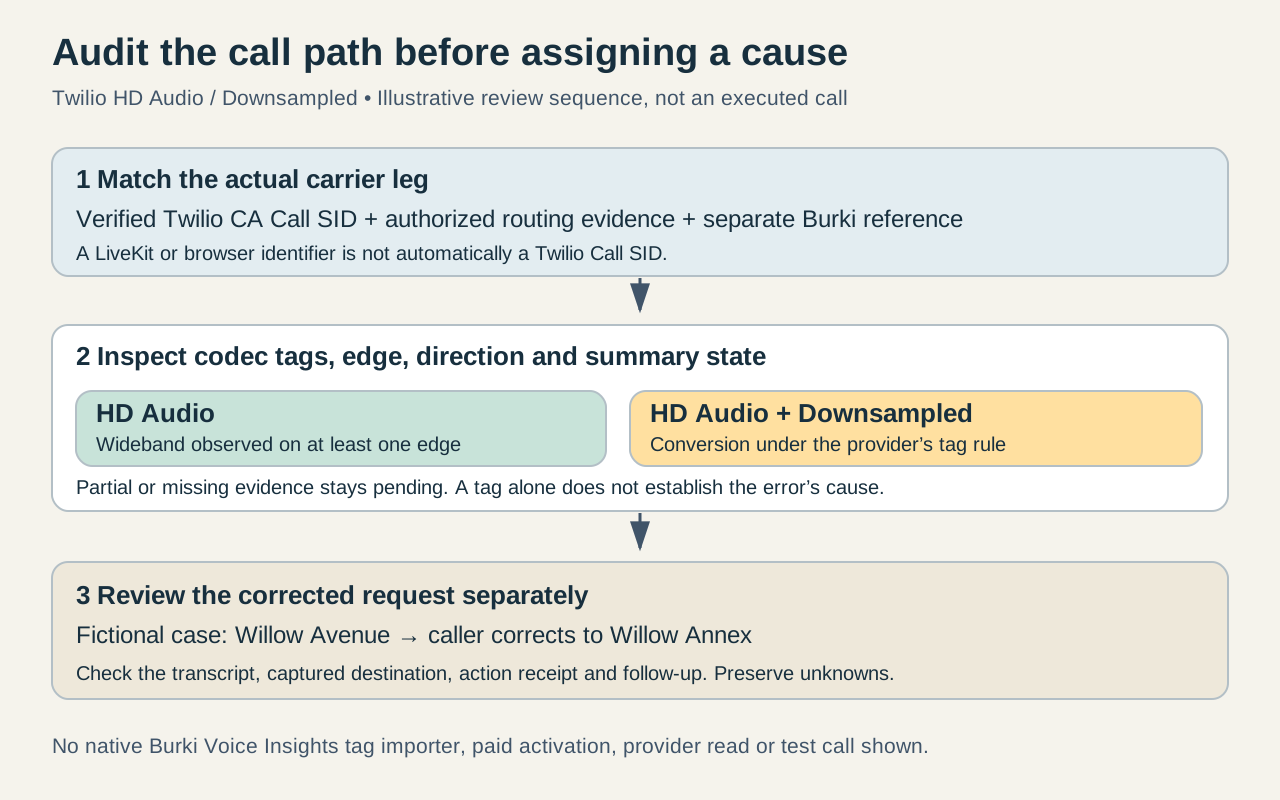
The diagram is an audit sequence. It is not a trace of an executed Burki call or a complete map of every possible carrier route.
Prepare an audit of an existing call
You need authorized access to the Twilio account or subaccount that owns the call, the actual Twilio carrier-leg Call SID, the relevant time window and the business question you are investigating. Start with an existing call whose records you are allowed to review. A fresh test call is a separate decision with its own cost and authority.
Write the question precisely. “The caller corrected a destination name twice” is more useful than “the model sounded bad.” Record whether the complaint concerns incoming recognition, outgoing speech, an interruption, a transfer or the final business action. Those problems can have different owners even within one conversation.
Keep a small evidence record:
Business question: was the corrected destination retained?
Twilio carrier-leg Call SID: [verified CA identifier]
Twilio account/subaccount: [authorized account reference]
Burki conversation reference: [separate application identifier]
Correlation evidence: [authorized routing or call records]
Call time and timezone: [recorded time]
Summary state and retrieval time: [partial/complete plus timestamp]
Do not copy account credentials, telephone numbers or raw customer transcripts into a public issue. The worksheet uses placeholders because the diagnostic method does not require publishing a person's call data.
Inspect the call in Twilio, without changing the route
In Twilio Console, open Monitor → Insights → Voice → Calls and locate the authorized call. Inspect its Call Summary and the relevant codec/tag information. Twilio documents this navigation in its Voice Insights guidance. API and Event Streams access depend on Advanced Features; review availability before planning an automated audit. Twilio Console and access guidance.
Record which edge the codec observation describes. Twilio's media-edge documentation distinguishes carrier, SIP and client/SDK streams. An inbound SIP-edge observation concerns media arriving from your SIP infrastructure; a carrier-edge observation concerns the PSTN side. Parent or child legs may be needed to understand the other direction. Media-edge definitions.
Inspect the direction associated with the complaint rather than whichever metric is easiest to find. An incoming recognition problem and an outgoing synthesized-speech problem should not share a single unexplained “codec” field in your audit record.
The Call Summary includes codec and inbound-stream metrics, while richer views can provide additional stream detail. This is transport evidence, not a transcript quality score. Call Summary documentation.
A useful review stops here if the call cannot be matched confidently. Similar timestamps or the same destination number can help locate candidate records, but they are not sufficient to join two unrelated calls. Preserve ambiguity instead of choosing the record that fits your preferred explanation.
Respect summary completion and API prerequisites
For an account with the required access, the documented read endpoint is:
GET https://insights.twilio.com/v1/Voice/{CallSid}/SummaryThe identifier is Twilio's CA Call SID, not an arbitrary application call ID. The resource requires Voice Insights Advanced Features. Twilio states that a partial summary is available within ten minutes after a call ends and that a complete summary can take up to thirty minutes. Summary resource and timing.
The endpoint above is a reference shape, not a request executed by this guide. Use your normal authorized read workflow and retain the returned processing state. If the record is partial, label the codec audit pending and revisit that same call. If access is unavailable, record the access limitation; do not translate it into “no issue detected.”
An integration should store the source record's time and state alongside its interpretation. That prevents a partial observation being silently reused as a final answer after the provider's record changes. The same discipline helps when comparing a dashboard screenshot with a later API response.
Work through a corrected destination name
Consider a fictional arts organization taking venue enquiries. The caller says “Willow Annex,” and the transcript first records “Willow Avenue.” The caller then clarifies: “Annex, not Avenue.” The receptionist should retain the correction and ask staff to follow up if it cannot confirm the destination.
Suppose the matching carrier record shows HD Audio and Downsampled. The legitimate finding is that the diagnostic record contains a wideband-to-narrowband conversion under Twilio's rule. The name mistake remains a separate observed event.
Review the available authorized transcript around the correction. Did the recognizer preserve the negation? Did the assistant acknowledge the replacement? Did the captured destination still contain the old name? These checks separate a recognition error from an application that recognized the correction but kept stale information.
If the recognizer returned “Annex, not Avenue” correctly but the saved request still says Avenue, a codec change is unlikely to address that specific persistence mistake. If the transcript missed the correction, investigate the incoming media evidence and recognition settings together. Neither observation proves that a different model or HD route would succeed on the next call.
If audio is available and authorized for review, use it to understand the complaint while preserving its source and direction. A recording is an observation at its recording point. It is not automatically the exact signal received by the recognizer or heard by the caller.
The follow-up decision can remain modest: correct the saved request through the business's established process, preserve the evidence and assign the unresolved transport question to the appropriate operator. The customer should not have to wait for a speculative model comparison before a person addresses the actual request.
Connect the audit to Burki honestly
Burki's current Twilio and LiveKit paths use different identifiers for different purposes. A Twilio webhook can carry the provider's Call SID, while a generic LiveKit SIP call can have an LK or ivr_lk_ application identifier. Browser calls are another path. Do not paste whichever ID is visible into the Voice Insights endpoint and assume it names the carrier leg.
Use authorized routing records or verified provider metadata to connect the actual Twilio leg to the Burki conversation. Keep both identifiers and the correlation evidence. If that evidence is missing, label the join unverified. The current product does not provide a native Voice Insights tag importer that makes this connection automatically.
For the conversation review, open Test Calls → Call history, then select the relevant Burki conversation. Inspect the available transcript, summary, captured details and action result. Keep “the destination was captured,” “staff received a request” and “the enquiry was resolved” as separate outcomes. A summary mentioning a destination does not prove delivery or resolution.
For an AI receptionist, this method helps review the real caller task before changing the model stack. The SIP trunk basics guide provides broader setup context, and the call summary guide explains the application review record. Codec evidence adds a transport dimension to that review; it does not replace it.
Check diagnostic costs before enabling more collection
The US Twilio voice pricing page, checked October 14, lists Voice Insights Advanced Features at USD 0.0024 per minute. Treat this as a scoped public rate, with account agreements and applicable tiers to verify. It is additional diagnostic pricing, not the complete carrier or Burki call cost. Current US pricing.
For an illustrative 1,000 billable diagnostic minutes at that listed rate, the additional amount calculates to USD 2.40. This is arithmetic, not an invoice, activation or claim that every account pays that price. Phone-number charges, calling, AI providers and platform usage have separate records.
Decide what evidence you need before buying more collection. A one-call review may be answerable from existing authorized summaries; a larger correlation study needs appropriate access, retained identifiers and a defined outcome. The worksheet keeps those decisions visible and gives the operator a usable next step without promising an automatic audio-quality fix.
Ready to try Burki?
Create an assistant and check your available browser practice allowance.
Create your assistantTrial eligibility and available practice are shown in your workspace.