Azure Speech vs Deepgram Nova-3: Languages, Benchmarks and Setup
Compare Azure Speech and Deepgram Nova-3 by caller locale, multilingual recognition, bounded independent benchmarks and current Burki setup. Free worksheet included.
Table of Contents▼
Choose speech recognition around the conversation you need to handle. A known English-speaking caller, a caller switching between Spanish and English, and a caller spelling an unfamiliar name create different requirements. A single word-error score cannot tell you which configuration meets all three.
This October 12, 2026 comparison covers Azure Speech's real-time recognition service and Deepgram nova-3-general. Both are available choices in Burki's current standard pipeline. Azure's Burki identifier, azure-speech, names the platform adapter. It does not identify an exact underlying Microsoft model release.
Do not treat this as a verified LLM Speech 2607 vs Nova-3 benchmark. Microsoft's September 10 announcement names LLM Speech 2607, but its body specifically describes Fast API access. Burki's current Azure adapter neither selects that revision nor proves which revision a running call receives. Microsoft's dated announcement.
Download the free Azure–Deepgram recognition worksheet. It contains a controlled fictional task, configuration records and empty result fields. No paid transcription test or Burki provider call was performed for this article.
Compare the language contract first
| Decision | Azure Speech in current Burki | Deepgram Nova-3 in current Burki |
|---|---|---|
| Native recognition choice | Azure Speech (BYO), azure-speech | Deepgram, nova-3-general |
| Credential requirement | Your Azure key and the matching resource region | The configured Deepgram credential and billing mode |
| Caller language | Explicit supported locale, such as en-US | Explicit language; runtime supports multi, but dashboard entry was not verified |
| Automatic language identification | Not exposed by this Azure integration | Direct Nova API offers a specific multilingual set; native dashboard configuration needs confirmation |
| Vocabulary controls | Provider supports phrase lists; current editor has no Azure phrase-list field | Key terms are exposed for Nova-3 |
| Exact provider revision proved by selector | No | Model family choice, rather than a completed-call receipt |
These native boundaries come from the current editor and adapter, rather than the full range of each provider's APIs. In particular, the Azure SDK accepts capabilities beyond those available in a given application. A provider feature list is not a product configuration guide.
Deepgram lists Nova-3 as general-purpose recognition without model-native turn detection. Its multilingual mode covers English, Spanish, French, German, Hindi, Russian, Portuguese, Japanese, Italian and Dutch. That set is smaller than its complete list of individually supported languages. Current model and language contract.
For example, Arabic support as an individual language does not mean Arabic is included in that multi set. This matters for a Dubai business receiving Arabic and English calls. Verify the exact recognition mode for the conversation, then assess caller dialects and accents separately. An English benchmark and a broad language count cannot establish an Arabic/UAE outcome.
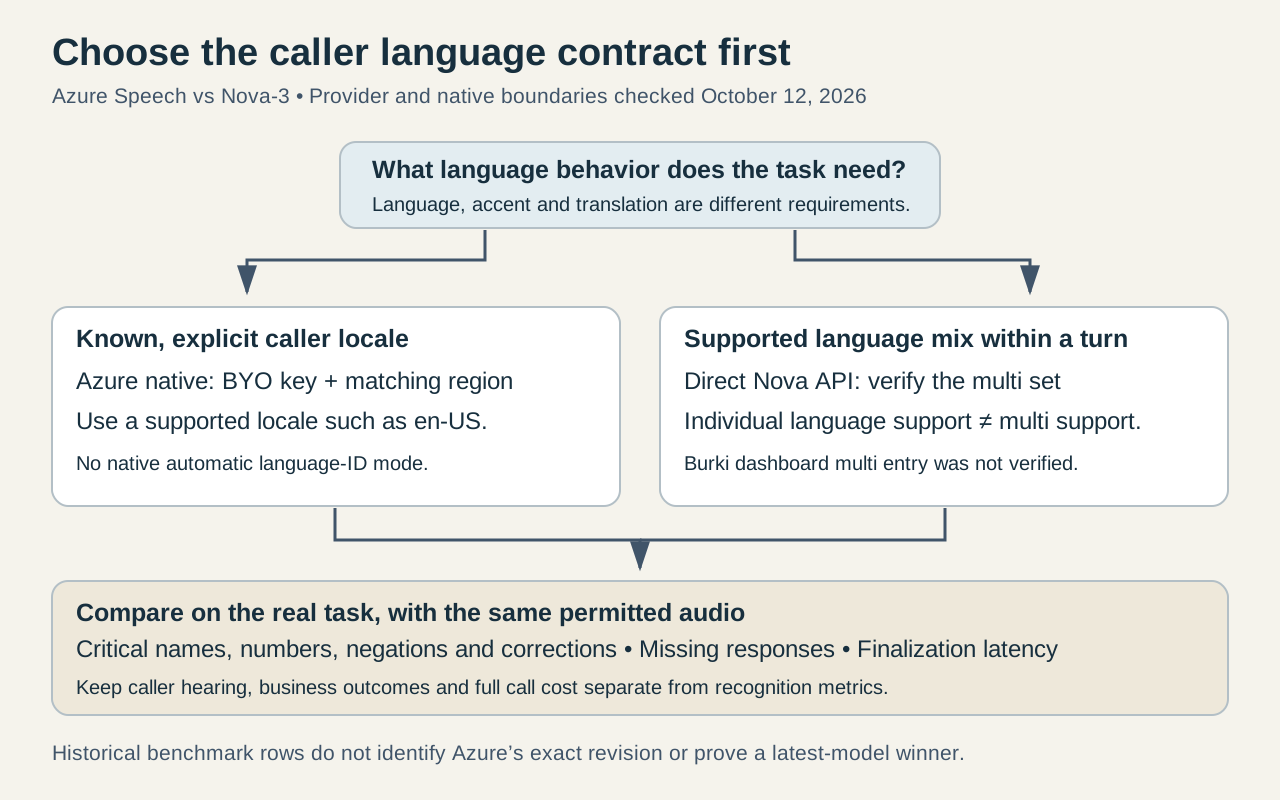
The diagram describes a configuration decision. It does not rank the providers or claim that one model handles every caller better.
Keep provider language identification separate from native support
Azure offers at-start and continuous language-identification paths with API-specific restrictions and candidate-language configuration. Its documentation distinguishes identifying languages from identifying regional variations of the same language. Those capabilities are useful when building directly on Azure, but Burki's present Azure path requires an explicit locale and does not expose automatic identification. Azure language-identification documentation.
For a single-language English service, begin with the actual expected locale and caller cohort. Do not switch to a multilingual setting solely because your callers have varied English accents. Accents, languages and code-switching are separate evaluation dimensions.
For Spanish–English calls, Deepgram documents language=multi on the Nova /v1/listen streaming endpoint. Flux Multilingual uses another endpoint and language-hint contract; copying its parameters into a Nova configuration is not equivalent. Nova and Flux code-switching setup.
Translation is another separate requirement. Recognizing a Spanish phrase does not promise an English translation, a bilingual reply or correct handling of a business action. The LLM instructions, voice output and approved handoff must fit the same caller workflow.
Read independent benchmark evidence with its limits
Pipecat reports 1,000 smart-turn-data-v3.1-train samples. This immutable README was last changed October 1, 2026, not necessarily when either service ran:
| Published row | Pooled semantic WER | Median TTFS | P95 TTFS | Transcripts returned |
|---|---|---|---|---|
| Azure, model N/A | 1.01% | 1,016 ms | 1,345 ms | 100.0% |
Deepgram nova-3-general | 1.37% | 247 ms | 298 ms | 99.8% |
Semantic WER uses Claude Sonnet 5.5 judging, rather than exact-word scoring. Missing transcripts are excluded from WER. TTFS ends at the final transcript, starting when speech ends; it is not full agent latency. Bootstrap uncertainty limits ranking. Azure's revision, individual run dates and language scope are unspecified. These historical rows establish no latest-2607 winner or result for your caller conditions. Original benchmark.
Run a small, task-specific comparison plan
Use a fictional community workshop help desk as a worked example. Its administrative task is to capture a preferred session date, caller name and callback number, then ask staff to confirm availability. The agent may record a request; it must not announce a confirmed place without a successful authorized booking result.
Prepare one consented or synthetic evaluation set and keep the audio identical between providers. Separate these cases:
- A straightforward English request: “Please ask about the Saturday morning pottery session.”
- A correction: “Not Saturday. Sunday, if there is a morning session.”
- An unfamiliar name, followed by an explicit spelling readback.
- A callback number, including a correction to one digit.
- A Spanish–English request, evaluated only in a configuration supporting that language mix.
The first four scripts are English examples, not evidence about every accent. Add representative caller accents and separately reviewed language examples. The worksheet asks you to label each cohort so a strong pooled average cannot hide failures for one group.
For each sample, record whether a transcript was returned, the critical values it retained, any changed negation and whether a correction replaced the earlier value. Score the final structured request too. If the transcript recognizes “Sunday” correctly but the agent submits Saturday from an earlier turn, recognition accuracy did not solve the application task.
Keep latency clocks separate. Measure final transcript delay, first audible agent reply and completion of any business operation independently. Hold the microphone or telephone path, region, audio encoding, network placement, turn settings and conversation instructions steady where possible. Log the differences you cannot control. This is a proposed evaluation method; all results remain blank until an authorized test occurs.
Use vocabulary hints without creating a false answer
Azure phrase lists favor specified names or terms at recognition time without requiring custom model training. Microsoft documents them for real-time recognition and other supported APIs, with limits and optional weighting. Burki's backend accepts a phrase_list option, but the current editor does not offer an Azure phrase-list or weight control. Do not treat a field in your conversation prompt as an equivalent speech setting. Azure phrase-list contract.
Nova-3's native Burki editor exposes Keywords & key terms → Key terms. Keep vocabulary narrow and relevant; a hint is a recognition aid rather than a rule that every caller said that term. The Deepgram keyterm guide covers the setup and its provider limits in more detail.
For the workshop example, a business name may be a useful hint. A specific session date or callback number should come from the caller and a confirmation process. Overfitting the recognizer to expected answers can conceal the very corrections you need to preserve.
Inspect and prepare the native Burki configuration
Open Voice → Model and provider choices. Under Conversation engine, choose Standard pipeline · advanced provider choices. The Advanced speech recognition controls are inside the same model/provider panel.
For Azure, select Azure Speech (BYO) under Recognition provider and azure-speech under Recognition model. Choose the supported Caller language locale and use an Azure Speech API key with the Azure Speech region of that same resource. Review Usage & billing and speech-recognition BYO readiness before planning a call. Managed Azure recognition, custom endpoints and automatic language detection are unavailable on this native path.
For Deepgram, choose Deepgram and nova-3-general. Select an explicit Caller language available in the current editor, and inspect Keywords & key terms if the workflow needs a short vocabulary list. Check credential readiness and the billing mode actually configured for your account.
The current runtime accepts Nova-3 language=multi, but this read-only dashboard review did not establish a working entry path for that value. Confirm a supported configuration route before using multilingual mode in Burki. The direct-provider API contract above does not establish a dashboard procedure, and Custom language code should not be treated as a verified workaround.
Switching recognition providers can change or clear provider-specific settings. Recheck language, credentials and the remaining turn settings after a change. A saved selection establishes configuration; it does not prove an accepted provider session. This article's read-only review did not enter credentials, save a configuration or place a test call.
Compare scoped costs before deciding
On October 12, Deepgram's public streaming Pay As You Go table lists promotional Nova-3 rates of USD 0.0048 per minute for monolingual and USD 0.0058 for multilingual. It separately lists keyterm prompting at USD 0.0013 per minute. These are provider rates with current promotional conditions, not full Burki call prices. Deepgram pricing.
For illustration, 60 billable audio minutes at those base rates calculate to USD 0.288 or USD 0.348 before add-ons. Adding the listed keyterm rate for all 60 minutes would add USD 0.078. This arithmetic is a budget example, not a bill, accepted usage receipt or permanent price guarantee.
The rendered Azure page, checked October 12 with Central US and USD selected, lists Standard Transcription real-time at USD 1 per audio hour, billed in seconds. That makes an illustrative 60 billable audio minutes USD 1 at this displayed rate. It is a scoped public estimate; your agreement, region, currency and current SKU determine the actual charge. Custom transcription and enhanced add-ons are separate rows, not capabilities automatically included in Burki. The free tier has separate eligibility and limits, and does not make a complete voice agent free. Azure Speech pricing.
Use the worksheet to record provider recognition costs, add-ons, LLM output, synthesis, platform and telephony separately. Compare cost per successfully handled request once valid outcomes exist, while keeping failed or missing transcription costs visible. A cheaper recognition minute is only one part of a useful AI receptionist. The voice pipeline guide helps connect this recognition choice to the rest of the conversation architecture.
Ready to try Burki?
Create an assistant and check your available browser practice allowance.
Create your assistantTrial eligibility and available practice are shown in your workspace.