Voice AI Pronunciation Controls: What Changed and How to Set Them Up
Fix text-to-speech pronunciation of business names with current provider controls, a worked Cartesia setup in Burki and a free pronunciation worksheet.
Table of Contents▼
A voice agent can answer the right question and still say your business name incorrectly. Fixing text to speech pronunciation starts by finding where the mistake happens: the response text, the synthesis model or the rule applied to that model. A pronunciation dictionary belongs in the speaking layer. It should not quietly change the canonical name in your business facts or customer records.
Recent provider updates make this a useful setup question. Deepgram added Flux TTS inline pronunciation controls on September 30, 2026. ElevenLabs published model-specific dictionary guidance on October 1. These are separate developments with different syntax and limits, so copying one provider's markup into another agent is not a reliable fix. This guide explains the changes, then walks through an existing Cartesia dictionary configuration in Burki.
Download the free pronunciation worksheet. The resource is free; synthesis, platform and telephone usage are separate costs.
What changed in the voice AI industry
Deepgram's September 30 update adds inline IPA pronunciation overrides to Flux TTS in batch and streaming. The feature is Early Access, and the provider warns that results can vary between generations. Its pause control is batch-only. Pronunciation cannot be combined with a pause or a speed other than 1.0, so a line that mixes all three is not an accepted configuration. Those details matter when turning a polished example into a live interaction. Deepgram release note.
ElevenLabs' October 1 guide describes dictionaries, inline IPA and model-dependent markup. It distinguishes Eleven v4 and v3 from older Flash, Turbo and Multilingual variants. That article is current guidance, not evidence that pronunciation dictionaries were invented this week. Check the exact selected model before choosing a phoneme rule, an alias or an inline expression. ElevenLabs pronunciation guide.
Burki's separate speech pipeline already exposes provider-specific pronunciation settings. The walkthrough below uses Cartesia's Pronunciation Dictionary ID. It does not enable Deepgram Flux TTS: Deepgram speech recognition and Deepgram speech synthesis are different integrations.
Find the layer that needs the correction
Consider a fictional business, Wexley Studio. The owner approves “WEKS lee Studio” as its spoken name. The response text is “Thanks for calling Wexley Studio. How can I help?” but the audible greeting uses a different pronunciation.
That is a synthesis problem. Keep “Wexley Studio” in the business facts and use a speaking rule for the sound. If the response text instead says “Westley Studio,” correct the business facts or response generation first. A dictionary for Wexley cannot reliably repair an entirely different word.
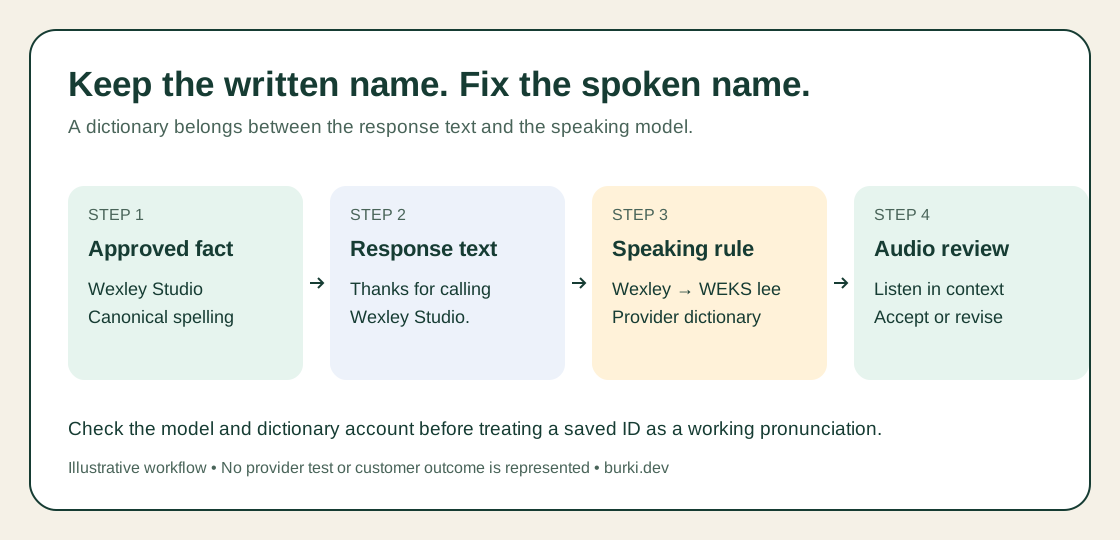
Illustrative flow. The dictionary changes the speaking instruction; the approved written name stays intact.
Write down the failing sentence, language, voice and model before editing anything. A pronunciation complaint without that context can produce a broad rule that fixes one greeting and damages another phrase.
Prepare a small dictionary in the right account
Cartesia documents pronunciation dictionaries as replacements that guide how selected words or phrases are spoken. Entries can use IPA or a sounds-like rendering. Create the dictionary through its authorized playground or documented API, then retain its returned identifier. Case handling depends on the model; the current documentation requires Sonic 3.6 or newer for case-insensitive matching. Cartesia custom pronunciations.
Start with one approved name rather than uploading an entire customer list. For this fictional example, your planning entry is:
| Field | Worked example |
|---|---|
| Written term | Wexley |
| Intended spoken form | WEKS lee |
| Target language | English |
| Acceptance sentence | Thanks for calling Wexley Studio. |
| Approval | Business owner confirms the intended sound |
“WEKS lee” is illustrative guidance, not a tested phonetic transcription. Listen to the actual output before treating it as correct. Use a fluent speaker for unfamiliar names or languages.
The dictionary must be accessible to the account whose credentials perform synthesis. Cartesia's API returns an ID and distinguishes private from public access. An ID copied from another account is not sufficient authorization. Resolve access with the dictionary owner; do not expose private vocabulary just to make a test pass. Cartesia dictionary API.
Connect the dictionary in Burki
Use an assistant with the separate speech pipeline for this walkthrough:
- Open Assistants and the assistant's Voice settings. Under Conversation engine, choose Standard pipeline · advanced provider choices for a draft intended to use separate recognition and synthesis. If that control is collapsed, expand Model and provider choices to find it.
- Open Speech settings, then Advanced voice stack. Choose Cartesia as Voice provider and a supported Sonic 3 model under Voice model. Keep the actual selected model in your worksheet.
- Choose the voice and language for your intended callers. Keep them stable while checking the dictionary so a voice change does not obscure the result.
- Open Voice tuning. Put the actual provider dictionary ID into Pronunciation Dictionary ID. The field takes the identifier, not the dictionary JSON or a pronunciation sentence.
- Review credentials, billing selection and available funds for the synthesis account. Save the draft, then use an authorized test to check the exact name in context before making it available to callers.
This field corresponds to the Cartesia plugin's dictionary option, documented for Sonic 3 models. A provider option's presence still requires valid account access and an accepted request. LiveKit Cartesia integration.
For GPT Live, the separately configured TTS provider is the Announcement voice used for configured disclosures and telephone handoffs. Its Cartesia dictionary does not alter GPT Live's own conversation voice. Decide which voice you are actually hearing before changing the setting.
Use a short acceptance script
A greeting alone is a weak test because it fixes the position and surrounding words. The worksheet includes six checks you can adapt:
| Check | Expected result |
|---|---|
| Greeting with Wexley Studio | Approved pronunciation is intelligible |
| The name inside a longer answer | The same name remains understandable |
| Name beside an address or number | Other details are not replaced or dropped |
| Capitalizations the assistant really uses | Behavior matches the exact model's matching rules |
| Unrelated similar word | The dictionary does not rewrite it unexpectedly |
| Phrase repeated after a correction | The updated response remains correct |
Record what you heard, the model and voice, and the dictionary ID or exported revision. Leave unperformed cases marked untested. This article does not include a measured pronunciation improvement or a synthesized recording from Burki.
Correct the common failure without widening the rule
If the name is unchanged, check the exact response spelling, selected model, dictionary ID and account access. If another word changes, narrow the entry. If the provider rejects the request, read the model's supported format instead of adding more markup. If the assistant speaks an IPA expression literally, the expression may be in conversation text rather than the provider control that interprets it.
Keep one reference sentence and one changed setting per iteration. A change that makes the greeting sound better but breaks the full business name in a longer answer needs more review.
Budget for the speaking layer
A downloadable glossary is free to use. Generating speech consumes provider usage according to the selected account plan. Check Cartesia pricing and Burki's pricing page, then account separately for the language model, recognition and telephone route. A provider's free allowance does not establish free production operation.
For context, Deepgram lists Flux TTS at USD0.045 per 1,000 characters on its pay-as-you-go page as checked October 6. That is a provider-only rate for its own product, not a Burki quote or a price for the Cartesia walkthrough. Deepgram pricing.
For a business building an AI receptionist, pronunciation is one part of a usable first impression. Begin with the words callers will actually hear, keep written facts intact and accept the final spoken result against a small, repeatable script.
Ready to try Burki?
Create an assistant and check your available browser practice allowance.
Create your assistantTrial eligibility and available practice are shown in your workspace.