Export a Burki Call Transcript to TXT and Check What It Contains
Download retained final call text from Burki, review missing turns and speaker labels, and keep transcript timestamps separate from audio and action evidence.
Table of Contents▼
You want to review a call without making someone scroll through the dashboard. A text file is useful for marking a misunderstood phrase, preserving a caller's correction or preparing an approved internal review. The file also needs an honest description: it contains saved final transcript rows, which are one part of the call record.
This guide explains how to export a Burki call transcript from the call-history list, what the current TXT export includes, and how to check it before using it in a review. It uses a fictional example. We inspected the current list controls and implementation on October 17, 2026; we did not open or download a private customer's conversation for this article.
Download the free transcript export review worksheet. It includes a synthetic file illustration, a missing-turn check and fields for evidence that belongs outside the transcript. The worksheet is free. Creating voice calls and retaining associated records can involve platform, provider and telephone charges; downloading a file does not make those services free.
Start with the question the file should answer
A useful review has a narrow question. For example: “Did the saved text preserve the caller's corrected delivery location?” That can be checked in the retained transcript. “Did the caller hear the corrected location before hanging up?” needs audio or other suitable playback evidence. “Was the address updated in the business system?” needs the actual authorized action result.
Write the question before exporting. This helps prevent a reviewer from treating one kind of evidence as proof of another. A transcript can report that the assistant said an update succeeded while the business action itself failed, or it can omit words that were not retained as final text.
You also need permission to handle the resulting local file. Use an authorized account and the correct organization, and follow your team's storage and sharing process. The current export is plain text; it does not automatically remove names, numbers or other sensitive content merely because it is downloaded.
Download from Call history
The current list provides a direct route:
- Open Calls and find Call history.
- If you know the record's ID, choose Call ID under Search type, enter it in Search call ID, then select Apply. Use the available filters when you need to narrow the list another way.
- Confirm that the row is the intended record using information you are authorized to see. Do not choose a record only because a phone number looks familiar.
- Select the row's download icon, labelled Download transcript. The current list action requests a TXT file.
- Check the browser's download result and inspect the permitted file locally. The interface message reports download handling; check the actual file rather than using that message as proof of completeness.
The current browser implementation names the file call-{id}-transcript.txt, replacing {id} with the selected call ID. Your browser may add a suffix if a file with the same name already exists. Keep the call ID in your review notes instead of relying on a filename alone.
These steps concern the list control observed for this guide. We did not access a private record's review drawer or download its content. The field and format descriptions below come from the current export implementation, with synthetic content used for illustration.
There is no format chooser in this list action. The underlying API has other export formats, but that does not mean the dashboard button offers a CSV or JSON menu.
Read the header before the conversation
The TXT export begins with call metadata, then writes the retained final rows in their stored creation-time order. Its structure is:
Call Transcript - Call ID: <call id>
Call SID: <call identifier>
Started: <stored start value>

[HH:MM:SS] <speaker>: <saved text>
The first checks are simple: does the call ID match the intended record, is the start value plausible for that record, and are there conversation lines after the header? The call identifier and any personal content may need protection when sharing a file. A filename or header should not be copied into a public support post without review.
Only rows marked final are selected. Interim recognition text is excluded. That avoids exporting every changing hypothesis as another turn, but it does not establish that every spoken word became a final row. If no permitted final rows are present, a file can contain the header without conversation lines.
The speaker label comes from the stored row. When no speaker is stored, the TXT export uses Unknown. Do not silently turn an unknown label into “customer” because a sentence sounds like a customer question. Preserve the uncertainty or compare with authorized supporting evidence.
Understand the timestamps
The time beside each TXT line is derived from the transcript row's stored creation timestamp. It is not a promise of an audio-aligned start time. It also appears as time of day without a per-line date or timezone.
That matters when you are investigating latency, interruptions or a call around midnight. Subtracting two TXT labels does not by itself measure how long a caller waited to hear a response. Ordering stored rows is useful for reviewing the saved conversation; measuring media timing requires the appropriate audio or runtime evidence.
Keep the original labels when annotating the file. If your review needs a timezone or calendar date, record the separately verified context and its source. Do not assume that a displayed dashboard local time and a text-file timestamp use the same representation.
Worked review: preserve a correction
The following lines are entirely fictional. They illustrate what a reviewer might find, not a real account export or a call test performed for this article:
[10:14:02] user: Please use the north entrance.
[10:14:07] user: Sorry, I mean the south entrance.
[10:14:10] assistant: You mean the south entrance.
For the question “Does the retained text include the correction?”, the answer is yes in this illustration. The first and corrected values are both visible, and the assistant's saved response refers to the corrected one.
For “Did the caller hear that response?”, the file alone is insufficient. For “Did anyone update a delivery instruction?”, the file provides no action receipt. The reviewer should record those as separate unanswered questions unless the relevant evidence has been checked.
Now change the example: suppose the file ends after the first line. You cannot conclude that the caller never corrected themselves. First establish whether this file contains the expected final rows and whether retention, a failed session or missing persistence could explain the gap. The worksheet keeps observed text, expected coverage and unverified explanation in different fields.
Handle incomplete or failed exports
| What you observe | Useful next check | What it does not prove |
|---|---|---|
| Download fails | Correct account, organization, call ID and permitted access; retain the exact error for support | That the call never happened |
| Header only | Whether final text was retained and is available under the applicable policy | That nobody spoke |
| Missing or surprising speaker labels | Stored labels and authorized supporting evidence | Which person actually spoke each line |
| Correction absent | Expected turn coverage and the relevant retained records | That the caller did not make a correction |
| Text says an action succeeded | The separate action result and authoritative business record | That the business action completed |
| Timestamp looks unexpected | Stored-time representation and independently known call context | Caller-heard delay or audio timing |
Do not change retention or organization policy to work around an export failure without the appropriate authority. If access is intentionally restricted, a download button does not override that restriction. If you contact support, start with the record ID and error through the approved channel rather than attaching a private conversation by default.
Close the review with an evidence record
A useful handoff says what was checked: the intended call ID, the export date, whether conversation rows were present, the exact issue found, and the evidence still missing. Keep an unmodified permitted original and record annotations separately so later reviewers can distinguish saved content from editorial notes.
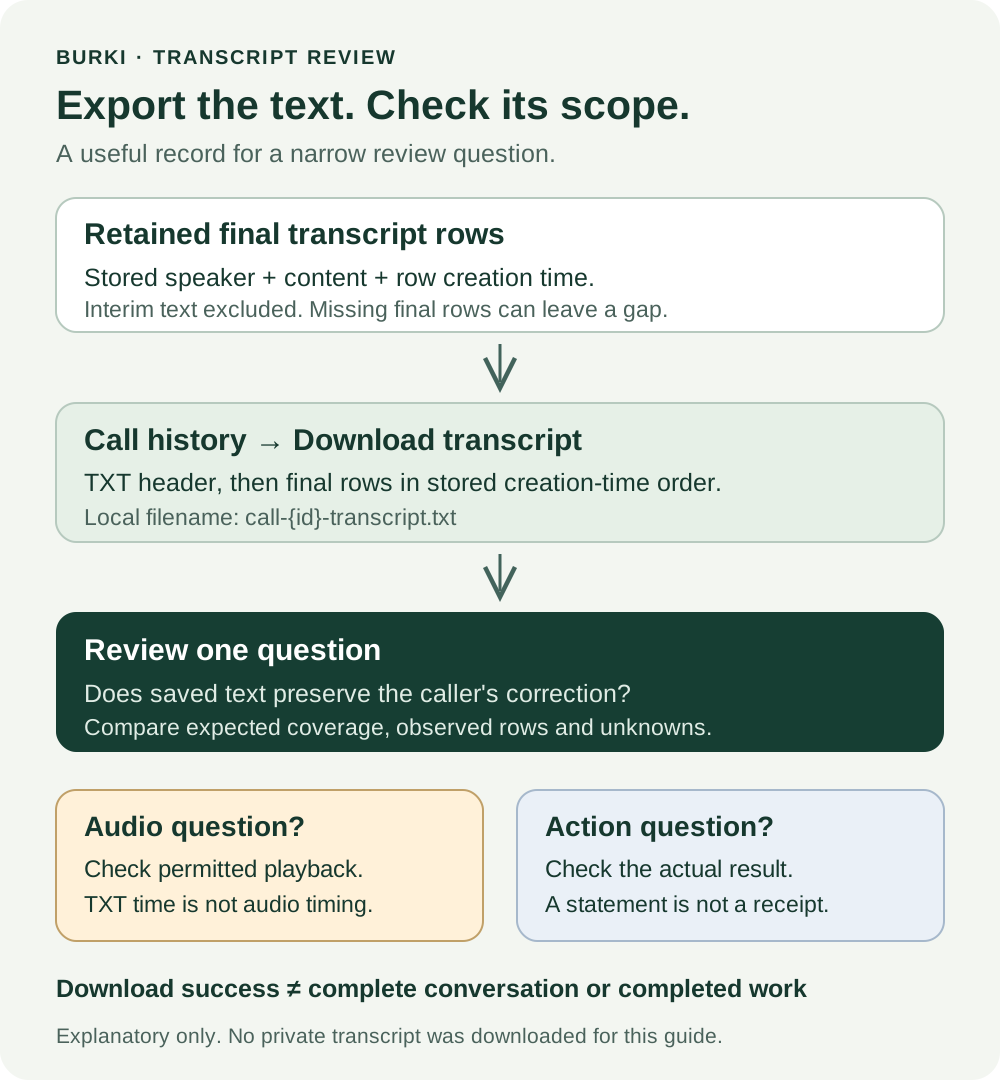
For an AI receptionist, this makes transcript review practical: you can inspect a particular misunderstanding without making the file carry claims it cannot support. Pair the text with verified recording playback when the question is about audible output, and with the actual action record when the question is about work completed.
Start with one authorized call and one review question. A good export review ends with a precise finding, even when that finding is that more evidence is needed.
Ready to try Burki?
Create an assistant and check your available browser practice allowance.
Create your assistantTrial eligibility and available practice are shown in your workspace.