Verify Burki Transfer Webhooks Before Processing an Event
Verify a transfer webhook's raw-body signature, bind its signed event ID and handle retries with a free offline example and receiver review worksheet.
Table of Contents▼
A transfer event reaches your receiver twice. Both requests have valid signatures, but the event says the transfer failed. The receiver has two jobs: avoid applying the same event twice, and preserve that failure instead of treating an authentic request as a successful handoff.
Burki transfer webhook verification lets a receiving system check the timestamp and exact request body against an organization-specific verification key. The receiver must also bind the event header to the signed body's identity and handle duplicate deliveries. A valid signature establishes authenticity under that key, not that a caller reached a member of staff.
This guide walks through the current transfer-event contract, a synthetic failure event and an offline verification example. Download the receiver review worksheet and standalone Python offline check. Both are free resources. The example uses a deliberately public dummy key, runs without network access or third-party packages, and does not create a real transfer or reveal an account secret.
Decide what your receiver will do
Begin with a narrow result: “Record one authenticated transfer lifecycle event in the correct organization's history, without repeating a business action on retry.” Do not begin by making every incoming event trigger a callback, CRM update or notification.
Transfer events describe stages such as started, prepared, bridged, failed, cancelled, ended or reclaimed. The event's type and status need interpretation in the context of that transfer attempt. Started is not bridged; ended is not proof that the caller's business request was resolved. A signed failure is still a failure.
This walkthrough concerns transfer lifecycle events. It does not establish that every ordinary call summary, transcript or other webhook uses the same signing contract. The saved delivery URL can also be used for other call results, but a shared destination does not make their schemas and verification behavior identical.
Choose the organization and event types the receiver is intended to handle. Keep any downstream action separate until its permissions, idempotency and success evidence have been reviewed. The warm and cold transfer guide explains the wider call behavior; this guide addresses the receiving system's event checks.
Find the verification controls and prerequisites
In the focused assistant editor, open Publish → After-call settings. The current implementation contains Send call results where your team works, Call results delivery URL, and Verify transfer webhooks. Expand Receiver verification to read the signing instructions. Other editor layouts may group these controls under their post-call settings area.
A verified organization administrator can use Reveal verification key for an authorized receiver setup. Treat that value as a secret and keep it in the receiver's secret storage. Do not put a real key in a browser client, screenshot, article, shared worksheet or source repository. The organization verification key is separate from the deployment signing secret; the receiver does not need the deployment master secret.
Revealing the key does not enable delivery or prove receipt. Delivery requires operator-enabled signing, an eligible organization, a compatible receiver and a public HTTPS destination on port 443. Transfer-event export is unavailable for HIPAA organizations in the current product. Do not change organization policy merely to follow a tutorial or interpret this restriction as a certification claim.
Transfer events use the assistant's saved call-results delivery URL. Review that setting and its existing consumers before an authorized change. Read the actual Published version state before saving assistant changes: legacy live settings means saving currently affects connected calls. Saving or publishing a URL is not acceptance evidence for the receiver, the phone route or a transfer.
No real key was revealed, URL changed, signing enabled or transfer attempted to prepare this guide. Current source supplies the verification contract; the local example below only verifies synthetic inputs.
Verify the exact bytes first
The sender provides X-Burki-Timestamp, X-Burki-Signature and X-Burki-Event-Id headers. Its signature is an HMAC-SHA256 hexadecimal digest, prefixed with v1=.
Construct the signed message from three pieces, in this exact order:
UTF-8/ASCII timestamp header + "." + exact raw request-body bytesUse the revealed verification key's UTF-8 text bytes as the HMAC key. Although the current key looks like hexadecimal text, hex-decoding it changes the bytes and produces the wrong signature. Do not substitute the deployment secret or an arbitrary organization API key.
Keep the request body unchanged until verification completes. Parsing JSON and serializing it again can change spaces, key order or escaping. Those changes can preserve the apparent meaning while invalidating a signature over the original bytes. Capture the raw body through the HTTP framework's appropriate mechanism, apply reviewed body/header limits and compare the expected digest with the supplied digest using a constant-time comparison.
Validate the signature version and format rather than accepting a loosely matched substring. Validate the timestamp and enforce your receiver's documented freshness and clock-skew policy. The offline example uses a 300-second window and a 64 KiB body limit as illustrative receiver policies. These are not Burki-configured guarantees or universal recommended production values.
Bind the event ID to the authenticated body
The signature covers the timestamp and body. It does not separately cover the X-Burki-Event-Id header. That distinction matters for duplicate handling.
After the signature passes, parse the verified raw JSON and validate its expected fields. Require the header's event ID to equal the authenticated body's id. Reject a mismatch before doing any deduplication or processing. If a receiver instead trusts only the ID header, somebody replaying an unchanged signed body could alter that header and make a naive duplicate check treat the same event as new.
The current sender forms the body ID from the transfer attempt UUID, a colon and the positive event-row ID. The offline example checks that canonical shape, accepts known transfer event types, rejects duplicate JSON keys and consumes only an explicit projection of the verified fields. If an optional attempt ID is present, it must agree with the ID's attempt component. These checks do not grant arbitrary payload details permission to become commands.
Scope the event identity to the organization associated with the receiver's trusted route and verification key. Do not choose the organization merely from an untrusted request field. A useful deduplication key is the trusted organization plus the authenticated, validated body ID.
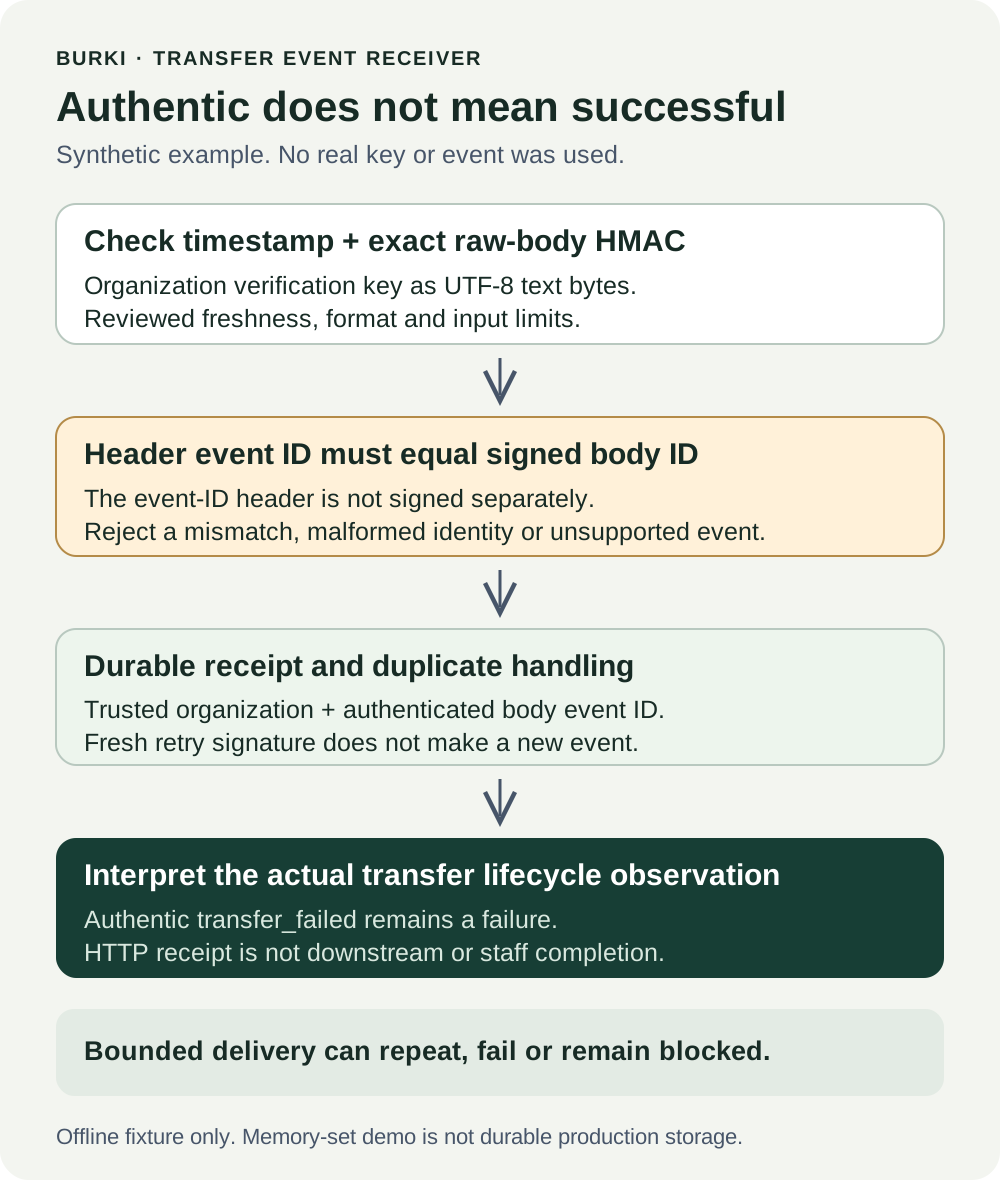
This is a receiver plan, not evidence of a connected endpoint or a completed handoff.
Handle retries with durable processing
Burki's transfer-event delivery can repeat the same event. A crash can cause the same stable event ID to arrive again, and a later attempt can have a fresh timestamp and signature while remaining the same event. The current sender has bounded retries and failure conditions: missing signing configuration defers delivery, a changed destination or export policy can cancel it, and a non-retryable response or exhausted attempts can stop it. Delivery is not guaranteed. Do not use a different signature or a later delivery time as a new business-event identity.
Use durable uniqueness and transactional handling for production. If processing only writes to the receiver's database, the uniqueness claim and corresponding change can be committed together. If it calls another system, define the durable operation and downstream idempotency or reconciliation before accepting the design. Marking an event seen, then crashing before the business operation, can lose work; doing the operation first, then crashing before recording it, can repeat work.
The downloadable example uses a Python set only to illustrate that two freshly signed deliveries can share one identity. It is not durable across restarts, safe across multiple workers or a production transaction design. Do not copy that set into a web server and call the receiver complete.
A successful HTTP response means the receiver accepted the request at that boundary. It does not prove a downstream notification, staff response or business resolution. Return success according to the reviewed durable-receipt contract and inspect actual processing evidence separately.
Run the public dummy-key example offline
Save transfer-webhook-offline-check.py locally and run it with Python 3:
python3 transfer-webhook-offline-check.pyThe file includes its public dummy key and a synthetic transfer_failed event. It makes no HTTP request, reads no account credentials and needs only the Python standard library. The fixed reference time makes its tests repeatable; it is not a clock service or a deployed endpoint.
The checks demonstrate that:
- An authentic failure remains a failure rather than becoming a bridged success.
- Changing body bytes, reserializing JSON, changing the timestamp without resigning, or using the wrong key fails verification.
- Hex-decoding the displayed key is different from using its required text bytes.
- Stale or excessively future timestamps are rejected under the example policy.
- A changed event header cannot override the signed body ID.
- Malformed identities, unsupported event types, duplicate JSON keys and oversized bodies are rejected.
- Two fresh deliveries of the same signed event identity apply once in the in-memory demonstration.
These offline check groups were run successfully for this resource. They do not prove Burki sent a real event, your server received it, your production storage is durable or a transfer connected. Keep those acceptance states separate in the worksheet.
Work through the failure event
Imagine the receiver gets synthetic event [attempt UUID]:7, with type transfer_failed and status failed. Its timestamp is fresh, its signature matches the raw bytes and its ID header matches the signed body. The receiver records the failed lifecycle observation under its trusted organization scope.
The sender retries the same event with a later timestamp and valid new signature. The receiver recognizes the same body identity and does not repeat its event processing. There is still one failure observation, not a new transfer attempt or a successful handoff.
Now change only X-Burki-Event-Id while preserving the body and signature. The MAC can still be valid because that header is outside its input, but the header/body ID binding fails. The receiver rejects it instead of treating it as a new event.
Finally, consider a genuine later transfer_bridged observation with its own event identity. That is a separate lifecycle event whose meaning must be reviewed. It still does not establish that the staff member resolved the caller's request. Never turn a valid webhook signature into a universal “successful call” label.
Complete the real acceptance record separately
Before an authorized production setup, review secret handling, trusted organization routing, raw-body capture, parser limits, clock policy, event validation, durable deduplication and failure recovery. Plan expected responses for malformed, stale, tampered and duplicated deliveries without using private customer data.
Later, when an actual transfer is authorized for the business, correlate the transfer attempt, signed event, receiver receipt and processing result. Carrier readiness and caller-heard behavior require their own evidence. Do not trigger a paid call merely to fill an article screenshot or worksheet.
The guide, worksheet and offline script are free. Production hosting, storage and voice, model, transfer announcement, carrier or number usage can incur costs. Review the account's actual configuration and current Burki pricing. Burki's AI receptionist workflows provide the business context; the receiver should preserve what each event actually proves.
Ready to try Burki?
Create an assistant and check your available browser practice allowance.
Create your assistantTrial eligibility and available practice are shown in your workspace.