Record and Review a Confirmed Callback Request in Burki
Set up native callback collection in Burki, understand interrupted or corrected readbacks and inspect confirmed versus incomplete results with a free worksheet.
Table of Contents▼
A phone number appearing in a transcript is not the same as a confirmed callback request. The caller might have corrected its last digits, interrupted the readback or said “yes” to a different question. AI callback request confirmation needs to refer to the number the caller actually meant.
Burki's Record callback requests action collects a complete international number, reads it back and records the caller's confirmation for review. A correction requires another readback and confirmation. The action records the request; it does not place a callback, send a message or promise when staff will respond.
This guide explains the current standalone-assistant setup and its result states with an illustrative correction. Download the free callback confirmation worksheet to separate a supplied number, a proposed value, a confirmed result and actual staff follow-up. No paid call or production callback request was created for this guide. The example describes expected behavior, not a recorded customer result.
Choose the native request you need
Use this feature when staff need a callback number that the caller has confirmed through the supported readback process. Give the team a clear reason for collecting it, an owner for the request and an honest explanation of what happens next.
For a fictional Harbor Reception assistant, the task is: answer approved public questions and, when the caller requests staff follow-up, collect their callback number. Staff then review the available request through their actual process. The assistant cannot independently promise a callback time.
The feature is available for standalone standard and GPT Live assistants with transcript retention permitted. It does not support Guided workflows or the builder. If your assistant uses a workflow, an instruction that asks for a number does not enable this native confirmation feature there.
The supported confirmation recognizer uses explicit English affirmations after the readback. Do not sell this walkthrough as language-independent confirmation simply because a voice model can speak another language. A caller's number can have international country context while the confirmation step still has this English-language limit.
This feature was briefly mentioned in the insurance renewal consultation guide. Here, the distinct task is understanding the native confirmation lifecycle and saved result. For broader country-code and extension planning, see international callback number confirmation.
Review prerequisites before enabling it
Open the intended standalone assistant and confirm that it belongs to the right organization. Review the current voice mode, model and provider prerequisites, account allowance and approved instructions before a separate authorized test.
Transcript retention must be permitted by the applicable organization policy. Do not confuse this with recording audio or selecting consent to record a browser test. Audio recording and transcript retention are different settings and permissions. The current interface's action description does not create a general transcript-retention switch; ask the responsible operator to verify the actual policy if it is unclear.
Do not change a restrictive retention policy merely to make the action available. If the current policy does not permit the necessary conversation data, use an approved alternative staff process. A policy or deletion change can also affect what remains available in later review, so do not assume a result is retained forever.
For telephone use, the actual phone route needs its own readiness and acceptance checks. A saved action setting is not evidence that a caller reached the assistant. Browser testing, when separately authorized, has its own admission and allowance; it does not prove a telephone route.
Configure the current action
Open Assistants, then the existing standalone assistant. In Actions, locate Record callback requests. Its description explains that it collects a complete international number, reads it back and records confirmation in call review. It also states that no call or message is sent.
For an authorized setup, turn the action on and review the rest of the assistant's instructions before intentionally saving. Do not enable it in a Guided workflow or assume a custom function with a similar name has the same behavior.
In Conversation → Instructions, explain the business purpose and the limits. A starter block is:
Help callers using approved public business facts. Collect a callback number only when the caller requests the approved staff follow-up. Use the native callback-number collection action with the complete caller-supplied digits and country context. Ask only for missing or corrected details. Let the native readback finish and wait for the caller's explicit confirmation. If the caller corrects the number, use the latest value and obtain a fresh readback and confirmation. Do not declare a request confirmed merely because the caller said yes elsewhere. Never say a callback was placed, a message sent or a response time accepted without an actual result supporting it. Explain the approved staff process and acknowledge when confirmation is incomplete.
The native action performs its own number readback. A manually written sentence or a model-generated “confirmed” flag is not a substitute for that process. Keep other questions, such as a preferred time, separate so an answer to them cannot be mistaken for the immediate number confirmation.
Read Publish → Published version before changing an existing assistant. For an unpublished assistant, save reviewed settings with Save changes, complete the appropriate authorized checks and use Publish assistant when ready for real calls. For a published assistant, saved edits remain drafts until Publish saved changes; telephone calls use the published version. A legacy live settings warning means saving currently changes connected calls. Do not assume every saved edit is isolated.
Knowledge, provider credentials and policies, and calendar availability remain live dependencies. Publishing alone does not verify the phone connection, make a callback or establish staff receipt.
Understand the confirmation window
The current implementation distinguishes three states. These are not three different business outcomes:
| State | Meaning in the native process | What it does not establish |
|---|---|---|
| Partial | The number is missing, invalid or needs correction | A usable confirmed callback number |
| Proposed | The supplied number has passed formatting validation; readback and confirmation are still needed | Caller confirmation, ownership or reachability |
| Confirmed | The current proposal completed the native readback and received a qualifying later affirmation | An actual callback, answered phone or delivered message |
Country context matters. The native parser needs an explicit country for a national-format number, or a number beginning with +. It checks whether the supplied number is structurally valid and normalizes it into an international form. That check does not prove who owns the number, that it belongs to this caller or that a later call will connect.
Confirmation requires the current number revision, completed uninterrupted readback and the immediately following committed caller turn with a qualifying explicit English affirmation. A response such as “Yes, but change the last digit” is a correction, rather than an uncomplicated confirmation. Do not turn every sentence containing “yes” into approval.
If the caller interrupts the readback, corrects the number or responds with something other than the expected affirmation, the old proposal cannot simply be carried forward as confirmed. Collect the missing or corrected value, read it back again through the native action and wait for a fresh confirmation. A silence or an unrelated response is not consent to use an unconfirmed value.
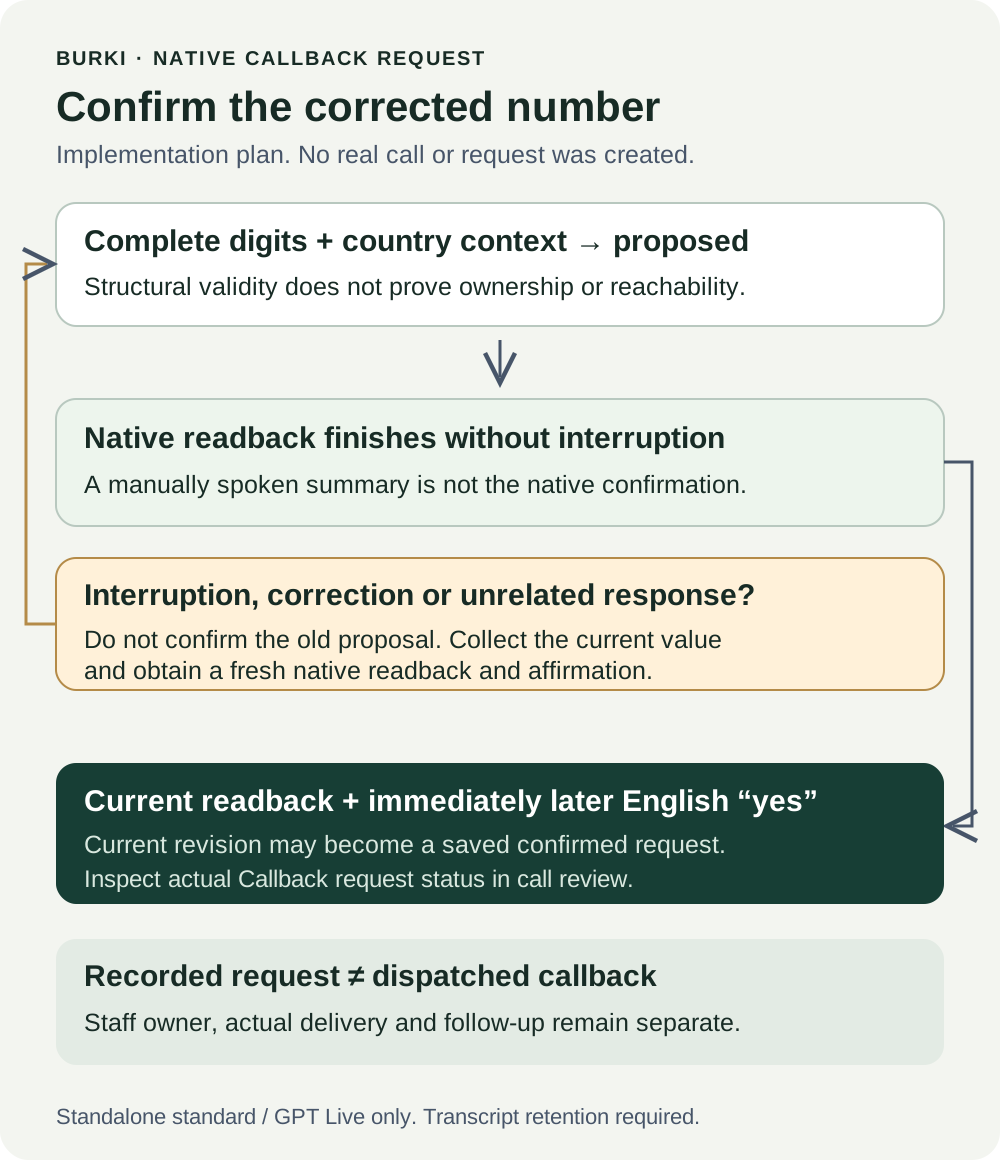
The diagram describes the checked implementation contract. It is an explanatory illustration, not evidence that a real caller heard a particular readback or that a production request was accepted.
Work through a correction
The following is a symbolic example. [original number] and [corrected number] stand for caller-supplied digits; these placeholders are not dialable numbers or values to paste into the action.
Caller: “Please ask someone to call me on [original number]. It is a UK number.”
Assistant: Uses the native collection action with the supplied number and country context. The native action begins reading back the proposed international number.
Caller: Interrupts: “Actually, the last two digits are different.”
Expected state: The old proposal is no longer eligible for confirmation. The assistant asks only for the corrected or missing digits, without restarting the whole business enquiry.
Caller: Supplies [corrected number].
Assistant: Uses the native action for the corrected value. Its readback finishes without interruption and asks whether that value is correct.
Caller: “Yes.”
Expected state: The corrected current proposal can become confirmed through the supported process. The old value must not be used merely because it appeared first in the transcript.
If the caller instead says “Can you call tomorrow?”, the expected result is not confirmation of the number. A preferred time is a separate request, and no scheduling action has occurred. The assistant should obtain a fresh readback and affirmation rather than retroactively assigning that answer to the earlier question.
Review the actual callback result
In Calls, open the relevant conversation's review. When a callback result is available, the Callback request section shows either Caller confirmed [number] or Incomplete, followed by the explanation that there is no confirmed callback number. The section also explains that it records a request only and that no callback or message has been sent.
Compare the actual result with the conversation and the latest correction. Do not choose a number manually from whichever transcript turn looks most convenient and then claim it was confirmed natively. A confirmed label establishes the saved native outcome at that point, not subscriber identity or staff execution.
If the callback section is absent, do not infer successful confirmation or a particular failure. Check the selected assistant/action, the actual conversation and retention policy, and whether results have finished processing. Absence from this view does not by itself identify the cause.
For the worksheet, preserve two distinct records: native callback status and staff follow-up evidence. The first might say confirmed with the corrected value. The second stays unknown until the team can link the request to a real follow-up. A callback event sent through another system needs its own acceptance and receipt; the callback follow-up ownership guide explains that wider process.
Test the failures you care about
Write expected results before any separately authorized test. Use safe approved test details and routes, and do not call an unrelated person's number merely to validate reachability.
| Case | Expected result | Failure to catch |
|---|---|---|
| National digits without country context | Ask for the missing country | Guessing a country and accepting the wrong number |
| Caller interrupts the readback | Fresh proposal/readback/confirmation as needed | Old proposal marked confirmed |
| Caller changes the final digits | Latest value gets its own confirmation | First transcript value retained |
| “Yes” answers a different question | No retroactive number confirmation | Any affirmative treated as number approval |
| Readback completes, followed by explicit English “yes” | Current native result may confirm | Confirmation tied to an older revision |
| Non-English or ambiguous response | Do not claim the English recognizer confirmed it | Unsupported multilingual confirmation promise |
| Retention prevents saved results | Follow approved policy and inspect the actual blocker | Audio-recording checkbox presented as a retention fix |
| Confirmed request exists | Staff owner reviews the actual next step | Claiming the callback was dispatched |
The worksheet leaves observed results blank because no test was run for this guide. Record the assistant, publication state, voice mode, actual route and evidence with your observations. Current source and deployed configuration do not replace caller-heard audio or an accepted real outcome.
Costs and staff ownership
The guide and worksheet are free resources. Voice use can incur platform, model, speech and carrier costs, with applicable number or other recurring charges. Review the actual account allowance and current Burki pricing before testing or production. Recording a request is part of the conversation; it does not provide a free future callback.
For a useful first version, give staff one clear responsibility: review the saved current result and decide what follow-up the actual business process allows. Do not promise response times or delivered messages from a configuration setting. Burki's AI receptionist setup supports that conversation; this native action makes the number-confirmation step explicit enough to review.
Ready to try Burki?
Create an assistant and check your available browser practice allowance.
Create your assistantTrial eligibility and available practice are shown in your workspace.