Duplicate a Burki Voice Assistant and Prepare the Copy for Another Desk
Copy a standalone Burki assistant, update branch facts and review omitted documents, native actions, credentials and publication state with a free worksheet.
Table of Contents▼
When you duplicate an AI voice assistant, you usually want to reuse a good conversation rather than rebuild every instruction. The useful question comes immediately afterward: which parts of the original still apply to the new desk, and which dependencies did the copy leave behind?
Burki's Duplicate control creates a new standalone assistant from an existing assistant's saved configuration and opens the copy for editing. It is a persistent creation operation. It does not copy the original's assigned phone numbers, Knowledge documents, call history or settings history, and native integration permissions need explicit installation on the copy.
This guide walks through the operation with fictional North Desk and South Desk assistants. Download the free assistant-copy review worksheet to track copied facts, omitted dependencies and the evidence needed before using the copy. The worksheet is a manual review resource. We inspected the current control and implementation; no production assistant was duplicated, saved, published or called to produce this example.
Decide what you are reusing
Start with a narrow purpose: “Reuse North Desk's question order for South Desk, with South's approved hours and contact process.” That gives you a reason to copy the conversation while checking the local facts.
For this example, North Desk's instructions contain three useful habits: answer known public questions directly, ask one question at a time, and use the caller's latest correction. South Desk needs the same habits. It does not need North's closing time, callback promise, staff contact destination or Knowledge files.
Write the differences before choosing Duplicate. If the source contains information the new assistant should not receive, choose a smaller approved baseline or create a new assistant manually. Duplication is not a selective export or a content-redaction step.
Use a standalone source in your own organization. The current Assistants interface excludes the Duplicate control from Guided workflow rows. For a record of a Guided workflow's saved draft and published history, use the separate workflow export guide. Exporting a workflow and duplicating an assistant preserve different things.
Know what the copy contains
The operation copies most of the source assistant's saved configuration, then creates a separate assistant record. Some relationships are intentionally omitted. Treat the following as a review map, rather than assuming that every item visible in the original is ready in the copy:
| Item | Current copy behavior | What to check next |
|---|---|---|
| Assistant name | Starts with a generated “Copy of” name | Rename it to the intended desk and record the new assistant ID |
| Instructions and configured greeting | Saved configuration is copied | Replace branch-specific facts and promises throughout the text |
| Voice, model and other saved settings | Configuration can carry over | Review the actual provider, model, language, funding and supported behavior |
| Active status | Can carry over from the source | Read the copy's actual status; do not assume it was created inactive |
| Assistant API-key override block | Reset rather than copied | Review applicable organization credentials and other provider settings |
| Other JSON configuration and endpoints | Can carry over | Inspect inline values, webhook destinations, custom settings and references |
| Spam scenarios | Copied | Check relevance and whether the selected voice mode supports them |
| Native integration action assignments | Skipped | Explicitly install and review any required native permissions |
| Other tool assignments | May be copied, including custom configuration | Review shared tool references, destinations and allowed operations |
| Assigned phone numbers | Not copied | Treat telephone assignment and readiness as separate work |
| Knowledge documents | Not copied | Add the approved documents needed by the new assistant and check readiness |
| Call history and settings history | Not copied | Keep any useful source review record separately; the new assistant has its own history |
Native integrations in this copying rule include Cal.com, HubSpot, Zapier, Square, Jobber and Open Dental. Their omission does not mean every possible action or endpoint was removed: other tool links and embedded configuration can remain. Nor does a copied model setting establish that the provider will admit a call.
The reset of the dedicated API-key override block is a specific behavior, not a guarantee that every credential-like value in every configuration field is redacted. A copy may also use applicable organization credentials. Review it within the account's normal access and credential policy, especially before sharing screenshots or configuration text.
Create one intentional copy
In the current interface, open Assistants and locate the intended standalone assistant. Beside Open, the copy icon has the accessible name Duplicate [assistant name]. Check the name and organization before activating it.
Choosing it creates a new saved assistant and navigates to that assistant's edit page. It is not a preview that waits for a later “confirm copy” action. Record the new assistant's identity before editing. A generated name can help you spot the copy, but its name alone is not proof that you are looking at the right record.
If the operation returns an error or navigation is interrupted, inspect the Assistants list before trying again. An unclear client-side result is not enough to conclude that creation failed. Find any new copy by name and identity so a retry does not leave several unintended assistants.
This walkthrough does not require a real copy merely to understand the feature. When applying it to your own account, create only the copy you intend to configure and keep the source available as a reference.
Replace the desk-specific facts
In the new assistant, review Assistant name, then open Conversation to check the available business details, Instructions and First greeting. The copied configuration may already be a completed setup, so do not expect every source assistant to reopen the initial new-assistant wizard.
For the fictional example, North Desk closes at 17:00, while South Desk's approved weekday closing time is 16:00. North's instructions also say that enquiries are reviewed by its own reception team. Change the hours and the staff process wherever they appear, including examples and exceptions. Renaming the assistant alone leaves those facts untouched.
Use a short replacement note while editing:
South Desk answers public questions using South's approved facts. Weekday desk hours are 09:00–16:00 in the stated local timezone. Staff review requests through South's approved contact process. Do not use North Desk's hours or contact destination. Do not say a request was sent, a callback scheduled or an appointment accepted without an actual confirming result.
These are fictional facts for illustrating the change. Replace them with approved information for your operation. Check repeated facts in the greeting, Knowledge sources, action configuration and custom settings as well as the main instructions. An outdated fact can survive outside the paragraph you edited.
For GPT Live, First greeting is guidance and may be paraphrased. A copied greeting is not proof of exact wording or first-turn playback. Keep the greeting consistent with the intended task rather than treating a text match as a voice test.
Rebuild the dependencies the copy needs
Open Knowledge and check what is actually attached to the new assistant. The source's uploaded documents were not copied, even if its saved Knowledge settings were. A copied instruction that says “use the uploaded policy” does not supply that policy. Add only the approved documents needed by South Desk and verify their processing state using the Knowledge upload and readiness guide.
Review Actions and any required installed integrations. Native integration assignments need explicit installation for the copy. Verify the account, permissions, required fields and staff ownership for each intended action. An organization-level connection or a successful action on North Desk does not establish an accepted action for South Desk.
Other custom tools can still reference the same underlying organization tool. Check its configuration before changing it: a shared reference is different from an independently copied tool definition. If an endpoint still points at North's request destination, do not accept the copy simply because the conversation now says “South.”
Also inspect Messaging, transfer destinations and any post-call endpoints present in the configuration. The operation is not a promise to recreate or isolate every external system. Keep unsupported or unnecessary actions out of the first acceptance plan.
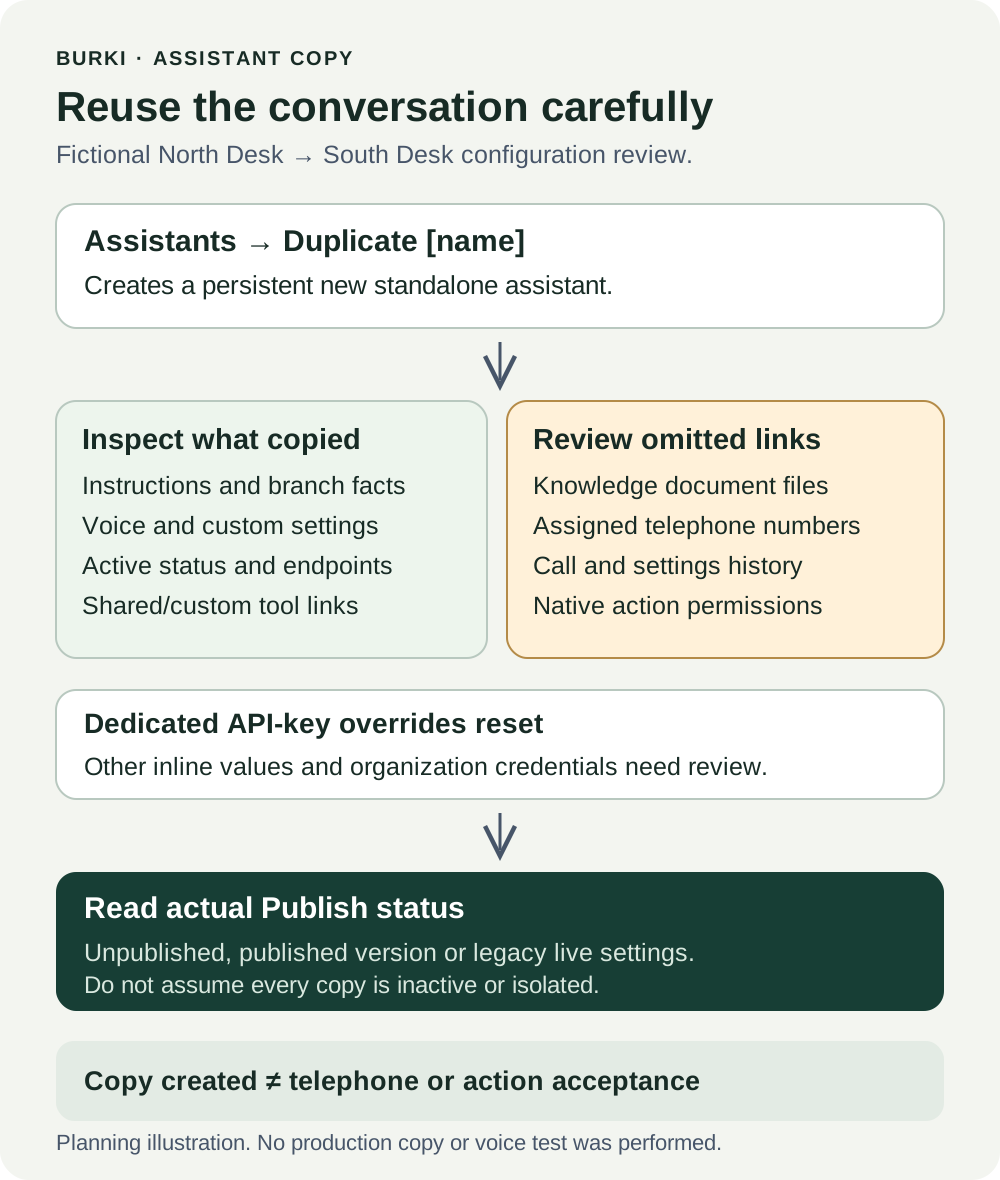
The diagram shows the copy boundary and review work. It does not show a connected telephone route, a duplicated provider account or successful business actions.
Read Publish before saving or connecting calls
Open Publish → Published version and read the copy's actual state. Do not infer it from the source's publication or from the word “copy.”
For an unpublished assistant, review the configuration, save intentionally with Save changes, complete the appropriate authorized checks, then use Publish assistant when ready. For an assistant with a published version, telephone calls use that version; saved changes remain drafts until Publish saved changes. A legacy live settings warning means saving currently changes connected calls. The copying code does not guarantee that every account creates an inactive, unpublished sandbox.
Knowledge content, provider credentials and policies, and calendar availability remain live dependencies. Publishing freezes the relevant settings and selected actions, not all external information. It also does not assign or verify a phone connection. Keep phone assignment and any actual telephone acceptance separate from configuration review.
The Settings History guide explains another separate operation: restoring an assistant's editable saved settings. The source's settings history is not transferred into this new assistant, and neither history restoration nor duplication proves a working replacement route.
Work through the South Desk check
Imagine reviewing the copy before a test. The name says South Desk, the instructions show 16:00, but a custom request endpoint still references North's reception queue. Knowledge has no uploaded files, and the copied model setting uses a provider configuration that has not been reviewed for this assistant.
The worksheet should record three separate findings: branch text updated, destination still requires review, and Knowledge/provider prerequisites incomplete. “Copy created” is true; “South Desk ready” is not established.
Before an authorized test, write the expected responses and results:
| Check | Expected evidence | Do not accept as a substitute |
|---|---|---|
| “When does South close on weekdays?” | Approved South hours and timezone in the answer | Correct assistant name with North's hours |
| Caller corrects North to South | Latest desk correction retained | Continuing with facts for the first desk mentioned |
| Question needs a missing document | Honest uncertainty and approved staff process | A confident answer attributed to an absent file |
| Caller requests a business action | Actual supported action result, or a clear explanation that it was not performed | A conversational promise without a result |
| Custom destination is needed | Reviewed correct destination and separately verified receipt | A copied tool assignment or a success-shaped answer |
| Real telephone use is intended | Correct publication, phone route and authorized call evidence | A saved form or browser-only check |
Record expected and observed behavior separately, along with the new assistant ID, configuration revision, publication state and route. No voice test was run for this guide, and the worksheet leaves actual observations blank.
Costs and the point of the first copy
The Duplicate operation itself does not start a voice conversation or send a message. That does not establish a general free plan entitlement. Later testing and production can incur platform, model, voice, carrier and recurring-number costs. Review the account's actual allowance, provider prerequisites and current Burki pricing before running them.
A useful first copy preserves the conversation habits you want and exposes the desk-specific work you still need to do. Start with one intentional assistant, replace the local facts, rebuild its omitted dependencies and record the actual acceptance evidence. Burki's AI receptionist setup is the commercial starting point; the worksheet makes the copying step concrete enough to review.
Ready to try Burki?
Create an assistant and check your available browser practice allowance.
Create your assistantTrial eligibility and available practice are shown in your workspace.