Set Up Idle Reminders in Burki Voice Agents
Configure a voice agent silence timeout in Burki, set a total reminder limit and prepare a review that separates inactivity from turn-taking.
Table of Contents▼
A caller says, “Give me a moment to find the reference.” The useful response is to leave room for the search, offer a short reminder if the conversation stays quiet, and have a deliberate limit for an abandoned call. Repeating “Are you there?” after every small pause would make the same workflow harder to use.
To configure a voice agent silence timeout in Burki, use the standard pipeline's Idle message, Idle timeout (sec) and Max idle messages. Together, these configure an inactivity reminder and a total reminder allowance. This guide walks through that existing function with a fictional parts desk. It does not announce a new feature or claim a measured improvement in calls.
Download the free idle-reminder worksheet for a settings record, logical timeline and acceptance cases. The worksheet is free. Any later voice test or production session can incur platform, speech, model and telephone costs. No call was run or assistant configuration saved to create this example.
Choose the right kind of silence control
Three controls can involve seconds while solving different problems:
| Control | Question it addresses |
|---|---|
| Turn completion | Has the caller finished the current thought so the assistant can respond? |
| Idle reminder | Has an otherwise inactive conversation waited long enough for a reminder? |
| Maximum call length | Has this session reached its admitted duration limit? |
A caller pausing inside a sentence is a turn-completion question. A caller talking over the assistant is an interruption question. Neither is solved simply by making the idle message more frequent. LiveKit's documentation distinguishes turn detection from interruption handling; Burki's inactivity controller is an additional application behavior. LiveKit turn-taking overview.
If the problem occurs during overlapping speech, use the separate Burki interruption-style guide. Here, the task is what happens when neither participant is speaking and no relevant new input has restarted the inactivity timer.
Check that the assistant uses the standard pipeline
Open Assistants and the intended saved assistant. Under Voice → Model and provider choices → Conversation engine, confirm Standard pipeline · advanced provider choices.
These idle reminders do not operate as a GPT Live setting. GPT Live · default for new assistants handles conversation through its realtime engine, and Burki rejects a positive saved idle timeout for that mode. Its editor can show Disable idle prompts when an incompatible saved timeout remains. Setting that timeout to zero resolves this particular configuration conflict; it does not verify every other requirement for changing engines.
Use an assistant already intended for the standard pipeline rather than switching a working assistant just to expose a field. Confirm its recognition, language-model and speech choices, credential ownership and funding before an authorized evaluation. A browser route and a telephone route need their own readiness checks.
Configure the message, delay and total allowance
Go to Workflow → Call behavior → Messages and timeouts. Record the current values before editing. The relevant fields are:
- Idle message: the reminder sentence the assistant is configured to speak.
- Idle timeout (sec): the inactivity delay. 0 disables idle prompts.
- Max idle messages: the total number of reminders permitted during that session.
- Max call length (sec): a separate session-duration preference, still subject to provider, admission and funding limits.
Use explicit values for the intended configuration rather than relying on a blank field or assuming one default applies everywhere. Editor display fallbacks, saved values and runtime defaults are not a single universal preset.
For a fictional Alder Parts Desk, the operator wants callers to have time to find a job reference. A proposed configuration is:
| Setting | Proposed value |
|---|---|
| Idle message | “Are you still with me? You can tell me the reference when you're ready.” |
| Idle timeout | 25 seconds |
| Max idle messages | 2 |
| Maximum call length | Review separately against the actual admitted limit |
Twenty-five seconds and two reminders are planning choices, not a recommended value for every caller or a tested optimum. Adapt them to the real task, including callers who need more time. Keep the message brief and neutral. An inactivity reminder should not invent a queue position, imply work finished, or ask for sensitive information merely to restart conversation.
Understand what restarts the clock
The current controller waits while the assistant or caller is speaking. It tracks activity from user-state changes, nonempty recognized input and the assistant finishing a speaking period. Relevant activity restarts the inactivity delay.
The reminder itself uses the regular speech path. It can be interrupted, and its speech also affects when another eligible quiet interval begins. The controller checks periodically, so the configured delay is not a guarantee of an exact timestamp at the caller's ear. Output scheduling, speech duration and the actual route still matter.
The important distinction is that activity restarts the timer but does not replenish the total reminder allowance.
Suppose Alder has already used one of its two reminders. The caller returns and says, “Found it, the reference is A17.” Normal conversation can continue. If the session later becomes inactive again, only one reminder remains. The caller's return did not create a fresh allowance of two.
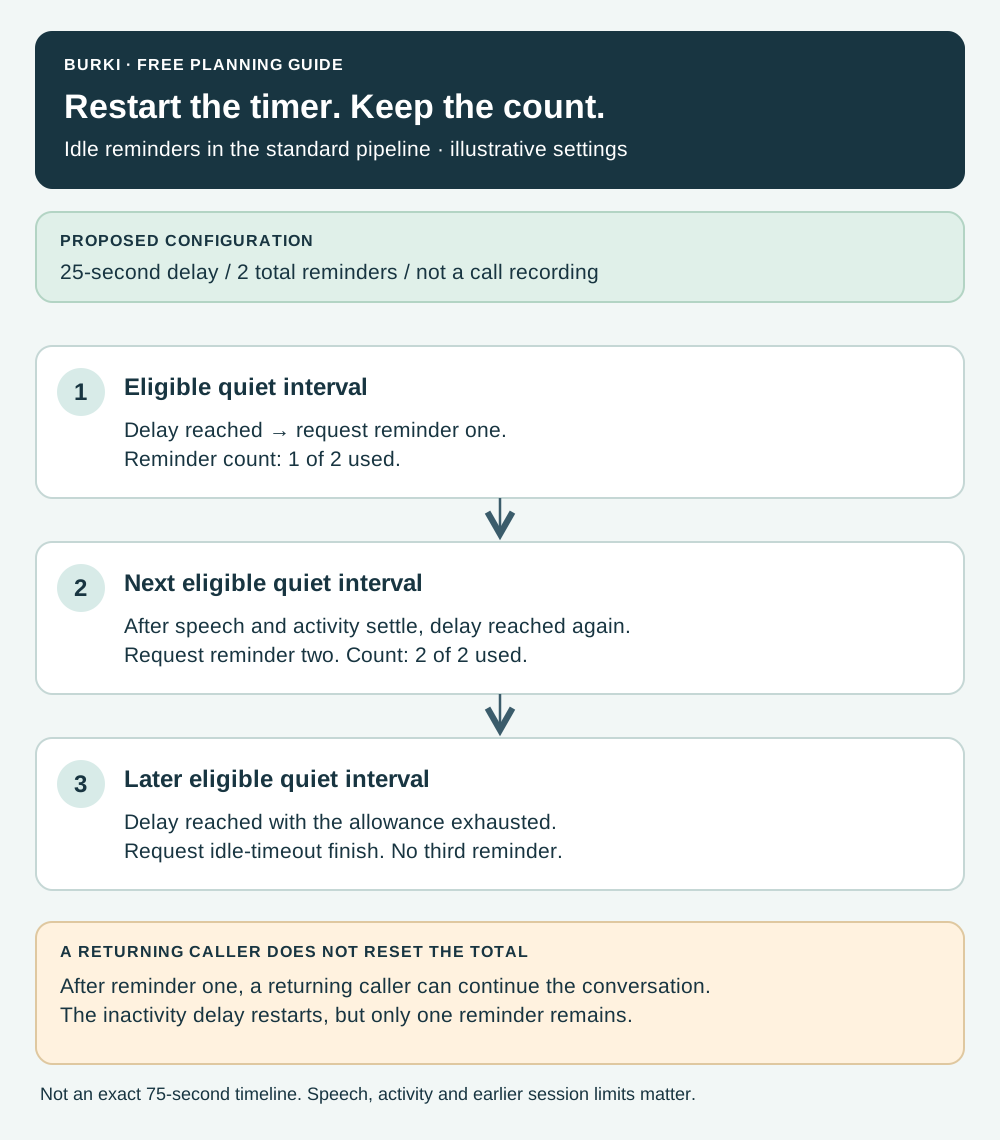
An illustrative control sequence, not measured call timing. Each interval begins from the relevant latest activity; the reminder count stays with the session.
Work through the abandoned-call case
With the proposed two-reminder limit, the logical sequence is:
- An eligible inactive interval reaches the configured delay. The first reminder is requested.
- After subsequent activity and speech have settled, another eligible inactive interval reaches the delay. The second reminder is requested.
- The allowance is now exhausted. On a later eligible inactivity check after another timeout, the controller requests an idle-timeout finish instead of starting a third reminder.
The call does not end merely because the second reminder was requested. There is a later eligible timeout check. It is also inaccurate to present this example as a guaranteed 75-second call: spoken reminders take time, activity changes the timer, and the admitted duration or funding limit may end the session first.
Do not promise that the configured End call message is necessarily heard in this path. A request to finish and an audible farewell are separate behaviors. Review the actual resulting end reason, conversation and authorized audio evidence before describing what a caller heard.
Save and publish with the correct scope
Before intentionally saving, inspect Publish → Published version. When the assistant uses a published version, saved changes remain a draft until the appropriate publication action. Telephone calls use the published configuration. A legacy live settings warning means saving currently affects connected calls, so treat that state deliberately.
For a reviewed setup, make the intended change with Save changes, then follow the applicable test and publication process. Publish assistant or Publish saved changes is a separate step where shown. Credentials, knowledge and other live dependencies still require their own review. No value was saved or published for this walkthrough.
An AI receptionist needs a clear caller experience as well as correct business facts. Explain the delay choice to the operator who owns that experience, and record which route the later acceptance covers. The pricing page separates the platform fee from the other usage components; a reminder is not an unlimited free background action.
Review behavior with a small acceptance set
The worksheet provides expected behavior and blank observed-evidence fields for these cases:
| Case | What the later review should establish |
|---|---|
| Caller searches quietly for a reference | A reminder occurs only after an eligible inactive interval |
| Caller continues speaking | The idle controller does not start a reminder during their speech |
| Assistant gives a longer answer | Its own speech does not trigger an idle reminder over itself |
| Caller returns after reminder one | Conversation resumes, with one total reminder remaining |
| Both reminders have been used | A later eligible timeout requests finish rather than reminder three |
| Timeout is zero | No idle-reminder task starts for that configuration |
| Assistant uses GPT Live | Positive idle timeout is treated as incompatible, rather than promised to work |
Leave unperformed cases marked untested. A saved field establishes configuration, while a unit test establishes only the bounded logic it exercised. Neither alone proves audible delivery, a clean telephone disconnect or a suitable pause length for actual callers.
If reminders arrive too soon, first check the saved and published timeout and the actual activity sequence. If they overlap speech, investigate state and audio evidence rather than increasing the cap. If a caller returns but later receives no fresh pair of reminders, remember that the cap is per session. Change that expectation before treating the preserved count as a failure.
Ready to try Burki?
Create an assistant and check your available browser practice allowance.
Create your assistantTrial eligibility and available practice are shown in your workspace.