Choose a Burki Interruption Style for Standard-Pipeline Voice Calls
Set up Fast barge-in, Balanced or Patient listener in Burki's standard pipeline, understand preset overrides and prepare a controlled listening review.
Table of Contents▼
Your assistant is explaining the opening hours. The caller says “right,” then a moment later says, “Actually, I mean Saturday.” Those are different inputs. The first may be an acknowledgment; the second changes the question. An interruption setting should be chosen around that conversation, not around a promise that the assistant always stops instantly.
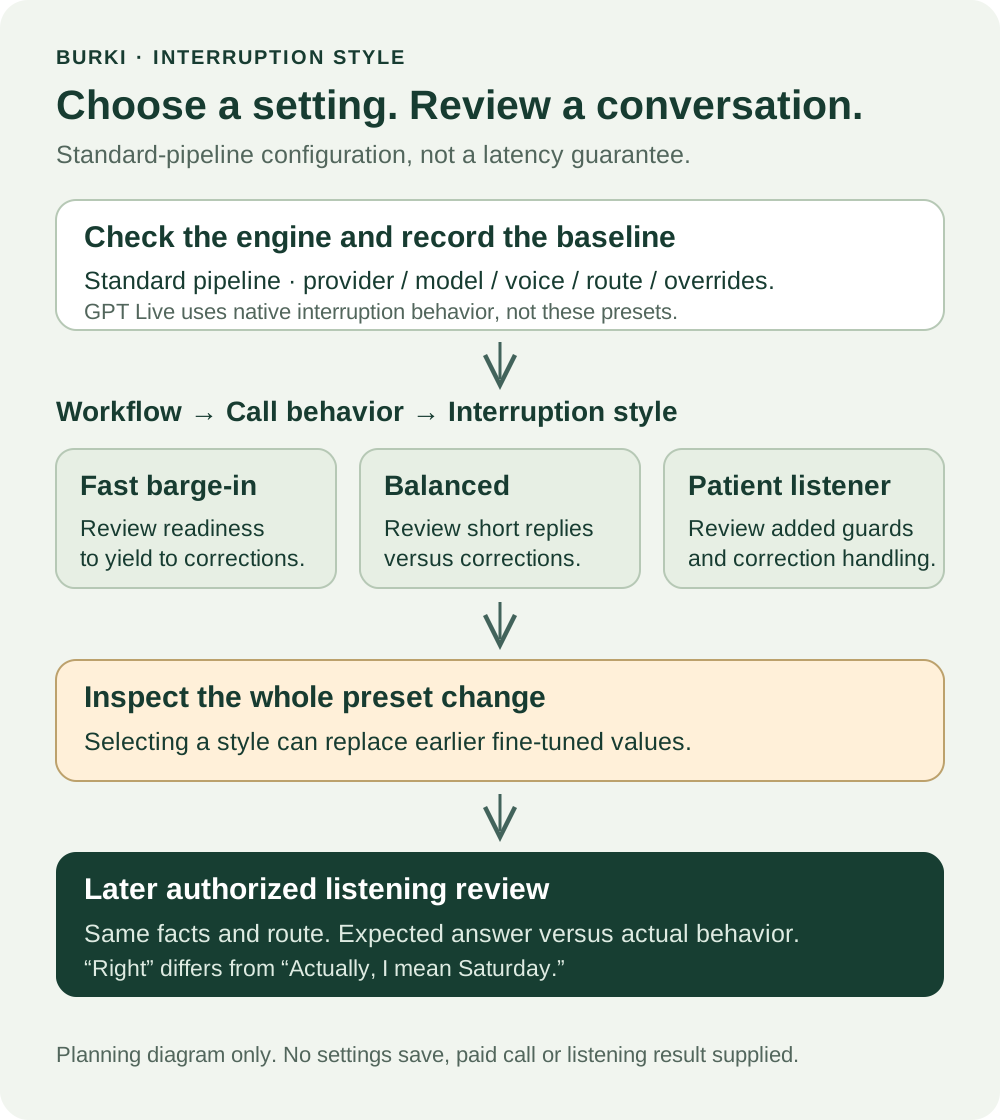
Burki's standard speech pipeline has three Interruption style presets: Fast barge-in, Balanced and Patient listener. This guide explains where they apply, how a preset changes the saved configuration, and how to prepare a useful review before putting a change into service. These are current controls, not a claim that the feature was released today.
Download the free interruption-style worksheet. It records the starting configuration, proposed change and expected versus actual listening results. The resource is free. Production voice usage and any later evaluation can incur platform, model, speech and telephone charges. No paid conversation or provider test was run for this example.
Check the conversation engine first
These presets belong to Burki's Standard pipeline, where speech recognition, the language model and speech synthesis are separate choices. GPT Live handles its conversational listening and interruptions natively. The cascade controls are hidden in that mode, while their saved values are preserved for switching back.
Open the assistant's Voice area and inspect Model and provider choices → Conversation engine. The current options are Standard pipeline · advanced provider choices and GPT Live · default for new assistants. Check the actual engine before looking for a preset.
Do not switch engines just to make a control appear without reviewing the resulting model, speech, credential, funding and supported-action requirements. A saved cascade preference does not become a GPT Live interruption control. This guide concerns an authorized standard-pipeline setup; it does not prescribe a mode migration.
The general distinction is also useful outside Burki. LiveKit's documentation separates detecting when a caller's turn ends from deciding how to handle speech during an assistant response, and describes different detection paths for realtime models and speech-recognition pipelines. Its latest SDK options should not be assumed to match every Burki control. LiveKit turn-taking overview.
Find the preset and record the starting point
For the current assistant workspace, use Workflow → Call behavior → Interruption style. Before changing it, record:
- The assistant and its conversation engine.
- The selected recognition provider/model, language model, voice and intended browser or telephone route.
- The current style and any values under Fine-tune interruptions.
- The current saved and published state, and the symptom you want to improve.
The symptom should be concrete: “brief acknowledgments repeatedly stop the explanation” is useful. “Make it more natural” is too broad to tell you whether a change worked.
Choosing a style applies a group of preset values to the draft configuration. It is not just a new name in the selector. It can replace timing, filtering and other preset values that were previously fine-tuned. Keep a record of any deliberate overrides before selecting another style, then inspect the resulting controls. Some previously saved overrides can still take priority when the configuration is resolved. If the assistant has imported or API-managed settings, review the full saved configuration through the authorized process. A selected label is not proof that every effective value equals that preset's defaults.
| Style | What to investigate in a later authorized review |
|---|---|
| Fast barge-in | Whether genuine corrections are handled readily without unwanted stops from ordinary overlap |
| Balanced | Whether short acknowledgments can pass without needless restarts while meaningful corrections still get attention |
| Patient listener | Whether more guarded interruption behavior avoids unwanted stops without making a real correction feel ignored |
These are review questions, not measured performance claims. The labels do not establish which style is best for a particular age group, industry, accent or noisy room. Choose from actual observed behavior for the intended callers.
Keep the neighboring controls separate
Under Fine-tune interruptions, the current form includes Minimum speaking time (sec), Cooldown between interruptions (sec) and Filter filler sounds.
Minimum speaking time concerns protection around the assistant's in-progress speech. It is not a promise about how quickly the caller's speech will be recognized, nor is it the caller-speech duration threshold. Cooldown is part of the handling between interruptions; it should not be treated as the entire conversation's pause setting. Several checks interact in the current implementation.
Filter filler sounds concerns caller input during the assistant's speech. The separate Active listening field is labelled for acknowledgments from the assistant while the caller speaks. Turning one into the other in your notes makes a comparison hard to interpret. Start with the preset and leave unrelated controls unchanged unless you have a specific reason to investigate them.
Interruption handling is also different from deciding when an unfinished caller sentence has ended. A complaint that the assistant responds before a caller finishes a thought may need investigation of turn completion and recognition, rather than simply choosing a different barge-in style.
Understand what the preset does not guarantee
The current standard-pipeline implementation considers meaningful recognized input, applicable confidence information, whether the current speech permits interruption and timing/filtering rules. Short acknowledgments and explicit correction or stop language can take different paths. Some explicit interruption phrases can bypass timing guards after the other applicable checks; do not interpret a timing field as an absolute rule that every correction must wait that long.
The current local acknowledgment and explicit-phrase rules include English examples. They are not a multilingual guarantee. Speech-recognition providers also differ in whether their parser supplies confidence information. A preset name cannot remove those differences or prove that a word was recognized correctly.
Do not read a setting's number as measured caller-heard stop latency. Recognition, detection, output buffering and the actual route all affect the listening experience. Product helper text is guidance, not a benchmark. A claim such as “always stops immediately” would need evidence this setup does not provide.
Worked setup: a short hours explanation
For a fictional Alder Service Desk, the operator has one approved fact: Saturday hours are 9 AM to 1 PM. The assistant gives a short explanation of weekday hours. The operator wants meaningful corrections to work while avoiding restarts after a whole acknowledgment such as “right.”
Use Balanced as the proposed starting configuration for this example, record the existing overrides, and leave the same recognition/model/voice choices in place. This is a planning choice, not an experimentally proven winner.
Prepare two different caller inputs:
Acknowledgment: The caller says “right” while listening to the explanation. The review question is whether this causes an unnecessary stop or restart.
Correction: The caller says, “Actually, I mean Saturday.” The review question is whether the assistant handles the changed day and answers from the Saturday fact, without continuing the old weekday explanation as if nothing changed.
An illustrative continuation is: “Saturday is 9 AM to 1 PM.” That sentence is an expected answer for the fictional facts, not output from a call performed for this article.
If the assistant yields but later answers the wrong day, the problem is not solved by reporting a fast interruption. If the caller's correction never reached the recognized text, investigate the listening path before concluding that the style alone caused the failure. If “right” is actually part of “right, but I meant Saturday,” preserve the meaningful correction rather than reducing the whole phrase to a harmless acknowledgment.
Review one change at a time
Keep the same fictional facts, prompt, provider versions, language, device and route when comparing a proposed style with the baseline. Record the actual configuration used for each later authorized observation. A phone test and a browser test are different conditions, even if the assistant name is the same.
The worksheet includes a small review plan:
- A whole acknowledgment during a short response.
- An explicit correction that changes the needed answer.
- A clear stop request during speech.
- A longer caller thought with a pause, to distinguish turn-completion trouble from interruption trouble.
Write expected behavior before evaluating. Then record what actually happened, including stale speech, unnecessary restarts, misunderstood corrections and missing evidence. Leave actual-result fields blank until a real evaluation is authorized and performed. No listening result or timing measurement is supplied by this guide.
For a broader review, use the existing interruption-recovery evaluation guide. It covers recovery across conversation and action states; this guide's purpose is the current preset setup and its configuration record.
Review saved and published changes before release
Inspect the assistant's current Publish status before saving a real change. Where versioned publication is in use, saved edits and the published telephone version are different states; review the current changes before publishing. Legacy live settings can affect connected calls differently, so do not assume that a saved configuration is always a separate rehearsal.
Use the authorized release process for the actual assistant and route. Preserve the prior configuration and the review finding so another operator can understand why the style was selected. No assistant settings were saved, published or tested to produce this guide.
For an AI receptionist, the useful outcome is a conversation in which real corrections are understood and the assistant continues appropriately. A recorded configuration and a narrow listening question give you a practical way to work toward that outcome without confusing a preset label with proof.
Ready to try Burki?
Create an assistant and check your available browser practice allowance.
Create your assistantTrial eligibility and available practice are shown in your workspace.