Build a Voice Agent for Equipment Rental Enquiries
Build an equipment-rental enquiry assistant that captures corrected items, hire and return dates, and delivery needs, with a free prompt and review worksheet.
Table of Contents▼
An AI receptionist for equipment rental can prepare a useful enquiry before the rental desk checks stock. The difficult part is often keeping the whole request consistent: one item becomes two different items, the return date moves, and the customer changes from pickup to delivery.
This guide builds that first version in Burki. It captures the final equipment list, quantities, definite hire and return times, and the requested transport arrangement. Staff retain decisions about availability, suitability, deposits, charges and the rental agreement. The result is a reviewable enquiry, rather than an invented reservation.
Download the free equipment-rental starter. It contains a fictional facts sheet, adaptable instructions, an enquiry record and six acceptance cases. The resource is free; production voice service, providers, telephone service and any connected systems have separate costs. No rental, customer contact or paid call was created for this article.
What current adoption does and does not show
YarMobile describes a Polish-speaking voice assistant for Wypożyczalnia Nadarzyn, an equipment rental business near Warsaw. Its case study covers June 23 to September 14, 2026 and describes equipment, rental-date and transport enquiries, with callback requests and staff confirmation of availability. This is an attributed implementer case, not a Burki customer result or an independent adoption-rate study. Named rental deployment.
That example illustrates a practical use of voice AI today: collect a coherent request while leaving the commercial decision with the rental business. It does not establish that Burki connects to the same rental system, supports that deployment's catalogue search, or will reproduce its results.
For scoped industry context, the U.S. Census Bureau's 2023 County Business Patterns national file reports 2,725 employer establishments under 2017 NAICS 532310, General Rental Centers. The file was published June 26, 2025. This is a historical count of locations in the 50 states and District of Columbia, not unique companies or a 2026 forecast. Businesses without paid employees are outside that measure. Dataset and release date, national data file, CBP definitions and coverage.
General rental centers are one defined slice of equipment rental, covering a range of consumer, commercial and industrial equipment. Heavy construction equipment rental is separately classified. The count is useful context for this kind of desk; it is neither the entire rental market nor an addressable voice AI market estimate. 2017 industry definitions, pages 456–457.
Choose a first task the desk can actually use
Start with incoming enquiries for named items. The assistant can ask what equipment the caller wants, confirm quantities, distinguish the intended hire start from the planned return, and capture whether pickup or delivery is requested. It can answer approved branch-hours questions from current business facts.
Leave equipment selection to qualified staff when the caller only describes a job. “I need something for a damp room” is useful context to preserve; it is not permission for the assistant to select a machine, certify its suitability or give operating advice.
Use a small scope table:
| Caller question | First-version response |
|---|---|
| “Can I enquire about one dehumidifier?” | Capture the named item and quantity |
| “Actually, add an air mover and remove the two fans” | Rebuild and read back the complete final list |
| “Can I have it delivered?” | Record delivery as requested, with staff review still needed |
| “Is it available and what will the deposit be?” | Preserve the questions for the desk unless a current verified source answers them |
| “Which machine is safe for this job?” | Ask for a qualified team member's review |
This first version needs no invented rental-inventory action. If the business later connects a system, evaluate its actual search, hold, quote and reservation outcomes separately. A successful conversational summary does not establish any of those writes.
Prepare one approved facts sheet
The downloadable example uses a fictional business, Alder Rental, serving one branch. Its facts are illustrative and must be replaced before use:
Branch timezone: America/New_York
Desk hours: Monday-Friday 08:00-17:00; Saturday 08:00-12:00
Sunday: desk closed; no unattended returns assumed
Named items used in this exercise: floor fan, dehumidifier, air mover
Delivery: enquiries accepted for staff review, not automatically arranged
Availability, suitability, deposits and final charges: rental desk confirms
Follow-up owner: the branch rental desk
Record when the facts were approved and who owns updates. Branch opening hours do not by themselves define billable rental days, authorize after-hours returns or establish delivery capacity. Keep those policies in separate fields, and leave a field unknown if the business has not approved an answer.
Avoid loading a stale catalogue and calling it live stock. A document can explain which item names the branch uses without establishing how many units are available for a particular period. If the business has a large approved facts document, use the existing knowledge-upload guide and check readiness before relying on it.
Build the enquiry assistant in Burki
The October 24 setup review inspected a blank Receptionist form without applying details, creating an assistant or starting a call. Use the following sequence for your own approved setup:
- Open New assistant → Set up manually → Receptionist.
- In Business setup, review Assistant job and enter the real Business name.
- Add the approved branch facts and enquiry limits to Business facts.
- In Desired outcome, describe the result as a final rental enquiry for staff review. Include the item list, hire and return times, transport request and unresolved questions.
- Use Apply business details to instructions for your own draft, then read the resulting Instructions. Check that an enquiry has not become a promise to reserve stock or dispatch equipment.
- Review First greeting and keep the purpose clear: the assistant helps with rental enquiries. The default GPT Live conversation can paraphrase greeting guidance; do not promise exact wording from that field alone.
You do not need to change the conversation engine or add an action merely to use this prompt-based starting scope. Check the actual allowance, provider readiness and save/publication state before an approved test. The template does not establish an integration, a delivered notification or a telephone connection.
Use instructions that survive a changed request
Adapt this original starting prompt to the business's facts:
Help callers prepare an equipment-rental enquiry for the rental desk.
Use only the approved branch facts and item names.

Keep one current list of requested items and quantities. When the caller
changes an item or quantity, replace that detail and read the whole final
list back. Do not keep a removed item as an additional request.

Ask for the intended hire start and planned return separately. Confirm a
specific calendar date, local time and branch timezone. Clarify relative
or conflicting dates instead of guessing. Check approved desk hours, but
do not calculate billable days or invent an unattended-return rule.

Ask whether pickup or delivery is requested. A change between them must
update the final summary. Explain which details need the rental desk.

If the caller describes only the job, preserve that description and ask
for qualified staff help with equipment selection. Do not give operating
or safety instructions, guarantee suitability, or invent catalogue items.

Before closing, read back the final items, quantities, start, return and
transport request. Ask whether those details are correct. Keep stock,
prices, deposits and agreement questions unresolved unless approved facts
or a verified system outcome actually answers them. Never describe this
enquiry as a confirmed reservation or delivery.
Keep questions short. The assistant does not need to ask for every possible field before understanding whether the caller wants information, a rental enquiry or a team member. If a required detail is unknown, record that gap for review rather than filling it with a plausible answer.
Work through the corrected equipment list
Here is the fictional enquiry the starter uses:
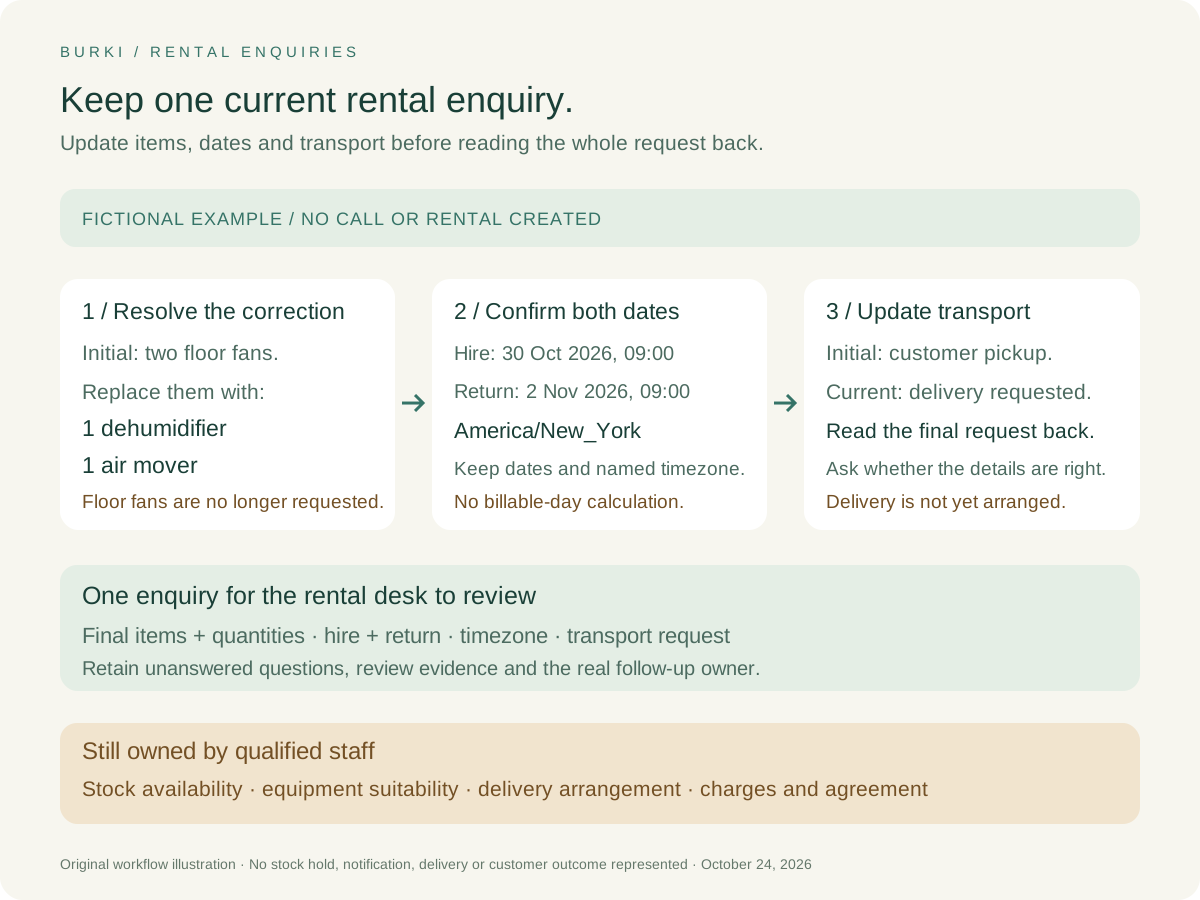
“I wanted two floor fans from Friday, October 30 at nine until Monday, November 2 at nine. Actually, make that one dehumidifier and one air mover. And I need delivery rather than collecting them.”
The current list should contain one dehumidifier and one air mover, with no floor fans. The intended start is October 30, 2026 at 09:00, and the planned return is November 2, 2026 at 09:00, in America/New_York. Delivery is requested and remains subject to staff confirmation.
Those dates cross the local November clock change. Keep the actual dates and timezone in the record instead of applying a permanent UTC offset. This example does not calculate a charge or decide how the business bills a weekend. The desk's Sunday closure also does not turn Sunday into a free rental day.
A useful readback would cover all four parts:
“The enquiry is for one dehumidifier and one air mover, starting October 30 at 9 a.m. and returning November 2 at 9 a.m., in the branch's New York time. You are requesting delivery. The rental desk still needs to confirm availability, delivery arrangements and the terms. Are those the details you want the team to review?”
This is an original, unperformed example. It is a proposed response to evaluate, not a transcript of a Burki call or evidence that a request reached a rental system.
Review the conversation as a desk handoff
After an actual eligible conversation, the responsible team should review the saved transcript and any configured after-call analysis. Check the final corrected details against what the caller said. A generated summary is review material; it is not independent proof of stock or a completed reservation.
The worksheet separates the final enquiry from unresolved decisions:
| Enquiry facts to verify | Decisions still owned by the desk |
|---|---|
| Named items and final quantities | Available units for the requested period |
| Hire start and planned return | Rental duration and applicable charges |
| Pickup or delivery request | Transport capacity, cost and final arrangement |
| Caller question and callback preference | Suitability, deposit, agreement and response |
Assign a real follow-up owner and review process before accepting live enquiries. This guide does not add automatic email, CRM or rental-system delivery. If such an action is introduced later, keep its accepted result separate from the conversation and preserve an uncertain outcome for investigation.
Check six cases before widening the scope
The starter includes expected behavior, blank observation fields and a correction plan for six distinct cases: a straightforward named item; the multi-item replacement above; a relative return date that needs clarification; a pickup-to-delivery change; a return outside approved desk hours; and a job description that needs staff equipment advice.
For each case, ask whether the final list is internally consistent and whether the assistant described the right status. A well-spoken answer that retains removed fans or confirms delivery without evidence fails the task. Fix the specific instruction or fact that caused the error, then reassess the case.
Keep any later browser, telephone, action and staff-follow-up evidence separate. Review the full operating costs through Burki pricing, then use the AI receptionist workflow to build around the business task. The rental desk should receive a clear enquiry it can act on, with the commercial decisions still visible and owned.
Ready to try Burki?
Create an assistant and check your available browser practice allowance.
Create your assistantTrial eligibility and available practice are shown in your workspace.