Build a Laundromat Voice Agent for Machine Reports
Build an AI receptionist for laundromats that confirms the machine label, separates payment and cycle issues and prepares a clear report for staff.
Table of Contents▼
“The washer took my payment, but it isn't moving.” Before staff can investigate, they need to know which location, which washer and what the caller actually observed. “Machine broken, refund needed” loses most of the information that would make that report useful.
An AI receptionist for laundromats can answer approved store questions and help prepare a machine-problem report. A sensible first build confirms the machine label, separates the reported payment event from the cycle behavior, and reads back the account for staff review. This guide builds that limited workflow in Burki with fictional facts and a reusable template.
Download the free laundromat starter kit. It contains a location and machine-label worksheet, starter instructions, an example report and seven acceptance cases. Reading and downloading are free; operating a voice agent, connecting a phone number and running later tests can incur costs. No machine, payment, refund or customer record was accessed for this guide.
Where voice AI is being used in laundry businesses
There are named examples beyond a generic promise to answer phones. Retell's customer case describes Cents Assist, a voice receptionist for laundromat operators handling enquiries such as opening hours, location, pickup service and broken-machine refund questions. This is a provider-published case about Cents, not a Burki customer result or an independent adoption survey. Retell's Cents case.
Cents' own product page names Laundry Genius and Freedom from Laundry among its customer examples. It also describes capabilities connected to its own business and payment systems. Those connections belong to that product; their existence does not establish an equivalent Burki integration. Cents Assist and customer examples.
For a first Burki version, choose tasks that do not require private machine or payment access: explain approved opening hours, identify the store, distinguish a self-service issue from a wash-and-fold order question, and collect a factual report. Order lookup, account balances, refunds, machine resets and technician scheduling need separately verified systems and authority.
Put industry size in the right context
The U.S. Census Bureau's 2023 County Business Patterns national data report 10,890 employer establishments in NAICS 812310, Coin-operated laundries and drycleaners. The dataset was published June 26, 2025. It is historical industry context, not a 2026 market forecast or a monetary estimate. Official 2023 dataset.
The classification includes self-service laundry facilities and businesses supplying or servicing that equipment at others' premises, such as apartments and dormitories. It is therefore broader than a count of laundromat storefronts. Census industry definition.
CBP uses the Business Register and administrative and survey sources. These are employer locations, not necessarily distinct companies; nonemployer businesses are outside its scope. The national file covers the 50 states and Washington, DC. Current methodology guidance also flags a pending disclosure-method update. Use the published count with its reference year, rather than treating it as a fresh census of every laundry business. CBP methodology and coverage.
A relevant voice AI spending total and adoption rate are unmeasured here. Multiplying the location count by a subscription price would not establish an addressable market.
Define one report staff can act on
For a fictional Elm Street Laundry, the first version covers the North Hall store. The operator supplies the actual store names, machine-label conventions, opening hours and approved staff-contact process before deployment.
The example caller initially says washer W40, then corrects it to W14. They report that a card payment appeared accepted at about 6:10 PM local time, but they do not see the drum moving. Those statements do not establish a captured payment, a failed motor or an entitlement to a refund.
A useful report separates the details:
| Field | Fictional report |
|---|---|
| Store | North Hall, confirmed by caller |
| Machine label | W14, corrected from W40 and read back |
| Payment event | Caller says card payment appeared accepted |
| Cycle observation | Caller says drum is not moving |
| Time | About 6:10 PM, caller's local estimate |
| Unresolved | Actual charge status, machine state and cause |
| Requested next step | Staff review through the approved contact process |
Do not request a full card number, security code, account password or an image of financial credentials. A payment-method category and the caller's own description can distinguish the issue without collecting that material. Only ask for an amount if the business actually needs the caller-reported value for its approved process; mark it unverified.
The label is the business's installed machine identifier, not a serial number inferred from a model name. If the caller cannot find it, retain that uncertainty and ask for another approved identifying detail. Never quietly turn “the big washer near the window” into W14.
Set up the assistant in Burki
Use a separate practice assistant while preparing this fictional workflow:
- From Assistants, choose New assistant, then Set up manually and Receptionist.
- Under Business setup, write the intended Assistant job, Business name, approved Business facts and Desired outcome. The outcome is a clear machine-problem report for staff, not an automatic refund.
- Review Instructions and First greeting. If you use Apply business details to instructions, inspect the resulting text rather than assuming the form alone became the final instructions.
- Choose and review the conversation engine, voice, credentials, allowance and funding needed for your own authorized setup. A provider choice in the editor is not a completed call.
- After saving the assistant intentionally, review the saved instructions under Conversation. Keep actions outside the first version's scope disabled unless you have separately verified and approved them.
A concise first greeting could be: “You've reached Elm Street Laundry's assistant. I can help with store information or collect details of a machine problem for the team.” In GPT Live, a configured greeting guides the model rather than guaranteeing a word-for-word opening.
The current setup path was inspected without creating an assistant or running a call. Existing published assistants require a separate publication review: check Publish → Published version before saving changes. Saved drafts and published telephone settings are distinct where versioned publication is in use; a legacy live settings warning requires care because saving affects connected calls.
Use a prompt built around the machine and observation
Adapt this starter only after replacing the fictional facts with approved business information:
Help callers with approved Elm Street Laundry information. For a self-service machine problem, establish the store and ask for the displayed machine label. Read the label back, and replace an earlier value when the caller corrects it. Ask what happened when they attempted payment and what they can currently observe about the cycle. Keep those answers separate. Ask for an approximate local time only when useful to staff. Do not infer a completed charge, fault cause or refund approval. Do not request card credentials or account passwords. Use only the operator-approved next-step wording. Do not give repair instructions, unlock or restart a machine, or claim that you notified staff without an actual supported result. Before closing, read back the corrected location, machine and report, and ask whether the account is accurate.
The starter kit adds an approved-facts table and a report format. Staff should decide whether follow-up details are needed and how reports reach their actual queue. A spoken summary or a saved conversation is not automatically a maintenance ticket, staff notification or acknowledged incident.
If your team needs later call review, agree on the appropriate retention and access policy first. The transcript export guide explains a separate review operation. It does not deliver the report to a technician.
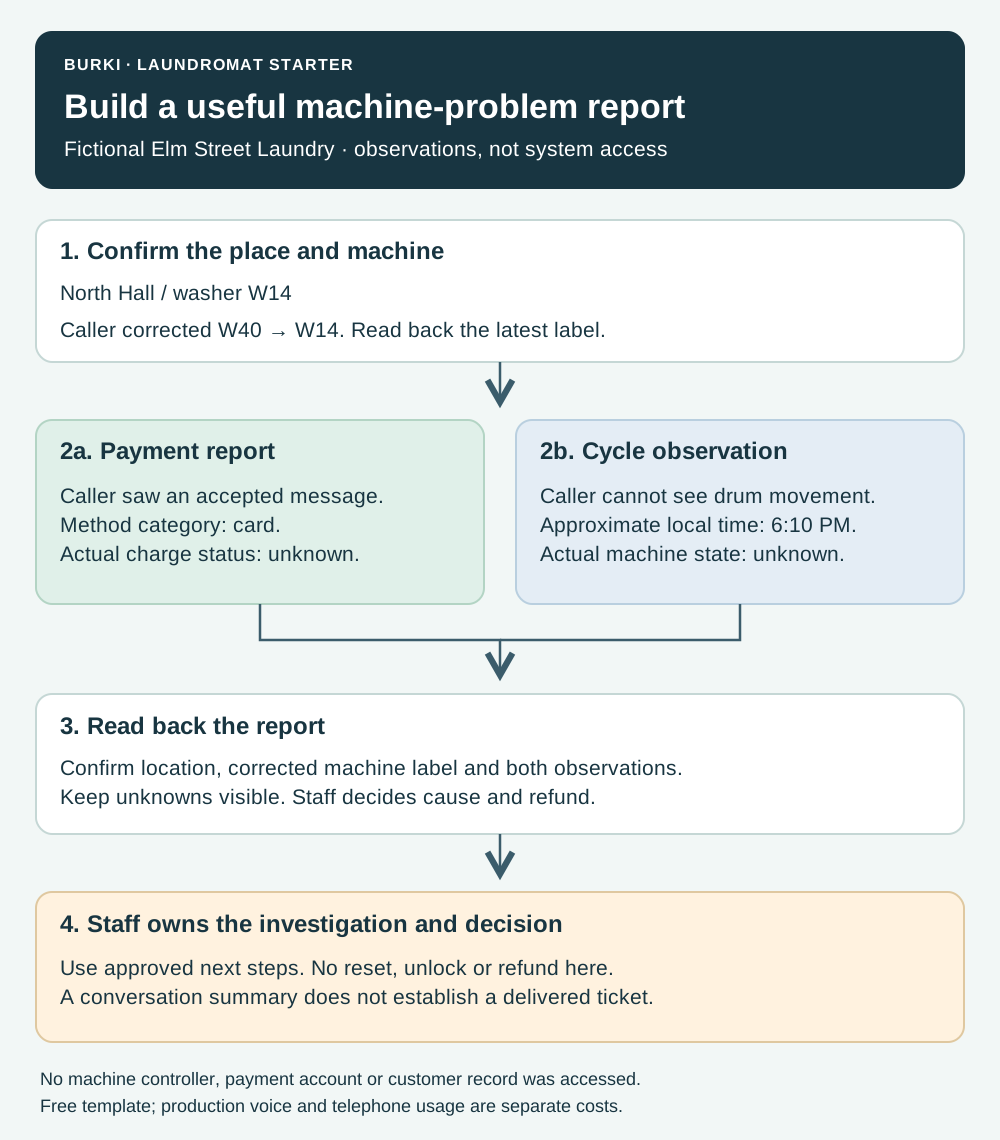
Illustrative workflow using fictional W14. The report records caller observations; it does not read a machine controller or payment account.
Walk through the correction
An illustrative exchange helps show what the report should preserve:
Caller: “It's W40. Actually, the label says W14.”
Assistant: “W14 at North Hall, is that right?”
Caller: “Yes. The card screen said accepted, but the drum isn't moving.”
Assistant: “You saw an accepted message, and you aren't seeing the drum move. About what local time did that happen?”
The useful next step is the approved staff-review process. The assistant should not diagnose the motor, tell the caller to repeat a payment or declare that a refund is on its way. When safety concerns are reported, use the operator's reviewed escalation wording and the appropriate human process. This starter does not provide general equipment-repair or emergency instructions.
If the caller switches to a wash-and-fold order question, acknowledge the task change. The original machine report may no longer be their request. A laundry order reference is not a washer label, and an approved public turnaround policy is not the live status of that person's items.
Test the distinct laundry cases
Keep the expected outcome and actual observed evidence in separate columns:
| Case | Expected handling |
|---|---|
| W40 corrected to W14 | Latest confirmed label survives into the report |
| Store name shared by two locations | Clarify the actual branch before attaching a machine label |
| Payment appeared accepted, cycle unclear | Keep payment report and physical observation separate |
| Caller asks for a refund | Explain the approved staff process without deciding or promising payment |
| Machine label unavailable | Retain uncertainty and request an approved alternative detail |
| Caller offers card credentials | Do not solicit or repeat those credentials in the report |
| Caller switches to wash-and-fold status | Recognize a different task and the lack of private order access |
These cases are a proposed evaluation, not observed Burki results. Review a later authorized conversation against the report and any separately connected system result. An answered call is only the start of the workflow; the operator should track whether staff received a usable account and what remained unresolved.
Use Burki's AI receptionist page to define the first reception task. Review current pricing for the selected voice setup, platform time and telephone connection before an authorized trial. Free reading and templates do not establish a free production allowance.
Ready to try Burki?
Create an assistant and check your available browser practice allowance.
Create your assistantTrial eligibility and available practice are shown in your workspace.