Build a Voice Agent for Course Enquiries
Build an AI receptionist for training centers that keeps course, cohort, application deadline, start date and prerequisites together before advisor handoff.
Table of Contents▼
“I was asking about Python, but actually I mean the evening data course.” If an assistant keeps the first course's application deadline after that correction, its answer can sound clear while pointing the learner to the wrong next step.
An AI receptionist for training centers needs to keep each answer attached to the correct course and cohort. The application closing date, teaching start date, delivery format, timezone and stated prerequisites belong to that record. This guide builds a fictional computer-training enquiry workflow in Burki that explains approved information and prepares unresolved questions for an advisor.
Download the free course-enquiry starter kit. It includes an approved course matrix, adaptable instructions, a corrected-course example and seven acceptance cases. It is a free resource, not a free production calling allowance. No learner record, application, payment or enrollment was created for this article.
What voice AI is doing in training admissions
Retell's named customer case describes TripleTen using its assistant Charlotte for initial program introductions, program questions and admissions-advisor scheduling. The reported workflow includes outbound admissions outreach to prospective students. It is a provider-published example of education administration, not evidence of this proposed Burki inbound setup or an independent sector adoption rate. TripleTen customer case.
That distinction helps choose a first build. A training provider can start with approved course information and advisor questions without assuming it has connected student records, enrollment, finance, messaging or a learning-management system. An admissions assistant and an automated admissions decision are different scopes.
For this guide, the assistant answers inbound questions. It does not initiate calls to prospects, decide that somebody qualifies, reserve a place or promise a job outcome. Those activities require their own verified product support, authority and process.
Use a scoped industry count, not a voice AI market estimate
The U.S. Census Bureau's 2023 County Business Patterns national file reports 1,633 employer establishments in NAICS 611420, Computer Training. The release is dated June 26, 2025. This is a historical location count, not 2026 revenue, an enrollment total or a forecast. Official CBP dataset.
The 2017 classification used by that dataset covers computer instruction such as programming, software applications and network management, including distance delivery. It excludes computer-repair training; academic institutions and other training categories have their own classifications. Do not describe the figure as every coding bootcamp, every training center or a classification finding about TripleTen. 2017 NAICS manual, Computer Training.
CBP draws from the Business Register using administrative and survey sources. It counts locations with paid employees, not necessarily distinct companies, and excludes nonemployer businesses. The national file covers the 50 states and Washington, DC. Current methodology guidance flags a pending disclosure-method revision, another reason to retain the published reference year and scope. CBP methods and coverage.
The relevant voice AI spending total and adoption rate are unmeasured here. A business-location count multiplied by a subscription price would not establish a market size.
Build an approved course-and-cohort matrix
Use a compact matrix rather than one paragraph containing several similar courses. Each answer needs a course identity and the applicable cohort. A course offered twice can have the same title but different dates, hours or delivery format.
For fictional Alder Digital Training, the operator supplies these illustrative records:
| Field | Python Foundations: weekend cohort | Data Foundations: evening cohort |
|---|---|---|
| Record ID | PY-W26 | DATA-E26 |
| Application closing date | 14 November 2026 | 10 November 2026 |
| Teaching start date | 21 November 2026 | 17 November 2026 |
| Delivery | On site | Online |
| Published teaching time | 10:00, Europe/London | 18:30, Europe/London |
| Stated preparation | Basic computer use | Comfortable using spreadsheets |
| Decision owner | Admissions advisor | Admissions advisor |
These are fictional teaching facts, not current course offers. Add an owner, approval date and source to each real record. Leave absent fees, seats, dates or prerequisites unknown. Do not fill a missing cohort detail from another course just because the names look related.
A stated prerequisite describes the provider's approved requirement. The caller's self-description is something to pass to an advisor. It is not proof that the learner satisfies the requirement or that an assessment has been completed.
Set up the administrative task in Burki
The current manual-creation flow is Assistants → New assistant → Set up manually → Receptionist. Under Business setup, prepare Assistant job, Business name, Business facts and Desired outcome, then review Instructions and First greeting.
For Alder, use “answer approved course and cohort questions” as the job. The desired outcome is an accurate explanation or an advisor-review brief. It is not an accepted application. Put the approved course matrix and the limits on admissions decisions into the instructions or another appropriately prepared knowledge source.
If using Apply business details to instructions, inspect the generated instruction text before intentionally saving. The form's business facts and the assistant's final instructions should not be assumed to match without that review. When a provider has a larger course catalog, maintain one approved source and check the actual readiness and version of any uploaded material. The separate Knowledge readiness guide explains that operation.
The current manual form and its field labels were inspected read-only without applying business details, creating an assistant or running a test. For an existing saved assistant, review the course instructions in Conversation. The worked facts below remain fictional; they were not saved to a product account.
Review the conversation engine, model and speech choices, credentials, allowance and funding for the intended setup. A draft using GPT Live treats First greeting as guidance and may paraphrase it. For example: “You've reached Alder Digital Training's assistant. Which course and cohort would you like to ask about?” Do not describe that as a recorded or guaranteed opening.
Keep the course correction ahead of the answer
Start by identifying the requested course. Ask for the cohort when the title alone is not enough. Resolve a correction before reading dates, delivery mode or preparation facts.
An illustrative conversation is:
Caller: “The weekend Python course. Actually, I mean the evening Data Foundations course.”
Assistant: “Data Foundations, the evening cohort. Is that the one you mean?”
Caller: “Yes. Is the seventeenth the last day to apply?”
Assistant: “For that cohort, applications close on 10 November 2026. Teaching starts on 17 November 2026.”
The distinction is the result. An assistant that correctly says “Data Foundations” but gives Python's 14 November closing date still fails. So does an answer that treats the teaching start date as the deadline merely because the caller suggested it.
Keep Europe/London with the published time in this example. If a caller asks what that means in another timezone and no verified conversion capability or approved conversion is available, preserve the published timezone and request clarification or advisor help. Do not silently assume their location from a phone number or improvise a conversion.
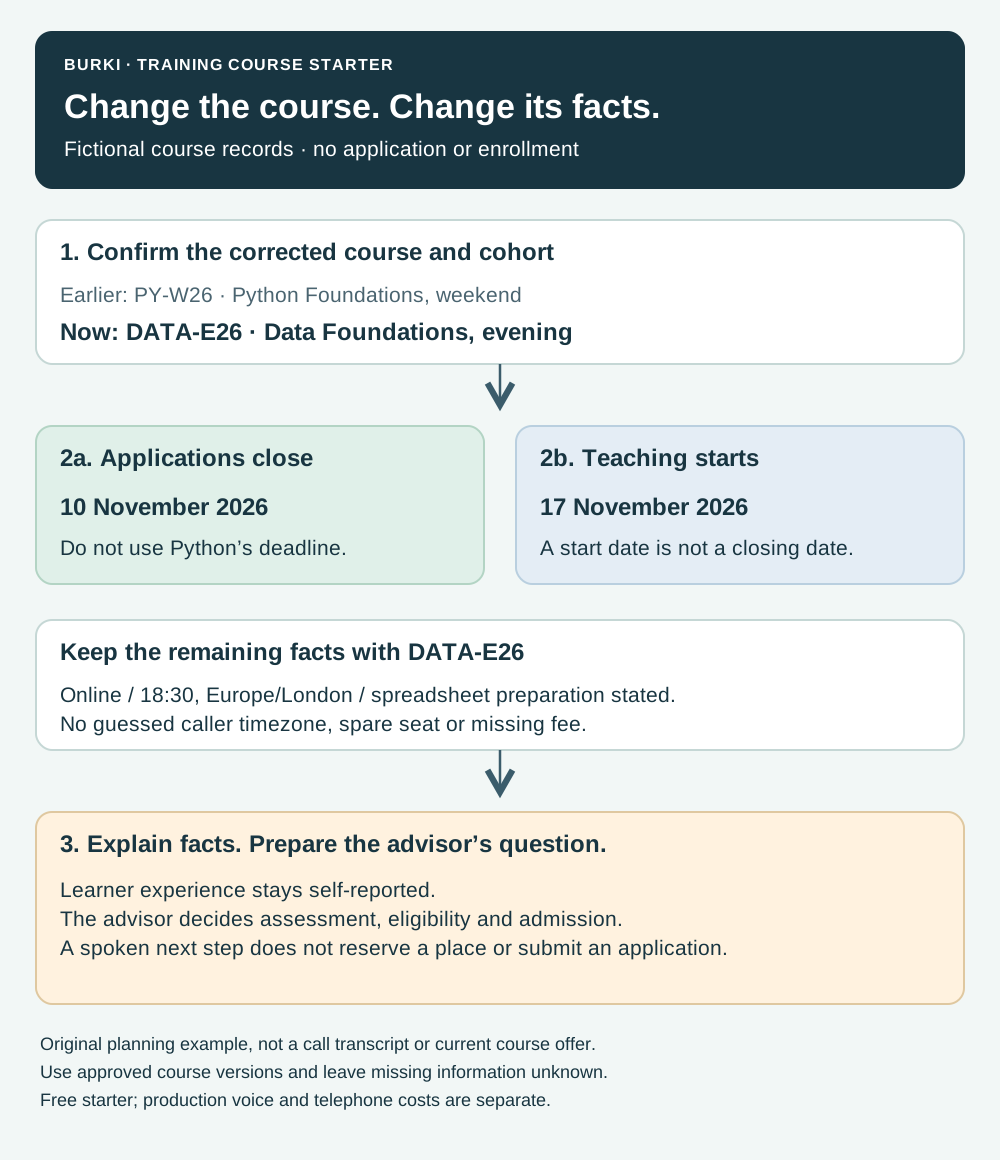
Illustrative records and expected conversation. Selecting the right row does not submit an application, confirm eligibility or reserve a seat.
Use instructions that preserve the record relationship
Adapt this starter to the actual approved catalog:
Help callers using only the approved Alder Digital Training course-and-cohort records. Identify the course and applicable cohort before giving dates, teaching times, delivery format or preparation requirements. If the caller corrects the course or cohort, confirm the new selection and use that record for every later fact. Distinguish application closing date from teaching start date. State the approved timezone with teaching times; do not infer a caller's timezone or invent a conversion. Explain the stated prerequisites, but treat the caller's experience as self-reported and leave eligibility, assessment, funding and admission to an advisor. Keep missing fees, seats and course dates unknown. Do not claim enrollment, a reserved place, a payment, a sent message or a booked advisor appointment without an actual authorized result supporting that claim. Explain the approved next step and read back any unresolved question accurately.
The downloadable kit includes a separate advisor brief: selected record ID, learner's stated goal, relevant self-reported preparation, the precise unanswered question and the requested next step. Collect only what that process needs. This example requires no academic transcript, identity document, financial details or private learning record.
A caller may ask, “Will this course get me a job?” Use the approved published course information and route individualized advice to the responsible advisor. Neither the matrix nor an assistant's confidence establishes accreditation, qualification equivalence, funding eligibility or employment outcomes.
Review the version before exposing it to callers
Before saving an existing assistant, read Publish → Published version. With versioned publication, a saved edit is a draft until the appropriate publication action; telephone calls use the published configuration. A legacy live settings warning means saving affects connected calls. Knowledge and other live dependencies also need their own ownership and review.
For an authorized release, review the actual saved instructions and applicable browser or telephone acceptance before Publish assistant or Publish saved changes where shown. No such action, paid test or prospect call was performed for this guide. The AI receptionist page explains the broader setup, and pricing separates the relevant usage and telephone costs.
Use the starter kit's seven proposed cases:
| Case | Expected handling |
|---|---|
| Python weekend corrected to Data evening | Replace the selected record and all dependent facts |
| Same course has two cohorts | Clarify the cohort before supplying a date |
| Caller mistakes start date for closing date | Name both dates and their different meanings |
| Caller asks for a local-time conversion | Preserve approved timezone; use only verified conversion or advisor help |
| Caller describes partial spreadsheet experience | Explain stated preparation and leave judgment to the advisor |
| Seat count, fee or next cohort is absent | Admit the missing fact instead of borrowing another record |
| Caller asks to enroll or reserve a place | State the actual supported next step without claiming completion |
These are expected outcomes, with observed fields left blank. A correct explanation is useful; a real application, appointment, payment or enrollment requires separate evidence. Track whether the advisor received a clear question and which uncertainty remains, rather than counting every answered call as a successful admission.
Ready to try Burki?
Create an assistant and check your available browser practice allowance.
Create your assistantTrial eligibility and available practice are shown in your workspace.