Build a Pest-Control Follow-Up Voice Agent
Build a Burki pest-control follow-up conversation that preserves post-visit observations and corrections while staff decide treatment and return visits.
Table of Contents▼
An AI receptionist for pest control needs to recognise a call about a visit that already happened. A caller reporting insects after treatment is not necessarily requesting a new sale, asking where the technician is, or authorising another visit. They may want to describe a change and ask whether staff will review it under their service plan.
This guide builds that specific conversation in Burki. The assistant preserves the visit details, the caller's latest observations and a corrected location, then explains the company's approved staff-review process. It does not identify a pest, recommend chemicals, assess whether treatment worked, decide plan coverage or book a technician.
Download the free post-visit starter. It includes a copyable prompt, a worked report and a staff worksheet. The example is fictional; no customer report was submitted or voice call placed to prepare it. The resource is free, while production voice and telephone usage can incur costs. Review the actual account allowance and Burki pricing.
What current adoption evidence establishes
GoTo's named Ideal Partners case describes AI Receptionist answering after-hours calls for its Pest division. The system distinguishes rescheduling enquiries from new or urgent service and forwards rescheduling details for dispatchers to address the following morning. This is vendor-reported administrative adoption, not independent evidence of performance, a Burki customer result or proof that the company uses the post-treatment workflow below. GoTo's Ideal Partners case.
For sector context, the 2023 County Business Patterns national file records 16,535 employer establishments in 2017 NAICS 561710, Exterminating and Pest Control Services. This is a historical count for the 50 US states and District of Columbia, not a forecast, current 2026 total, company count, revenue estimate or voice AI addressable market. No currency applies. Census 2023 dataset, national data ZIP.
The classification covers pest-control establishments and excludes crop and forestry pest control. It is broader than the particular household follow-up task here. 2017 NAICS manual, printed page 502. The methodology page carries a notice that its guidance is no longer current; we use its historical dataset scope, not a claim about current disclosure methods. Nonemployer businesses are outside this count. Census methodology.
These sources justify exploring a bounded administrative use case. They do not establish an industry-wide AI adoption rate or the savings available to a particular operator. Start with the questions your own team receives after a visit: what callers observed, which facts they correct, and which reports need a qualified colleague's response.
Separate the report from the decision
Our fictional company, Cedar Pest Office, wants a reception assistant to handle this request:
“Someone treated the house on Thursday. We saw more insects, and I want to know whether a return visit is included.”
The useful report has three parts. First is the prior work the caller refers to: a stated visit date, site and any reference the company authorises the assistant to collect. Second is the observation: what the caller says they noticed, where and when. Third is the question for staff: a coverage question, a request to discuss a return visit or another administrative concern.
Keep those parts separate. The caller saying “it didn't work” is a report of their concern, not a verified technical finding. Seeing something after treatment does not let the assistant decide the pest species, treatment outcome or next safe action. Those questions belong with the company's qualified team and its approved process.
| Capture for review | Keep pending for staff |
|---|---|
| Caller-stated visit date and service reference | Match to the correct service record |
| Site and latest corrected observation location | Assessment of the observation |
| What the caller noticed and when | Pest identification and treatment advice |
| The caller's specific coverage or return-visit question | Eligibility, plan terms and any charge |
| Approved contact preference | Actual staff response and any scheduled visit |
The assistant does not need a complete household history, payment card or speculative description of the chemicals used. Collect only what the operator approves for this initial conversation.
Prepare the public facts
Before opening Burki, complete the starter's business-facts section with the company's real name, service area, office timezone, public contact process and staff review route. Include the exact administrative process for post-visit reports. If the company has a public document for customers, verify its version and scope before using it.
For Cedar, the fictional rule is simple:
The reception assistant can clarify a caller's post-visit report and explain how to contact the office team. Staff verify the service record, review the observation and answer questions about treatment, charges and return visits. A report is not a booking or a coverage decision.
Do not invent a guarantee period, included return visit or promised response time. Even where a business offers a service plan, applicability can depend on the actual contract and visit. If the assistant cannot access a verified account record, it should not turn a general policy into a decision about this caller.
Define an approved route for safety or treatment questions before launch. This starter does not triage exposure, diagnose bites or provide pesticide instructions. It should use the operator-approved qualified-staff or other appropriate contact process instead of improvising advice. The operator must supply that process; the model should not guess a number or imply a transfer happened.
Build the Receptionist conversation in Burki
For an authorised new setup, open Assistants → New assistant → Set up manually → Receptionist. In Business setup, review Assistant job, Business name, Business facts and Desired outcome. Set Assistant job to Receptionist and put approved public process information in Business facts.
Use a narrow desired outcome:
Clarify a caller's report following an earlier pest-control visit, preserve the latest site and observation corrections, and explain the approved staff-review process. Leave service-record matching, treatment assessment, plan coverage, charges and return-visit scheduling to staff. Do not claim anything was submitted or booked without an actual supported result.
Apply business details to instructions applies text to the form. Read Instructions and First greeting before creating or saving anything. For this example the greeting can offer help with a post-visit enquiry and explain that staff handle treatment and return-visit decisions. GPT Live may paraphrase the greeting; it is not an exact playback guarantee.
New manual assistants currently default to GPT Live. Review the actual engine, language, voice and provider or managed-funding requirements. Creating an assistant is separate from connecting a telephone number, completing funded admission or proving the caller can hear it. This guide does not establish a pest-management integration or any particular carrier's readiness.
For an existing assistant, read Publish → Published version before saving. Published assistants keep saved edits as drafts until Publish saved changes. A legacy live settings warning means saving changes connected calls. For a new assistant, Create assistant, Publish assistant and telephone connection are separate steps. The settings-history guide explains the version controls and live dependencies.
Add a prompt that keeps observations factual
Adapt this block in Conversation → Instructions to the operator's real process:
You help with post-visit administrative enquiries using the approved business facts. First establish that the caller is describing a visit that already happened. Ask only for the operator-approved service reference, visit date, site, observations and contact preference. Treat these as caller-stated until staff verifies them. Keep the prior visit separate from new observations and the question staff must answer. If the caller corrects a location, date or description, read back the latest value and supersede the earlier one. Do not identify pests, assess treatment success, suggest products or chemicals, give exposure advice, decide plan coverage or quote a return-visit charge. Explain the approved qualified-staff contact process for questions outside this scope. Do not say a report reached staff, a return visit is included or a technician is booked without an actual verified result.
The prompt defines conversational behaviour. It does not create a staff task, authenticate a customer or connect a service-management system. The TXT worksheet is a manual resource, not an automatically populated Burki queue.
Where conversation retention is enabled and authorised, staff can review the available transcript and complete the worksheet through their approved process. Where retention is unavailable or disallowed, the assistant must not promise a stored report. Use the real public contact process and make the next step clear.
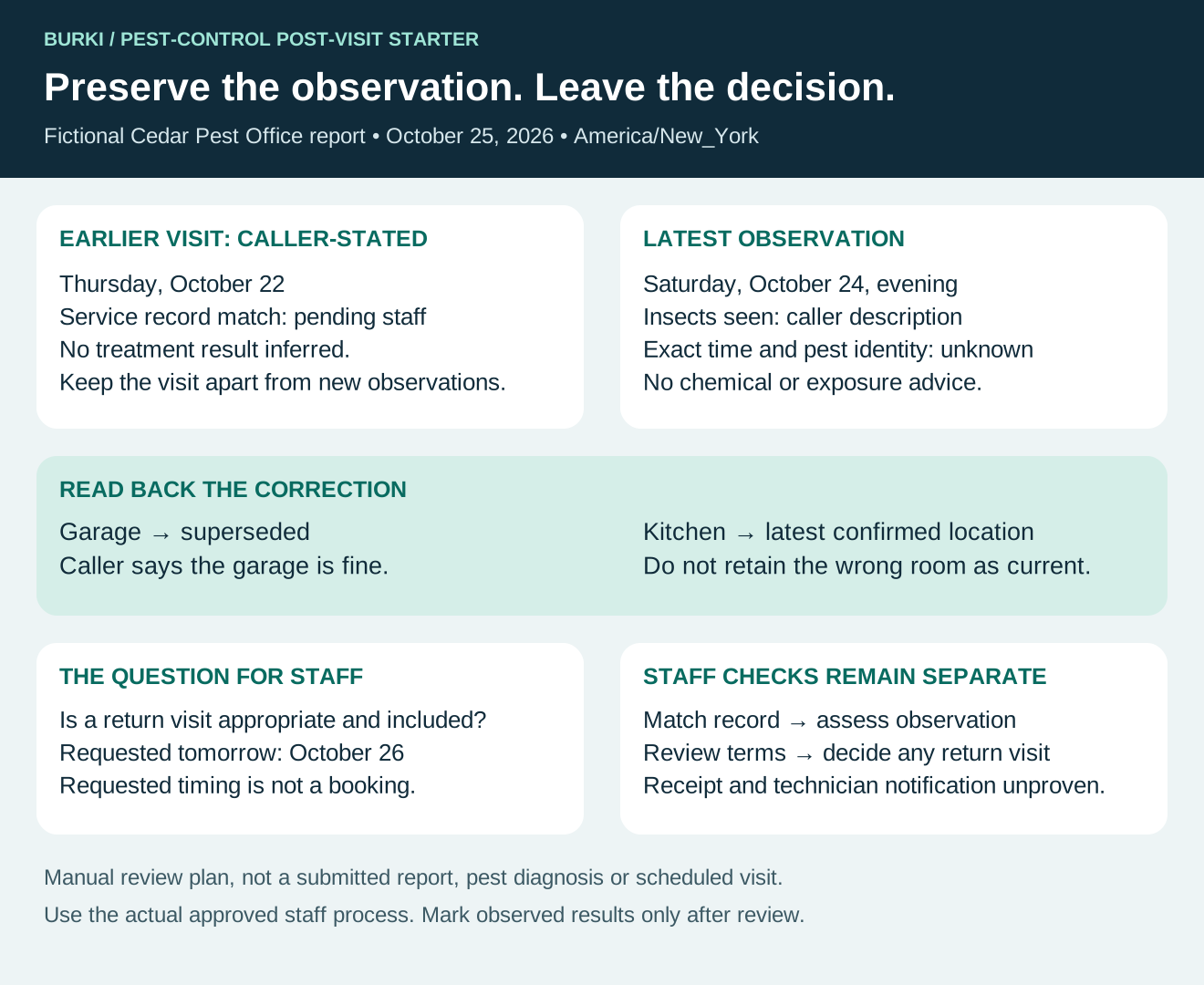
The diagram explains responsibilities; it is not evidence of a submitted report, diagnosed pest or scheduled visit.
Work through a corrected observation
This fictional exchange takes place on October 25, 2026. Cedar's office timezone is America/New_York.
Caller: “You treated the house Thursday, October 22. There are insects in the garage again. Is another visit free?”
Assistant: “I can help clarify the report and explain the office review process. Staff need to check the service record and any return-visit terms. What have you noticed since the visit?”
Caller: “Actually, not the garage. I saw them in the kitchen on Saturday evening. The garage is fine.”
Assistant: “Thank you for correcting that. Your report is insects seen in the kitchen on Saturday, October 24, in the evening, after the visit you say took place on October 22. The garage is not the reported location. Is that correct?”
Caller: “Yes. Can you tell the technician to come tomorrow?”
Assistant: “I can't confirm a return visit or whether there would be a charge. Staff need to review the report and your service terms. I can explain the approved office contact process.”
The worksheet should record kitchen as the latest caller-confirmed observation location and mark garage superseded. It should preserve the relative sequence of visit and observation while leaving an exact clock time unknown. “Saturday evening” should not become a made-up timestamp.
The staff question is whether a return visit is appropriate and covered, plus the caller's requested timing. A request for tomorrow is not a reserved appointment. The report should not become “failed treatment,” “covered callback” or “technician notified” without evidence for each status.
Check the failure cases before inviting real calls
The starter provides six cases with expected results written in advance: corrected room, corrected prior visit, unknown reference, a request for chemical advice, a coverage question and a requested return date. Keep observed results blank until someone actually reviews an authorised conversation.
A good correction case preserves the original concern without keeping the wrong room as the current location. A good coverage response leaves a clear question for staff. A fluent answer that invents a guarantee period or a safe chemical to use is a failure, even if it sounds reassuring.
Do not measure success only by a generated summary. Track whether the actual staff process received the correct report, whether a staff owner reviewed it and whether the caller's question was answered. Review any missing service reference or ambiguous site through the operator's approved matching process; an incoming phone number alone does not establish identity or access to another person's records.
Later, compare similar reports over a stated period: missing details, correction errors and further clarification needed. Keep counts, dates and unknowns. No national establishment count can tell you how many hours this particular conversation will save.
Burki's AI receptionist can support the administrative conversation around a post-visit report. Start with one approved task and a usable staff worksheet, then add a connected action only after its permissions, failure behaviour and actual completion evidence are separately verified.
Ready to try Burki?
Create an assistant and check your available browser practice allowance.
Create your assistantTrial eligibility and available practice are shown in your workspace.