Scribe v2 vs Universal-3.5 Pro: Channels and Speaker Roles
Compare Scribe v2 and AssemblyAI Universal-3.5 Pro for saved call recordings: channel separation, speaker roles, model selection, costs and a practical evaluation worksheet.
Table of Contents▼
A recording can contain two channels, three people and only two business roles. If your transcription system treats those as the same thing, a tidy transcript can still attribute an important correction to the wrong person.
This comparison looks at ElevenLabs Scribe v2 and AssemblyAI Universal-3.5 Pro for saved recordings, with the documentation checked October 17, 2026. The question is which request and output contract fits your recording layout. It is not a live voice latency contest.
The selected production batch identifiers are scribe_v2 and universal-3-5-pro. Scribe's prerecorded model is separate from Scribe Realtime. AssemblyAI also lists universal-3-6-pro-preview on its roadmap, so 3.5 should not be described as its newest model across every release status. This guide does not configure or evaluate that preview. ElevenLabs model catalog, AssemblyAI production model selection, preview status.
These direct batch workflows are not verified native Burki dashboard functions. A live recognition provider selector does not establish a saved-file retranscription connector. Use Burki's available call review evidence separately from any independently authorized provider evaluation.
Download the free channel and speaker evaluation worksheet. No files were uploaded and no paid transcription tests were run for this guide. The worksheet is free; provider processing is separate.
First inspect the recording you actually have
Write down three different facts before selecting a model:
| Question | Example | How to verify it |
|---|---|---|
| Which channel contains the sound? | Left and right audio tracks | Inspect the file and the recording system's channel map |
| Which individual is speaking? | Receptionist, coordinator, caller | Review an authorized reference sample |
| What role do they have here? | Staff or customer | Apply the conversation context and verified channel mapping |
A channel number is a location in the audio file. A speaker tag groups speech attributed to one voice. A role describes what that person is doing in this conversation. None of those labels authenticates a person's identity.
Do not assume a stereo file contains two isolated parties. It might duplicate the same mixed audio onto both channels. Transfers can also put two staff members on the same side. Inspect those properties before relying on labels downstream.
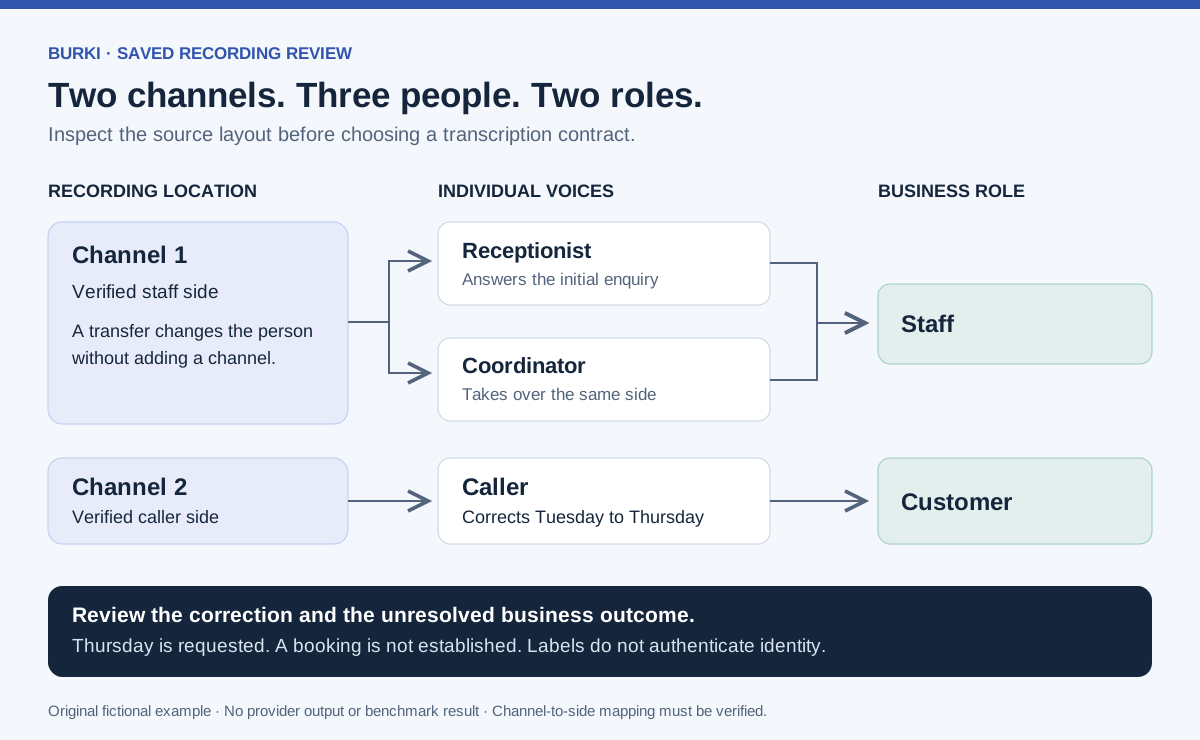
This is an illustrative recording layout, not a transcript produced by either provider.
Compare the contracts before comparing scores
Scribe's multichannel guide supports up to five channels and assumes one speaker per channel. AssemblyAI's multichannel contract can also request diarization within each channel. That difference matters for a transferred call. Scribe transcription guide, AssemblyAI multichannel contract.
| Need | Scribe v2 batch | Universal-3.5 Pro batch |
|---|---|---|
| Preserve separated audio tracks | use_multi_channel=true | multichannel: true |
| Distinguish several people on one track | Multichannel mode assumes one speaker per channel | Combine multichannel with speaker_labels: true |
| Infer agent/customer roles from speech | Separate role mode, incompatible with multichannel | Separate speaker-identification feature; do not assume multichannel compatibility |
| Keep the selected model explicit | model_id=scribe_v2 | Pin the speech_models list |
Scribe's role detection requires diarization, cannot be combined with multichannel mode and adds 10% to the base cost. AssemblyAI documents content-based speaker identification separately; its role contract requires speaker labels. These are inferences from speech, not verified identity. Scribe request options, AssemblyAI speaker identification.
Use a verified channel-to-role map when you already have one. If role assignment needs to be inferred, keep that as a separate, reviewable step. Do not silently substitute inferred “Agent” for “the person on the staff recording channel.”
Work through a transferred enquiry
Consider an original fictional community-class enquiry. The caller starts by asking about Tuesday, then corrects the request to Thursday. A receptionist answers first and passes the conversation to a coordinator.
The recording team has verified that channel 1 contains staff audio and channel 2 contains the caller. There are two channels, three people and two roles. The intended review record is:
Requested day: Thursday, corrected from Tuesday
Staff participants: receptionist, then coordinator
Caller role: customer, based on verified channel mapping
Appointment status: enquiry only; no accepted booking established
This record is a target for human review, not a model result. The final line matters: a corrected day in a transcript does not establish that a place was reserved.
For a clean recording with one person on each track, evaluate both channel modes against the same source. Check that words remain on the correct side, including simultaneous speech and long silences. Preserve the original channel indices before translating them into staff/customer labels.
For the transferred version, test whether you need the two staff voices separated. AssemblyAI's per-channel diarization is a documented fit for that request shape. Its labels combine channel and speaker, such as 1A, 1B and 2A; expected-speaker limits apply per channel. Those labels still need review against the reference recording. Per-channel diarization.
Scribe's one-speaker-per-channel assumption makes that transferred layout a different evaluation case from a clean two-party recording. Do not mark it successful simply because both staff members appear under the staff channel. Decide whether grouping them is acceptable for your use case or whether individual attribution is required.
If you only have a mixed mono recording, start a separate diarization evaluation. Both providers offer speaker labeling, but inferred voice groups must still be checked. Do not manufacture a channel map after the fact and present it as recording metadata. Scribe transcription features, AssemblyAI speaker diarization.
Prepare explicit, unexecuted request settings
For Scribe, the current conversion endpoint accepts multipart form data. A channel-mode settings fragment is:
model_id=scribe_v2
use_multi_channel=true
file=<authorized-recording>
Its API offers separate channel transcripts or a combined chronological output; the combined form carries word-level channel indices and requires timestamps. Do not add role detection to this configuration. Scribe conversion contract.
For AssemblyAI, a corresponding job body could be:
{
  "audio_url": "<authorized-upload-url>",
  "speech_models": ["universal-3-5-pro"],
  "multichannel": true,
  "speaker_labels": true
}
Pinning the list avoids silently relying on the documented default fallback from 3.5 Pro to Universal-2. The production selection page lists 18 supported languages for 3.5 Pro. Check your actual language before choosing that pinned contract. Model and fallback selection.
Submit through the documented prerecorded transcript endpoint, retain the job identifier and wait for a terminal result. A submitted job is not a completed transcript. Check failures and returned metadata before accepting the output. AssemblyAI job example.
These fragments explain configuration choices. They are not complete clients, and neither has been executed here. Keep credentials server-side, use an authorized transfer path for recordings and agree on funding before running an evaluation.
Read benchmark claims at the right level
AssemblyAI's September 30 comparison is vendor-authored and discusses both batch and realtime products. Its public benchmark dashboard contains multiple sections with different model and dataset scopes. We could not verify a complete matched batch experiment for this exact pair covering channel layout, role labels, served model revisions and run conditions. The article therefore does not turn its scores into a winner for this workflow. Vendor comparison, benchmark methods and tables.
A diarization measure such as concatenated minimum-permutation word error rate combines word and speaker attribution errors. It does not directly measure whether a person was correctly classified as a customer. Likewise, a realtime first-token figure and a completed batch job duration measure different boundaries.
Build a small reference set around your actual decision instead. The worksheet separates word errors, person attribution, business-role errors, important corrections, turnaround time and billable scope. Leave every result blank until a permitted run and review produce evidence.
Use the same authorized source files for both models, with documented language and channel layout. Keep mono, isolated-channel and transferred-call results separate. Record attempted, usable and failed jobs, including errors rather than excluding them from an attractive average. This guide's worked script is English; evaluate other supported languages and caller accents independently.
Price the channels and extras you intend to use
As checked October 17, ElevenLabs lists Scribe v2 at USD 0.22 per hour. Its conversion contract bills every channel's full duration. Plan eligibility and account terms still matter. ElevenLabs API pricing, billing and role options.
AssemblyAI lists Universal-3.5 Pro at USD 0.21 per hour, with speaker diarization an additional USD 0.02 per hour. Multichannel billing and other selected features affect the actual total; speaker identification has a separate Speech Understanding cost basis. Verify the configured account quote. AssemblyAI pricing.
For an assumed one-hour file containing two billable channels, base-rate arithmetic is USD 0.44 for Scribe or USD 0.42 for AssemblyAI before relevant extras. That two-cent difference does not price a complete reviewed transcript, and it is not an invoice. Add processing options, storage, transfer, review effort and failed or repeated work using the actual billing evidence.
Compare cost per usable reviewed recording alongside the raw rate. A slightly cheaper job that loses the Tuesday-to-Thursday correction may be unsuitable for the task regardless of its aggregate word score.
Use the result in Burki without inventing a connector
In Burki, open Calls and find the relevant record in Call history. Review its available transcript and outcome evidence. Treat the retained application transcript as its own artifact. A new transcript created by a separate provider evaluation should remain a separate, versioned artifact with its source, model and review status.
The current native voice catalog includes realtime recognition choices. That does not verify a dashboard button for uploading these saved files to Scribe v2 batch or Universal-3.5 Pro batch. This guide does not claim such a connector or describe an unverified setup screen.
For an AI receptionist, the useful question is whether staff can recover who requested what and see what remains unresolved. Use the call summary template to turn reviewed evidence into an actionable handoff. Keep the original words, inferred labels and staff-confirmed business outcome distinguishable throughout that handoff.
Ready to try Burki?
Create an assistant and check your available browser practice allowance.
Create your assistantTrial eligibility and available practice are shown in your workspace.