Murf Falcon 2 volumeOffset: Set Voice Agent Listening Levels
Configure Falcon 2 volumeOffset, compare listening channels and check echo without confusing relative gain with caller understanding. Includes a free worksheet.
Table of Contents▼
A voice agent can sound clear on the laptop used to build it and faint on the handset used by a customer. Turning up the generated voice may help, but it can also change the conditions that trigger an interruption. If the agent then reacts to its own playback, a louder greeting has created a second problem.
Murf added Falcon 2 volumeOffset on October 13, 2026, for its streaming speech endpoint and WebSocket voice configuration. This is a new output-level control on an existing model, reviewed here on October 16. It is separate from the word-timestamp update covered in our earlier guide. Dated provider release.
Burki's current source exposes legacy Murf FALCON and GEN2 choices, with no verified Falcon 2 or volumeOffset control. The provider steps below describe a direct integration. They do not announce a Burki setting or a completed speech test. The useful practice for Burki users is to review the actual listening path and the choices their assistant currently supports.
Download the free listening-level worksheet. It includes a fictional desk-reception example, blank comparison records and pass/fail cases. No synthesis, phone call or benchmark was run for this article. Reading the guide is free; production voice usage is separate.
Decide which listening problem you are fixing
Start with a precise observation. “The voice is bad” combines several problems that call for different fixes.
| Observation | First question to resolve |
|---|---|
| Greeting is faint, including in a quiet room | Is the same device, route and playback setting being compared? |
| Words are loud but names are wrong | Was the wording recognized or pronounced incorrectly? |
| Agent seems to interrupt itself | Is outgoing speech returning on the input path? |
| Only the transfer introduction is jarring | Are the assistant and the next audio source at different levels? |
| One phone sounds different from another | Are you evaluating a device effect or a synthesis change? |
Keep those observations separate in the worksheet. A listening-level change is a poor way to fix the wrong street name, and a recognition-model change is a poor first response to a muted player. If the report is about a missing syllable rather than faintness, inspect the audio and transcript around that exact position before adjusting gain.
Choose a small acceptance question for the first review: can a listener comfortably repeat the opening instruction on the intended device, with no newly observed self-interruption? That is a practical test question, not a promise that one parameter can control comprehension.
Understand what the number means
The current contract accepts an integer from -50 to 50, default 0, on Falcon 2 streaming. Positive values increase output level; negative values reduce it. The scale is relative to the model output, so it is not a decibel setting or a fixed LUFS target. Murf suggests 10–25 for phone channels, but that is a provider starting range, not a prescribed value for every caller. Volume control and channel guidance.
Write the configured value as volumeOffset: 10, rather than “10 dB boost.” Do not label a higher value a higher-quality voice. The same transcript can remain incorrect after it becomes easier to hear, and a clean audio file can still reach a user through an unsuitable playback path.
A useful review record has three columns: requested setting, observed output and actual listening result. The first is configuration evidence. The second might be an authorized saved audio artifact. The third needs the target playback arrangement. None should silently stand in for the others.
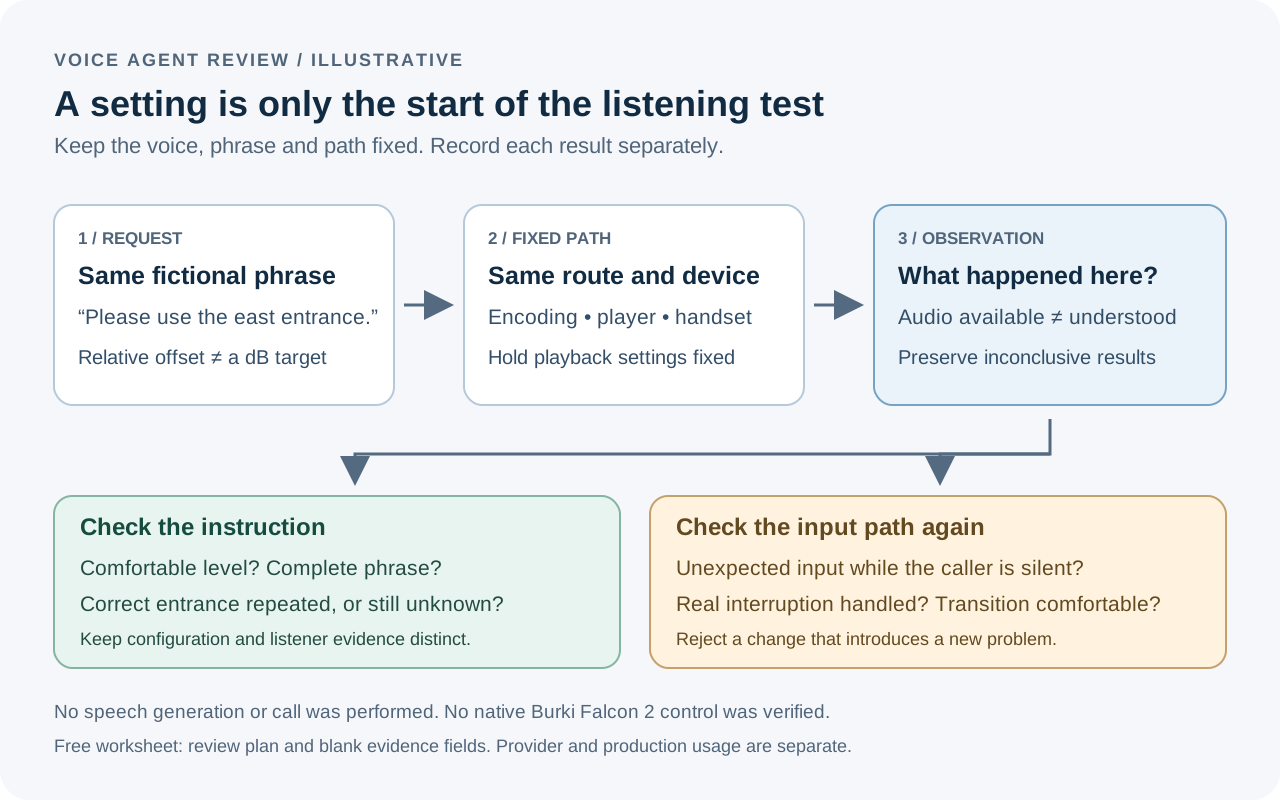
The diagram illustrates a review sequence. The arrows do not represent a native Burki volume control, an executed call or a measured improvement.
Prepare a reproducible baseline
Use an account authorized for the provider endpoint, a supported voice and locale, and an application that handles the selected audio format. Keep provider credentials on the server. The current Stream Speech reference uses POST /v1/speech/stream, model falcon-2, and requires text and a voice identifier. It also documents regional endpoints and matching format/sample-rate choices. Streaming API reference.
Before an authorized test, record these items:
- The exact voice, model, locale, request date and endpoint region.
- The text, encoding, sample rate and player or telephone route.
- The listening device and its playback setting, held fixed during the comparison.
- The application version and whether echo handling or interruption settings changed.
- The original result at the default offset, including a clear failure description if there is no usable audio.
These records make a later disagreement useful. “The second version sounded better” is hard to investigate if it also used a different voice and headset. “The same phrase was too faint on this handset at its fixed setting” tells the next reviewer where to look.
Do not publish real caller recordings merely to document the change. The worksheet can hold an internal evidence reference and a short description without copying a person's conversation into a public article.
Configure one deliberate change
For a direct-provider request, this illustrative body adds one offset to a fixed phrase:
{
  "text": "Welcome to Willow Hall. For reception, please use the east entrance.",
  "voiceId": "YOUR_VERIFIED_VOICE_ID",
  "model": "falcon-2",
  "locale": "en-US",
  "format": "ULAW",
  "sampleRate": 8000,
  "volumeOffset": 10
}
Replace the voice placeholder with one your account supports. The format and sample rate are an example for a compatible telephony receiver, not a universal choice for browsers. The JSON is an unexecuted request shape. For WebSockets, the provider places volumeOffset inside voice_config; confirm the session contract rather than copying the entire REST body into a text frame. Request fields, streaming customization.
Compare the baseline with one small deliberate alternative before considering a larger change. Keep a result even when it is inconclusive. If the listener also changes the phone volume, start a separately labeled comparison rather than quietly treating it as the same trial.
For a production integration, validate the integer before sending it. Murf now documents that values outside the range are clamped, rather than rejected: 80 becomes 50. A successful response therefore does not prove the exact requested offset was applied. Keep actual errors and missing audio separate from that adjustment. Current model limits.
Work through a fictional reception example
Willow Hall is a fictional venue with a staffed reception desk. Its test phrase identifies the east entrance. A reviewer reports that the greeting is faint on the reception handset, while the same words are comfortable on desktop headphones.
First, record the two paths separately. The desktop result is a useful control, but it does not establish a telephone failure or its cause. Capture which handset and route were involved, whether the full instruction played, and whether the reviewer could repeat the entrance without a second attempt.
Next, hold the handset setup fixed and compare the default with a modest provider-supported alternative. The worksheet proposes rows for 0, 10 and 15 as an original review plan. Those rows are empty because no trial was performed. They are not recommended production values for Willow Hall or a claim that each increment improves intelligibility.
Suppose a future authorized review finds a level comfortable but also hears the assistant respond while nobody is speaking. Record both outcomes. The correct conclusion is not “gain fixed” or “turn detection broken.” The new playback condition needs an echo and input-path check before the change can be accepted.
Finally, repeat the complete exchange with an actual caller interruption: “Is that the entrance beside the café?” The assistant should address the question using approved venue information. Clear playback does not make an unverified accessibility instruction true. If the information is unknown, the assistant should request staff help.
Check echo and transitions before accepting the result
Murf warns that stronger playback can feed back into the microphone and produce false interruptions; its guidance recommends checking the actual target channel and reviewing each voice separately. The provider also describes peak protection and unchanged time to first byte. Those are vendor statements, not measurements made for this guide or guarantees for an entire voice system. Provider cautions.
Use a short set of independent checks:
- Let the assistant finish while the test caller stays silent. Note any unexpected input or restart.
- Add a real interruption. Record whether the old reply stopped and whether the correction was handled.
- Listen across a transition to a prerecorded message or a staff introduction. Note a distracting jump in level.
- Return to the baseline if the changed output sounds uncomfortable or introduces an artifact.
Keep the last case reversible. Do not change voice, interruption sensitivity, encoding and offset together to make one test pass. The point is to identify a setting that fits a path, while retaining enough evidence to explain a failure.
For wider transport questions, the Twilio HD and downsampling guide explains a different kind of evidence. A codec tag does not tell you the caller's volume, and a comfortable level does not prove an HD path.
Price the experiment separately from the agent
The current Falcon 2 model page lists USD 0.01 per 1,000 characters, checked October 16. For illustration, 20,000 billable characters at that rate would be USD 0.20 in synthesis charges. That is arithmetic with an assumed billable quantity, not an invoice or a completed experiment. Confirm current account terms and character accounting. Falcon 2 pricing.
Your budget also needs any recognition, LLM, platform and telephone charges, plus repeated or discarded output. Do not infer a refund policy from cancellation or assume a free guide includes free production usage. A change that prompts more repetitions can affect the overall workflow cost even when the synthesis unit rate stays the same.
In Burki, review the current assistant's Voice → Model and provider choices → Conversation engine and available standard-pipeline choices. Its voice controls are under Speech settings → Advanced voice stack. This source review did not verify a new Falcon 2 setting in the live editor, and a custom voice identifier cannot add the missing model or volume parameter.
For an AI receptionist, the immediate goal is a complete, comfortable exchange on the channel customers actually use. Keep the device observation, recognized words, interruption behavior and resulting request visible in the same review. That gives you a reason to accept, reject or investigate a change without turning a provider control into a promise about every call.
Ready to try Burki?
Create an assistant and check your available browser practice allowance.
Create your assistantTrial eligibility and available practice are shown in your workspace.