Cartesia Ink 2 vs Deepgram Flux: Handle Revocable Turns
Compare Ink 2 and Flux turn events, scoped benchmarks, costs and cancellation handling. Includes a paused-reference example and free evaluation worksheet.
Table of Contents▼
A caller pauses halfway through a reference: “The enquiry is for B seven…” The voice agent starts preparing an answer. Then the caller continues, “…four, not B seventeen.” The important question is whether the system discards its first interpretation before it speaks or changes a record.
Cartesia Ink 2 vs Deepgram Flux is a useful comparison at that boundary. Both expose signals for an apparently finished turn that may continue. Their endpoints, transcript handling and controls differ, so replacing a model name is not enough to migrate an application.
This October 16 review compares current ink-2 and flux-general-en contracts, with separate historical benchmark evidence. Cartesia's model table dates its current stable multilingual entry to September 17, 2026; the original Ink 2 announcement was July 9. Those are different milestones. This article does not announce either model as a new launch today. Current Ink model table, original announcement.
Burki currently exposes Deepgram Flux recognition choices, but no Ink 2 recognition selector. Its generic Cartesia recognition adapter does not establish an integration with Ink's Auto turn events. No side-by-side Burki call, provider benchmark or automatic model switch was performed here.
Download the free turn-contract worksheet. It provides a reproducible review plan with empty result fields. The worksheet is free, while actual provider requests and calls can cost money.
Compare the endpoint before the model
Cartesia distinguishes automatic turn detection at /stt/turns/websocket from its manual /stt/websocket path, where the application controls finalization. Its batch endpoint uses a different model. A result from one path should not silently become evidence for another. Endpoint comparison.
Flux uses /v2/listen with flux-general-en for English. Its multilingual option is flux-general-multi, which is outside the English numerical comparison below. Specify the actual audio format and sample rate for raw audio and follow the current client contract. Flux setup requirements.
Choose the ownership model deliberately. If your existing application controls turn boundaries, evaluate that manual arrangement as such. If you want semantic endpointing to decide when a reply can begin, test the automatic turn lifecycle. Do not attach a natural-conversation claim to a run that was forced to end at a known speech boundary.
The worked example here is English only. Ink currently lists English, French, Hindi, Japanese and Spanish. That language list is not an accent benchmark, a guarantee for mixed speech or evidence that every integration exposes the same choices. Review the exact caller language, endpoint and deployment separately. Current Ink languages.
Map an early signal to a cancelable draft
| Meaning | Ink 2 Auto | Flux English |
|---|---|---|
| Caller starts | turn.start | StartOfTurn |
| Possible turn end | turn.eager_end | EagerEndOfTurn |
| Caller continues | turn.resume | TurnResumed |
| Recognition turn closes | turn.end | EndOfTurn |
Ink's turn updates carry the accumulated text for that turn; appending each update repeats words. Keep one current turn value and retain the final event separately. An early-end event can be followed by a resume. Ink turn lifecycle.
Flux's eager and resume events require an eager_eot_threshold; they are not enabled by its basic default connection. Deepgram describes speculative reply preparation, cancellation on resume and delivery after the final turn signal. That work can add LLM requests. Flux eager processing.
These are recognition signals. A completed recognition turn does not prove the caller confirmed a reference, permitted a database change or accepted an appointment. Keep a separate business rule for those decisions.
For example, the assistant may need to read back a corrected identifier and ask whether it is right. If the caller speaks over that readback, do not reuse an earlier confirmation. The recognition event helps decide when to listen and reply; the business state decides what has actually been agreed.
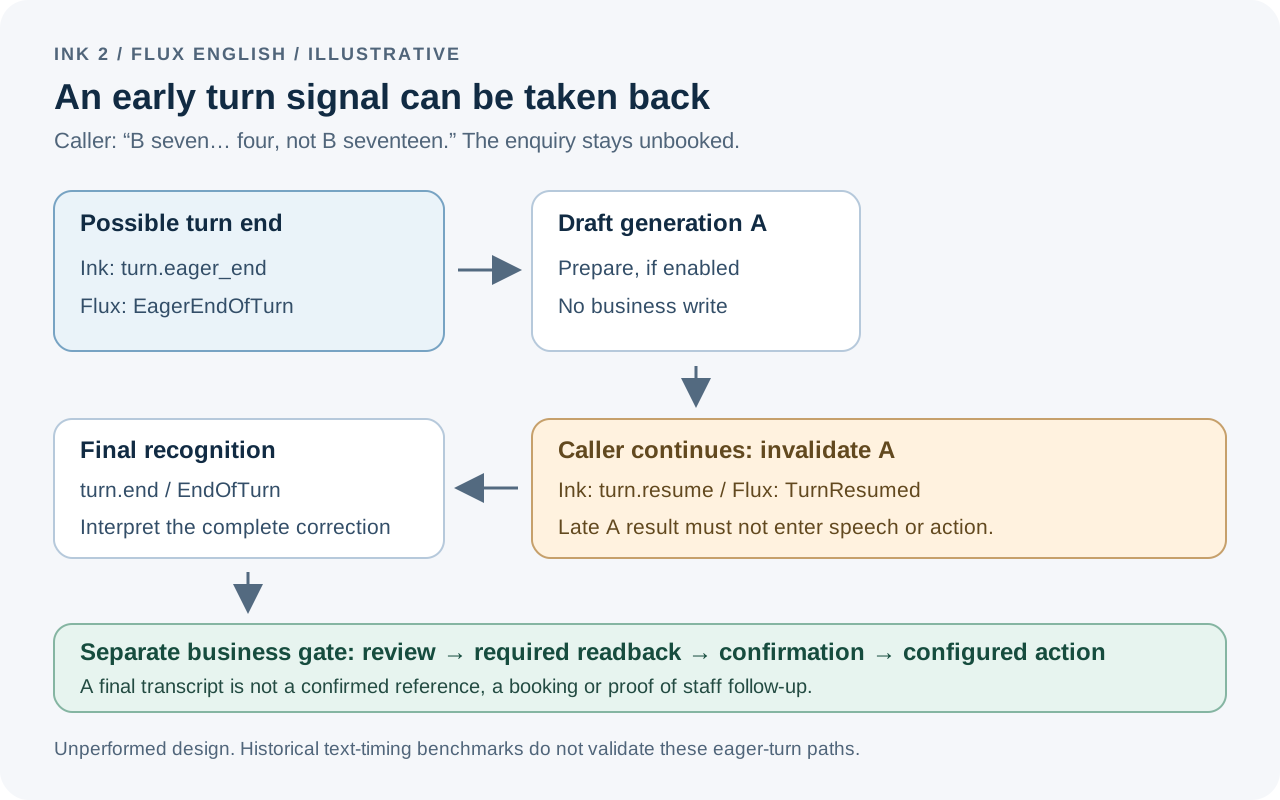
This diagram is an application design example. It does not show a completed native Burki integration, measured timing or a provider-accepted action.
Work through a paused identifier
Use a fictional community venue receiving enquiries about room references. The public facts do not include availability, and the assistant has no booking tool. The expected result is a correctly captured enquiry for staff review.
The caller says:
I need the details for B seven… four, not B seventeen. Can someone explain the room layout?
Write the expected result before any evaluation: requested reference B74, superseded interpretation B17, layout answer unknown until an approved source or staff member provides it. A completed transcript should preserve the correction rather than quietly turning the utterance into a polished sentence that conceals what changed.
Now describe the application's state at each point:
- Speech begins. Allocate a local turn identifier and a new draft generation identifier.
- An eager signal arrives after the incomplete reference. Prepare a tentative reply only if this optimization is supported and worth its cost.
- Speech resumes. Mark that generation obsolete and cancel its pending work.
- The corrected turn closes. Build the current interpretation from the final text and read back B74 when the workflow requires confirmation.
- Only after the appropriate confirmation, save the confirmed enquiry through the configured business workflow. Do not claim a room was booked.
The exact event sequence is a test expectation, not a prediction that either model will emit its eager event at those words. A fair review records the actual sequence, including a run where no early signal occurs. The application must remain correct in that simpler case.
This is different from speech-recognition finality. Ink describes emitted words as stable, yet a caller can add a correction in later words. Stable tokens do not make the earlier interpretation permanently correct. Your request record needs the final meaning of the whole exchange, with the original wording available for review.
Prevent a canceled result from becoming the next reply
A cancellation call is not enough by itself. Work may complete just as cancellation is requested, or its result may already be waiting in another part of the application. Use an application-owned generation identifier to decide whether a result still belongs to the current turn.
When a draft completes, check its identifier against the active generation before allowing it into speech or a business action. When the caller resumes, advance the generation and mark the earlier one unusable. An old result arriving later should be retained as discarded evidence if useful, rather than becoming the “latest answer.”
Use the same discipline for a reconnect. A response associated with the old connection must not be attached to a new turn simply because both mention the same venue. Record connection, turn and generation separately. A provider request identifier helps correlate messages, but it is not automatically a unique business transaction key.
The resource includes a late-result case: draft A finishes after draft B becomes current. The expected output is no speech and no action from A. That invariant is useful whether the provider uses turn.resume, TurnResumed, a client cancellation signal or another supported mechanism.
For irreversible work, keep the confirmation and action gate downstream of this logic. Preparing a sentence is different from submitting an operation. Do not let a speculative LLM tool call bypass the business rule merely because speech output was held.
Tune the control you actually understand
Ink's current defaults are start_threshold 0.8, eager_end_threshold 0.6 and end_threshold 0.3, with a 5,600 ms backstop. Its thresholds follow an active-turn likelihood and must stay ordered. Flux instead uses eot_threshold 0.7 by default, optional eager configuration and a 5,000 ms timeout. A matching numeric value does not represent matching behavior. Ink controls, Flux controls.
Begin with each provider's documented baseline. Evaluate hesitant speech, a pause inside an identifier, a short completed answer and a real correction. Change one control at a time, recording the full configuration, rather than trying to make both providers show the same slider values.
For a direct Ink integration, the Auto API documents per-connection settings and a config command for changes. Use that endpoint's current field names rather than sending a Flux Configure message to Cartesia. This guide supplies an evaluation design rather than a tested client or an instruction to enable speculative work in production. Ink Auto API reference.
Read the benchmark as a historical text measurement
Cekura's original comparison is dated September 24, 2026. Lower is better in these published rows:
| Measure | Ink 2 | Flux English |
|---|---|---|
| Pipecat WER | 2.39% | 3.90% |
| Ocular WER | 3.09% | 4.18% |
| Median first text | 1.51 s | 791 ms |
| Median final-text delay | 123 ms | 108 ms |
Coverage differs: 1,000/999 usable public clips, eight Ocular recordings each and 198/199 timed turns, with 0/7 failures respectively. Ocular's overlapping reported intervals do not establish an accuracy winner. These are English transcription and text-timing results, not full-agent response times or semantic-turn precision. Exact run dates and served revisions are unverified here. Original comparison and coverage.
The public source snapshot inspected October 16 uses unversioned aliases in configurations checked September 12. Its Ink configuration is the manual endpoint; Flux uses forced finalization. The exact mapping from those files to every published row is unverified. Consequently, the table cannot validate today's Ink Auto eager-end behavior or declare the latest models a matched winner. Pinned Ink configuration, pinned Flux configuration.
The benchmark's published method also distinguishes available text, completion and reliability, with provider-specific termination and excluded unusable results. Keep those boundaries beside the numbers. Public method snapshot.
Compare cost and current Burki choices
As checked October 16, Deepgram lists Flux English Pay As You Go at a promotional USD 0.0065 per minute, with a regular rate of USD 0.0077. Cartesia lists Pro at USD 5 per month, with 100,000 credits and approximately 9 hours 16 minutes of Ink 2 if used for recognition. Different allowances and concurrency make these unlike billing structures; neither figure is an entire voice-agent price. Verify account terms and current rates. Deepgram prices, Cartesia plans.
Include LLM work from discarded drafts in the decision, along with speech generation, platform and carrier usage. A lower recognition unit rate does not settle the cost of a conversation that generates multiple unused answers. Keep measured billing separate from an estimate based on assumed minutes.
In Burki's current source, the standard-pipeline recognition controls are under Voice → Model and provider choices → Advanced speech recognition. Choose only the Recognition provider and Recognition model options actually offered. Deepgram's Flux models appear in that catalog; Ink 2 does not. This review did not verify provider invocation or a native editor control for every eager-turn parameter, and the deployed voice worker's exact source revision remains unconfirmed.
For an AI receptionist, choose based on the integration you can support and the caller behavior you can verify. Keep the reference correct when speech resumes, reject stale draft results, and require the business confirmation before a write. The call summary guide helps review the final application record; the event worksheet adds the earlier decision trail that a tidy final transcript alone cannot show.
Ready to try Burki?
Create an assistant and check your available browser practice allowance.
Create your assistantTrial eligibility and available practice are shown in your workspace.