Connect a Custom LLM to Burki’s Voice Pipeline
Configure Burki’s Custom Provider with a model, BYO key and HTTPS endpoint. Separate the primary LLM from voice, fallback models and connected actions.
Table of Contents▼
A custom LLM voice agent needs more than an endpoint pasted into a text field. The endpoint must speak the protocol the application expects, the account must use the intended credentials, and the operator must know which part of the conversation that model controls.
Burki’s Custom Provider option configures an OpenAI-compatible language-model endpoint. In Standard pipeline, that is the model producing the conversation’s replies. With GPT Live selected, the separate business LLM does not replace GPT Live’s conversational voice engine. Selecting Custom Provider alone does not change engines, add a realtime voice service or create a business action.
This guide prepares a primary HTTPS Chat Completions configuration and a useful first acceptance task. Download the free endpoint worksheet for a configuration inventory, a fictional response fixture and observation fields. The worksheet is free; model, voice, telephone and hosting costs remain applicable. Check Burki pricing and your endpoint’s actual account arrangement.
The current fields were inspected in an uncreated manual assistant on October 26, 2026, alongside the current source. No key or endpoint was entered, no assistant was saved and no provider request was made. The exact running voice-worker revision remains unverified; the steps describe configuration, not an accepted live connection.
Identify the component you want to change
Before opening the form, write down the job of the endpoint. For this walkthrough it accepts conversation messages and produces language-model responses through a compatible Chat Completions interface.
That differs from a speech-recognition service, a text-to-speech voice, a complete realtime audio model, a fallback candidate and a Web request connected action. A tool might look up an order after the model asks for it. The primary LLM decides what to say and which supported tool to request. Giving those two URLs the same label would make a configuration review difficult.
| Choice | What it controls in this walkthrough |
|---|---|
| Conversation engine | Standard pipeline or GPT Live architecture |
| AI provider: Custom Provider | The configured language-model endpoint |
| AI model | Exact model identifier accepted by that endpoint |
| Provider API key | Authorised credential for that provider account |
| Base URL | Provider’s documented HTTPS API base |
| Recognition and speech settings | Separate listening and spoken-output configuration for Standard pipeline |
LiveKit’s official compatibility guide describes using its OpenAI plugin with a compatible Chat Completions endpoint and an explicit model, base URL and key. That is protocol context, not a guarantee that any service advertising compatibility accepts Burki’s actual options and usage requirements. Official compatibility guide.
Prepare a small endpoint contract
Ask the endpoint owner for the exact API base, model identifier, credential scope, streaming behaviour and applicable pricing. Check the documented base path rather than combining a hostname and guessed route. This guide uses https://llm.example.com/v1 as a reserved illustrative address; it is not a service to connect to.
For a fictional Harbor Sign Desk, the inventory is:
Purpose: answer approved public collection-counter questions
Conversation engine intended for this example: Standard pipeline
AI provider: Custom Provider
AI model: REPLACE_WITH_APPROVED_MODEL_ID
Base URL: https://llm.example.com/v1 [illustration only]
Provider API key: supplied securely by the authorised account owner
Language-model billing/credential mode: explicit BYO
Connected business actions for this first task: none
Provider acceptance and voice result: NOT TESTED
Do not put an actual key in the downloadable worksheet, a prompt, an example URL or a shared screenshot. Record its owner and approved storage location instead. The model field needs the identifier the chosen endpoint actually accepts; a friendly name from another provider is not enough.
Burki’s native custom configuration requires explicit BYO credentials and an HTTPS Base URL. A key typed into the assistant does not itself switch the organisation’s language-model credential mode. Have the workspace owner verify that mode through the authorised account process before expecting the custom configuration to run. This guide does not change an account’s billing settings or establish managed custom-provider support.
The interface also lists Custom WebSocket. It has a different endpoint and protocol contract. Do not choose it as an alternative spelling for this HTTPS setup, or infer that a Responses-only endpoint will work with the Chat Completions adapter.
Open the current Custom Provider fields
For an authorised new build, open Assistants → New assistant → Set up manually → Receptionist. New manual assistants currently default to GPT Live. Read that engine selection before deciding what this model should control.
Open Voice → Model and provider choices → Default AI stack. In AI provider, choose Custom Provider, described as your own OpenAI-compatible endpoint. The current form exposes AI model, Provider API key and Base URL. Enter the approved identifier, authorised credential and documented HTTPS base only when you are actually configuring an approved endpoint.
For Harbor’s intended Standard pipeline, review the Conversation engine deliberately and configure the corresponding recognition and spoken-output providers. The fresh interface inspection for this article left the default GPT Live engine unchanged. It verified the Custom Provider fields; it did not verify a running Standard pipeline or a particular provider account.
Do not treat a field appearing as an acceptance result. The model may reject an option, the key may not have access, or the endpoint may return a response shape different from the one required. Save those possibilities as concrete checks rather than assuming the provider label resolves them.
For an existing assistant, review its publication state before editing. Published assistants keep saved changes as drafts until Publish saved changes. If Publish → Published version warns about legacy live settings, a save changes connected calls. The settings-history guide explains that distinction and the restoration controls.
Give the first configuration an answerable task
Harbor’s fictional approved facts are short:
The public collection counter opens Tuesday and Thursday, 10:00–15:00, in the business’s stated timezone. Counter hours do not establish whether a particular sign is ready. Staff confirm order status and collection arrangements through the approved office contact process.
Put the real business’s verified public facts in Business facts, then review Instructions and First greeting. Keep the first task independent of a customer database or external action. This makes it possible to review the endpoint’s response behaviour before attributing a failed order lookup to the model.
An adaptable instruction is:
Answer collection-counter questions using the approved business facts. Keep public opening hours separate from the readiness of a particular order. If the caller corrects a day or time, use the latest request and read back the relevant detail. If a fact is missing, say what cannot be confirmed and explain the approved staff contact process. Do not claim an order is ready, a collection is reserved or staff were notified without an actual verified result.
This is original task material, not observed custom-model output. It does not install a lookup, create a staff queue or authenticate a caller. Keep any future connected action separate from the primary model configuration and verify its permissions and results independently.
Work through the expected reply
The fictional caller says: “Can I collect my sign on Friday? Sorry, Thursday at two.” The expected answer uses Thursday at 14:00, recognises that the counter is open then under the approved facts, and leaves the sign’s readiness unknown.
A useful response would explain: “Thursday at 14:00 is within the collection counter’s opening hours. I can’t confirm whether your sign is ready; staff need to check the order through the office process.” This is a proposed answer for review, not a transcript of a provider run.
The failure cases are specific. Keeping Friday after the correction is a conversation error. Saying the order is ready is an unsupported business claim. A correct text response with no spoken output is a different failure to investigate in the voice path.
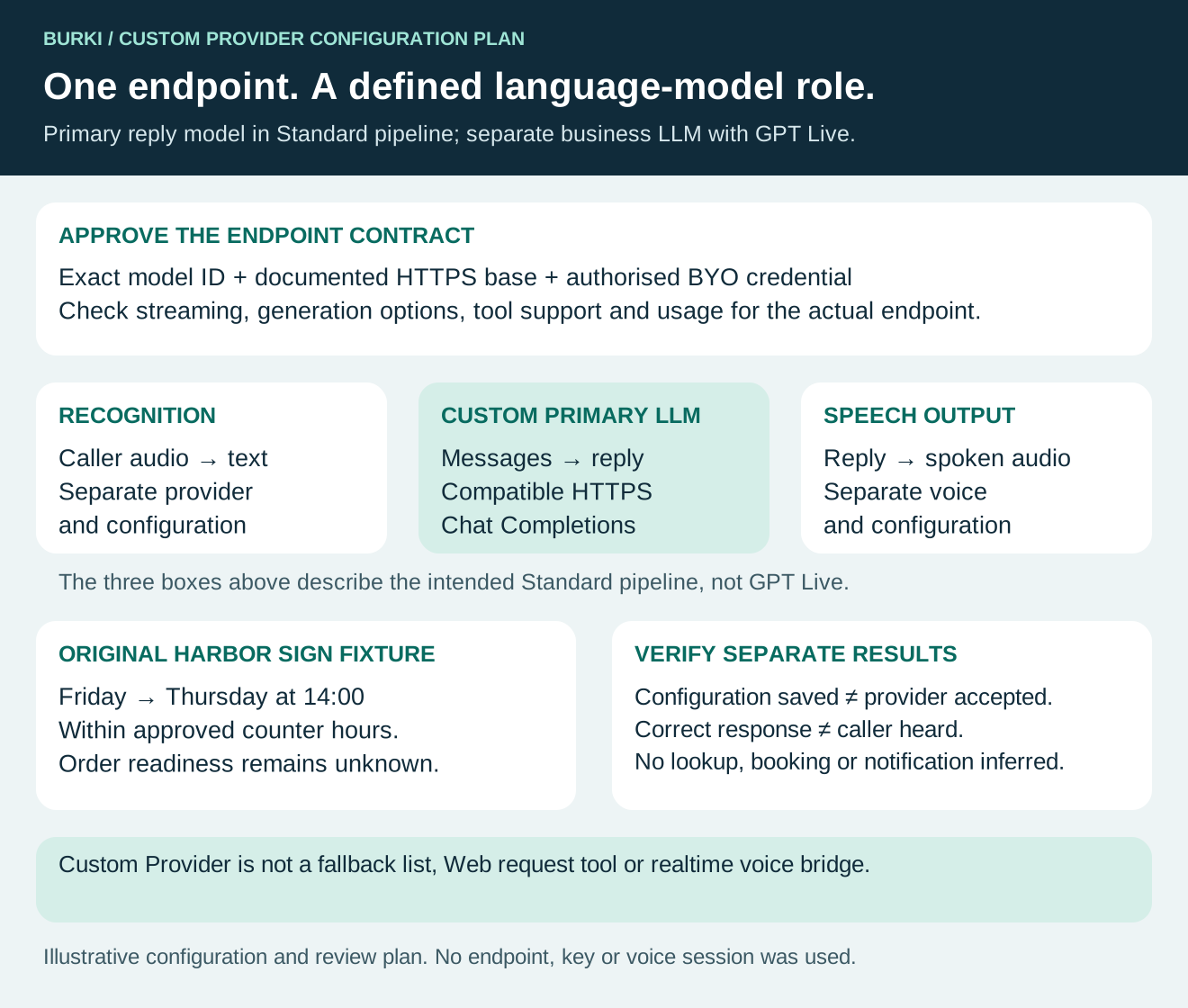
The diagram is an implementation plan. It does not show a connected endpoint or completed conversation.
Check protocol, tools and usage separately
Before a separately authorised provider evaluation, write the expected behaviour for one plain response, one correction and one unavailable response. Preserve the actual settings and complete result or error. Do not infer successful streaming from a non-streaming example in the provider’s own dashboard.
Check how the endpoint handles the requested generation options and returns streamed response chunks and usage evidence. A service can accept a request while producing incomplete or incompatible output. Burki’s current custom path uses the compatible Chat Completions adapter; it is not proof of compatibility with an arbitrary gateway’s extensions.
If you later add a supported action, review tool-call arguments, results and the resulting answer as a separate case. A plain text response does not establish tool compatibility. A tool request is not proof that the action ran, and an outer successful execution does not necessarily establish the business result inside it.
For a missing key, non-HTTPS base or unsupported billing mode, resolve the actual blocker before retrying. For an uncertain provider response, preserve the original attempt and inspect its status rather than repeatedly starting new sessions. The worksheet leaves observations NOT RUN until evidence exists.
Budget the whole voice route
BYO means the endpoint’s account and charges need their own review. Record its unit of measurement and actual account terms, along with Burki’s platform charges, recognition, spoken output and any telephone or hosting costs. A lower model tariff alone does not price the complete receptionist.
For Harbor, also record the effort needed to review an unclear answer. If the task depends on staff checking order readiness anyway, do not invent savings from changing the language model. Compare the quality and cost of the actual approved workload after a measured review, with failures retained.
Use Burki’s BYO guide for the responsibility and cost boundaries. The fallback guide covers a different configuration: an ordered set of alternatives, not this primary endpoint.
The first useful result is a clear model-and-endpoint contract plus one task whose expected answer the business can judge. Once that is established, extend the AI receptionist with the next supported workflow, keeping configuration, provider acceptance and caller-heard behaviour as separate evidence.
Ready to try Burki?
Create an assistant and check your available browser practice allowance.
Create your assistantTrial eligibility and available practice are shown in your workspace.