Set Up a Recording Disclosure Before GPT Live
Configure an every-call recording disclosure and separate announcement voice for Burki GPT Live, with funding checks and a practical review worksheet.
Table of Contents▼
A voice AI recording disclosure needs a deliberate place in the call. Putting a sentence in the conversation prompt and hoping the model says it is a different configuration from preparing a separate announcement before the conversation starts.
Burki has a recording-disclosure setting and, for GPT Live, an Announcement voice separate from the conversational voice. This guide explains the current configuration path, a worked disclosure plan and the evidence needed before trusting the result on a customer route. It uses Every call (recommended) only. It does not promise that a returning caller will be recognised and skipped.
Download the free disclosure checklist. The worksheet separates the approved message, recording eligibility, announcement provider and actual playback review. The resource is free; recording and production voice usage require the applicable funding and provider setup. See Burki pricing before authorising a test.
This walkthrough was checked against the current frontend release and native voice source on October 25, 2026. The exact running voice-worker revision was not independently established. No recording setting was changed and no paid call was made for this article. Configuration instructions therefore do not establish that a particular caller heard a disclosure.
Choose the announcement before changing the assistant
Start with the business's approved recording process. Decide which calls the organisation intends to record, why it retains the audio, who can review it, and what callers need to be told. Have the appropriate owner approve the wording and any process for a caller who objects. A product switch does not settle the legal requirements of every jurisdiction.
For our fictional example, Juniper Repairs Reception has approved the following short practice script for its own review:
This call is being recorded for service review. If you do not want to continue on a recorded call, please tell us so we can explain the office contact option.
This is illustrative wording, not a universal consent script. Replace it with the text your business has approved for the actual recording behaviour and jurisdiction. Do not say a call is being recorded unless that is the intended, verified behaviour of the route. Do not promise an unrecorded channel or an immediate staff transfer unless that option actually exists.
Juniper's example office-contact instruction is equally specific: the assistant can explain the approved public contact option. The prompt does not give it a tool to pause recording, delete audio or make a transfer. If the business needs one of those actions, it needs a separately implemented and accepted workflow.
Record the script's owner, version and approval date in the worksheet. A change from “may be recorded” to “is being recorded” changes the statement being made to callers. Treat that as a meaningful content change, rather than a cosmetic edit.
Understand the two voices
GPT Live supplies the conversational voice. The Announcement voice is used for configured recording disclosures and supported telephone handoff speech; it can sound different from the conversation that follows. Review the transition deliberately so a caller does not mistake it for a second company or a separate person joining the call.
In the native implementation, an applicable GPT Live disclosure is prepared as separate speech before the conversational session starts. The speech path has its own credential, voice, rate and funding checks. A completed playback result is required by that path before it proceeds. Failure or uncertain cleanup is intended to stop startup, rather than silently continue as though the announcement had succeeded.
Those implementation checks are useful, but they are not a listening test on your route. A saved message is evidence of configuration. A playback result is evidence from a runtime stage. Hearing the complete message through the actual caller path remains a separate acceptance check, particularly while the exact running worker revision is unverified.
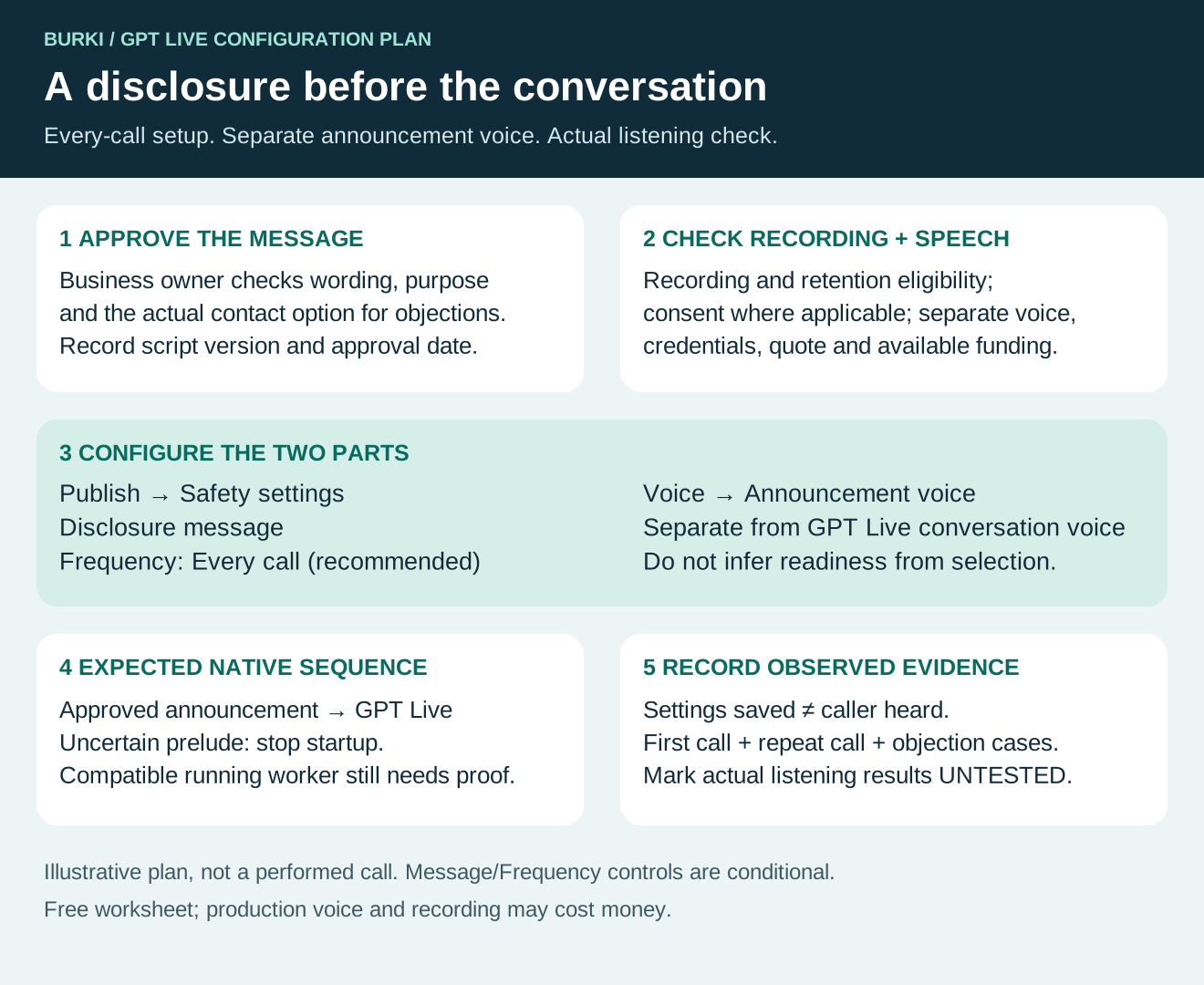
The diagram is a configuration and review plan, not a trace of a call made by Burki for this guide.
Check eligibility and costs first
The disclosure path depends on recording being enabled and allowed. The current native checks consider the assistant's recording and auto-save settings, the workspace's retention policy and, for browser tests, recording consent bound to the current user and organisation. An enabled disclosure alone does not override a workspace policy that prevents recordings from being stored.
Free practice does not record calls. A funded recording test has different prerequisites from a free conversation preview. Do not turn on recording merely to obtain an example for a tutorial, or infer that a visible transcript means audio was recorded.
The announcement uses separately quoted speech usage. Check the actual announcement provider, model, voice, credentials and available funds. A valid GPT Live conversational configuration does not establish that the separate announcement provider is ready. Missing credentials or pricing evidence can prevent admission before speech begins.
Production conversation, recording and telephone costs can involve different services. Review the actual allowance and pricing for the route you intend to use. This article makes no claim of a complete no-cost recording path, and the downloadable checklist does not authorise a paid test.
Open the current recording controls
For an authorised configuration change, open the intended assistant and go to Publish → Safety settings. Review Enable recording first. When recording is enabled, the editor exposes Recording disclosure. When disclosure is enabled, it exposes Disclosure message and Frequency.
The message and frequency fields are conditional controls. Their current labels were checked in source; if your saved assistant has the switches off, they will not all be visible. Do not mistake a hidden field for a missing saved value, or change a live assistant merely to inspect the field.
In Disclosure message, enter the business-approved text. Keep it short enough to understand on the first listen, and check names, abbreviations and the promised alternative contact process. The current configuration uses the message as text, rather than asking GPT Live to improvise a disclosure from the normal greeting.
For this guide, select Every call (recommended) in Frequency. The editor also offers First call only per caller, but that option is not established as working in the current native recording-disclosure path. Do not use it to promise suppression on repeat calls. The worksheet deliberately includes a second call as an every-call review case.
This is a narrower task than choosing every recording option. It does not establish caller-only recording support, a particular storage format, an audio-retention duration or deletion behaviour. Leave those to the separately verified recording configuration your organisation needs.
Configure the GPT Live announcement voice
For a GPT Live assistant, open Voice → Announcement voice. Review the selected speech provider, model and voice using the current controls. Choose a voice your business has permission to use and a supported configuration with the necessary credentials or managed funding.
Do not change a saved assistant from Standard pipeline to GPT Live just to reveal this panel. Engine changes affect other capabilities and need their own review. If you are evaluating the interface, an authorised blank manual setup can show the GPT Live fields without creating an assistant or starting a session.
Keep the normal First greeting focused on the conversation. For Juniper, it could offer help with public repair information and the approved office-contact process. Do not duplicate the disclosure in the greeting merely to compensate for an unverified announcement path. That can produce repeated announcements without fixing the underlying problem.
The first greeting in GPT Live is guidance and may be paraphrased. The disclosure configuration is a separate speech path. Record both texts so the reviewer knows which sentence belongs to which part of the call.
Review the saved and published version
Before saving an existing assistant, read Publish → Published version. For a published assistant, saved edits remain drafts until Publish saved changes. If the panel warns that the assistant uses legacy live settings, saving currently changes connected calls. Do not assume every save is an isolated draft.
For a new assistant, creating and saving the configuration is separate from Publish assistant and from connecting a customer telephone route. Use the settings-history guide to understand the current version and restoration controls rather than treating the disclosure worksheet as a release procedure.
Record the exact configuration intended for the test, including the approved message and announcement voice. Knowledge, credentials and workspace policies can remain live dependencies. A publication record alone does not establish that those dependencies stayed unchanged or that the announcement was audible.
Work through the recording objection
In Juniper's fictional conversation, the announcement plays first. The caller then says: “I don't want this recorded. Can you stop it?” The assistant needs to follow the approved contact process without inventing an ability to control recording.
An appropriate instruction for this limited example is:
If a caller objects to recording, acknowledge the objection and explain the approved office contact option from the business facts. Do not claim you paused recording, deleted audio, changed consent or connected a person unless an actual supported action establishes that result. Do not argue with the caller or keep collecting repair details after they decline this recorded conversation.
This is a conversation instruction, not an audio-control tool. Juniper's reviewer should check that the response respects the scope and that the public contact option is accurate. If no acceptable alternative has been defined, the business needs to resolve that process before inviting customer calls.
The worksheet marks script approved, settings saved, version reviewed, provider admission and caller heard separately. A check beside the first three must not automatically check the last two.
Use a small acceptance set
Before any separately authorised test, write the expected results. The checklist provides rows for the first call, a repeat call, an objection, unavailable announcement credentials and an interrupted or uncertain prelude.
For a normal and repeat call, expect the approved every-call announcement before the GPT Live conversation. For a provider or playback failure, review whether startup was stopped and preserve the actual error. Do not fix a failed announcement by removing the disclosure and calling the result successful.
When an authorised recording is available, use the recording-playback review to distinguish a listed audio file from a recording that actually plays. Inspecting stored audio and listening from the caller's endpoint answer different questions. Record both where required by your acceptance process.
The useful outcome is a short approved message, the right separate voice and a record of what was actually established. Burki's AI receptionist provides the surrounding conversation; the business still owns its recording process, customer contact options and release decision.
Ready to try Burki?
Create an assistant and check your available browser practice allowance.
Create your assistantTrial eligibility and available practice are shown in your workspace.