Inworld Usage API: Reconcile Voice AI Usage
Build an Inworld usage reconciliation plan with UTC windows, freshness checks and pagination, plus a free worksheet for keeping provider usage and bills distinct.
Table of Contents▼
A usage dashboard can answer how much a provider processed without answering what a particular customer owes. That distinction matters when you operate voice assistants across several businesses, compare provider records with application history, or investigate a surprising charge.
Inworld added its experimental Usage API on October 7, 2026. This guide checks its current contract on October 23 and explains a practical collection workflow. It is an implementation guide to an existing release, with an original reconciliation example. Inworld product log.
Download the free usage reconciliation worksheet. The worksheet helps you record a reporting period, retain collection receipts and investigate differences. It is free to read and adapt; provider access, generation and production voice service have their own costs. No authenticated usage query or paid voice generation was performed for this article.
Check access and decide what the report should answer
The current API requires Builder or above. Builder is listed at USD 100 per month, including USD 100 in credits. Those are provider plan terms, not a Burki subscription or a promise that this reporting workflow is free. Verify the workspace and billing arrangement before planning access. Inworld pricing, Usage API access.
Start with one narrow question: “What speech usage did this provider workspace report for yesterday?” Keep a separate question for your application: “Which calls and assistants ran during that period?” Do not combine them into a customer charge until you have a documented way to match ownership and apply the relevant contract.
Write down who owns the provider workspace. A report collected from one company's account cannot establish usage in another account. If the team uses its own provider credentials for some assistants and a platform's managed arrangement for others, first identify which records each party can actually retrieve. A blank field in the worksheet means the relationship is unresolved; it does not mean the activity cost nothing.
Read the contract before building a collector
GET /usage/v1/records reports consumption, not invoices. Records use UTC buckets; hourly reporting covers ranges up to 30 days. History is limited to 30 days. readTime is a completeness watermark, approximately an hour behind current time. Recent periods need another fetch, and historical figures can change. API-key grouping is unavailable. Keep integer metric strings intact. Current Usage API reference.
Those constraints suggest a small, explicit collection process. Keep the report's identity stable, retain each retrieval as evidence and replace the working view when an updated retrieval arrives. For example, use an internal report identifier such as studio-usage-2026-10-22. That label belongs to your collector. It is not a provider request identifier or evidence that the provider supports customer-level allocation.
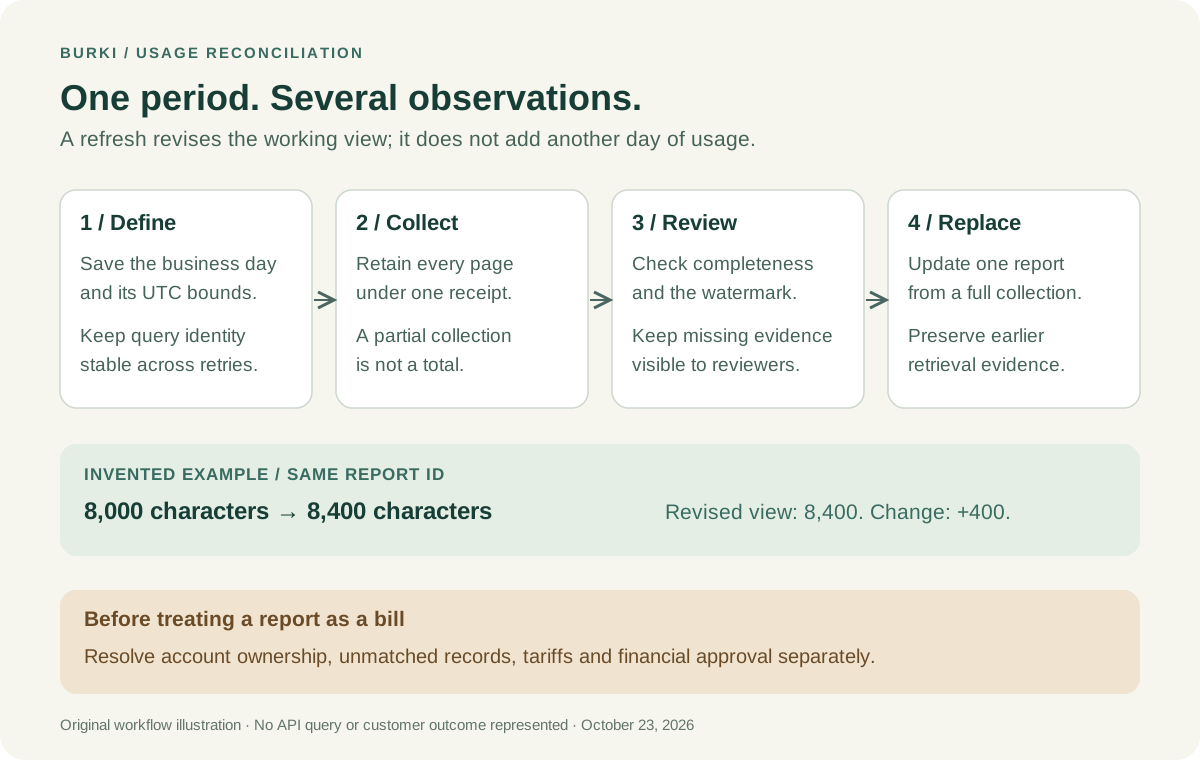
The illustration separates retrieving records from explaining a difference and approving a bill. The later steps remain your responsibility.
Define a period with an original worked example
Consider a fictional community studio that reviews usage on an America/New_York business day. Its report for October 22, 2026 runs from local midnight to the next local midnight. On that date, the corresponding bounds are:
Start: 2026-10-22T04:00:00Z
End:   2026-10-23T04:00:00Z
Save the local dates, timezone and converted bounds together. The example is date-specific. Do not turn the four-hour offset into a permanent rule: use a timezone library for each report date. For another business, choose its actual reporting timezone instead of copying New York.
The studio's first collection might happen shortly after the reporting period ends. Its next collection should ask about the same period, rather than silently changing the end to “now.” Otherwise, the two reports would answer different questions and their difference would be hard to interpret.
Keep these three timestamps distinct in your own ledger:
| Timestamp | Question it answers |
|---|---|
| Reporting bounds | Which period are we reviewing? |
| Collection time | When did our system retrieve this evidence? |
| Provider watermark | Through which instant does the returned evidence say it is complete? |
These are bookkeeping roles in the proposed collector, not three interchangeable definitions of “today.”
Request the first page, then preserve the same query
This is an unexecuted request example, not an accepted provider response. Supply the provider's required Basic credential through your server's secret handling; the variable below is a placeholder. Keep credentials out of screenshots and stored receipts, and do not enable shell tracing.
curl --get 'https://api.inworld.ai/usage/v1/records' \
  --header "Authorization: Basic ${INWORLD_API_KEY}" \
  --data-urlencode 'startTime=2026-10-22T04:00:00Z' \
  --data-urlencode 'endTime=2026-10-23T04:00:00Z' \
  --data-urlencode 'granularity=GRANULARITY_HOUR' \
  --data-urlencode 'groupBy=USAGE_DIMENSION_SERVICE' \
  --data-urlencode 'groupBy=USAGE_DIMENSION_MODEL'
Follow a nonempty nextPageToken using pageToken, retaining the other query values. Leave timeZone unset; v1 rejects a value. Request and pagination fields.
The corresponding collection algorithm is deliberately small:
Create a collection receipt for the fixed reporting period.
Retrieve a page and retain its raw response securely.
Record that page's readTime and our collection time.
If another page exists, retrieve it with the same query.
Continue until the result is exhausted.
Mark the collection unusable if any required page failed.
If a watermark precedes the report end, keep it provisional.
Schedule a later retrieval of that same recent reporting period.
Publish a working view only from a complete collection.
An application should distinguish a completed empty result from a failed collection. Imagine the first page contains records, but retrieving a later page fails. Showing the partial sum as the day's total would create a convincing number from incomplete evidence. Keep the last complete working view and expose the failed collection's status instead.
Use a local collection identifier to join page receipts. Retain the original metric names and units alongside values. The worksheet deliberately gives you a place for an error and a next action, because “retry needed” is a useful operational result.
Refresh the report without counting the same activity twice
Use two layers in your own storage: immutable retrieval evidence and a replaceable report view. A refreshed collection is another observation of the same reporting period, not another day's activity to add to the total.
For the studio example, suppose an initial provisional working view shows 8,000 characters. A later complete collection for the same report shows 8,400 characters. These are invented values for explaining the collector. The refreshed working view is 8,400, with a recorded change of 400. Adding both observations into 16,400 would double-count the reporting period.
Before replacing a view, compare the query identity and whether every page was collected. If the query changed, retain it as a different report. If the collection failed, preserve the error instead of manufacturing a revision. Keep a bounded refresh policy that fits the reporting purpose, with an explicit record of when the team last checked it.
Even a collected report should not be named “invoice final.” Use a status such as collected_for_review, then keep the explanation and financial approval separately. That makes a later correction possible without pretending an older observation never existed.
Investigate a difference before assigning a cause
A provider record and an application call list can differ because they describe different boundaries. Build an investigation around evidence rather than immediately labelling the difference a billing bug.
For example, the studio might see one assistant session in application history and two provider-side attempts in its own implementation log. The next question is whether both attempts belong to that session and what each attempted. A second attempt is not automatically a second customer conversation, and an application entry is not automatically a complete record of provider consumption.
Use a comparison table with separate columns for provider workspace, reporting period, application period, known attempt identifiers and the supporting receipt. Record “unmatched” when the link cannot be established. Do not distribute a workspace total across customers merely in proportion to their call counts and label the result measured usage. Any allocation rule needs its own description, owner and limits.
Keep the tariff review separate as well. A consumption value alone does not establish taxes, credits, minimums, discounts or the price applicable to a particular account. Estimate only with the account's verified terms, label the estimate and reconcile against the relevant bill when it becomes available.
Use the report alongside Burki's actual records
In Burki, review Usage & billing for application-side information and inspect the assistant's configured provider before deciding which account's evidence to compare. An AI receptionist combines a conversational workflow with provider and telephone services; the provider's workspace report is one part of that picture.
This guide does not introduce an automatic Inworld Usage API connection inside Burki. It describes a separate collector for an account you can access. The current provider choices and a saved assistant configuration also do not prove that a particular worker invoked a model or that an account accepted the request. Keep actual execution receipts attached to the investigation when they exist.
If the question is how to trace an individual provider request, use the separate Inworld request ID guide. If the question is which billing arrangement you are configuring, start with Burki pricing. A useful usage report makes the evidence easier to review; the remaining account, attribution and billing decisions still need to be resolved explicitly.
Ready to try Burki?
Create an assistant and check your available browser practice allowance.
Create your assistantTrial eligibility and available practice are shown in your workspace.