Mistral Voice Agents: Browser Tools vs Phone
Plan Mistral voice agent tools for browser and phone use, with a worked read-only example, enterprise SIP limits, costs and a free surface-readiness worksheet.
Table of Contents▼
A voice agent answers a workshop question correctly in a browser. The same saved agent then receives a phone call and cannot run the lookup. The approved information has not changed. The missing piece is the application code that handled the browser's tool call.
Mistral launched Voice Agents on October 20, 2026, alongside the Voxtral 3 speech family, whose four models are in Public Preview. This guide checks the current implementation contract on October 24. It focuses on one practical question: where must a tool run for a browser workflow to remain available on a phone line? Mistral changelog.
Download the free tool-surface worksheet. It contains an original read-only example, a deployment inventory and expected failure cases. No agent, session, connector or phone route was created for this guide. Reading the resource is free; provider sessions and production services have separate costs.
Separate the agent from the application running it
Mistral's Voice Agents SDK coordinates transcription, a language model and speech playback. Its saved agent holds configuration, while a session is one conversation. A session can override saved options, and saved configurations can be versioned. The SDK uses LiveKit for audio transport. Those facts describe Mistral's product, not an integration inside Burki. Voice Agents overview.
For a concrete inventory, separate four things: the business facts, the agent instructions, the tool declaration and the code that answers the tool. They can be reviewed together without pretending they are stored or executed in the same place.
A declaration says that a function exists and describes its inputs. It does not prove the current session has a handler that can produce a result. Record the intended execution surface alongside each dependency before testing a different channel.
| Dependency in the proposed workshop assistant | Where the first version keeps it | What to check before another surface |
|---|---|---|
| Approved entrance instruction | Operator-owned fact record | Same approved version is available |
| Response rules | Agent instructions | Missing facts remain unknown |
| Lookup declaration | Tool configuration | Name and inputs still match the task |
| Lookup handler | Browser application | That application actually runs there |
| Result and spoken answer | Session evidence | The result supports what was said |
This is an original planning inventory, not a list of components already installed in a provider account.
Work through a read-only browser tool
Use a fictional Alder Community Workshop. Its approved record says that the Saturday craft session uses the garden entrance. The assistant may explain the entrance; it cannot reserve a place, change an attendee record or promise admission.
This original unexecuted TypeScript function definition follows the provider's documented client-tool shape. It is a fixture, not a complete running application:
const entranceInfo = functionTool({
  name: "entranceInfo",
  description: "Read the approved workshop entrance record.",
  parameters: z.object({ sessionCode: z.string() }),
  handler: ({ sessionCode }) => sessionCode === "CRAFT-SAT"
    ? { status: "known", entrance: "garden entrance", record: "entry-01" }
    : { status: "unknown" },
});
The definition assumes the documented functionTool and z imports. A client handler runs in your application. Saving its declaration on an agent does not save that handler; it must be attached again when the application starts the session. Missing handlers produce an unhandled_tool event and a failed tool result. Mistral client-tool contract.
The interesting acceptance case is the unknown session code. The expected answer is that the assistant cannot establish the entrance for that session and needs the approved next step. It should not borrow the Saturday answer. Keep the exact result beside the expected answer so a later reviewer can tell whether the assistant used evidence or guessed.
For your own application, record which release supplied entry-01. Changing that record is a business-content change even if no model setting changes. A browser success using one record version should not approve a different version for telephone use.
Plan browser session setup without exposing the provider key
The current browser path uses the TypeScript SDK. Your server holds MISTRAL_API_KEY and calls client.audio.sessions.create; the page receives the session ID, participant token and server URL. The browser uses initSession with create and delete callbacks, and requires HTTPS or localhost for microphone access. Protect the session-creation route with application authentication. Mistral browser setup.
Prepare the following sequence before intentionally creating a session:
- Choose the approved fact record and the allowed question. Keep the initial task read-only.
- Select the actual account, model and voice available for that deployment. Record them rather than relying only on an alias label.
- Keep provider credentials on the server. Define which authenticated application user may request a session and which approved options that route accepts.
- Attach the intended client handler in the browser and pass the corresponding declaration through the documented session flow.
- Decide which transcript, tool-result, error and closure evidence the application will retain, with appropriate access and retention controls.
- Include an intentional close path. A demonstration that stops showing audio is not, by itself, a record that all session work ended.
These are preparation steps for an implementation you own. They do not report an SDK installation, browser recording or accepted provider request performed for this article. Use the provider's current quickstart for the full installation and audio setup rather than treating the small fixture above as an end-to-end starter application.
A phone call does not run the browser handler
Mistral's SIP telephony is currently enterprise access through the account team, not self-service. It starts calls from a saved agent bound to the phone number. Current limits include inbound calls only, no transfer to a person, and no client-side tools. The provider coordinates number and SIP setup with the customer. Current telephony contract.
For the workshop example, forwarding a call to that saved agent would not bring the browser's entranceInfo implementation along. Do not describe this as a missing prompt instruction. Repeating “always call the lookup” cannot supply code that is absent from the execution surface.
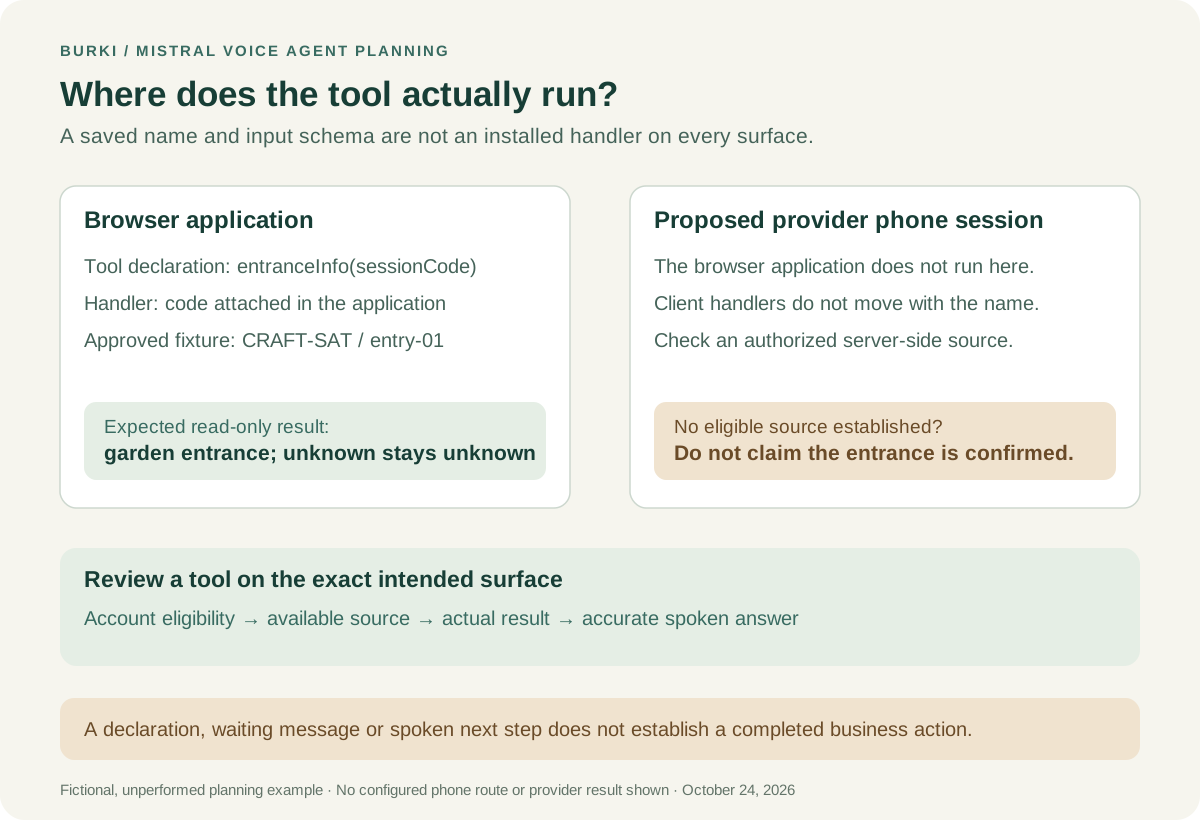
The diagram is a planning comparison. It does not depict a configured SIP route, verified connector or completed call.
For the telephone version, choose an actually available source that the phone session can use. Mistral documents server-side web search, document libraries and workspace connectors. A connector requiring authentication must already be authenticated. There is no demonstrated flag here that turns an arbitrary client function into a server-side phone tool. Server-side tools.
A practical first phone version could use an appropriately prepared, approved document containing the public entrance facts. Confirm that the intended account, agent version and document are ready before claiming the information is available. If a required live lookup has no supported, authorized connector, leave that task unavailable and explain the actual next step. Do not claim a ticket was opened or a callback delivered merely because the assistant described one.
Review the instructions for the phone's actual limits
For this fictional task, adapt an instruction such as:
Explain only the approved entrance information for the identified workshop session. Confirm the session if it is unclear. Use the available approved source and keep its facts attached to that session. If the source is missing, fails or does not contain the requested session, say the entrance cannot be confirmed and explain the operator-approved next step. Do not reserve a place, claim admission, invent a transfer or say a callback has been arranged without a result establishing it.
This is original instruction material, not observed model output. Review the approved next step before using it: “Please contact the workshop team through its published channel” requires different evidence from “I have asked the team to call you.”
If the proposed workflow includes a waiting message, review the eventual answer against the actual lookup result. Saying that information is being checked is not evidence that the check succeeded.
Budget the agent session separately from a raw speech model
The current Voice Agents API pricing lists USD 0.04 per conversation minute with Mistral Small 4, or USD 0.08 with larger models. These are provider agent-session rates. Raw transcription and TTS have their own tariffs; do not substitute those component rates for this product. Mistral API pricing.
For an illustrative 100 billed conversation minutes, those rates produce USD 4 or USD 8 in provider Voice Agents usage. That arithmetic does not establish account credits, carrier charges, number rental, connector charges, support terms or the complete cost of a phone deployment. Confirm the applicable account arrangement and measurement unit before estimating a production budget.
The worksheet asks for expected consumption, actual units and accepted outcomes separately. A low-cost session that cannot access the required information has not completed the workshop's task. Keep failures in the review rather than counting every connected call as a successful enquiry.
Apply the same dependency check to Burki
This guide does not add Mistral or Voxtral 3 support to Burki. The current Burki source has no native Mistral Voice Agents bridge, and an OpenAI-compatible or custom text endpoint does not establish compatibility with another product's audio session and tools.
For a Burki AI receptionist, inspect the assistant's actual Actions and approved business information, then review which route and version will handle the conversation. A saved action label, an attached document and a successful business result are separate pieces of evidence. The conversation-engine guide explains Burki's architecture choices; Burki pricing covers its own cost components.
Use the worksheet to ask one practical question of every proposed tool: “What authorized component will answer this call on this surface?” If that component is missing, fix the deployment plan or narrow the task before promising the caller a result.
Ready to try Burki?
Create an assistant and check your available browser practice allowance.
Create your assistantTrial eligibility and available practice are shown in your workspace.