Build a Pet-Boarding Enquiry Voice Agent
Build a Burki pet-boarding enquiry voice agent that explains approved first-stay requirements and keeps each pet’s dates separate for staff review.
Table of Contents▼
A pet boarding enquiry voice agent can explain a facility’s approved first-stay process and clarify what the owner is asking for. The useful first version keeps each pet’s service, dates and remaining requirements separate. It does not turn an enquiry into an accepted stay.
Consider a caller asking about overnight boarding for one dog and daycare for another. Only the overnight pickup date changes. The caller then asks whether the dogs can share a space. A general summary saying “two dogs, next weekend” loses the information staff need to review the request.
This guide builds that administrative conversation in Burki. Download the free first-stay starter for approved-facts fields, a copyable prompt, a per-pet matrix and review cases. The resource is free; production voice and telephone usage have applicable costs. Review the actual allowance and Burki pricing before any authorised test.
All worked details are fictional. No pet document was collected, reservation made or call placed for this guide.
What voice AI adoption shows today
RingCentral’s named Destination Pet case describes AI Receptionist handling routine questions and lead capture within its pet-care communications. That is a vendor account of administrative adoption. It does not establish this particular boarding workflow, automatic document acceptance or a Burki customer result. The reported organisation spans broader pet services; do not treat the case as a measured study of boarding facilities alone. Destination Pet case study.
For historical sector context, 2023 County Business Patterns records 25,551 employer establishments in 2017 NAICS 812910, Pet Care (except Veterinary) Services, across the 50 US states and District of Columbia. This is an observed location count, not companies, all operators, a current 2026 total, a forecast, revenue or voice AI’s addressable market. No currency applies. Census dataset, national data ZIP.
The category includes boarding, grooming, sitting and training, so it is broader than boarding alone and excludes veterinary services. 2017 NAICS manual, printed page 581. The current methodology page warns that its guidance is no longer current; this article uses the historical dataset scope, including the exclusion of nonemployer businesses. Census methodology.
The practical opportunity is therefore a local operating question: which first-stay questions can your team answer from approved public facts, and which details must remain pending for staff? The sources do not supply a dependable industry-wide voice AI adoption rate or a savings forecast for your facility.
Define the first-stay task
Our fictional facility, Willow Boarding Desk, wants reception to explain its public enquiry process and clarify requested services before staff reviews them. Its approved example facts are deliberately limited:
First-stay enquiries need staff review before a reservation is accepted. Staff explain the facility’s registration and document process, confirm any assessment requirements and check capacity. Overnight boarding and daycare are separate requests. Shared-space arrangements need staff approval for the particular pets and stay.
Those are fictional business rules, not universal boarding requirements. Replace them with the facility’s actual approved process. Do not invent required vaccinations, ages, lead times or a rule that all pets from one household may share accommodation.
The task can automate a useful part of the conversation: answering published process questions, separating the requested service for each pet, preserving date corrections and explaining the next administrative step. It cannot inspect a record it cannot access, determine medical suitability or decide that staff has accepted a document.
Keep the first version small. An owner should not have to provide a complete care history merely to ask how a first stay works. Staff should define the minimal enquiry details and the approved contact route for questions outside reception’s scope.
Prepare a per-pet enquiry matrix
Use one row for each pet and service. A single household reference can connect the enquiry, but it should not merge different dates or requirements.
| Field | What the conversation can establish | What remains a staff check |
|---|---|---|
| Pet label and requested service | The owner’s stated pet and boarding/daycare request | Correct facility record and service eligibility |
| Arrival and pickup dates | Latest caller-confirmed requested dates | Capacity and accepted reservation |
| First stay or returning | What the caller says | Actual registration status and current requirements |
| Public prerequisite question | Which approved process the owner needs explained | Document acceptance and any assessment result |
| Request to share a space | The owner’s preference for identified pets | Approval for those pets and that stay |
| Contact preference | The requested way to follow up | Actual staff receipt and response |
Do not equate “we visited before” with a current accepted registration, or “I have the paperwork” with reviewed documents. Keep those as separate fields in the worksheet.
If the company does not have a verified public upload or submission method, do not invent one. The assistant can explain the actual office contact process without requesting sensitive documents in the conversation or promising that files were sent.
Set up the Receptionist conversation
For an authorised new build, open Assistants → New assistant → Set up manually → Receptionist. The current Business setup fields are Assistant job, Business name, Business facts and Desired outcome. Select Receptionist for the job and use the actual facility name.
Put the approved public first-stay process in Business facts. Use a desired outcome such as:
Explain the facility’s approved first-stay enquiry process. Keep each pet’s requested service and latest arrival/pickup dates separate. Capture questions about prerequisites or shared accommodation for staff review. Leave document acceptance, assessment, suitability, capacity, prices and reservations to staff. Do not say anything reached staff or was booked without a verified result.
Apply business details to instructions applies text to the form. Read Instructions and First greeting before creating or saving. A suitable greeting could offer help with the public first-stay process and ask what service the owner is enquiring about. GPT Live may paraphrase the greeting; this is not proof of exact playback.
New manual assistants currently default to GPT Live. Review the real engine, language, voice and provider or managed-funding prerequisites. The setup described here does not create a kennel-management connection, a document checker, an automatic staff queue or a telephone route. Current UI and source were checked on October 26; the exact running voice-worker revision and caller acceptance were not independently established.
For an existing assistant, first inspect Publish → Published version. Published assistants keep saved edits as drafts until Publish saved changes. If the panel warns about legacy live settings, saving changes connected calls. New assistant creation, Publish assistant and telephone connection are separate steps. Use the settings-history guide for the version controls and live-dependency boundaries.
Add an instruction that preserves the relationship
Adapt this block in Conversation → Instructions:
Help with boarding and daycare enquiries using approved public facility facts. Ask only for the minimum enquiry details the operator has authorised. Keep a separate record for each pet and requested service. When the caller corrects a date or service, confirm which pet it applies to and read back that pet’s latest request. Do not change another pet’s dates without confirmation. Treat first-stay or returning status and document claims as caller-stated until staff checks them. Explain the approved registration and document process without accepting documents or deciding suitability. Shared accommodation is a preference for staff review, not an entitlement. Do not give veterinary advice, infer capacity, quote unverified charges or confirm a reservation. Use the approved staff contact process for questions outside this scope. Do not claim a report was submitted, staff notified or a stay booked without a verified result.
This prompt defines the conversation. It does not implement the record system shown in the worksheet. Where retention is enabled and authorised, staff can review available conversation evidence and complete the matrix through their actual process. Otherwise use the approved contact route without promising a stored enquiry.
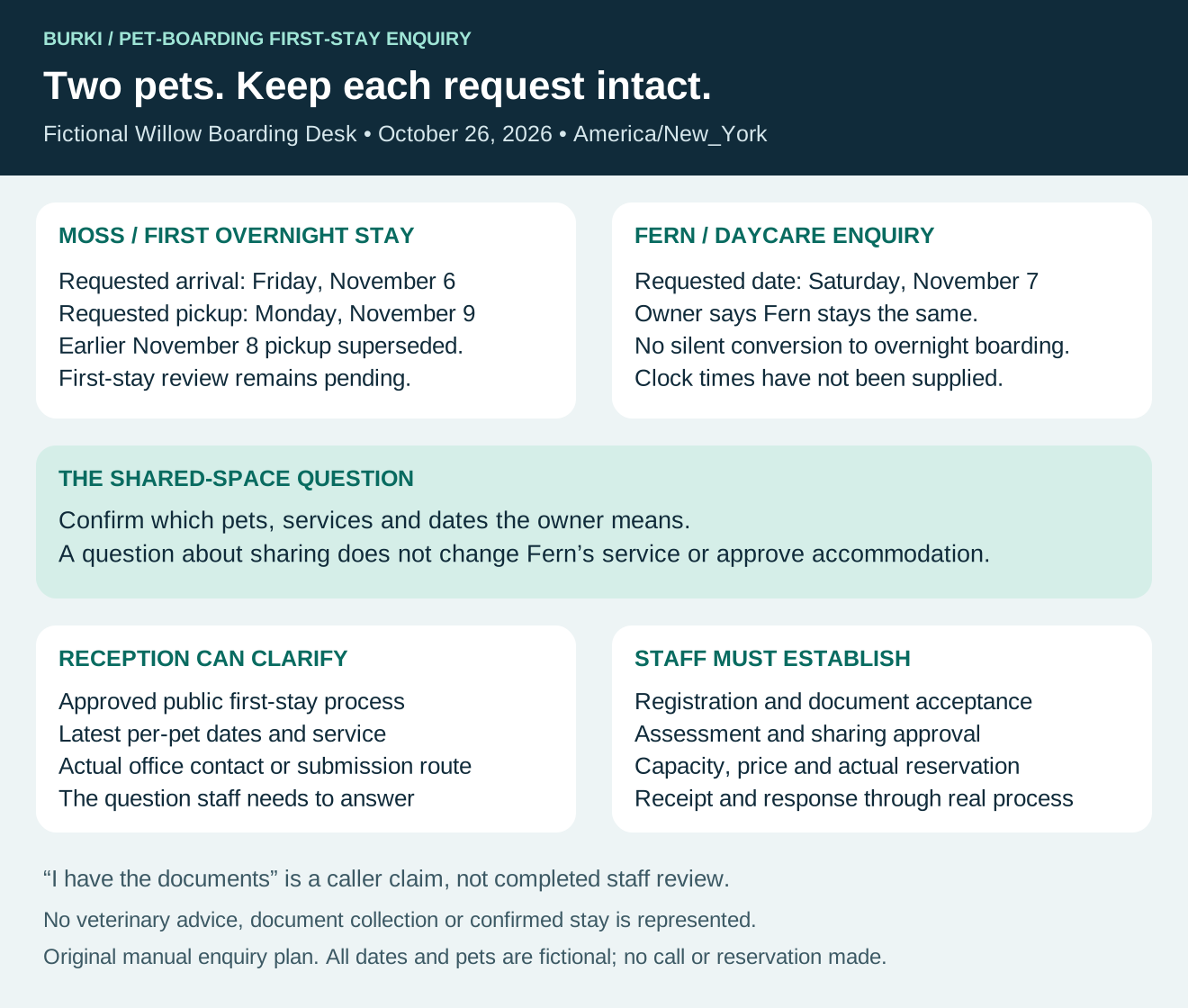
The diagram is an original request plan, not a reservation or a completed pet-care assessment.
Work through two different requests
In this fictional conversation, the facility uses America/New_York. The owner asks on October 26, 2026:
Owner: “Moss needs a first overnight stay from Friday, November 6, to Sunday, November 8. Fern only needs daycare on Saturday, November 7.”
Assistant: “I have Moss’s requested overnight stay as November 6 to November 8, and Fern’s separate daycare request as November 7. Staff still need to review the first-stay process and availability.”
Owner: “Actually, collect Moss on Monday, November 9. Fern stays the same. Can they share a room?”
Assistant: “Moss’s requested pickup changes to Monday, November 9. Fern’s daycare request remains Saturday, November 7. Shared accommodation would need staff review for the particular pets and stay. Your requests currently involve different services and dates; are you asking about changing Fern’s service too?”
That last question matters. The owner’s preference does not justify silently converting daycare into an overnight stay. Staff needs a clear request before checking any shared-space option.
Owner: “No, keep Fern as daycare. I just wanted to know the rule. I have Moss’s documents already.”
Assistant: “Fern remains a daycare enquiry. Having the documents is different from staff reviewing and accepting them. I can explain Willow’s approved submission process; staff will confirm the requirements and any reservation.”
The worksheet now has two rows. Moss requests overnight boarding November 6–9, with first-stay review pending. Fern requests daycare November 7, unchanged. Moss’s earlier November 8 pickup is superseded. There is no confirmed shared accommodation, accepted document or reserved space.
Do not invent arrival or pickup clock times from those dates. If the facility needs a requested time, ask and record it with the actual timezone; staff still needs to confirm the arrangement.
Review the important failures
The starter includes cases for a correction affecting only one pet, an ambiguous pronoun, a request to share, a claim that documents already exist, an unverified price and a request to confirm space. Write expectations before any separately authorised test, then record the observed response and correction needed.
The most useful failures are not just awkward phrases. If Fern’s daycare becomes three nights of boarding, the assistant changed the request. If “documents available” becomes “documents accepted,” it invented staff work. If it says “you’re all booked” after a fluent readback, it crossed the reservation boundary.
Also check a simple public-process question. Someone asking how to contact the first-stay team should receive the approved information without being pushed through an unnecessary two-pet intake. A narrowly defined assistant should ask fewer irrelevant questions, not more.
Review actual staff follow-through separately: whether a usable enquiry reached the authorised process, which row needed clarification and whether staff answered the owner’s question. The worksheet leaves receipt, document acceptance and reservation evidence blank until those events occur.
Burki’s AI receptionist can support this public-information and enquiry conversation. Start with approved requirements and a clear per-pet record, then add a connected booking or document workflow only after its exact permissions, failure behaviour and actual outcomes have been verified.
Ready to try Burki?
Create an assistant and check your available browser practice allowance.
Create your assistantTrial eligibility and available practice are shown in your workspace.