Voxtral Mini vs Small Transcribe 3
Compare Voxtral Mini and Small Transcribe 3 for recorded audio using current prices, scoped independent WER and speed evidence, and a free error-review worksheet.
Table of Contents▼
The useful Voxtral Mini vs Small Transcribe 3 comparison starts with a saved recording and the errors that matter in it. A lower average word error rate does not tell you whether the model preserved the corrected quantity, person or project code your team needs.
Both models launched on October 20, 2026, in Public Preview. Their exact version identifiers are voxtral-mini-transcribe-3-0 and voxtral-small-transcribe-3-0. This guide checks their recorded-audio use on October 25; it does not compare the separately named realtime model. Mini model card, Small model card.
Download the free offline model-review worksheet. It contains original speech fixtures, a reference-record template and paired observation rows. No audio was uploaded, no model output generated and no paid transcription benchmark run for this article.
Choose the product that matches the recording
Mistral's current speech-to-text guide distinguishes offline recordings from live streams. It presents Mini as the starting point for recorded files, with Small as a larger alternative when remaining transcription errors justify it. That is provider selection guidance, not proof that a larger model improves every file. Current model-selection guide.
An offline transcription request begins with audio that already exists. Streaming the text response from that file does not turn the model into a recognizer for an ongoing phone conversation. Keep the application job clear before comparing response times.
For example, a team may review a short voice message after a customer conversation. Its immediate need is a faithful record to inspect. Whether a voice assistant answered at the right moment during the original call is a different question with different evidence.
This article does not establish native Mistral transcription inside Burki. A live speech-recognition selector, a saved call transcript and a direct provider's recorded-file endpoint are separate capabilities.
Read the current benchmark as context
The saved October 25, 16:50 UTC snapshot of Artificial Analysis's non-streaming table reports the following values. These are published independent measurements, not Burki results; a later live table can change. Model-provider table.
| Recorded-audio model | AA-WER | Median batch speed factor | First-party standard price per audio minute |
|---|---|---|---|
| Voxtral Mini Transcribe 3 | 2.2% | 76.2 | USD 0.0035 |
| Voxtral Small Transcribe 3 | 2.1% | 65.6 | USD 0.004 |
The two prices are Mistral's standard listed input tariffs. Confirm the applicable account arrangement rather than treating this as an all-in operating quote. Mistral API pricing.
AA-WER measures reference-word substitutions, deletions and insertions; lower is better. The published suite uses approximately eight hours: AA-AgentTalk weighted 50%, VoxPopuli-Cleaned-AA 25% and Earnings22-Cleaned-AA 25%, with duration weighting inside each dataset. The respective sample counts are 469, 628 and six. VoxPopuli uses its English subset. The method normalizes text before scoring. Benchmark methodology.
The leaderboard labels the suite AA-WER v2; the current method history describes v2.2 refinements. Individual model run dates, resolved backend versions and client region were not established here. Exact long-file chunking for this pair was also not pinned. Do not turn the rounded 0.1 percentage-point gap into a claim of statistical significance or a forecast of your own error rate.
Speed factor is audio duration divided by API response time, including network delay. The displayed factor is a seven-day median; AA describes a ten-minute audio workload. It is batch processing speed, not time to a conversational turn or audio heard by a caller. Speed measurement scope, timing method.
Check languages and output requirements separately
The current language specification lists 50 languages for each offline model. That is coverage information, not a common fifty-language quality benchmark. A team evaluating another language needs reference material and reviewers for that language. The aggregate figures above do not supply those results. Model language specification.
For output, the current offline contract provides segment timestamps; word timestamps are unavailable. Speaker labels can be requested, but a label still needs interpretation against the recording. It does not by itself identify a staff role or an account owner. Offline feature contract.
Write down the actual required output before sending a file. A searchable paragraph, a timestamped reviewer view and a speaker-attributed conversation are different deliverables. If a downstream system depends on word timestamps, resolve that incompatibility before choosing between these models.
Build a paired review around a corrected message
Use an original fictional message for Alder Print, a small production desk:
“This is about project Q seventeen. Sorry, Q seventy, not seventeen. We need four display cards, not fourteen. Please ask Nila to check the revised proof before anyone prints it.”
The expected transcript must retain the correction as spoken. The operational reading is Q70, four cards and Nila checking the revised proof before printing. Transcribing the original Q17 and fourteen accurately while dropping the corrections would leave the wrong task for staff.
Keep two records. One is the verbatim reference that a reviewer checks against an approved recording. The other is the business interpretation that the team expects a human reviewer to recover. A normalized WER score and a correct final interpretation should not silently become the same metric.
The worksheet supplies the script, not an audio file or a completed reference transcript. Before a real evaluation, an authorized speaker would record it, and a reviewer would verify what was actually said. If the speaker says something different from the script, correct the reference to the recording rather than grading against the intended sentence.
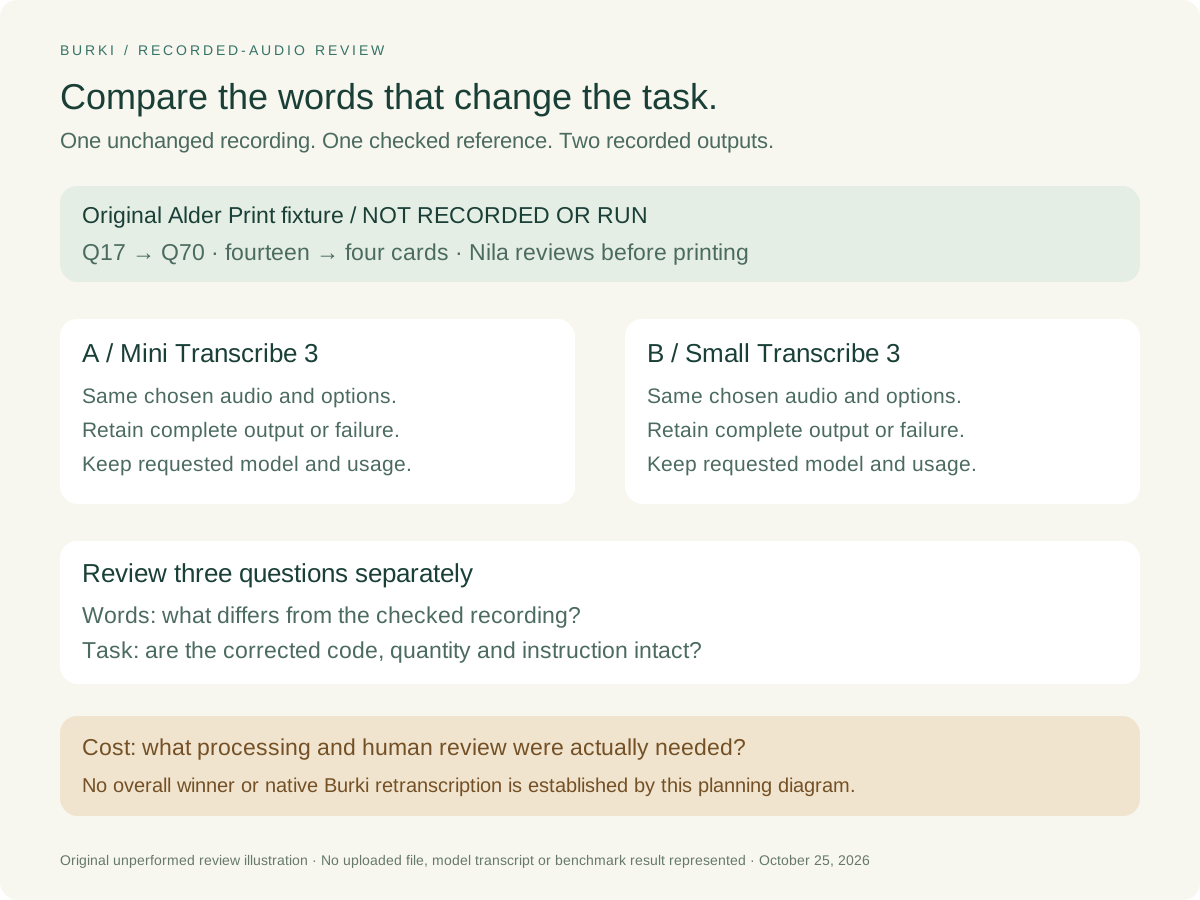
This is an unperformed review design. There are no model scores hidden behind the illustration.
Prepare the same request for each model
The current quickstart uses a Mistral account key, the Python or TypeScript SDK and the audio transcription endpoint. Keep the key in the protected environment used by your application. The example below is a request plan, not code executed for this guide. Current file quickstart.
Recording: an approved, unchanged local file
Request path: POST /v1/audio/transcriptions
Run A model: voxtral-mini-transcribe-3-0
Run B model: voxtral-small-transcribe-3-0
Language, timestamp and other options: identical and explicitly recorded
Reference: reviewer-verified words from that same recording
Outputs and accepted usage: NOT RUN
Mistral accepts a local file, an accessible file URL or a previously uploaded file ID as alternative inputs. Choose one route and preserve its provenance. Use the documented request and result handling for the actual integration; do not invent an input combination to make the review easier. File transcription inputs and request.
For your own approved evaluation, prepare this sequence:
- Freeze the recording, reference, intended language and required output. Record the file hash and duration where available.
- Decide the acceptance rule and allowed spending before processing. Keep private customer recordings out of a public example.
- Prepare two otherwise identical requests with the explicit version IDs. Record requested settings and returned metadata without assuming an alias resolved to the version you intended.
- Save each complete response, any failure and the accepted usage evidence separately. A request being submitted is not a completed transcript.
- Review the words against the reference, then inspect the critical corrections. Do not overwrite the source transcript with a cleaned summary.
- Keep every planned attempt in the record. Do not select only the nicest result from several retries and call it representative.
This preparation does not authorize a paid run. The worksheet remains usable before any provider processing is approved.
Interpret a result without inventing a winner
Suppose a future review finds that both outputs preserve Q70 and four cards. That would support those specific cases under the recorded conditions. It would not show that Small never helps or that Mini is equivalent for all languages and recordings.
If only one output preserves the correction, inspect the actual words and retained options. A meaningful omission is useful evidence; a formatting difference such as “four” versus “4” may not change the task. Write the rule before seeing which model produced which form, and keep raw outputs available for later disagreement.
Add a separate case with an unfamiliar approved name or project term. If vocabulary options are introduced, compare both models under the same selected conditions or explicitly label the changed experiment. Do not attribute a vocabulary improvement to model size alone.
Keep model choice and operating process connected. Staff still need to resolve an unclear recording before printing anything. A transcript that sounds confident is not authorization to manufacture an item, update a project or contact a customer.
Calculate whether the added cost matters
At the listed standard rates, 1,000 audio minutes cost USD 3.50 with Mini or USD 4.00 with Small, a USD 0.50 difference in provider transcription charges. This is original arithmetic from the current tariffs, not a claim about account credits, cached inputs, priority service, taxes, storage or total review cost. Current standard tariffs.
For the print-desk example, add the time spent checking the corrected code and quantity, the number of unresolved messages and any approved reprocessing. Leave the value of an avoided production error unknown until the business has evidence. An average WER difference alone does not calculate it.
Use the Burki transcript-export guide when you need to preserve an existing Burki conversation record. Exporting a transcript does not retranscribe the original audio through either Voxtral model. For an AI receptionist, choose the supported live workflow separately and review Burki pricing for that operating arrangement. The model-review worksheet helps answer the narrower question: which recorded-file result gives your team a reliable record at an acceptable measured cost?
Ready to try Burki?
Create an assistant and check your available browser practice allowance.
Create your assistantTrial eligibility and available practice are shown in your workspace.